3D Models for AR on Mattress Product Pages
Your product page shows the quilt beautifully, but the shopper still can't tell how the finished bed will sit beside their nightstand. They open the room viewer, wait for a detailed mattress to load, then leave before it appears. 3D models for AR need to answer a room-fit question before they impress anyone with fabric detail.
For mattress brands, the useful asset is a correctly scaled bed that works on an ordinary phone. It should help shoppers understand footprint, height, and appearance, without pretending a camera can prove comfort, firmness, or motion isolation.
Why a Mattress Page Needs 3D Models for AR
Say a shopper is choosing a queen hybrid for a smaller primary bedroom. The studio photograph shows a pillow-top quilt and a substantial border, but it doesn't explain how the mattress and foundation will sit between the dresser and the window.
An augmented reality model lets the shopper place a digital version in the camera's view of that bedroom. The phone identifies a surface, estimates its position, and displays the product within the physical setting. Instead of mentally translating a photograph into room dimensions, the shopper can inspect the bed from different positions.
Give the model a specific job
The product-page question isn't whether the mattress looks attractive. It's whether the selected configuration makes sense in the shopper's space.
Useful viewing choices include:
Mattress only: Show the product's profile without implying that a foundation is included.
Mattress and foundation: Make the finished stack visible, including any legs.
Compatible adjustable base: Show the approved combination rather than an attractive but unsupported pairing.
A review of AR usability research found visual augmentation in 281 papers, or 96%, illustrating how central visual content was to the field's formative research. That supports treating the model as an important interface, not a decorative add-on. It doesn't establish that AR will improve mattress sales.
Practical rule: Give AR responsibility for fit and appearance. Give the rest of the product page responsibility for explaining the sleep experience.
Connect room fit to product understanding
Once the shopper understands the profile, the next question may concern what's inside it. Keep a layer breakdown, ticking and gusset specifications, foundation compatibility, and trial terms close to the viewer.
The same distinction matters on showroom floors. A retail sales associate can use a scaled model to discuss an unavailable size or configuration, then move the conversation toward the floor model and the customer's preferences. The phone handles spatial explanation; the associate handles the selling conversation.
Formats and File Budgets That Load on Phones
Plan for a GLB and a USDZ, not one generic export. A high-resolution mattress rendering is an image, while an AR deliverable contains geometry, materials, textures, and the information a viewer needs to place the product.
For the Android path, Google's Scene Viewer documentation requires a reachable glTF 2.0 or GLB model URL and lists support for extensions including and . Those extensions affect how materials and texture placement survive the handoff.
AR delivery files for a mattress catalog
Shopper path | File | Viewer | Scale and size rule |
|---|---|---|---|
Browser 3D and Android AR | glTF or GLB at a public URL | model-viewer and ARCore Scene Viewer | Use a real-time glTF scene and materials the destination viewer supports |
iPhone, iPad, and Vision Pro | USDZ | Quick Look in Safari, Messages, Mail, News, and Notes | Define , meet Apple's file-size guidance, and confirm operating-system eligibility |
One product-page button | GLB as and USDZ as | Google model-viewer | Produce paired exports from the same approved geometry, not a single generic file |
Apple's Quick Look documentation identifies USDZ as its delivery format and lists iOS 12, iPadOS 12, and visionOS 1 or later as platform minimums. Eligibility still needs checking against the actual shopper device and intended experience.
The practical product-page pattern appears in Google's model-viewer example: a GLB supplies , while a USDZ supplies . The shopper can have a straightforward entry point even though the production team manages separate assets.
Keep the bed honest before making it detailed
Apple's asset guidance calls for metadata to establish physical scale and recommends keeping USDZ files below 25 MB for better sharing performance. Treat that as a delivery recommendation, not a promise that any smaller file will run smoothly.
A compact file can still require too much texture memory or too many rendering operations. For mattress assets, prioritize the recognizable profile, gusset, piping, handles, and major quilt pattern.
Remove invisible parts: Delete fully occluded components from the placement asset.
Simplify surface detail: Bake fine stitching into textures instead of modeling every thread.
Consolidate carefully: Merge small meshes where that won't prevent useful component control.
Inspect texture use: Don't give a small label the same texture budget as the whole ticking panel.
Use the guide to 3D graphics file formats when aligning marketing, design, and web teams on deliverables. Keep clean silhouettes and written specifications available for shoppers who don't open the viewer.
3D Models for AR Build Steps
Start with the approved specification sheet, not a beauty render. A visually convincing mattress can still have the wrong finished height, an exaggerated pillow-top, or a foundation that doesn't match the selected product.
This workflow keeps dimensional approval ahead of surface polish.
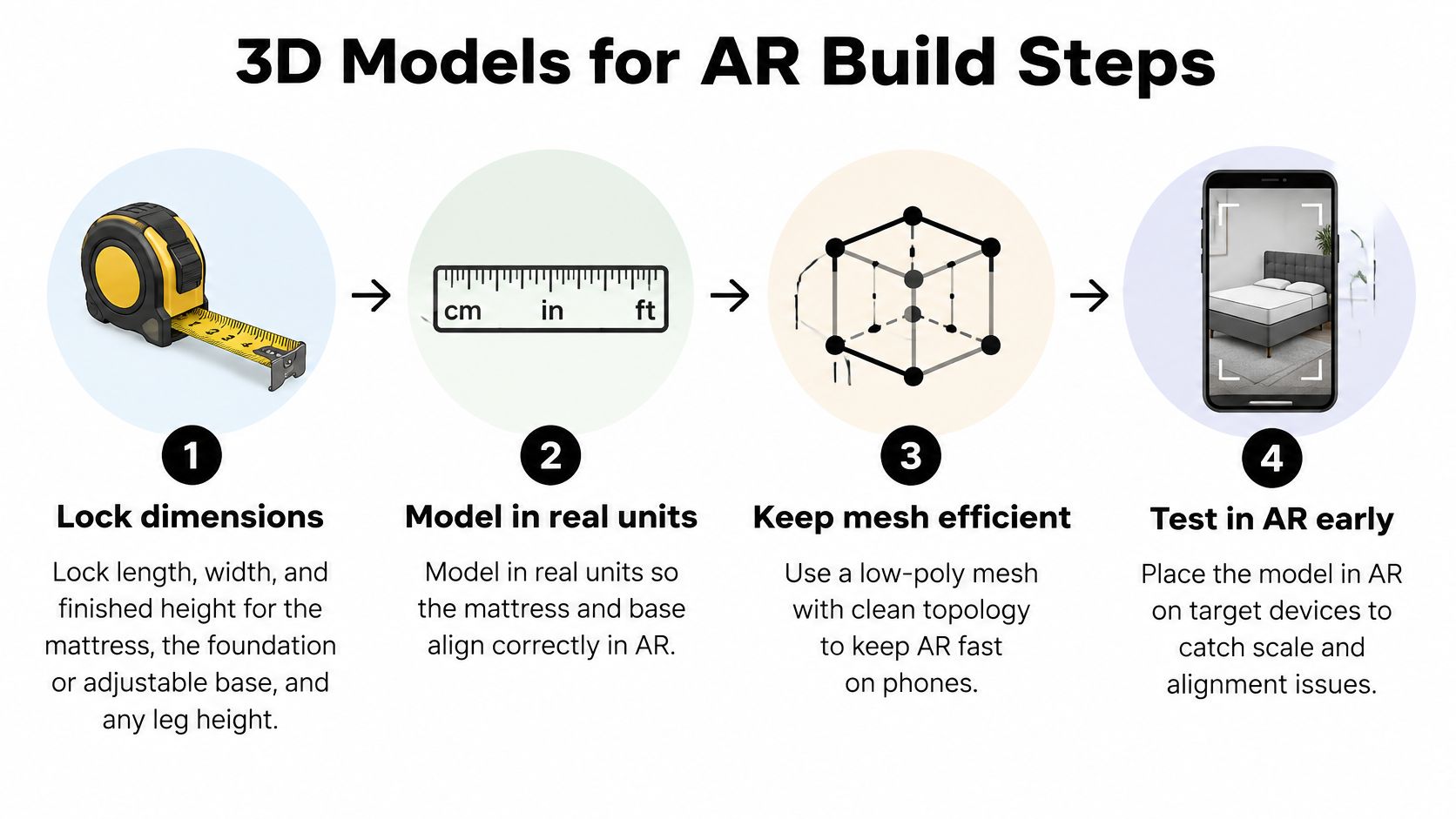
Establish geometry and scene structure
Lock the complete configuration. Record approved length, width, and finished height for the mattress, foundation or adjustable base, and legs. Distinguish mattress height from total bed height so nobody approves the right mattress on the wrong stack.
Model in real units and build visible surfaces. Establish the top panel, border, gusset, piping, and handles at their actual proportions. Keep internal foam layers and coils out of the room-placement model unless an intentional cutaway requires them.
Organize components as a scene. Give the mattress and foundation separate, clearly named nodes rather than combining everything into an unmanageable object. The Khronos glTF overview describes support for scene hierarchy, materials, geometry, cameras, animations, and textures, with structured references and binary mesh or animation information.
That structure gives the production team a way to manage components without duplicating the entire product scene. It doesn't mean every viewer will automatically expose a component selector, so approve the interface alongside the asset.
Finish materials and validate the handoff
Shade ticking from a real reference. Match the approved fabric color, quilt direction, border treatment, and piping contrast. Review at normal phone-viewing distance, where a readable quilt pattern matters more than microscopic stitch geometry.
Export both delivery versions from approved geometry. Keep orientation, component placement, and material naming consistent through the export process. Check the results independently because conversion can change appearance even when the source scene is correct.
Connect hosting and the product page. Put the GLB where the destination viewer can retrieve it, supply the Apple asset, and verify that each selected SKU opens the corresponding files. A working viewer with the wrong cover or foundation is still a publishing failure.
Place the product in a known room before catalog expansion. Compare its footprint and top surface against measured references. Add a readable height callout, then confirm that the label and the model describe the same configuration.
Approve the mattress as a product before approving it as an image.
Don't clone a finished scene across the catalog until someone checks which variants share geometry. A different ticking color may reuse a mesh; a different quilt construction or finished height may require a revised shape.
What Shoppers Can and Cannot Judge in AR
More engagement isn't automatically a better purchase decision. An experiment involving an IKEA lamp compared images, standalone models, and AR with 120 participants and found that AR significantly increased engagement without a notable improvement in product attitudes or purchase intention.
That's a useful caution, not a mattress conversion benchmark. A shopper can enjoy placing a product in a room and still lack the information needed to choose it.
Which mattress questions AR can answer
Shopper question | AR model can show | Still needs |
|---|---|---|
Will it fit this room | True length, width, and finished height on the floor | A tape-measure habit and written dimensions for shoppers who skip AR |
How tall is the bed | Pillow-top profile, gusset, and foundation or base stack | A labeled height, not only a pretty side view |
What does the cover look like | Ticking color, quilt pattern, piping, and border | Swatches, since fabric sheen shifts by screen |
How does it feel | Nothing reliable from exterior geometry | Layer breakdown, firmness scale, trial, and a retail sales associate on the floor |
The distinction is especially important for hybrid mattresses. An exterior model can show the border and top-panel shape, but it can't establish how the coil core responds beneath a hip or how much movement a partner will notice.
The evaluation boundaries are straightforward.
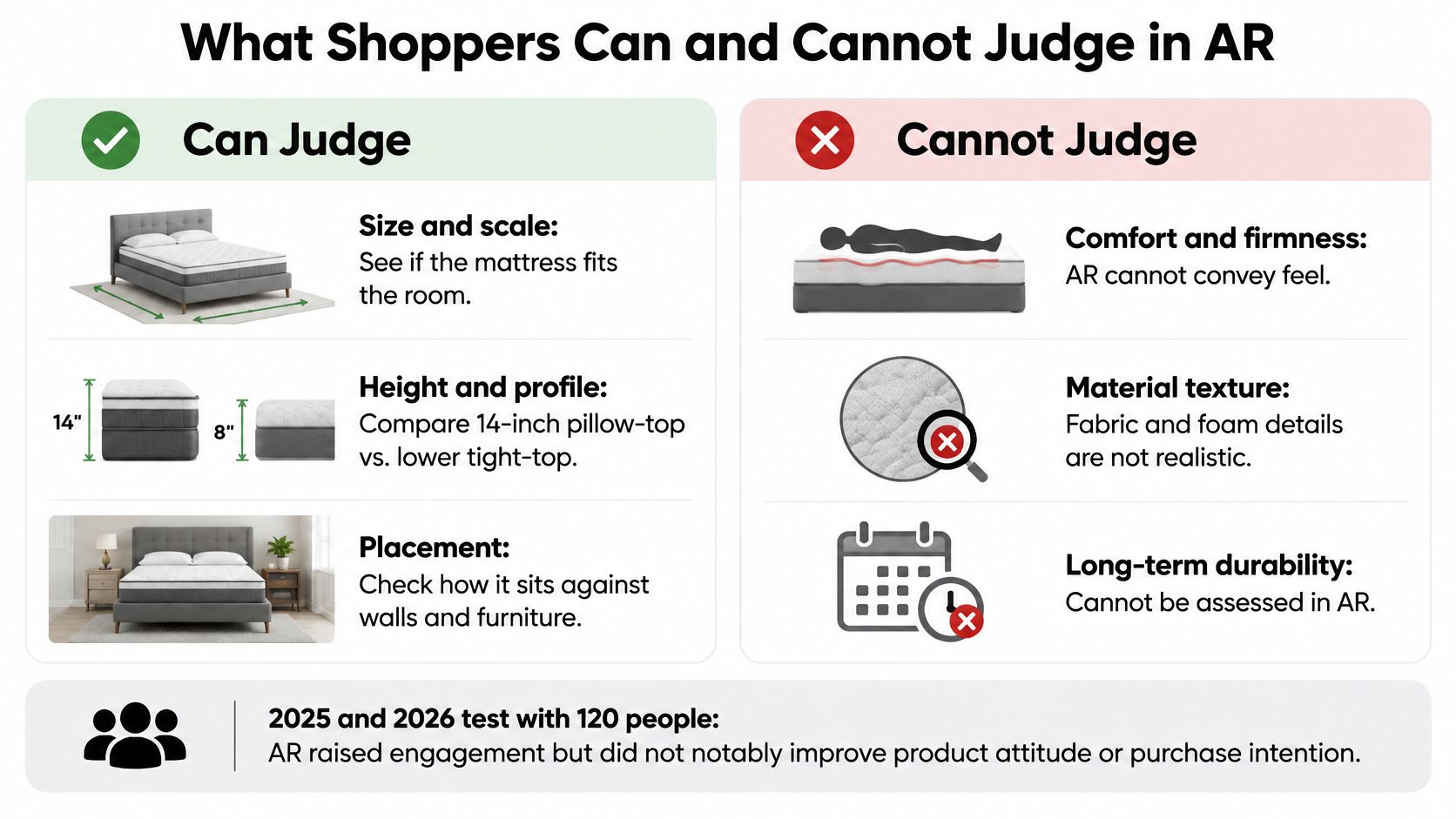
Measure the decision after the interaction
Use a Digibun-style layer breakdown to explain construction, then connect material descriptions to appropriately supported product claims. A cutaway illustrates where foam and coils sit; it isn't independent proof of cooling, pressure relief, durability, or edge support.
For measurement, distinguish an AR launch from a useful next action:
Product understanding: Did the shopper open construction details or a firmness comparison afterward?
Configuration progress: Did they complete a size or foundation selection?
Retail intent: Did they request a store visit or ask a specific compatibility question?
Post-purchase clarity: Do return reasons reveal fewer misunderstandings about dimensions or finished height?
Treat return reduction as something to investigate, not an outcome to promise. The practical guidance on reducing product returns can help teams connect better expectations with clearer product communication.
Keep photos, readable dimensions, and a text equivalent available without AR. Customers shouldn't need camera access, a compatible phone, or precise touch gestures to learn essential product information.
Device Tests Before a SKU Goes Live
Set a practical minimum of low-, mid-, and high-tier Android phones, then add an iPhone running Quick Look. This is an internal acceptance plan, not a guarantee that every customer device will behave identically.
Google's ARCore guidance recommends testing device classes representative of the audience and notes that additional AR features can increase CPU utilization. A dense quilt mesh, large ticking textures, adjustable-base animation, and camera tracking all compete for limited device resources.
Phone checks for a mattress AR model
Check | What usually fails | Record |
|---|---|---|
First load | Oversized GLB, heavy ticking textures, or a USDZ above Apple's recommended size | Seconds until the bed is stable |
Walk around the bed | Dense mesh plus camera tracking | Whether frames stay steady through a full lap |
Memory | Hidden geometry, extra colliders, uncompressed textures | Peak use on that device class |
Floor lock | Extra AR features raising CPU demand | Whether the mattress stays planted and at true scale |
First load passes when the asset becomes usable within your team's documented target on the tested connection. Record the network conditions and test a fresh load, not only a repeat visit with cached files.
Movement passes when the shopper can walk around the product without disruptive stutter. Include a close view of the quilt and a wider view of the complete stack, since teams shouldn't approve performance from a motionless front view.
Use this checklist while testing the actual product-page handoff.
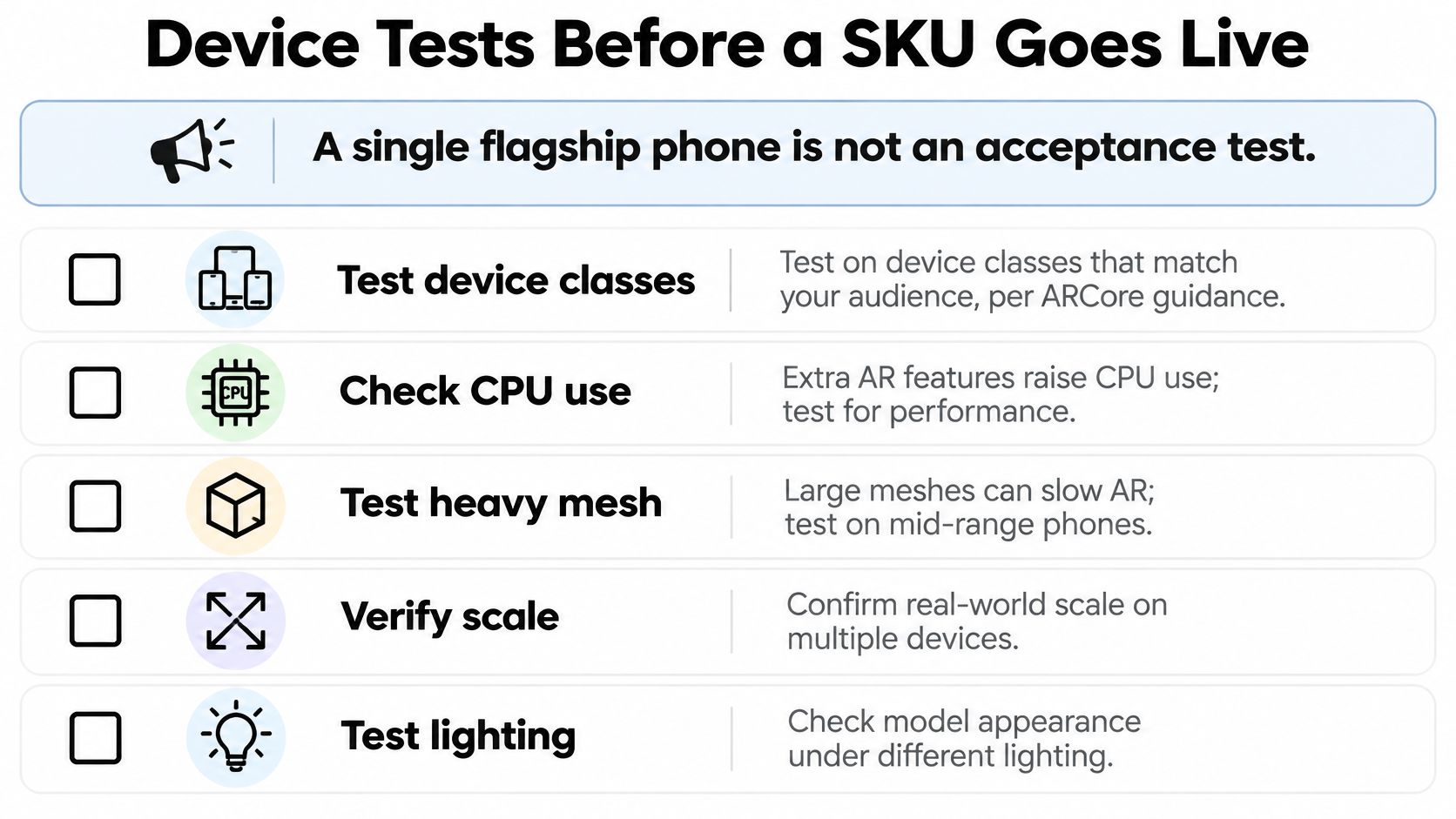
Fail the asset before the shopper does
Memory passes when the tested phone can sustain the session without closing the viewer or showing progressive instability. Floor lock passes when the bed remains anchored as the camera moves, with the expected footprint and height.
Set acceptance targets before reviewing the finished artwork. Otherwise, an impressive render can make the team reluctant to reject an unreliable asset.
A simpler quilt that appears reliably is more useful than a perfect quilt the shopper never sees.
If weaker devices struggle, prepare a lighter mobile variant and reserve richer materials for suitable hardware or desktop viewing. Repeat the checks after changes to geometry, materials, animation, or enabled AR features.
Test Apple and Android separately, including material appearance under different lighting. Use the page-load-speed guide to examine the surrounding page too, because a fast model won't compensate for an overloaded product page.
Mattress Retail Moments Where AR Pays Off
A shopper comparing hybrid mattresses already has plenty of photos. What interrupts the purchase is a specific question: will this bed fit the room, does it work with the base they own, how does it differ from the model beside it. AR earns its place when the retail team can name that question and measure whether the shopper resolves it.
A true-to-scale model that opens quickly on an ordinary phone answers fit questions that even excellent photography cannot. A photoreal asset that stalls answers nothing.
On the product page
Put the room-view action beside the main product imagery, with a label that says what it does, because an unlabeled icon gets ignored. Say the shopper compares a taller pillow-top with a lower tight-top, places each in the bedroom at real scale, then opens the construction comparison. The page should preserve the selected size through that handoff so a queen stays a queen, and keep foundation compatibility and trial terms one tap away.
Teams deciding which questions the room view should answer can review HearSmart's online mattress rankings to see how competing brands present their lineups and which features shoppers encounter first.
Measure progress into comparison or a completed size selection. Rotation counts alone say little about whether the model resolved anything.
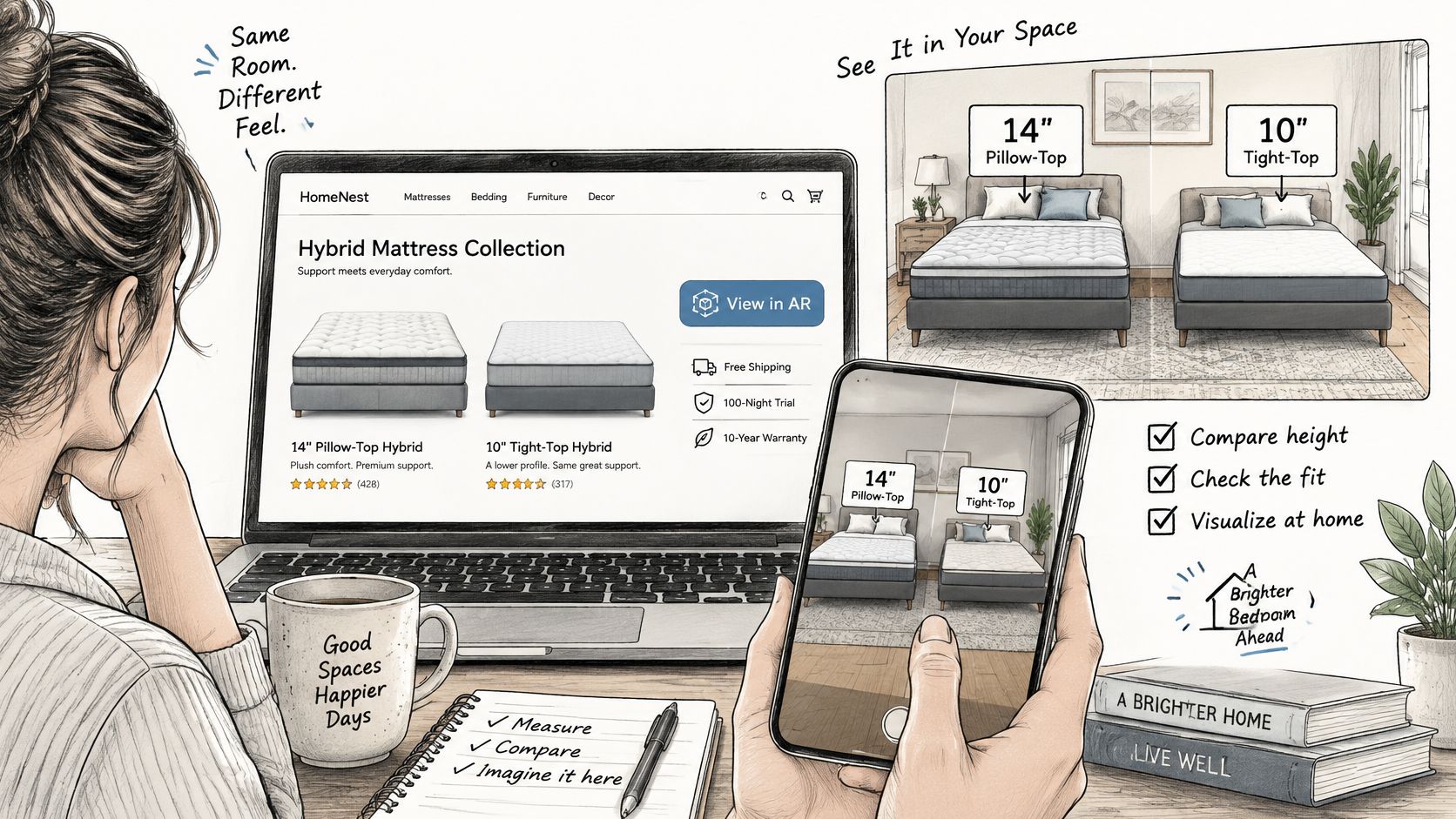
On a showroom floor with limited display space
A couple likes the feel of a floor model. The store, though, doesn't display their preferred cover or compatible adjustable configuration. The RSA opens the approved model to show the appearance and, where supported, how the base articulates under the mattress.
The associate should clearly separate the displayed configuration from what the couple physically tested. The phone adds visual context to the visit; the lay-down test remains the comfort check, since a scaled render can confirm footprint and height while saying nothing honest about firmness or motion isolation.
Track qualified follow-up inquiries and quoted configurations associated with those demonstrations. That tells the retailer more than counting how often associates open the asset.
Across a private-label collection
A private-label team may have several approved ticking treatments and a limited photography budget. Where the construction and profile match, the designer can reuse approved geometry and swap the fabric treatment rather than rebuilding the product. One validated shell produces a consistent set: proportions stay honest across every variant, and a new ticking becomes a material update instead of a new modeling job.
Keep lifestyle Room Scenes for setting and clean Silhouettes for channels that need straightforward product images. A 360 product viewer can support browser inspection when the customer wants a close look at the cover before thinking about room placement.
Evaluate approved-asset production effort alongside movement into retailer inquiries or product selection. Protect margins by funding assets that answer buying questions and skipping detail shoppers cannot use.
If visitors inspect every angle and then leave without opening specifications, investigate the missing explanation before commissioning more thread detail.
Decide Whether Your Next Model Is Ready
Publish only when the asset passes the device checks and the physical configuration is correct. That includes the selected foundation or base, not just the mattress sitting above it.
If the model floats, misstates height, opens the wrong cover, or struggles on a representative phone, hold it. An unreliable visualization gives shoppers another reason to question the product information and gives store teams another misunderstanding to resolve. A fast, true-to-scale model that loads on an ordinary phone earns more confidence than a photoreal asset that stalls before it renders.
Start with a controlled pilot
Choose a bestselling SKU with stable specifications and a clear buying use case. Assign an owner for dimensional approval, another for page integration, and someone responsible for reviewing results.
Use a short release checklist:
Product approval: The selected size, cover, base, and displayed specifications agree.
Technical approval: The delivery files work across the chosen device set.
Customer access: Essential information remains available without the viewer.
Measurement readiness: The team can connect interaction with meaningful next actions and review relevant return reasons.
Run the pilot through a full sales cycle before expanding across the line. Review customer questions alongside analytics, because a retailer inquiry about clearance may reveal value that an add-to-cart report misses.
Build a coherent visual set
If your current page contains only cover photography, prioritize a scaled placement model, an interior layer breakdown, and a room scene. Each should answer a different question. The placement model confirms whether the footprint and profile fit the room, the layer breakdown shows what the ticking covers, and the room scene sets the product in context. Repeating the same beauty shot in three file formats helps no one.
BEDHEAD serves mattress and bedding brands, from the industry's biggest manufacturers and retailers to regional and emerging bedding businesses, with website design and 3D visualization services. Teams building their understanding can use Bedhead University.
BEDHEAD offers mattress-focused 3D visualization and website design to help teams connect accurate product assets with useful shopping experiences. Visit BEDHEAD to discuss a pilot SKU, your current product imagery, and the room-fit questions your next AR model should answer.