How to Improve Page Load Speed on Mattress Websites
A shopper lands on a mattress product page expecting to see the quilt pattern, ticking, foam layers, reviews, price, and delivery details. Instead, a lifestyle render is still loading, the review widget is blocking the page, and the size selector hasn't become usable. The shopper leaves before learning why the hybrid mattress is different.
That's why how to improve page load speed matters so much in bedding. Mattress websites combine large product imagery, layer diagrams, comparison tools, reviews, financing widgets, chat, analytics, and extensive catalogs. Generic speed advice often misses the trade-offs that determine whether a shopper sees the product clearly or abandons the page.
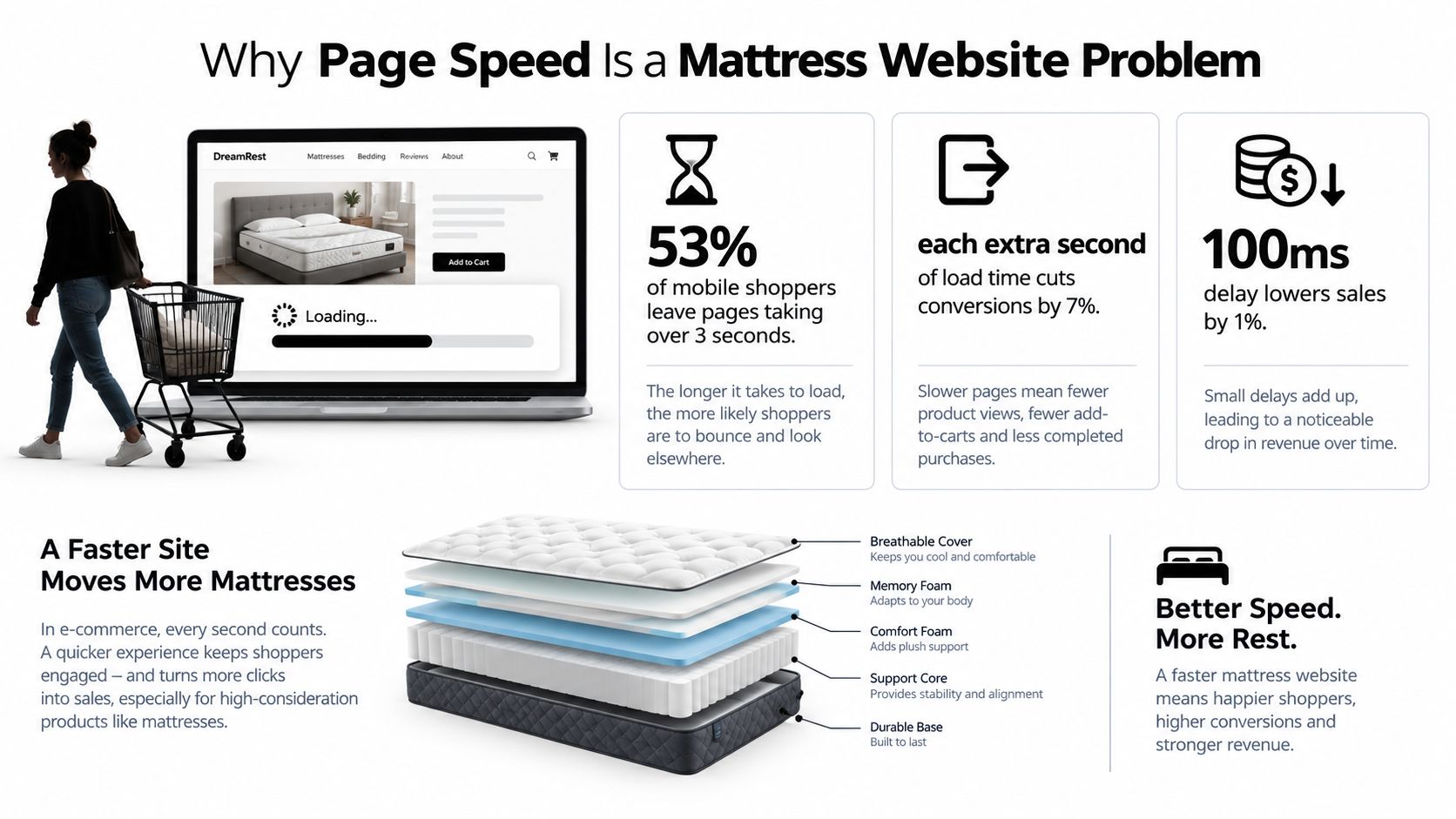
Why Page Speed Is a Mattress Website Problem
A slow mattress website doesn't merely create a technical inconvenience. It interrupts the buying journey at the moment when a shopper needs reassurance. Mattress buyers want to inspect construction, compare comfort claims, understand materials, and visualize the product in a bedroom. If the hero image, Digibun layer breakdown, or product details arrive late, the page feels incomplete.
Google analyzed approximately 900,000 mobile websites and found that the average time required to fully load a mobile page was 22 seconds, far above the roughly 2-second performance point Google identified as desirable. The same analysis found that 53% of mobile visitors leave when a page takes longer than 3 seconds, while bounce rates averaged about 13% for pages loading in under 3 seconds and approached 60% after 9 seconds. (Google's mobile site speed analysis)
The product page is part of the showroom
In a physical store, a retail sales associate can immediately point out the gusset, explain the quilt, open a cutaway, and guide a customer toward the right firmness. An eCommerce page has to perform those jobs through content and interaction.
A mattress PDP may need to load:
A hero image showing the finished mattress and its cover details.
A Digibun visual that explains foam layers, coils, edge support, and construction.
Room Scenes that help shoppers understand scale and styling.
Reviews and ratings that reduce uncertainty.
Size, firmness, and height selectors tied to price and inventory.
Financing, delivery, returns, and warranty information that support purchase confidence.
Every element has a purpose, but every request also competes for bandwidth, browser processing, and attention. A visually rich page can improve product understanding, yet it can also delay the first meaningful experience if the team treats every asset as equally urgent.
Practical rule: The first screen should answer “What is this mattress, why is it different, and what can I do next?” before secondary features begin loading.
Page speed also affects paid media efficiency and organic landing-page performance. A shopper arriving from a Google search or a social campaign may never reach the content that justified the click. For manufacturers and retailers, that creates a commercial problem across the funnel, from product discovery to showroom appointment requests and online checkout. A focused website development and SEO approach for mattress brands should therefore treat speed as part of product communication, not as a final technical polish.
Quick Wins That Move the Needle Fast
Start with the assets shoppers need immediately. On a mattress page, that usually means the main product image, headline, price, primary offer, and the first interaction. Don't lazy-load the hero image just because a tool recommends lazy-loading every image. Load the confirmed above-the-fold LCP image early, then defer the gallery, lower-page lifestyle scenes, video, reviews, and chat until they become relevant.
Fix the images shoppers see first
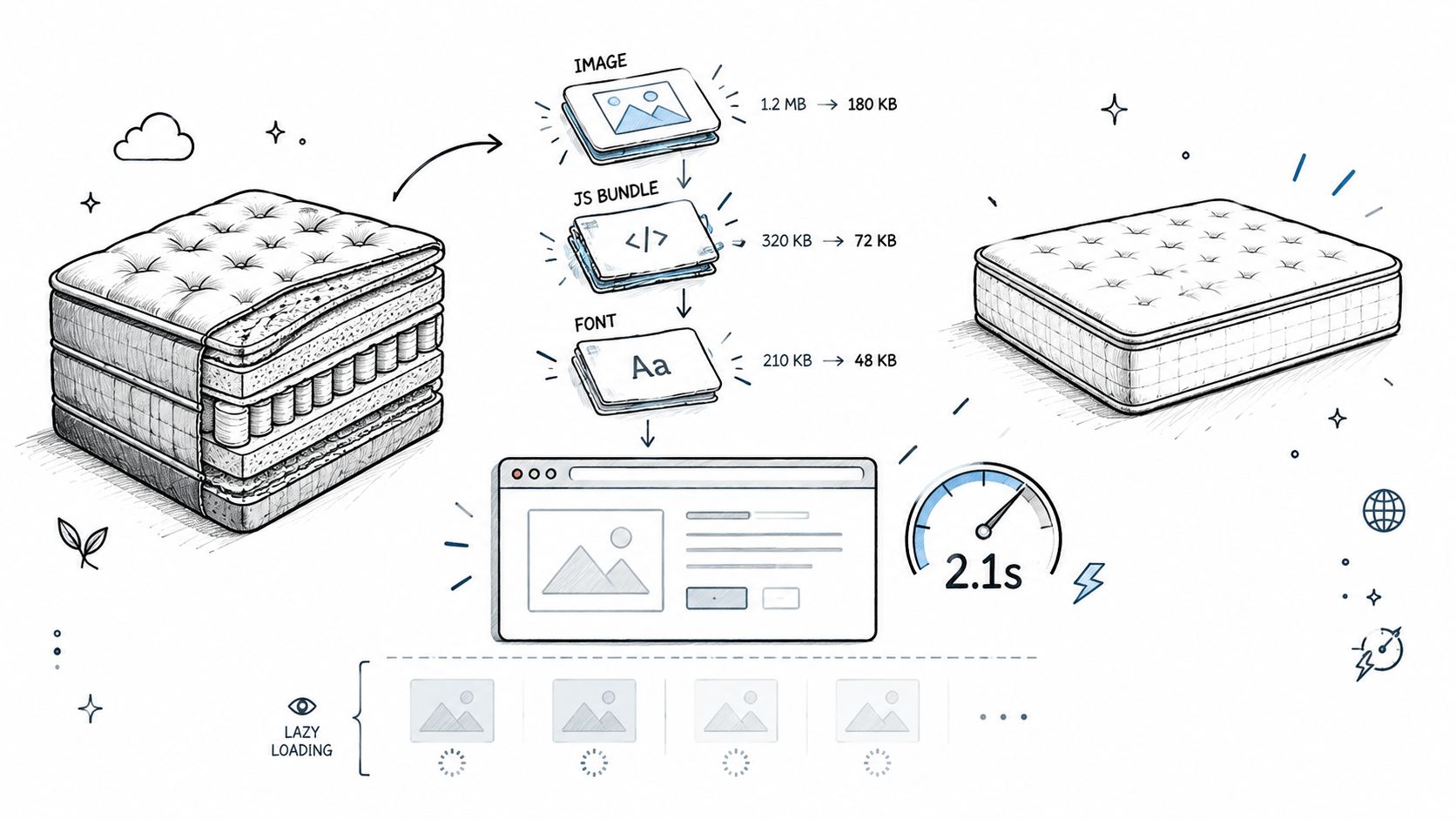
The first practical task is to identify the largest visible element in Chrome DevTools or PageSpeed Insights. If it's a hero mattress render, export that asset in AVIF or WebP, at the largest dimensions the page displays. A full-resolution Room Scene uploaded for a wide desktop monitor shouldn't be delivered unchanged to a narrow mobile screen.
Use responsive image markup with and , and give every image explicit width and height. This prevents the product description, review summary, or add-to-cart area from jumping when an image finishes loading.
The right image workflow is selective:
Eager-load the confirmed LCP image. The main product visual needs an early network priority.
Lazy-load below-the-fold media. Gallery images, layer detail panels, and later Room Scenes can wait until they approach the viewport.
Serve the right crop. A portrait mobile product image shouldn't force a phone to download a wide desktop composition.
Compare visual quality at realistic sizes. A fabric texture may tolerate stronger compression than a close-up showing quilting, stitching, or foam density.
Remove duplicate variants. A carousel that loads every mattress angle before interaction wastes resources.
Page weight is driven primarily by images and JavaScript. The 2025 Web Almanac reported median page sizes of approximately 2,862 KB on desktop and 2,559 KB on mobile. Images represented about 1,059 KB on desktop home pages and 911 KB on mobile pages, while JavaScript represented approximately 697 KB on desktop home pages and 632 KB on inner pages. The same report found that 98.1% of pages made at least one JavaScript request. (2025 Web Almanac page-weight data)
Reduce what the browser has to execute
Image compression won't rescue a page that starts dozens of scripts before the main content is usable. Review platforms, advertising tags, personalization tools, financing widgets, pop-ups, and chat services all deserve an owner and a purpose.
Remove integrations that no longer support a measurable business task. Defer nonessential JavaScript, and load interaction-heavy features only after the shopper needs them. A review widget can appear lower on the page without blocking the product image. A chat tool can wait until the page has rendered or until the shopper opens it.
Caching is another quick win. Page caching reduces repeated server work, while browser caching lets returning visitors reuse static files. A CDN can deliver images and other assets closer to the shopper, which matters for brands serving customers across multiple regions.
For a practical image workflow, use the guidance in this mattress-focused image optimization resource as a starting point, then validate the result on actual product templates. The useful outcome isn't a better score in isolation. It's a page where the shopper sees the mattress, understands the offer, and can interact with the next step sooner.
Medium-Term Fixes for Sustainable Speed Gains
Quick asset changes help, but recurring speed problems often begin before the browser receives the first meaningful response. A catalog with many variants, layered product data, inventory connections, personalization, and promotional rules can place substantial work on the server. If the backend is slow, front-end compression only addresses part of the problem.
Start with the server response
Measure time to first byte, database response time, cache-hit behavior, and the difference between cached and uncached requests. A mattress retailer should test representative templates, not only the home page. Compare a category page, a product page with reviews, a product page with multiple sizes, and a landing page built for paid traffic.
Look for patterns:
A slow response on every template may point to hosting, application, or database constraints.
A slow product page may indicate inefficient variant queries, review integrations, or personalization logic.
A page that slows during campaigns may need better caching, capacity planning, or traffic handling.
A fast desktop result paired with a poor mobile experience may indicate excessive JavaScript or oversized responsive assets.
Caching needs careful invalidation. Price changes, promotions, stock levels, and delivery messages must update when they should. Serving a stale mattress offer quickly is not a performance success. Coordinate cache rules with merchandising and operations so speed improvements don't create inaccurate product information.
Choose infrastructure around the catalog
A CDN is valuable, but it isn't a substitute for a reliable origin server. Use geographically distributed delivery for static assets, then examine whether the origin can respond consistently when shoppers request uncached pages. Efficient hosting, backend optimization, and sensible database queries create the foundation that front-end work depends on.
Responsive design also affects performance because the page should deliver content appropriate to the device rather than forcing every shopper to receive the same layout and asset set. A clear responsive design framework for mattress websites can help teams connect mobile layout decisions with image sizing, navigation, comparison tools, and conversion elements.
Speed improvements can produce commercial gains, although the result depends on the size and quality of the change. A SOASTA study cited by Google found that mobile pages loading 1 second faster achieved conversion-rate increases of up to 27%. Deloitte's “Milliseconds Make Millions” research reported that a 0.1-second improvement was associated with average conversion increases of 8% for retail websites and 10% for travel websites, while its mobile analysis measured a 10.1% conversion-rate improvement after a 0.1-second gain. (HTTP Archive performance analysis)
These figures shouldn't become a promise attached to every optimization project. They support a better operating method: establish a real-user baseline, improve the slowest high-value journey, and measure conversion and engagement after each material release. A page that loads faster but loses a useful comparison tool may not help the business. Keep the experience that helps a shopper choose, and remove the delay that doesn't.
Advanced Engineering for High-Performance Sites
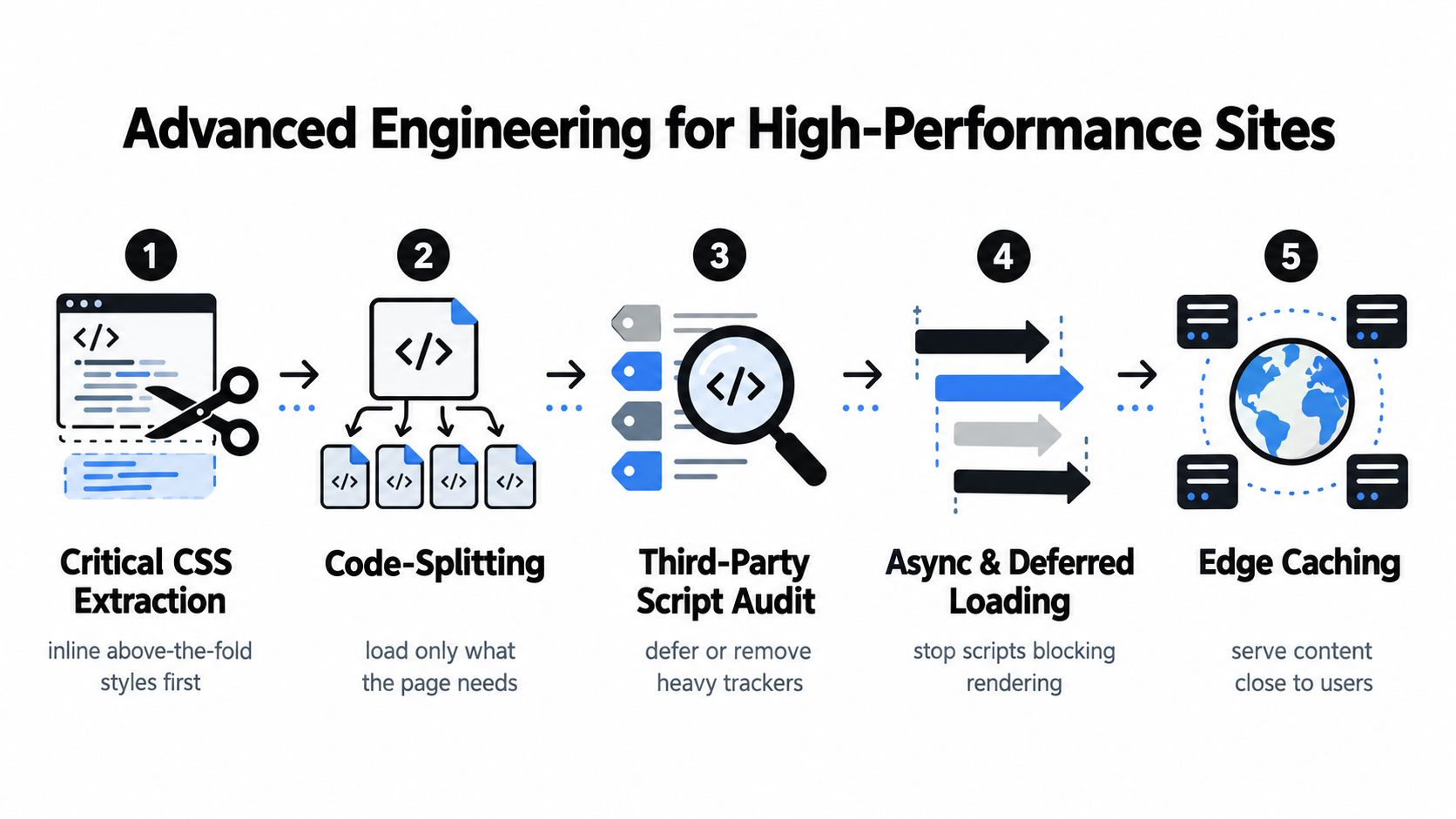
Large mattress catalogs need more than a compression plugin. They need a clear loading order. The browser should receive the HTML, critical styles, primary product image, and essential interaction code before it spends time on reviews, chat, tracking, video, or a large gallery.
Prioritize the render-critical path
Use DevTools to identify the LCP candidate and trace how the browser discovers it. If the hero image sits behind client-side rendering or a slow stylesheet, the file may be technically small but still arrive too late. Once the correct LCP resource is confirmed, preload it selectively and avoid lazy-loading it.
Critical CSS extraction can place above-the-fold styles closer to the document, while noncritical styles load later. Code-splitting can keep a product page from downloading scripts required only by the checkout, account area, store locator, or virtual shopping experience. These techniques demand testing because mattress sites often use shared components across category, product, and campaign templates.
Use resource hints with discipline:
can prepare a connection to an important external origin.
can prioritize a confirmed critical resource.
Responsive image attributes can help the browser choose the appropriate file.
Deferred loading can move nonessential code away from the initial render.
MDN recommends CDNs, compression, resource hints such as and , and lazy-loading for noncritical content. It also warns that lazy-loading can create SEO problems when crawlers can't access equivalent content. (MDN performance best practices)
Don't preload several product images because they look important in the design file. Multiple preloads compete with the HTML, CSS, and actual LCP resource. Similarly, aggressive JavaScript deferral can break variant selectors, financing messages, or analytics events if the team doesn't test the full path from landing page to purchase.
Govern third-party services like inventory
More than nine in ten web pages include at least one third-party resource, according to the 2025 Web Almanac's third-party analysis. (2025 Web Almanac third-party data) Mattress sites commonly add review widgets, chat, advertising, consent management, analytics, personalization, virtual shopping, and product feeds. Each service may be reasonable on its own, but the combined main-thread cost can delay rendering and interaction.
Create a simple vendor register with four fields:
Business value, such as assisted sales, attribution, reviews, or compliance.
Blocking behavior, including whether the tag delays rendering or interaction.
Transfer and execution cost, measured in the browser rather than guessed from vendor claims.
Loading condition, such as initial page load, consent, user interaction, or near-viewport entry.
Then make a decision. Remove a tag with no owner or current purpose. Defer one that supports a secondary journey. Load a necessary tool after consent or interaction when its function allows it. Keep a critical service, but monitor it and hold the vendor accountable for regressions.
The same discipline applies to product imagery. Digibun layer graphics may be essential for explaining construction, while a second decorative angle may not be. Silhouettes can communicate shape with less visual complexity, and a Room Scene may work better below the initial product summary. For an additional technical perspective on diagnosing and prioritizing these issues, teams can consult Wistec for site speed.
Measuring Results and Building a Performance Roadmap
A speed project needs a baseline, a change log, and a business measure. Start by recording field performance for priority templates, then document the release that changed images, scripts, hosting, or rendering. Lab tools help isolate a problem, but real shoppers reveal whether the page remains usable on the devices and connections that matter to the business.
Use Core Web Vitals as operating thresholds
Google defines three Core Web Vitals thresholds. Largest Contentful Paint should be 2.5 seconds or less, Interaction to Next Paint should be 200 milliseconds or less, and Cumulative Layout Shift should be 0.1 or less. Google evaluates these thresholds at the 75th percentile, so a site generally needs at least 75% of page views to meet the good level for a metric to receive a good classification. (Google's Core Web Vitals guidance)
Each metric points to a different mattress-site problem:
LCP often leads back to a hero product image, slow hosting, render-blocking CSS, or delayed server response.
INP can expose heavy review widgets, filters, size selectors, chat tools, and long JavaScript tasks.
CLS often appears when product images, promotional banners, review modules, or financing content load without reserved space.
Track the LCP element, image decode time, time to first byte, render-blocking requests, and main-thread long tasks. Don't judge success only by total page weight. A larger page can still produce a better first interaction if the browser receives the right resources in the right order.
Turn measurements into a working queue
A practical roadmap can follow this order:
Baseline priority journeys. Record mobile and desktop results for the home page, category page, product page, and campaign landing page.
Fix the first visible bottleneck. Confirm the LCP candidate, resize the asset, correct its loading priority, and verify the server response.
Audit interaction cost. Test filters, size selectors, reviews, add-to-cart controls, financing, and chat.
Reserve visual space. Add dimensions to every product image and dynamic module that can move the layout.
Measure commercial behavior. Compare product engagement, add-to-cart activity, checkout progression, and conversion after a controlled release.
Review the stack regularly. Recheck new images, tags, plugins, integrations, and catalog templates before they become permanent overhead.
Use an analytics implementation guide for mattress marketing teams to connect performance changes with meaningful events. A faster page that receives fewer completed purchases because a tracking or variant event broke needs immediate investigation.
Measure the journey, not just the score: A shopper who can see the mattress, choose a size, understand the construction, and add the product to cart is more valuable than a laboratory grade without a usable buying experience.
Performance ownership should sit across marketing, merchandising, development, and sales. Marketing controls tags and landing-page assets. Merchandising controls photography, product content, and catalog complexity. Development controls delivery and interaction behavior. Retail leadership can then judge whether the faster experience supports margins, floor-model messaging, showroom appointments, and eCommerce sales.
Bedhead Network is free for mattress industry professionals at www.BedheadNetwork.com, with marketing insights, news updates, networking, training resources, an industry directory, and business tools for manufacturers, retailers, suppliers, and other bedding professionals.
If your mattress website is slow because of oversized Digibun renders, lifestyle scenes, review widgets, or an unmanaged marketing stack, BEDHEAD can help audit the experience and prioritize practical fixes. The team combines mattress-specific product page optimization, SEO, 3D assets, and website development so performance improvements support clearer product selling rather than stripping away the content shoppers need.