What Is 3D Viewer? a Guide for Mattress Brands
A 3D viewer is software that lets users open, inspect, rotate, zoom, and sometimes place a digital three-dimensional model in augmented or mixed-reality environments without using a full 3D design application.
You're reviewing a mattress product page before a campaign launches. The photography looks polished, but your sales director still asks whether shoppers will understand the quilt profile, the transition foam, or why this hybrid belongs above another model in the lineup.
That's the useful starting point for visualization. Not whether the mattress looks impressive on screen, but whether the shopper can understand what they're buying and what they still need to ask.
What Is 3D Viewer Software for Mattress Brands
A shopper scrolls past a flat photograph of a queen hybrid. They can see the ticking and a stitched logo, but they can't tell where the quilt ends, how the gusset relates to the overall profile, or what sits beneath the cover.
An interactive model gives that shopper another way to inspect the product. Depending on how the experience is built, they might turn the mattress, move closer to the border, or open a prepared cutaway showing the foam layers.
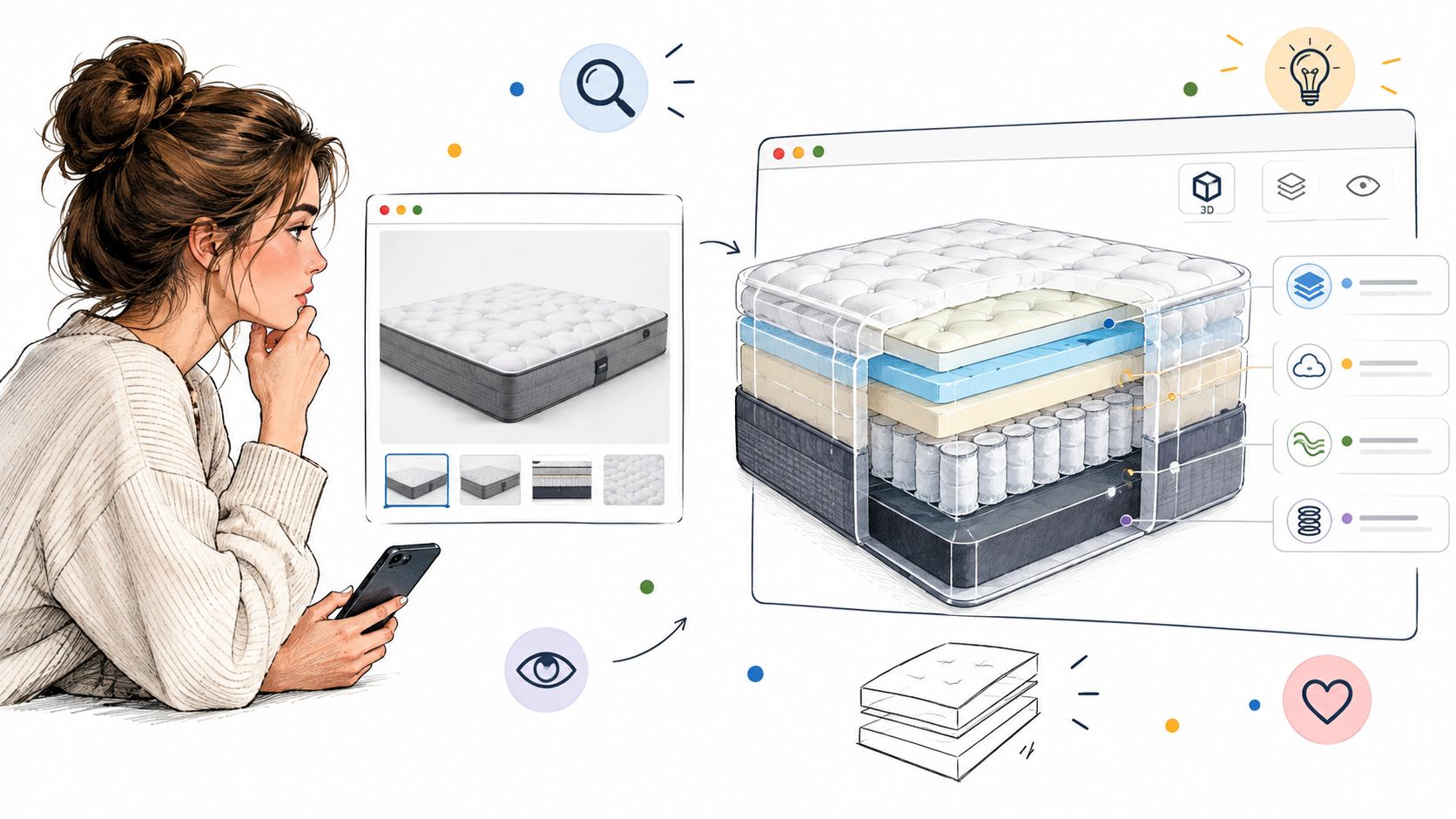
A viewer presents what a designer builds
The important distinction is viewing versus authoring. A viewer presents an existing model for inspection; modeling software creates or changes its geometry, materials, lighting, and animation. The Microsoft 3D Viewer overview illustrates this presentation-focused role.
Think of the model as your digital floor sample and the viewer as the display mechanism. Installing the viewer doesn't create accurate quilting, add missing handles, or correct an outdated layer stack. Those details must exist in the approved asset.
For a marketing director, that distinction clarifies responsibilities:
The product team confirms construction, proportions, and component descriptions.
The visualization team builds the approved digital representation.
The website team makes that representation available through usable controls.
The sales team checks whether the experience supports a clear product explanation.
Choose the tool for the job
Software terminology can blur these roles. If a component partner also works in apparel, Genpire's resource to find CLO alternatives for apparel teams is relevant to that separate tool-selection conversation, not a substitute for selecting a mattress viewer.
Your own decision should begin with the buyer's question. If shoppers need to inspect the border and underside, interactive viewing may fit. If they need a clear layer explanation, a labeled cutaway might be enough.
Practical rule: Buy the ability to answer a product question, not interactivity for its own sake.
How a 3D Viewer Works Behind the Screen
Opening a digital mattress is a little like unpacking a flat-pack bed. The pieces, their positions, and their surface finishes must come together before you see the finished object.
The difference is that the viewer keeps drawing the scene as the shopper moves around it. The mattress doesn't become a new photograph every time someone drags a finger across the screen.
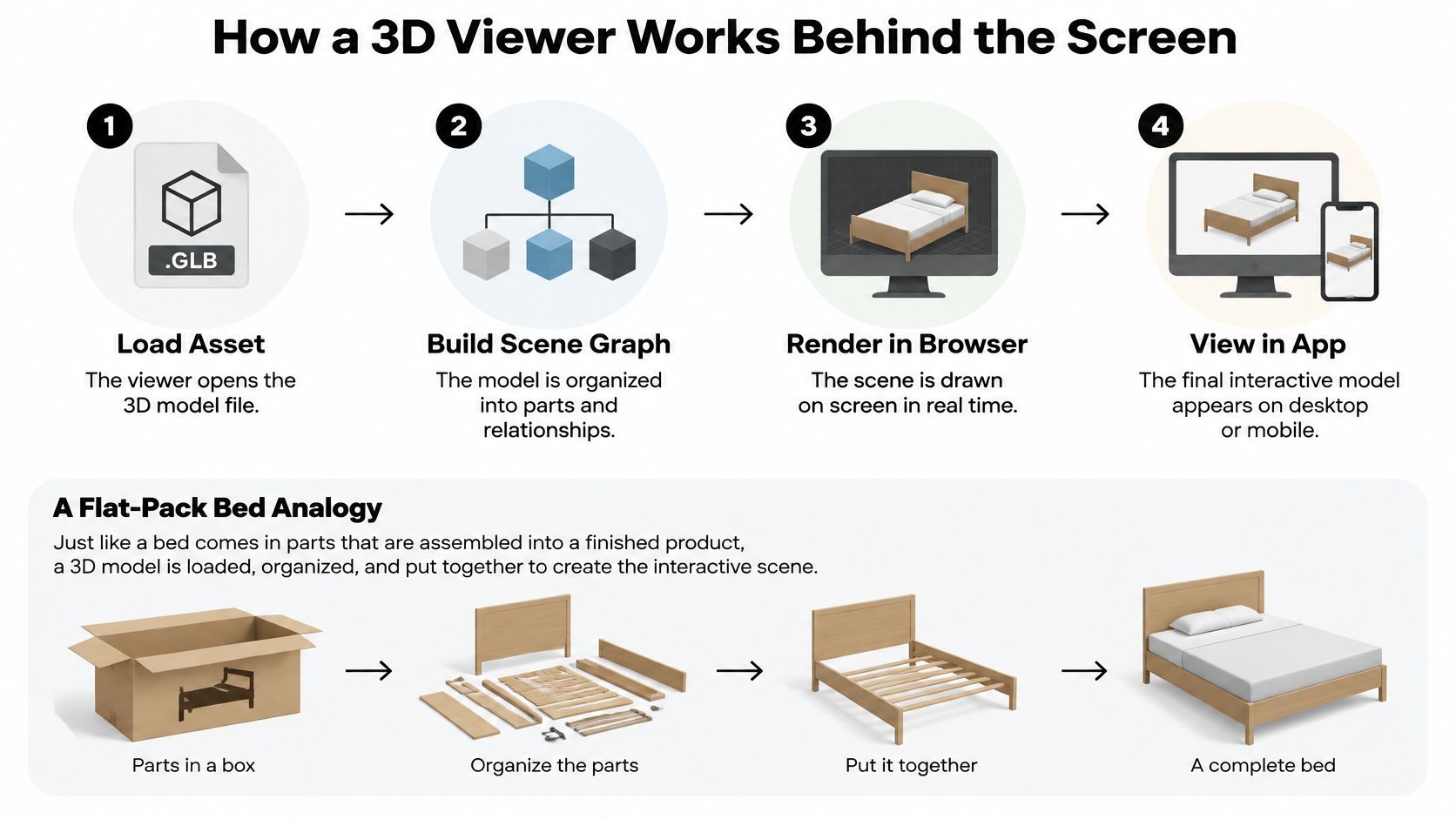
From a model file to an organized product
Loading the asset is the unpacking stage. The viewer receives the information needed to represent the mattress, including its shape and surface appearance.
It then builds a scene graph, an organized set of parts and relationships. In the flat-pack analogy, this is the assembly plan that tells you which pieces belong together and where they sit.
A digital mattress might organize the cover, border, handles, and internal components separately. That organization matters when the intended experience includes selecting a component or displaying a prepared exploded view.
The Library of Congress description of glTF explains how an asset can describe nodes, meshes, materials, textures, cameras, and animations. For marketing teams sorting out the terminology, this guide to 3D graphics file formats provides a useful starting point.
Drawing the mattress as the camera moves
In browser implementations, WebGL supplies the graphics interface inside an HTML canvas and can use the device's graphics hardware without browser plug-ins. Its rendering process turns model geometry, camera position, materials, and textures into the image the shopper sees, as described in the MDN WebGL documentation.
When the shopper rotates the mattress, the software redraws the view from the new camera position. This lets the same asset expose quilting, fabric appearance, edge construction, and different viewing angles.
The workload depends on what you ask the device to draw:
Geometry complexity affects how much shape information must be processed.
Texture resolution affects the detail and memory demands of fabric surfaces.
Lighting calculations affect the work needed to represent those surfaces.
Device capability affects how comfortably the hardware handles that workload.
That's why a model can feel smooth on a desktop but less responsive on an older phone. For teams considering a wider interactive-content workflow, Faberwork LLC's resource on AI media production for technology leaders offers a related production topic. The mattress-specific requirement remains simpler: the approved model must display clearly on the devices your buyers use.
Comparing 3D Viewers With 360 Images, AR, and Configurators
A shopper asking to see the opposite side of a mattress needs something different from a shopper asking whether it will look oversized in a bedroom. Calling both experiences “interactive” doesn't help your team choose the right tool.
Separate the visual format from the purchasing question before you approve development.
How 3D Viewers Compare With Related Product Visuals
Format | What the Shopper Can Do | Best Mattress Question It Answers |
|---|---|---|
360-degree image sequence | Move through prepared views around the product | What does the border, handle arrangement, or opposite side look like? |
3D viewer | Rotate, zoom, and inspect a digital model | How do the represented components and overall proportions relate? |
Augmented reality | Place a digital representation within a real environment | How does the mattress appear at scale in this space? |
Product configurator | Change supported attributes or components | What does the selected size, quilt, fabric, or construction option look like? |
A 360 product viewer may be the more focused choice when the task is showing the exterior from prepared angles. A configurator serves a different purpose: helping buyers inspect valid product choices rather than just move the camera.
Visible construction isn't demonstrated performance
A model can depict a reinforced perimeter. It can't prove how that perimeter feels when someone sits on the edge.
The same boundary applies to comfort, firmness, temperature regulation, and long-term durability. Those questions need specifications, supporting demonstrations, relevant testing information, reviews, or an in-store experience, not a more dramatic camera movement.
Zakeke's discussion of ecommerce product visualization cites a retail dataset in which cart additions rose from 32% to 45% after introducing 3D renders. That result isn't a forecast for your mattress range, and it doesn't establish which product information caused shoppers to proceed.
A digital cutaway shows the construction you've represented. It doesn't independently verify the product or let someone feel it.
For example, a cooling-material callout should identify the actual material and explain the basis for the claim. A blue animation moving through foam isn't evidence of temperature regulation.
Choose the format that resolves uncertainty, then supply the evidence the format can't provide. This keeps your product story useful rather than merely entertaining.
Where Mattress Brands Use 3D Viewers
On the showroom floor, a retail sales associate can stand beside a floor model and use a tablet to explain what the shopper can't see beneath the ticking. The shopper still lies down on the mattress, while the digital presentation supports the construction conversation.
Consider these as practical applications, not documented performance case studies. Each serves a different selling moment.
Beside the floor model
A prepared layer view can show where the quilt package ends, which foam layers sit above the support unit, and how the border relates to the finished mattress. The associate can connect each visible component to the approved product explanation instead of pointing vaguely at the surface.
Keep the conversation grounded in the sample beside the shopper. If the screen shows a different ticking pattern or an old gusset treatment, the associate has to explain the mismatch before explaining the product.
A useful showroom sequence is:
Orient the shopper by matching the digital product to the floor model.
Expose the relevant component rather than opening every available feature.
Explain its intended role using approved product language.
Return to the physical mattress for the comfort assessment.
Sales training should help associates move between those steps naturally. The tablet supports the conversation; it shouldn't take over the appointment.
On the product page and in buyer meetings
For ecommerce, use the viewer to address expectation gaps before checkout. A shopper concerned about a deep profile should be able to inspect the border and find the corresponding finished dimensions nearby.
Handle placement, underside appearance, and edge construction are also useful inspection subjects. Treat their relationship to returns as a question to investigate, not an automatic promise that adding a viewer will reduce them.
A manufacturer can also present a proposed hybrid to retail buyers before samples ship. Clearly label development-stage visuals, especially when ticking, foam specifications, or final finishes remain subject to approval.
Physically based rendering, or PBR, helps represent how materials respond to light. The Khronos explanation of glTF PBR describes standardized material properties that support more consistent surface representation, provided the asset contains suitable material and texture information.
Among the available visual solutions, Bedhead Marketing offers Digibuns for layer breakdowns, Silhouettes for clean product images, and Room Scenes for lifestyle presentation. Those assets can complement a viewer rather than compete with it; these interactive product examples provide another reference when planning the mix.
The right combination gives each channel a usable explanation, whether that's a retail buyer presentation, a showroom tablet, or a direct-to-consumer product page.
Keeping 3D Viewers Fast and Accessible for Buyers
The most interactive presentation isn't necessarily the most useful one. If a shopper can't load it, operate it, or retrieve the product details without it, you've introduced another obstacle to the purchase.
That matters when someone is shopping on an older phone, using assistive technology, or comparing mattresses over a slower connection. Don't make access to construction information depend on successful interaction with a demanding graphic.
Treat engagement claims cautiously
Industry material discussing 3D ecommerce adoption reports 82% of shoppers interacting with 3D assets when shown and conversion rates up to 94% higher in some Shopify-reported comparisons. These aren't universal benchmarks, and they don't establish causation.
An interaction tells you that someone used a feature. It doesn't tell you whether they understood the layer stack, found the correct foundation requirements, or became more confident about the selected mattress.
Commerce standard: A buyer who skips the viewer should still be able to make an informed product comparison.
Keep your measurement tied to the selling task. A shopper repeatedly rotating a mattress might be engaged, or they might be struggling to find a detail that should have been labeled.
Build an equivalent path to the facts
Use progressive enhancement: the page should work as a product explanation before interactive graphics become available.
Still images should provide clear exterior and construction views, with a way to inspect detail.
Dimension diagrams should communicate measurements without requiring camera manipulation.
Descriptive text should explain layer composition and identify essential product differences.
Video and downloadable specifications should offer additional ways to review the product.
Accessible controls should support keyboard operation, clear focus, and understandable labels.
Keep essential facts in the page content rather than hiding them exclusively inside visual hotspots. A screen-reader user shouldn't have to infer foam order from the position of a graphic.
Ask your team to test the failure state deliberately. Block the model, attempt keyboard-only navigation, and check whether someone can still identify the product, review its specifications, and continue shopping.
This guidance on improving page-load speed can support the broader page review. Protect the basic shopping experience before adding visual complexity that buyers may not need.
Integration Options and Implementation Basics
Start with where the viewer will be used, not with the largest available rendering file. A public product page, an associate's tablet, and a private buyer presentation have different access and content needs.
Assign an owner for both technical delivery and product accuracy. Otherwise, a website update can be complete while the displayed mattress still reflects an earlier specification.
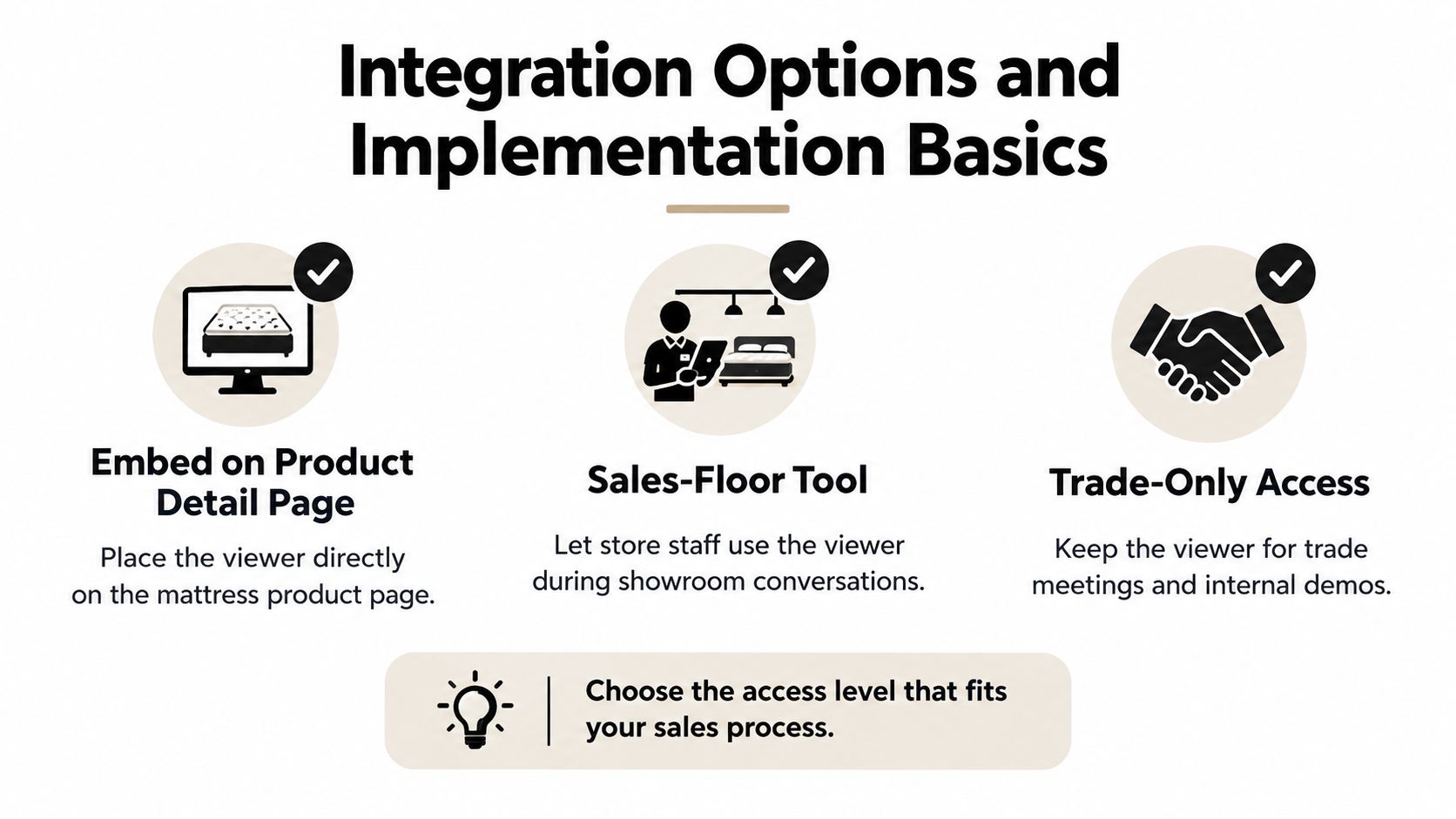
Select the access model
Website embedding puts the viewer directly in the shopper's decision path. Plan its placement beside relevant product details rather than assuming it must occupy the entire opening screen.
A sales-floor tool should help staff get to the correct mattress and construction view quickly. A trade-only presentation may instead prioritize controlled access to unreleased products and clearly identified development versions.
Choose the access level that fits your sales process. Don't build public configuration controls merely because a private buyer presentation needs to show proposed options.
Prepare an asset for delivery
Khronos glTF is designed for efficient transmission and loading of scenes. A complete scene can be packaged as a single binary .glb file, reducing network requests compared with separate files, and glTF 2.0 is recognized as the ISO/IEC 12113:2022 runtime 3D asset-delivery standard.
Use a controlled preparation sequence:
Remove unnecessary geometry, including hidden detail that contributes nothing to the intended inspection.
Resize textures according to how much detail shoppers can see.
Apply appropriate optimization, such as compressed textures, simpler detail levels, and progressive loading.
Test first load and interaction on mid-range mobile hardware, not only the designer's workstation.
Raw CAD and high-detail rendering assets shouldn't be treated as web-ready deliverables. Approve the optimized version on its own merits, checking that performance changes haven't removed important product details.
Ownership question | Decision to record |
|---|---|
Who controls the source asset? | Name the team responsible for revisions and approved exports. |
What triggers a review? | Include changes to ticking, foam, dimensions, labeling, and available options. |
Who approves publication? | Require product accuracy and channel usability sign-off. |
This is also a margin decision. Define the maintenance scope before commissioning options that your team will have to revise whenever the production specification changes.
Next Steps for Your Mattress Product Pages
Audit a hero product this week before commissioning a viewer. Choose a mattress with a clear commercial role and enough construction detail to test whether better visualization would answer meaningful buyer questions.
Have a product specialist, an ecommerce manager, and a retail sales associate review the same page. Ask them to identify what a shopper can confidently understand and what still requires a phone call or showroom explanation.
Check the product story before adding controls
Use a simple checklist:
Layer order is stated clearly and matches the approved construction.
Finished dimensions are easy to locate and tied to the selected product.
Foundation requirements explain what the buyer needs beneath the mattress.
Care instructions are available without searching through unrelated content.
Certifications and claims identify what applies to the actual product.
Visual limitations are clear when a cutaway is illustrative or a finish is not final.
Mark which gaps need imagery and which need better copy, documentation, or staff training. Don't commission a complex visual feature to solve a missing specification.
Pilot against a defined buyer question
Pair the pilot with transparent callouts and downloadable specifications. Record the questions customer service receives before and after launch, and review whether shoppers can find the information the model was intended to explain.
Assess conversion rates alongside loading behavior, device usability, product mix, and campaign changes. Don't credit the viewer for every movement in sales, and don't overlook whether the experience helps associates tell the same accurate story across channels.
For further learning, use Bedhead University's mattress-industry education resources. Training should connect the digital explanation to what manufacturers, retail teams, and shoppers need to understand.
Join the free Bedhead Network (BEDNET), a hub for mattress industry professionals offering marketing insights, news updates, networking, training resources, an industry directory, and business tools. It's a relevant resource for manufacturers, brick-and-mortar and ecommerce retailers, private-label brands, and sleep product startups evaluating their next move.
BEDHEAD combines mattress-focused digital marketing, a 3D design studio, brand development, expert consultation, and sales training to connect accurate product visuals with a clear selling story. If you're evaluating a viewer, layer breakdowns, or product page improvements, visit BEDHEAD to discuss a visualization plan built around your construction, sales channels, and buyer questions.