How to Create Infographics for Mattress Brands: A Guide
Your hybrid mattress page has a polished room scene, a specification table and a long list of features. Buyers still ask which model feels firmer, what's inside it and what happens if it isn't right for them. On the showroom floor, sales associates are answering those same questions beside floor models whose construction buyers can't see.
Learning how to create infographics starts with choosing which of those questions to answer. A useful mattress infographic supports a buying decision. It doesn't squeeze the entire sales presentation into an image.
Plan One Infographic Around a Single Buyer Decision
Say your team combines cooling, firmness, construction, certifications and warranty coverage into one graphic. Each claim may be accurate, but the buyer looking for trial terms has to search through unrelated information. That's a planning problem, not a typography problem.
Write the takeaway before choosing a template. For example, a construction graphic might explain how a hybrid combines cushioning foam layers with a coil support unit. A comparison graphic might help shoppers distinguish the models in a collection without implying that the most expensive option suits everyone.
Visual format by buyer task
Buyer task | Best visual | Mattress example |
|---|---|---|
Compare values across products | Bar chart | Trial-period length across three hybrid lines |
Look up exact specifications | Table | Coil count, foam thickness and warranty per model |
Show how a trend moves | Line chart | Monthly return rate before and after a size-guide update |
Explain product structure | Labeled diagram | Layer order of a hybrid: ticking, quilt, foam, coil unit |
Walk through a process | Flow diagram | Delivery, setup and a hypothetical 100-night trial |
A study published in Statistics, Politics & Policy found that graphs helped people estimate differences, while tables worked better for estimating equality and calculating sums; three-dimensional pie charts reduced comprehension. Use flat charts for numerical comparisons rather than perspective effects that make values harder to judge.
That doesn't rule out a dimensional product rendering. An exploded mattress diagram explains physical structure; a tilted statistical chart adds decoration to quantities.
Write the decision into the content plan
Assign the asset a place in your content marketing strategy: which buyer question it answers, where it appears and what action follows. Don't commission a graphic just because the blog needs an image.
Practical rule: Show the draft briefly to someone outside the product team. If they can't identify the intended takeaway, simplify the message before polishing the design.
Test the Format Against a Text Control First
An infographic isn't automatically better than a clear paragraph. Before paying for a finished design, test whether buyers need a visual explanation at all.
A randomized-trial sub-study published in 2025 found that adding an infographic produced no significant improvement in recruitment, expressions of interest or retention, despite an additional cost of £0.13 per participant. That isn't a mattress conversion forecast. It's a useful warning against assuming that an attractive format produces a business result.
Decide what would justify the build
Choose a measure connected to the buyer's task:
Understanding: Can shoppers correctly distinguish the construction options?
Shopping behavior: Do qualified visitors proceed to the relevant product or add it to their cart?
Service demand: Do support teams receive fewer questions about the feature being explained?
Create a plain-language control containing the same claims as the proposed graphic. Keep the offer, placement and surrounding product information consistent so you're testing presentation rather than different promises.
Warranty exclusions, safety instructions and legal conditions belong in accessible page text, not exclusively inside artwork. If the text version answers the question just as well, keep it and spend the design budget on a harder visualization problem.
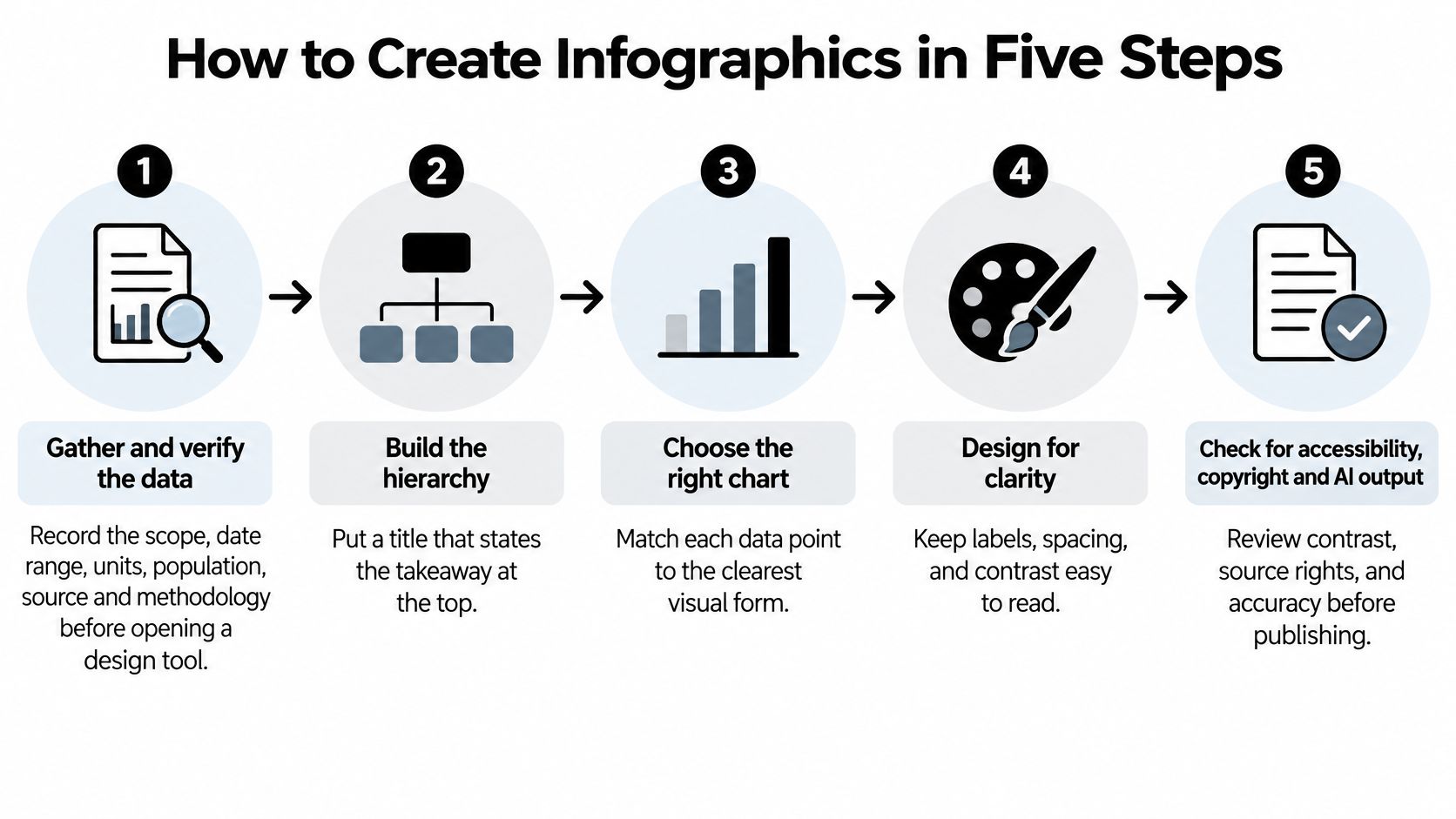
How to Create Infographics in Five Steps
Build from approved product information, not from whatever fits the template. The process below keeps evidence, layout and review connected.
Build from the specification outward
Gather and verify the data. Record scope, date range, units, population, source and methodology in a source sheet before opening the design file. For mattress specifications, identify the model, size and construction revision so a coil count from one configuration doesn't migrate into another.
Build the hierarchy. Put the takeaway in the title, follow it with a short explanation and give the main visual the most space. A heading such as Hybrid Construction is less useful than one that tells buyers what the construction helps them understand.
Choose the right visual and label directly. Put material names, values and explanations beside the relevant layer or data point instead of making readers chase a legend. An eye-tracking study in the Journal of Eye Movement Research involving 78 college students found that viewers spent most of their viewing time on axes and label regions as graph and task complexity increased.
Set readable type and honest scales. Keep comparison scales consistent and start magnitude bars at zero so their lengths represent the values fairly. Hennepin County's infographic standards recommend text of at least 16 pixels, but you still need to inspect the exported asset at its actual display size.
Test with representative viewers. Open the draft at phone width and ask people unfamiliar with the layout to explain its main conclusion. Revise any label that causes hesitation, then complete accessibility, rights and specification approval before release.
Work through a hybrid breakdown
Start with an approved cross-section showing ticking, quilt, foam layers and the coil unit. Label the gusset at the side panel rather than presenting it as another horizontal comfort layer.
Add the material and approved thickness beside each relevant layer. Keep the functional explanation narrow: a cushioning layer can be described in terms of pressure relief when that claim is supported, but its presence alone doesn't prove superior sleep or cooling.
Distinguish illustration from measurement. If the exploded layers aren't drawn to scale, say so. Don't stretch a thin component until it appears to dominate the mattress.
Extra snowflakes, shields and feature badges won't rescue an unclear breakdown. Remove decorative icons unless they help buyers identify something meaningful.
Templates and Tools That Suit a Mattress Team
Most marketing teams can start in Canva or PowerPoint. A product diagram with precise layer shapes, editable callouts and repeated model variants usually benefits from Illustrator or Figma.
Keep calculations in a spreadsheet or chart tool. The layout file shouldn't become the only place anyone can find the numbers.
Infographic tools compared
Tool | Best for | Export formats | Watch for |
|---|---|---|---|
Canva | Fast templates and brand kits | PNG, JPG, PDF, SVG on paid plans | Limited control over chart accuracy |
Adobe Illustrator | Custom vector product diagrams | SVG, PDF, EPS, PNG | Steep learning curve; usually needs a designer |
Figma | Team review and reusable components | PNG, JPG, SVG, PDF | Charts often need a plugin or manual drawing |
Datawrapper | Charts built directly from a data sheet | PNG, SVG, PDF | Less freedom for product-led layouts; check export access |
Google Sheets or Excel | Source data and calculations | CSV, XLSX | Not a finished visual; keep it as the data record |
PowerPoint or Keynote | Quick layouts for sales decks | PNG, PDF | Raster exports need sufficient output resolution |
Make revisions inexpensive
Build a fixed grid, approved palette and reusable component library. Keep icons for ticking, quilt, gusset and materials visually consistent, and leave labels editable.
For size-related accessories, resolve the buying question before designing the diagram. A resource that helps shoppers find the right mattress protector size from Protect-A-Bed can support a sizing explanation, while your own product sheet remains the authority for the dimensions you sell.
Use separate templates for construction, model comparison and process explanations. Forcing all of them into the same vertical layout creates cramped tables and unnecessarily tall product-page images.
A reusable template should preserve consistency, not force unrelated information into matching boxes.
Keep a revision log showing changed claims, their source and the approver. A retailer shouldn't receive an old trial-period graphic because someone exported from a desktop copy instead of the approved master.
Good graphic design for the mattress industry also respects the physical product. Preserve the actual quilt pattern, border treatment and silhouette rather than swapping in a generic mattress illustration.
Export Specs for Web, Social, Email and Print
Keep a layered master file and create channel-specific exports from it. A showroom sales sheet needs different typography and composition from an image embedded beside a mobile product specification table.
Export specs by channel
Channel | Format and color | Size guidance | Notes |
|---|---|---|---|
Product page | WebP or PNG, sRGB | Use the product-image benchmark below where applicable | Keep the mattress recognizable beside labels |
Social feed | JPG or PNG, sRGB | Match the placement's current upload dimensions | Keep key text clear of the edges |
PNG or JPG, sRGB | Match the email template's content width | Repeat key figures in live text | |
Print sales sheet | PDF, CMYK | Final trim size with printer-approved bleed | Proof a physical copy first |
Retail presentation or deck | PNG or PDF, sRGB | Match the slide canvas and display | Use vector PDF where the deck supports it |
For product imagery, Google Merchant Center requires at least 500 by 500 pixels, recommends approximately 1,500 by 1,500 pixels or larger, and recommends that the product occupy 75% to 90% of the frame. Treat those as product-image guidance, not a requirement to cram an entire infographic into a square or upload annotated artwork as a primary shopping image.
Inspect the delivered file
For print production, a practical starting specification is a CMYK PDF with raster artwork at 300 dpi at final size and 3 mm bleed, subject to the printer's job specification. Proof it physically: labels that look comfortable on a monitor may be unreadable beside a floor model.
If you animate the graphic, compare Story and Feed video dimensions with Scheduler.social before setting the canvas. Don't crop a finished comparison chart into a placement that removes its units.
Use descriptive filenames and inspect compression around small type. The distinction between pixel dimensions and print density matters; this guide to resolution in graphics helps teams avoid exporting a large-looking but soft image.
Checks for Accessibility, Copyright and AI Output
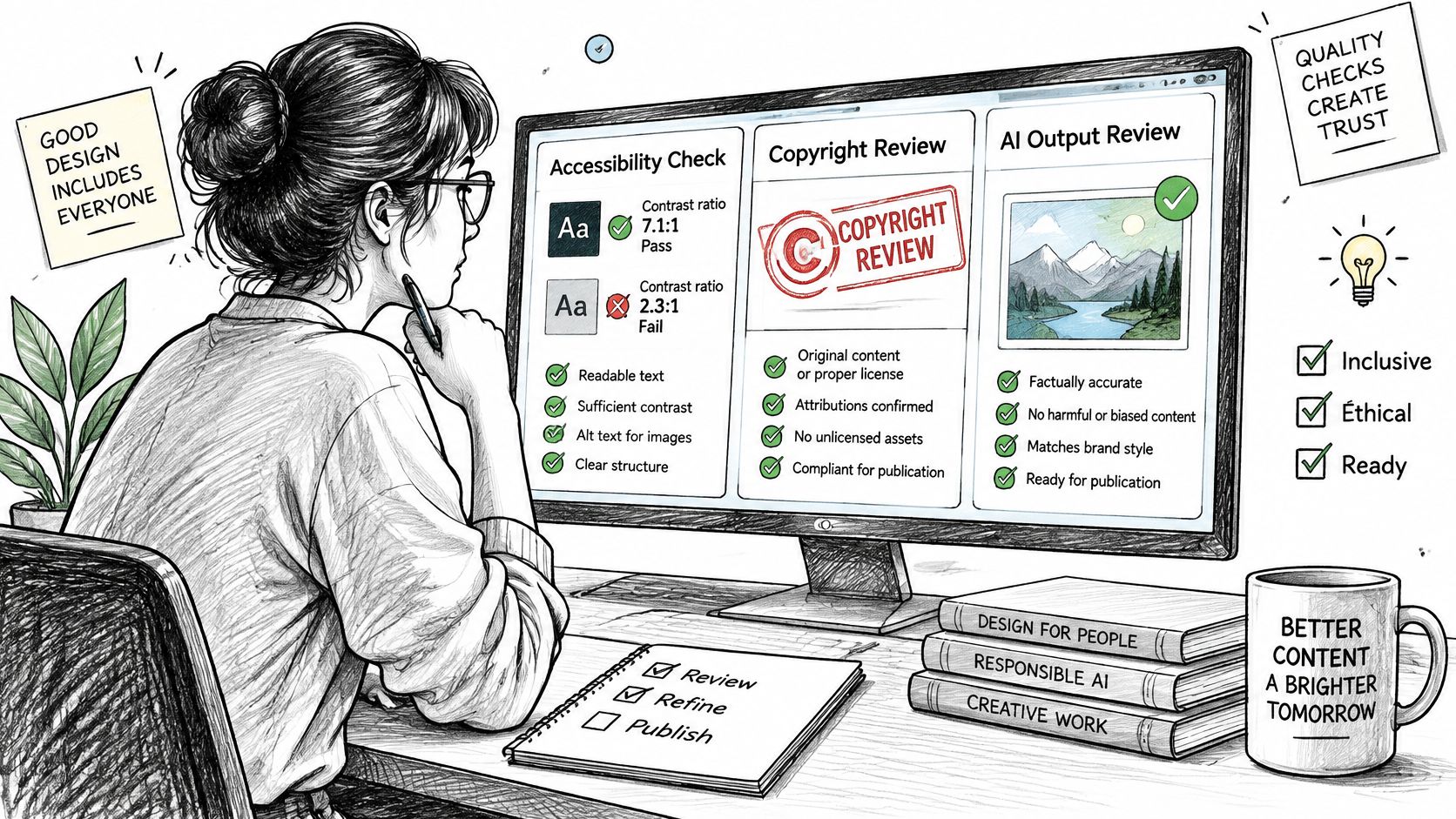
The common publishing mistake is checking accessibility after the layout is locked. Pale labels and color-only firmness tiers are production defects, not finishing preferences.
Review readability and equivalent access
Section508.gov's color-accessibility guidance specifies contrast of at least 4.5:1 for ordinary text, 3:1 for large text and 3:1 against adjacent colors for essential non-text graphics. Test the actual foreground and background colors rather than approving them by eye.
Check contrast: Use a contrast checker on text, chart marks and meaningful icons.
Remove hue: Inspect the asset in grayscale and confirm that labels, shapes or patterns distinguish each product family.
Audit context: Confirm the title, units, date range, source and methodology.
Provide equivalents: Add concise alt text and a longer description or accessible table for essential information.
A medium-firm model shouldn't be identifiable only because its bar is blue. Name the firmness tier directly, and don't treat different brands' subjective firmness scales as interchangeable measurements.
Clear rights and approve generated content
The U.S. Copyright Office explains that copyright protects original expression rather than underlying facts and generally begins when a work is fixed in tangible form. You can report factual specifications without copying someone else's photograph, illustration or distinctive chart artwork.
Keep asset ownership, license terms and permitted uses in the project folder. Include fonts in that audit; Font Checker Pro's copyright guide is a useful prompt for reviewing font permissions before distributing editable templates.
Treat AI as a production assistant, not a specification source. Compare every generated label with the approved sheet, check chart geometry against values and inspect product images for invented quilting, missing layers or altered certifications.
Release standard: The product specialist approves the claim, and the designer confirms that the visual represents it accurately.
How to Publish and Measure the Infographic
Place the asset where the buyer makes the relevant decision. A construction breakdown belongs near the product specifications; a trial-process explanation belongs near trial information, not buried in an unrelated image carousel.
On a showroom screen, design for the viewing distance and the sales conversation. Associates should be able to point to a component without reading a dense paragraph aloud.
Give the image useful context
Google Search Central identifies alt text as the most important image-specific metadata and recommends relevant surrounding content, descriptive filenames and a preferred image through structured data or an tag. Its guidance also cautions against excessively narrow or wide image proportions.
Use a filename such as . Write alt text that identifies the subject and meaningful takeaway, while placing detailed specifications in accessible page content.
Measure the buying outcome
Record a baseline before changing the page. A practical test window might begin with two to four weeks of observation, but extend it when traffic is sparse or promotions make the period unrepresentative.
Track the exposure: Record which page version a visitor received.
Tag distribution: Use UTM parameters on email and social campaign links, not internal navigation.
Check commercial quality: Read add-to-cart behavior alongside returns, support questions and margin implications.
Account for confounders: Note price changes, stock shortages, promotions and shifts in traffic source.
More time on the page isn't automatically success. Buyers may be studying helpful construction information, or struggling to decipher it.
For social distribution, connect the asset to a defined audience and destination through your social media marketing strategy. Likes can help assess creative interest, but they don't establish that shoppers understand the mattress or choose the right model.
Next Steps and Bedhead Resources
Choose the unresolved question that matters most on your current product page or showroom floor. Assign an owner, approve the underlying information and decide what result would justify publishing the graphic.
Bedhead Marketing is a digital marketing agency, 3D design studio, brand-development, expert-consultation and sales-training organization focused exclusively on mattresses and bedding. It supports manufacturers, brick-and-mortar and eCommerce retailers, private-label brands and sleep-product startups.
Bedhead University provides education for teams developing their category marketing skills. Bedhead Network (BEDNET) is free for mattress industry professionals, with marketing insights, news updates, networking, training resources, an industry directory and business tools.
BEDHEAD connects accurate product storytelling with Digibuns layer breakdowns, Silhouettes, Room Scenes, product-page optimization and mattress retail sales training. Its team also supports USP development, presentation decks, SEO, content strategy and Google and Meta paid media so the asset fits a broader selling plan. Visit BEDHEAD to discuss a buyer-decision graphic built around your product specifications and sales needs.