Email Marketing Drip Campaigns: A Mattress Brand Playbook
A shopper spends an afternoon comparing your floor models, leaves an email address, and goes home to discuss the purchase. Your next message is a holiday promotion for a mattress they never tested. Meanwhile, your eCommerce team keeps paying to bring that same shopper back to a product page that still doesn't answer their questions.
Email marketing drip campaigns should extend the showroom conversation, not restart it. The useful sequence remembers what interested the buyer, explains the product clearly, and makes the next step easy. Before blaming weak copy, though, your team needs to confirm that the messages reach the inbox and that you have permission to send them.
Which Drip Sequence to Build First
Say a regional mattress retailer collects a few hundred showroom email addresses each month. Everyone receives the same newsletter, whether they tested hybrid mattresses yesterday or bought an adjustable base last season. The store has contact information, but it hasn't built a follow-up process.
A drip campaign is a series of messages started by a buyer action, rather than the promotional calendar. Messages triggered by a specific action can outperform bulk sends because timing and context raise relevance, a principle documented in Experian CheetahMail's welcome-email analysis.
Choose the trigger closest to a buying decision
Use this starting framework as a launch recommendation, not a benchmark for mandatory send times. Each flow should stay short and end when its assigned action happens, rather than continuing through a preset number of messages regardless of buyer behavior.
Starting drip sequences by buyer trigger
Trigger | Typical Contact | First Send | Exit Condition |
|---|---|---|---|
Showroom email capture | Shopper who visited the store | Within 1 hour | Purchase recorded at point of sale |
Retailer quote or planogram request | Retail buyer or store owner | Within 15 minutes | Meeting booked |
Spec-sheet or layer-guide download | Early-research consumer or RSA | Immediately | Quote requested or order placed |
Abandoned mattress product page | Online shopper | 1 hour after exit | Order placed |
RSA training sign-up | Retail sales associate | Immediately | Training module completed |
A browse-abandonment flow requires an identified, eligible contact. An anonymous product-page visit isn't an email address, and a tracking event doesn't establish marketing permission.
Keep browse abandonment separate from cart abandonment. In its analysis of more than 325 billion emails, Klaviyo's 2024 benchmarks reported $3.65 in revenue per recipient for abandoned-cart flows against $0.11 for standard campaigns. That finding concerns carts, not everyone who glanced at a mattress page.
Match the follow-up to the relationship
A retail buyer requesting a planogram needs assortment, floor-space, and presentation information. A consumer downloading a layer guide needs help understanding construction and feel. Use customer segmentation to separate those conversations before writing templates.
Starting rule: Build the sequence your sales team already follows up on by hand.
That group gives you an identifiable intent signal, a known next step, and a practical way to measure whether automation improves the existing process. It's a stronger starting point than a broad nurture campaign with no clear destination.
How to Build a Trigger-Based Sequence Step by Step
Use one conversion event, one segment, an immediate first message, then branches driven by behavior. Build the workflow around an observable action, not a vague ambition to increase engagement.
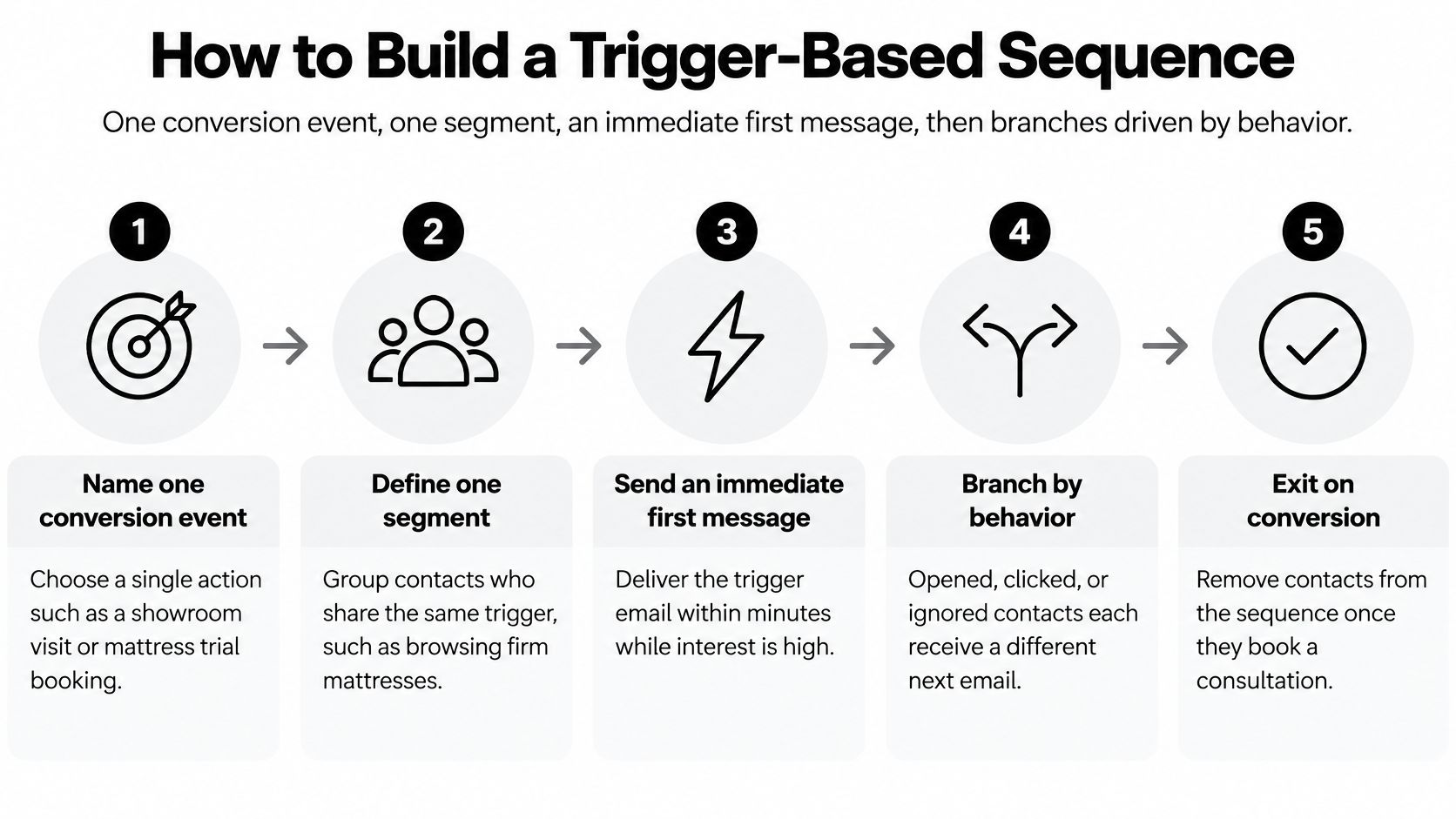
Build the logic before the creative
Name one conversion event. Choose a booked consultation, accepted quote, or completed order. Define where that event is recorded so marketing and sales aren't counting different outcomes.
Separate contacts by lifecycle stage and intent. Keep manufacturers, retailers, component suppliers, and retail sales associates in distinct flows. Within the consumer audience, distinguish someone comparing constructions from someone asking about delivery.
Send the trigger response immediately. Deliver the requested guide, acknowledge the quote request, or confirm the training registration while the action is still fresh. For abandonment workflows, use the deliberate delay assigned to that trigger rather than treating every page exit as an urgent request.
Add conditional branches. Use clicks, product-page views, form completion, and inactivity to select the next message. Opens can inform a branch, but they shouldn't outweigh a direct reply or completed form.
Exit on conversion. Connect the workflow to your CRM, eCommerce platform, or point-of-sale system. A completed purchase should remove the shopper from acquisition messaging before the next scheduled send.
Set frequency caps and preferences. Account for newsletters, promotions, and other active flows before adding another message. Let contacts choose the information they want instead of forcing a choice between everything and nothing.
Make the branch useful to the buyer
For a hypothetical branch, a shopper who clicks the layer breakdown twice could receive a technical follow-up explaining foam density and ticking. Use the actual product specifications, and distinguish material properties from promises about comfort or durability.
Someone who opens three emails without clicking could move to a slower, shorter path. Don't escalate the discount just because they haven't responded, especially when the store is protecting margins on a premium floor model.
Ask for preferences directly when behavioral clues are ambiguous. A form asking whether someone wants construction details, showroom assistance, or delivery information provides zero-party data without guessing why they browsed.
Test the exceptions before launch
Use test contacts to simulate an order, an unsubscribe, a reply, and a repeated trigger. Check whether contacts can accidentally re-enter the sequence or receive competing messages from separate locations.
The distinction between automated and scheduled sends is meaningful: DesignRush's email statistics summary reports 1.49% conversion for automated emails versus 0.08% for scheduled campaigns. These are cross-industry reference points, not a forecast for a mattress retailer.
I would build two sequences well before building six. Reliable event tracking and clean exits are worth more than a crowded automation dashboard.
What Each Email in a Mattress Sequence Should Say
The first email has a concrete job: prove that the store remembers the visit. Name the models or firmness levels that were really tested, introduce the next step, and give the shopper a reply address someone monitors.
In Omnisend's 2025 benchmark, welcome sequences averaged a 35.53% open rate, 3.94% click-through rate, 2.11% conversion rate, and $6.16 in revenue per email. Those ecommerce averages justify attention to the welcome message, but they don't establish expected showroom results.
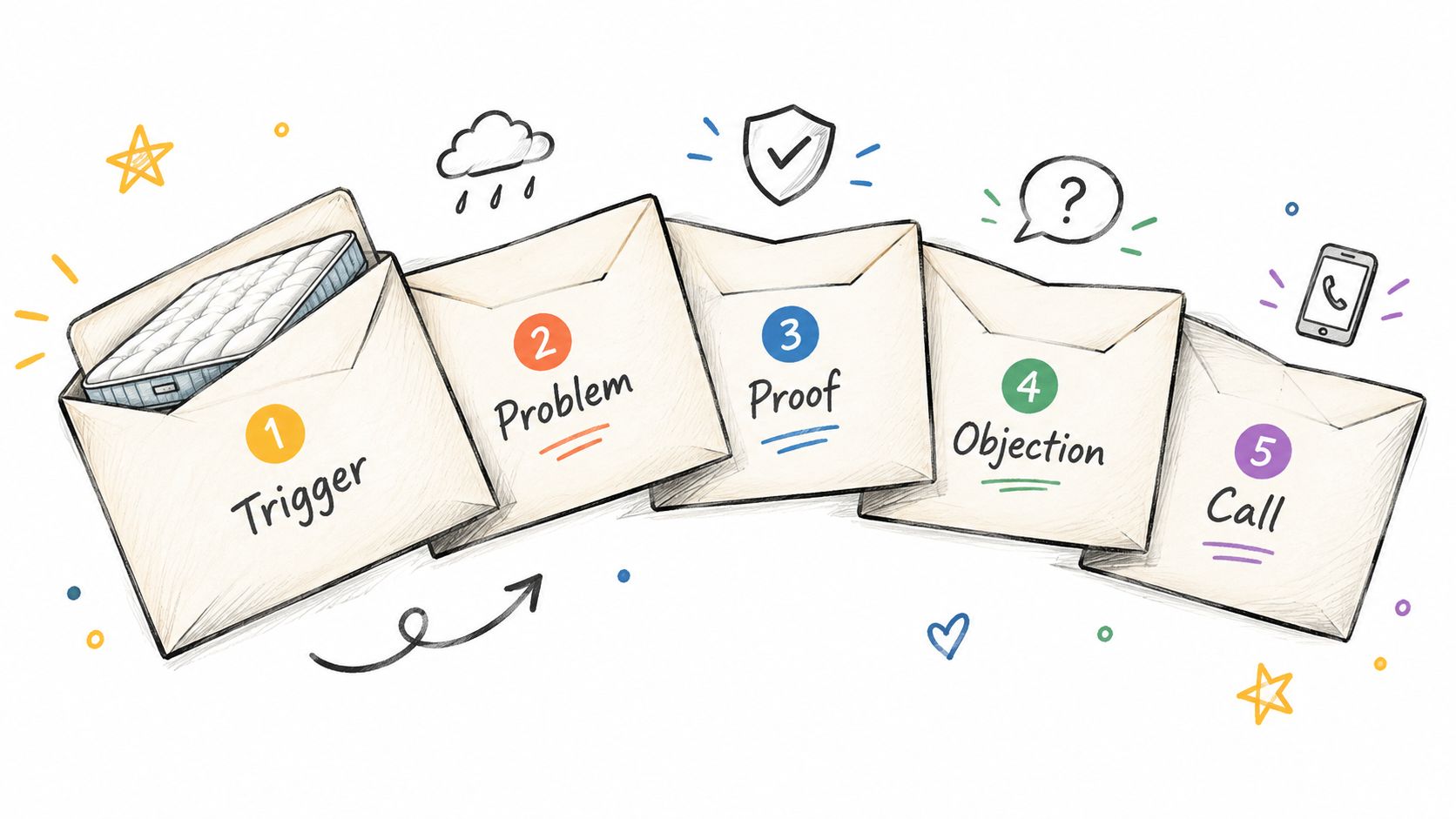
Give every message a different job
The following is a proposed showroom cadence. Adjust it around replies and buying activity rather than sending every message mechanically.
Five-email showroom sequence by job
Send Timing | Job | Mattress Example | |
|---|---|---|---|
1 | Day 0 | Confirm the visit and set expectations | Thank the visitor and name the three firmness levels they tested |
2 | Day 2 | Explain the category problem | Why hybrids and all-foam beds feel different under the same weight |
3 | Day 5 | Deliver proof or a technical asset | Digibun layer breakdown showing coil, transition foam and comfort layer |
4 | Day 10 | Handle the main objection | Trial length, returns process and warranty terms in plain language |
5 | Day 14, or sooner after a completed return visit | Invite the consultation | Book a fitting appointment at the retailer or a call with the brand |
Explain construction without turning the email into a specification dump. A hybrid's pocketed coils and foam comfort layer can produce a different response from an all-foam support system, but construction alone doesn't determine firmness.
Show what the shopper can't see
A Digibun layer breakdown makes the technical email useful by showing where each component sits. Connect the illustration to the exact model on the product page, not a similar mattress with a different layer stack.
Use Silhouettes for clean model identification and Room Scenes for lifestyle context. Explain how ticking and quilt construction contribute to the initial surface feel, and distinguish gusset height from total mattress depth when discussing deep-pocket fitted sheets.
The objection email should answer the questions floor staff need to resolve: when the trial starts, what returns involve, and what the warranty specifically covers. Don't replace those answers with reassurance that everything is hassle-free.
One template shouldn't try to sell a consumer, brief a retail buyer, and train an RSA.
Before sending, review exaggerated urgency and vague promotional language. MailAdept's checker for spam trigger words can flag wording worth reconsidering, but it isn't an inbox-placement guarantee.
Consent and Compliance Rules for Drip Sends
Automation doesn't change a promotional email's legal purpose. Under the FTC's CAN-SPAM compliance guide, messages primarily advertising or promoting a commercial product or service remain commercial email even when a workflow sends them.
A manufacturer can break this process before writing a subject line by importing a trade-show spreadsheet directly into a dealer sequence. A retailer can do the same by reusing a consumer list for a manufacturer's unrelated campaign.
Check every commercial message
Accurate identity: Use truthful sender, recipient, reply-to, and routing information.
Honest subject lines: Don't imply an order update when the message is a promotion.
Clear opt-out: Explain conspicuously how to stop marketing messages, and honor requests promptly.
Required footer information: Include the sender's valid physical postal address and an advertising disclosure where applicable, as addressed in the CAN-SPAM statute.
These elements belong in every applicable message, not just the welcome email. Test the opt-out from an actual received message rather than assuming the template setting works.
For European recipients, the EU's online privacy guidance explains that prior consent is generally required for promotional email, with an exception for existing customers receiving marketing about the company's own similar products or services.
In a hypothetical import of 2,000 trade-show contacts into a European dealer flow, admit only contacts with documented consent or a qualifying existing-customer relationship. A badge scan or database entry alone doesn't establish eligibility, and a prior relationship isn't blanket permission.
Add a pre-send technical gate
Authenticate the sending domain with SPF, DKIM, and DMARC. Separate promotional drip mail from transactional order confirmations using a dedicated subdomain or sending infrastructure, and review complaint and bounce rates against documented internal thresholds.
Provide a plain-text alternative and one-click unsubscribe where applicable. Store consent source, customer status, and suppression status as workflow fields checked before every send, not as notes someone must remember to review.
Permission determines whether a message should go out. Technical checks determine whether your sending setup is ready to deliver it.
KPIs That Show Whether Drip Campaigns Earn Revenue
KPI | What It Tells You | Reference Point |
|---|---|---|
Inbox placement rate | Whether messages reach the inbox rather than spam | Establish your own baseline with seed tests |
Click-through rate | Whether delivered content prompts action | 4.66% automated vs 0.74% campaigns |
Conversion rate | Whether messages drive defined outcomes | 1.49% automated vs 0.08% campaigns |
Revenue per email sent | Economic value of each send | $3.41 automated vs $0.155 campaigns |
Unsubscribe rate | Possible fatigue or relevance mismatch | 0.59% automated vs 0.20% campaigns |
Booked-meeting rate | Qualified opportunities for showrooms and manufacturers | Track against your own pipeline |
Click-to-open rate | Click activity relative to recorded opens | 11.19% for welcome sequences |
Triggered-email open rate | Directional context, affected by privacy protections | 45.38% across 2022 and 2023 |
The automation and campaign comparisons are cross-industry figures reported by DesignRush, while the welcome click-to-open reference comes from Omnisend. GetResponse's 2024 benchmark report provides the table's 45.38% triggered-email open rate and a 5.02% triggered-email click-through rate across 2022 and 2023.
Read the dashboard in delivery order
Start with inbox placement, then clicks, downstream actions, and revenue per recipient. A platform's delivered status doesn't prove inbox placement, and inbox placement doesn't necessarily mean placement in the primary tab.
Open rate is a weak headline metric because privacy protections can inflate recorded activity. The authentication gap also remains material: Sinch Mailgun's 2025 deliverability report found DMARC adoption increased 11%, while 18% of respondents weren't using it and 28% were unsure whether they were.
Treat the automated-versus-campaign unsubscribe comparison as a warning to investigate, not an acceptable-loss allowance. Check which message, acquisition source, or overlapping campaign caused the increase before rewriting the entire flow.
Connect email activity to mattress buying
Build separate audience dashboards so each team sees outcomes it can influence:
Retailers: Track email-assisted showroom visits, fitting appointments, product-page engagement, and recorded purchases.
Manufacturers: Follow dealer inquiries, quote requests, retailer presentations, and accepted opportunities.
RSAs: Measure training completion and engagement with product education, rather than consumer orders they don't control directly.
Use consistent campaign tags and connect CRM or point-of-sale records where practical. Agree on marketing attribution rules so a clicked email doesn't automatically receive credit for the entire sale.
Record a 90-day baseline as a working recommendation before judging your program against cross-industry averages. Define denominators carefully: revenue per recipient and revenue per email sent aren't interchangeable, especially when contacts receive different numbers of messages.
Fixing Sequence Decay and Handing Off to Other Channels
Benchmarketing's drip benchmark reports opens declining from 57.8% on the first welcome email to 25.8% by email five or later, alongside lead-nurture averages of 28.6% opens and 3.8% click-through. Don't read that as permission to accept declining performance without investigating it.
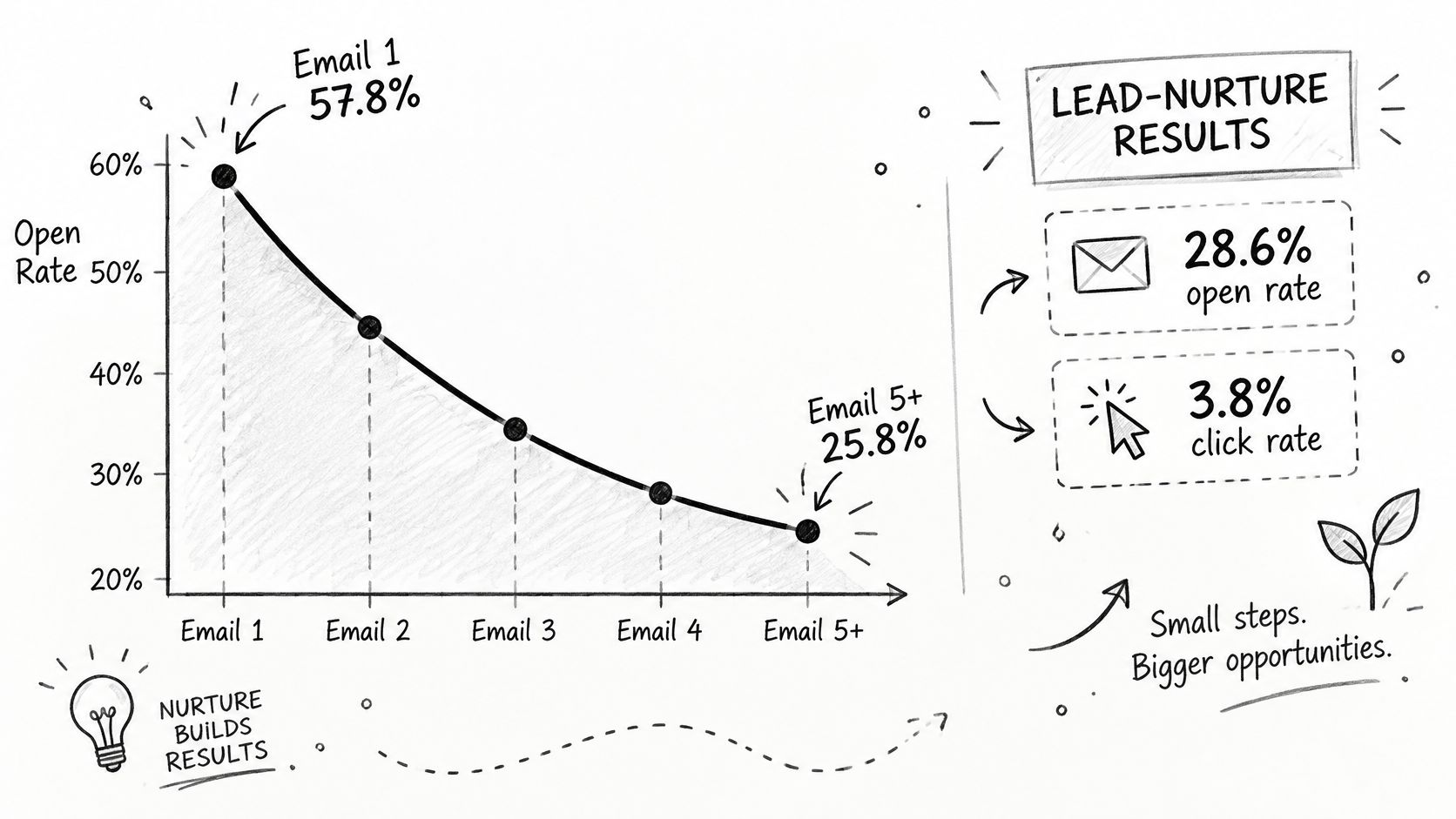
Diagnose the symptom before changing the workflow
Symptom | Likely Cause | Fix |
|---|---|---|
Opens fall sharply after email three | Same angle repeated across a long sequence | Test cutting to four or five emails and change each angle |
Unsubscribes above 0.59% | Frequency too high or content mismatched to the segment | Add frequency caps and a preference center; split the segment |
Clicks happen but no orders or bookings | CTA sends buyers to a generic page | Link to the exact product page, fitting booking, or quote form |
Opens rise while sales stay flat | Privacy-driven opens inflate engagement | Judge clicks, visits, and revenue per recipient |
Inbox placement drops for a whole sequence | Missing or misaligned SPF, DKIM, or DMARC | Authenticate the domain and separate promotional mail |
The unsubscribe reference is a diagnostic prompt, not a universal ceiling. Likewise, authentication is a starting check for placement problems, not the only possible cause.
Test one variable at a time: subject line, sender identity, content angle, CTA, or delay. Randomize comparable contacts into a treatment group and an unchanged control; a true no-send holdout can help assess incremental business outcomes when volume permits.
Review results by segment and acquisition source. A trade-show contact considering a dealer relationship shouldn't be judged against a showroom shopper who already selected a model.
Slow down or change channels
Set an inactivity window appropriate to the buying cycle, then offer eligible inactive contacts a preference or re-permission message. Suppress nonresponders rather than keeping them in an indefinite educational loop.
Technical buyers need time to review specifications. A requested presentation or spec sheet warrants faster, relevant follow-up, while broader inbox problems call for a structured email deliverability review.
Handoff rule: After two or three messages without useful clicks, review whether email is still the right next action.
For a known, high-intent lead, consider an agreed phone call, consented text, or showroom appointment instead of automatically sending another email. For a low-intent subscriber, pause rather than escalating contact, and coordinate retailer and manufacturer outreach so the buyer doesn't receive duplicate approaches.
Audit One Live Sequence This Quarter
Choose one high-intent live flow and audit it over a working week. Keep the review narrow so the team can identify a specific fix without changing several automations at once.
Pull a 90-day view of showroom captures or quote requests, with each contact's acquisition source and final outcome.
Check sending health first. Review authentication, complaint patterns, and inbox placement before judging the copy.
Compare commercial outcomes using consistent definitions for clicks, conversions, and unsubscribes.
Inspect every message for sender identity, postal address, applicable disclosure, and a working opt-out.
Change the weakest email. Rewrite or retire it, then keep the rest of the sequence steady during a proposed four-week observation period.
Fix the gap the audit exposes
If buyers click but remain confused, bring the email in line with the product page and showroom presentation. Digibun layer breakdowns can explain construction, Silhouettes can identify models, and Room Scenes can add lifestyle context.
If the email promise conflicts with the showroom conversation, improve sales training before increasing traffic. Teams that need self-paced education can use Bedhead University.
For ongoing industry resources, join Bedhead Network, BEDNET, to connect with other mattress industry professionals.
BEDHEAD combines mattress-focused digital marketing, 3D design, brand development, expert consultation, and sales training for manufacturers, retailers, private label brands, and sleep product startups. If follow-up emails don't match your product page or showroom presentation, visit BEDHEAD to discuss a sequence review and the copy, visuals, or staff training needed to close that gap.