Website Development Process: A Mattress Brand Guide
Your team has approved new floor-model renders, rewritten the comfort story and scheduled a mattress collection launch. Then someone opens the product page on a phone, and the mattress image stalls while the construction details sit out of view. A weak website development process can waste the work that went into the product before shoppers ever understand it.
The expensive mistakes often start before anyone writes code. If your team hasn't agreed on product fields, image variants and buying journeys, you'll pay to resolve those decisions inside finished templates. Treat the website as a long-term sales platform, not a brochure with a checkout button.
The Website Development Process at a Glance
A mattress website must connect what manufacturers know, what retail sales associates explain and what shoppers need to decide. That requires coordinated technology: HTML structures content, CSS controls presentation, JavaScript enables behavior and HTTP supports browser-server communication, as documented in the W3C's standards history.
The marketing team's job isn't to choose every technical implementation. It's to ensure that the people building the site have clear requirements and that sales, product and operations approve the decisions affecting their work.
Website Development Stages for a Mattress Brand
Stage | Question it answers | Mattress-specific output | Sign-off gate |
|---|---|---|---|
Discovery | Which shopper and dealer tasks must the site support? | Task list, analytics baseline, success metrics | Stakeholders sign off on the metrics |
UX and UI | How does a buyer get from category to the right mattress? | Sitemap, filter logic, product-page and finder wireframes | Usability test with real shoppers |
Content strategy | What product facts must every page answer? | Structured fields for ticking, quilt, gusset, foam layers and hybrid construction | Specs approved by the product team |
Product imagery | What does each bed look like without marketing gloss? | Silhouettes and standard angles for every SKU | Naming and size variants checked |
3D and interactive | Which construction details need to be seen, not read? | Layer breakdowns, room scenes and interactive viewers | Load tested against the performance budget |
Development | How do design and content become working pages? | Templates, CMS setup, commerce and CRM links | Code review and staging approval |
QA | Does it work on phones, keyboards and with screen readers? | Browser, device and accessibility test results | No critical defects open |
Launch | Can a visitor find, compare and buy immediately? | Redirects, tracking, sitemap and retailer locator live | Go-live checklist signed |
Maintenance | Who keeps prices, imagery and scripts accurate? | Monthly review, change log, regression checks | Named owner and review schedule |
These are approval gates, not an excuse to keep specialists apart. Developers should review imagery plans before rendering begins. Retail staff should challenge finder questions before designers polish the screens.
Choose the content management system, or CMS, around actual editing needs. A manufacturer publishing dealer resources needs different permissions and workflows from a retailer managing promotions, local inventory and online checkout.
Practical rule: Don't commit the next stage's production budget until the previous gate has approval from the people responsible for sales, not only design.
Discovery and UX Planning for Mattress Shoppers
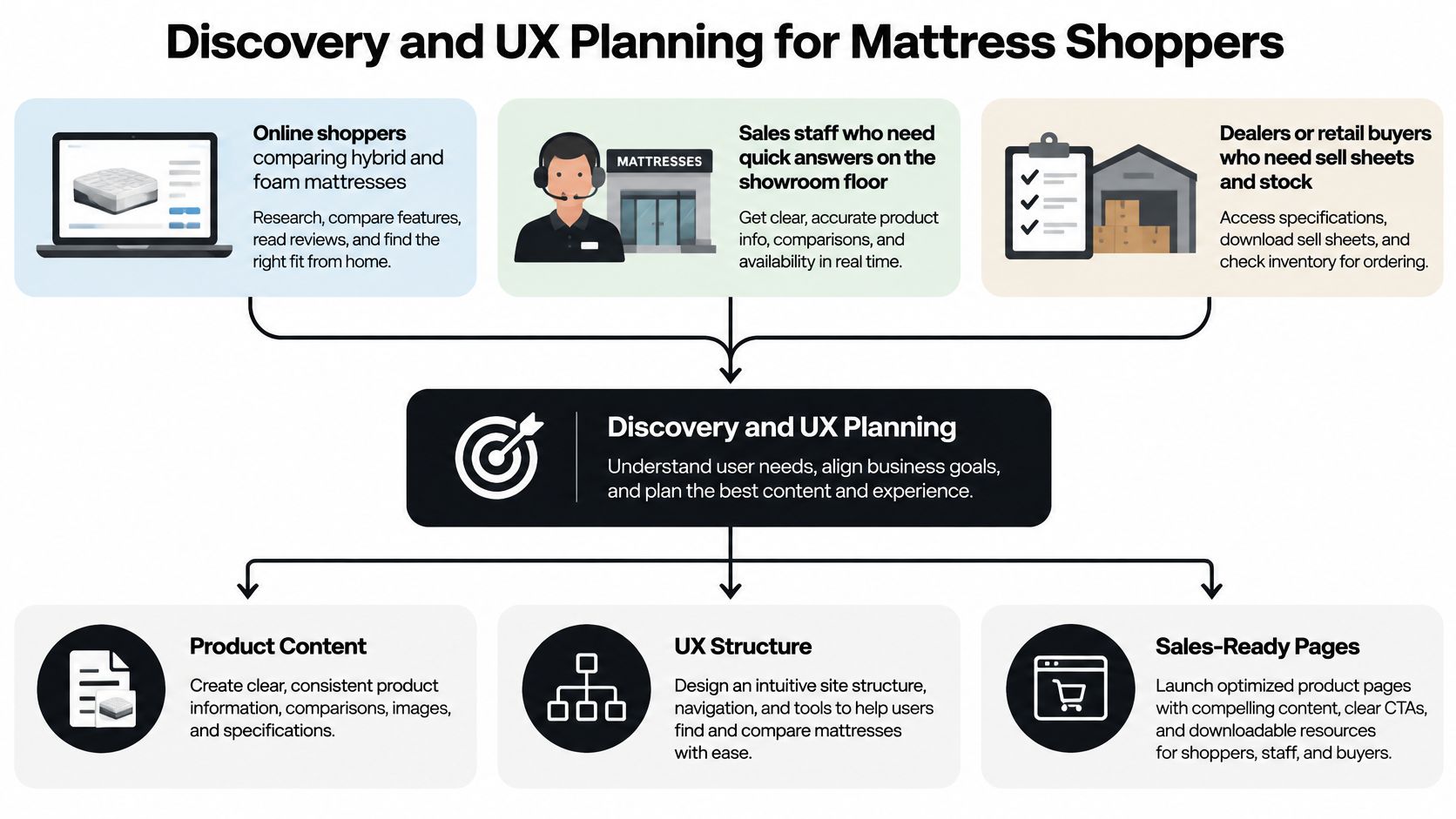
Start with distinct audiences: online shoppers comparing hybrid and foam mattresses, sales staff answering questions beside floor models, and dealers or retail buyers looking for sell sheets and stock information. They may share product data, but they don't need identical navigation.
Set expectations before production begins. The GOV.UK alpha-delivery guidance describes approximately 4–8 weeks for discovery and 6–8 weeks for alpha, where teams test limited prototypes rather than production-quality code. Use that staged approach to investigate risk, not as a fixed estimate for every mattress website.
Run Discovery in a Useful Order
Write the business outcome. Choose a concrete result, such as fewer size-related returns or more qualified dealer quote requests. A homepage redesign is a deliverable, not a business outcome.
Inspect the existing journey. Pull analytics for category pages, product pages, search and forms. Look for exits after size selection or delivery information, then investigate rather than assuming the imagery is responsible.
Interview each audience. Ask shoppers what they'd check before buying, including firmness, height, warranty and return eligibility. Ask sales associates which questions interrupt their presentation and dealers which documents they struggle to find.
Map the priority tasks. Test journeys such as finding a side-sleeper option within a budget, comparing hybrid construction or locating a dealer with the relevant floor model. Include exceptions, such as an unavailable size or a postcode outside the delivery area.
Prototype before committing. Build a clickable finder or comparison flow in Figma and give participants realistic tasks. Use a consistent approach to conducting usability testing, observing where people hesitate rather than explaining the interface to them.
Define the Beta Decision
Leadership approval isn't evidence of shopper need. An executive may like a detailed sleep quiz while participants want to compare firmness, construction and price.
Discovery should produce a short, shared requirements document covering audiences, priority tasks, product inputs, integrations, constraints and measurable outcomes. Record unresolved assumptions alongside the person responsible for testing them.
Agree the beta gate in advance: the proposed finder, comparison tool or retailer locator must be viable, cost-effective and supported by staff who can operate it. Don't approve a dealer-stock feature unless someone owns the accuracy of the stock information.
Content Strategy and Product Imagery That Sell the Sleep Experience
Say a retailer uses a single white-background photograph on a mattress page. Buyers expect a thicker quilt than the delivered product has, and the store receives returns tied to that mismatch. In this scenario, adding a construction breakdown and gusset close-up addresses the missing explanation, not merely the page's appearance.
That isn't evidence that renders automatically reduce returns. It illustrates the decision your content team should make: which uncertainty must each asset resolve?
Structure Facts Before Writing Copy
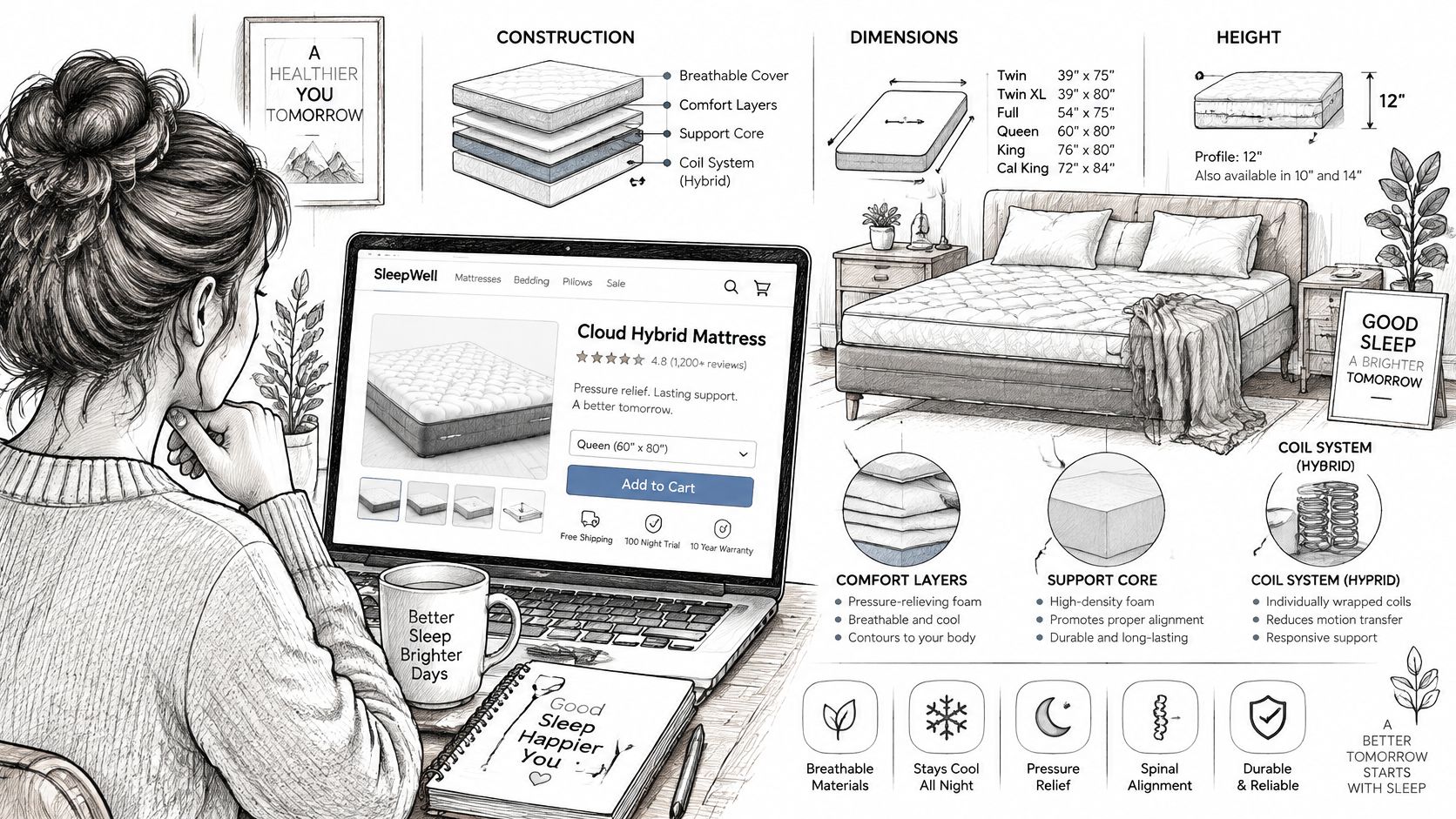
Create approved fields for ticking, quilt, gusset, comfort layers, support core and the coil system used in hybrid mattresses. Include dimensions, finished height, firmness rating, care instructions, warranty and return policy.
Don't bury these facts inside promotional paragraphs. Structured fields let developers use the same approved information in filters, comparison tables and retailer feeds without retyping it.
Define how firmness is described, too. If a brand's rating is its own scale, label it clearly rather than implying that a shopper can compare it directly with every competing brand.
Image Formats and the Buyer Question Each One Answers
Format | Buyer question it answers | Best placement | Returns effect |
|---|---|---|---|
Silhouette | Which exact model and angle am I buying? | Category grids and marketplace listings | Clarifies model identity; no measured reduction established |
Digibun | How thick is the quilt and what sits in the foam stack? | Product page and comparison table | Addresses questions that could otherwise lead to returns |
Room Scene | How does this bed look in my bedroom? | Lifestyle pages, campaigns and dealer decks | Adds context; doesn't establish dimensions or fit |
Silhouettes are clean product images. Consistent angles make it easier to distinguish cover patterns, profiles and model variants without decorative distractions.
Digibuns are layered images of the inside of products. Show the actual foam stack, label materials accurately and distinguish a quilt package from the comfort layers beneath it. A visually impressive cutaway is counterproductive if it represents construction the factory doesn't ship.
Room Scenes supply lifestyle context. They shouldn't replace dimensional drawings or imply that a foundation, headboard or accessories come with the mattress.
Use this framework when deciding how to use imagery across the buying journey. Approve construction and naming before producing the full asset library.
The trade-off is upfront production effort versus reuse. A detailed 3D model may cost more to establish than a basic product image, but it can support web exports, print materials and sales decks. Budget for revisions when ticking, quilting or layer specifications change.
Performance Budgets for Visual Mattress Sites
Use Core Web Vitals to turn performance approval into measurable acceptance criteria rather than a discussion about whether the site feels fast.
Core Web Vitals Targets for Mattress Product Pages
Metric | What it measures | Good threshold | Typical mattress page failure |
|---|---|---|---|
Largest Contentful Paint (LCP) | Time until the main content appears | 2.5 seconds or less | Hero room scene or large mattress photo loads late |
Interaction to Next Paint (INP) | Response delay after taps, clicks and keypresses | 200 milliseconds or less | Firmness filter or configurator lags on mid-range phones |
Cumulative Layout Shift (CLS) | Unexpected movement while the page loads | 0.1 or less | Gallery or review widget pushes the Add to Cart button down |
The thresholds above are reported in the HTTP Archive's performance analysis. Google's Core Web Vitals reporting evaluates performance at the 75th percentile of page visits, so a fast demonstration on an office computer isn't sufficient.
Set the Budget Before Design Approval
Agree on a page-weight ceiling. Have developers propose a limit for the product template and allocate room for imagery, fonts and scripts. Otherwise, the room scene, video and viewer may each consume the same loading allowance.
Export for the display size. Compress imagery and hero video, and serve responsive image sizes. A mobile shopper shouldn't download a print-resolution render to inspect the quilt.
Reserve gallery space. Specify image dimensions and stable placeholders. The size selector and purchase controls shouldn't jump when photography or reviews appear.
Defer optional experiences. Load an interactive viewer or configurator when someone opens it. Keep a useful static image available before that interaction.
Challenge third-party scripts. Review chat, review widgets, advertising pixels and duplicate tracking tags. Each needs a business owner who can justify its presence.
Test ordinary hardware. Include a mid-range Android phone and constrained connection alongside desktop testing. Check actual devices represented in your analytics rather than assuming every shopper has a flagship phone.
Animation needs the same scrutiny as imagery. If developers are exploring React campaign layouts, ogBlocks' resource on animated ogBlocks blocks for React landing pages can inform the discussion, but any chosen implementation still needs testing within your budget.
For a struggling existing site, prioritize the visible bottleneck before replacing the entire platform. A disciplined approach to improving page load speed starts with measurement, then verifies each change against a real product journey.
A construction viewer earns its place when shoppers can use it without waiting through the sales explanation it was meant to simplify.
Accessibility and Security Checks Before Launch
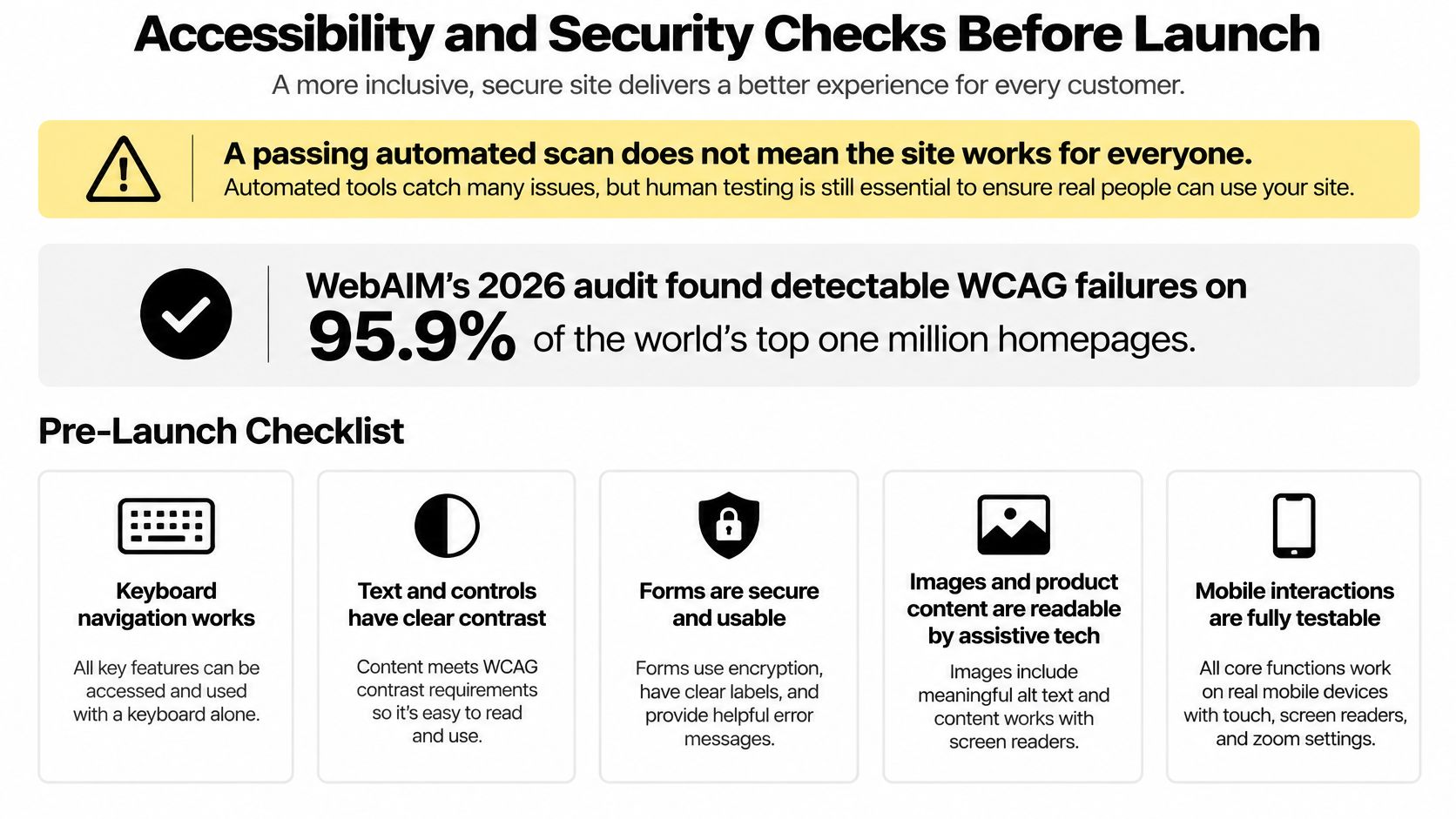
A passing automated scan doesn't mean the site works for everyone. A report summarizing WebAIM's 2026 audit states that detectable WCAG failures appeared on 95.9% of the world's top one million homepages, according to the accessibility compliance report. Automated checks can flag missing alternative text or contrast problems, but they can't establish whether a shopper understands your mattress comparison.
Test Purchase Tasks With People
WCAG 2.2 conformance guidance organizes accessibility around perceivable, operable, understandable and effective experiences, with conformance levels A, AA and AAA. I would specify Level AA as the project's practical target, while separately confirming applicable legal obligations.
Make acceptance criteria task-specific:
Keyboard navigation. Move through the gallery, firmness filter and size selector without a mouse. Confirm that focus remains visible and doesn't become trapped.
Screen-reader comprehension. Find the price, selected size and warranty, then verify that variant changes are announced meaningfully.
Alternative interaction. Operate the configurator without relying on dragging, pinching or complex gestures.
Usable errors. Submit incomplete dealer and lead forms. Errors should identify the relevant field and explain how to correct it.
A mobile layout isn't automatically accessible. Include these tests when reviewing responsive design, especially when navigation and product controls change across screen sizes.
For a bedding-category example of public accessibility communication, review SouthShore Fine Linens' details on digital accessibility. Your own statement should describe your actual support route and practices, not substitute for testing.
Match Security Risks to Real Functions
Use the OWASP Top 10 guidance to build concrete test cases rather than accepting a general assurance that the site is secure.
Broken access control. Confirm that dealers can't access another account's restricted pricing or documents.
Injection. Validate and safely handle input in search, contact and quote forms.
Security misconfiguration. Restrict staging access and remove unsafe production defaults.
Software supply chain failures. Review dependencies and third-party scripts before adding them.
Assign owners for both accessibility and security after launch. Include human testing in the operating budget, and recheck affected tasks when components, embedded tools or CMS templates change.
Launch Criteria and Maintenance That Protect Sales
A launch date shouldn't override a failed buying journey. Release only when the team can demonstrate that visitors can browse, understand the offer and complete the intended action.
The GOV.UK service-team guidance supports treating delivery as an ongoing responsibility. For a mattress business, that means keeping marketing, product, customer service and technical ownership connected after deployment.
Require Evidence Before Go-Live
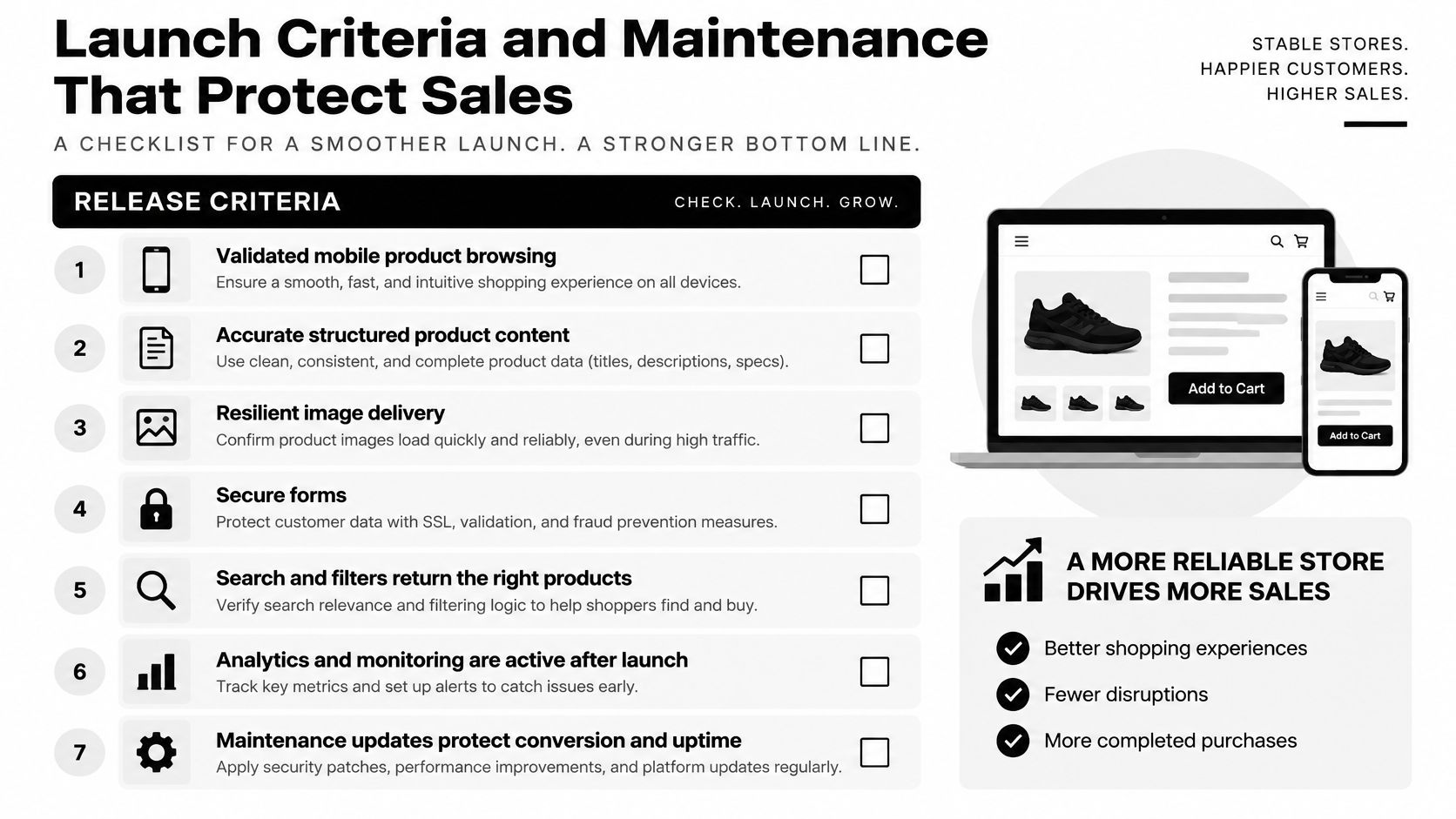
Mobile browsing validated. Search and filters return the correct mattresses, including unavailable-size and empty-result states.
Product content approved. Construction, dimensions, prices and policies match the products being sold.
Images resilient. Galleries have working fallbacks rather than leaving blank spaces when an asset fails.
Forms and controls usable. Secure submissions and keyboard-accessible interactions work in the production environment.
Events verified. Retailer referrals, quote requests and purchases register correctly without duplicate conversion events.
On launch day, map old product URLs to relevant replacements, publish the refreshed sitemap and test tracking with real submissions marked for removal from reporting. Redirects help preserve continuity for visitors and search engines, but they don't guarantee unchanged rankings.
Check the retailer locator against the current dealer list. A technically functional map is still a sales problem if it directs shoppers to a store that no longer carries the collection.
Keep a Sales-Focused Review Schedule
During the opening months, review abandonment points weekly and compare product-page conversion with the discovery baseline. Read support tickets for recurring questions about size, firmness, delivery and returns, then distinguish missing explanations from operational problems a website can't fix.
Maintain a short change log and assign a named owner to approve regression checks:
CMS updates. Recheck forms, filters and product templates after plugin or platform changes.
New image formats. Confirm browser support, fallback delivery and gallery behavior.
Price changes. Verify consistency across the page, cart, feeds and interactive viewer.
Analytics additions. Retest responsiveness when new scripts enter the page.
Seasonal readiness. Plan load testing before Labor Day and Black Friday campaigns rather than during them.
Keep tested backups and a rollback procedure. When a release breaks checkout or dealer inquiries, restoring a working version matters more than defending the launch.
Decide Your Discovery Scope Before Briefing a Team
You don't need a complete redesign specification to start. You need enough clarity to prevent a design brief from becoming an expensive argument about product information, integrations and ownership.
Prepare the Inputs That Determine Scope
Choose the business outcome. Write a sentence such as reducing size-related returns or increasing qualified dealer inquiries. Identify which team can verify the result and what baseline is available.
Select a pilot. Start with a product-page template or finder journey rather than rebuilding every experience simultaneously. Use a representative hybrid mattress with meaningful size variants and construction detail, not the simplest SKU in the catalog.
Gather the working materials. Assemble the SKU data sheet, current analytics, image and 3D asset inventory, and dealer or retail-partner list. Mark missing approvals explicitly so the project estimate includes the work needed to obtain them.
Bedhead Marketing focuses exclusively on the mattress and bedding industry, serving manufacturers, brick-and-mortar and eCommerce retailers, private label brands and sleep product startups. Our work connects website design and 3D visualization with digital marketing, product storytelling, brand development, consultation and sales training, so the online explanation can support the showroom conversation.
For a second set of eyes on discovery, contact the team at info@bedheadmarketing.com or through the Bedhead contact form. Teams building internal skills can start with the free education library at Bedhead University.
Join Bedhead Network (BEDNET), too. It's free for mattress industry professionals and provides marketing insights, industry news, networking, training resources, an industry directory and business tools.
Decide the scope before you brief the team. Approve the product facts and buying tasks before paying to build around them.
BEDHEAD offers mattress-specific website design, 3D visualization and digital marketing that connect product information with the way shoppers and dealers make decisions. Visit BEDHEAD to discuss a discovery review, bringing your current product page, SKU information and the sales outcome you want the next build to support.