Low Poly City Scene Tutorial for Mattress Marketing
A mattress marketer gets a Friday brief. The homepage needs a city-lifestyle hero for a hybrid mattress launch. The showroom team wants it to feel urban and premium. The ecommerce team wants it lightweight enough for the product page. There's no appetite for a location shoot, no time for a photoreal room build, and the current mattress silhouettes won't carry the story on their own.
That's where a low poly city scene earns its place.
For mattress brands, this isn't game art for its own sake. It's a controlled visual system that can support product launches, room scenes, hero banners, virtual showroom backdrops, and interactive product demos without dragging the file weight and revision cycles of full photoreal architecture. When you're trying to show ticking, quilt pattern, gusset shape, and foam-layer storytelling in the same campaign, a stylized city backdrop often gives the product more breathing room than a fussy realistic environment.
Why Mattress Brands Need a Low Poly City Scene
A lot of bedding teams already know the visual problem. The mattress itself is clean, rectangular, and technically important. The campaign brief, though, asks for emotion. “Make it feel city.” “Make it feel modern.” “Make it fit a younger DTC buyer without looking cheap.”
A low poly city solves that faster than most alternatives.
It fixes a real production bottleneck
Photoreal architecture is expensive in time, even when the model library already exists. Every window reflection, concrete material, and camera angle turns into revision overhead. A stylized city lets the team block the skyline, establish mood, and keep the eye on the mattress.
That matters on bedding pages because the product still has to do the selling. The viewer needs to read edge support, profile height, top-panel finish, and, in some categories, visual cutaways of foam layers or coil systems. If the environment gets too realistic, it starts competing with the SKU.
Practical rule: If the backdrop says more than the mattress, the scene is working against conversion.
It matches how mattress brands actually merchandize
Many mattress brands already use simplified art direction elsewhere. Clean typography. muted room scenes. controlled color palettes. product-first PDP layouts. A low poly city fits that system better than a random stock loft or a hyper-detailed penthouse exterior.
It also gives creative teams more range. One scene can be recolored for a cooling mattress, warmed up for a quilted luxury model, or stripped back for a private-label value collection. If your team is building interactive assets, 3D product visualization for mattress brands is where this starts to become more than a banner image.
For art direction, it helps to look outside bedding once in a while. Some of the cues in these effortless city-chic decorating tips are useful because they show how urban mood often comes from shape, contrast, and restraint, not clutter.
It's a content format, not a niche style
The commercial market makes that clear. A major Unity listing for POLYGON City - Low Poly 3D Art by Synty shows a release date of July 25, 2017 at Unity Asset Store, and the broader category now extends far beyond a few novelty packs. For mattress marketers, that's useful because it means the workflow is mature. You're not forcing an experimental art style into a campaign. You're borrowing from an asset category that's already organized for fast scene building.
Blocking the Layout Before You Model
The biggest mistake in low poly city work is opening Blender or Maya and starting to model buildings before the composition is solved. For mattress marketing, the product zone has to drive the whole layout. If the skyline is beautiful but the mattress sits awkwardly in frame, the render missed its job.
Start with framing and negative space
Build the camera first. I usually lock the hero angle before I care about facades, windows, or rooftops. A low poly city for a mattress hero still needs a sales hierarchy. The bed belongs in the cleanest visual pocket of the image.
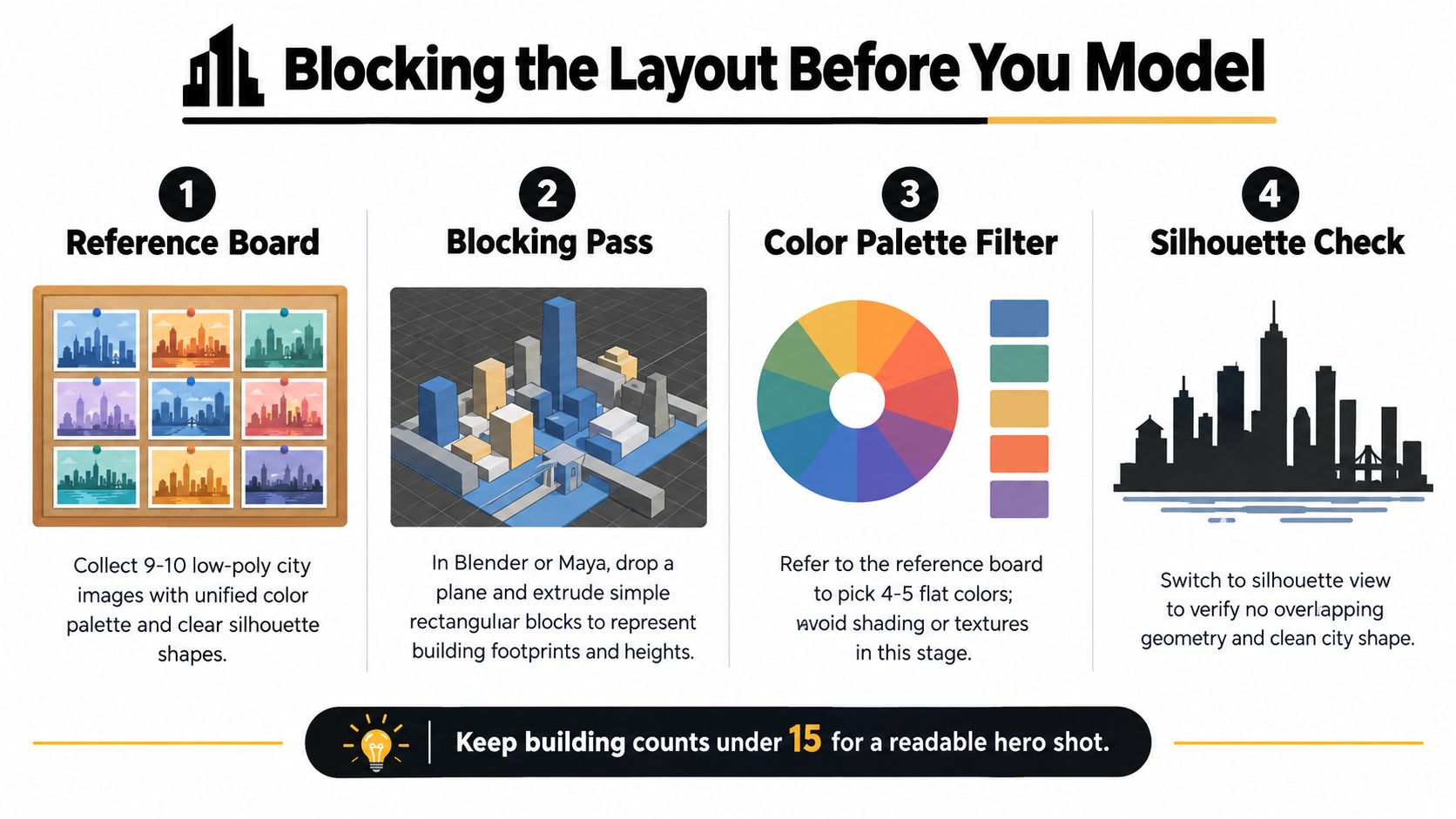
Use a simple blocking pass:
Ground plane first. Set units to meters so export behavior stays predictable.
Camera next. Lock a single hero shot before adding detail.
Footprints after that. Drop empties or cubes for each building mass.
Product clearance always. Leave a foreground zone open so the mattress doesn't compete with geometry.
A lot of room-planning logic translates well here. This Slone Brothers Furniture layout advice is aimed at interiors, but the underlying principle is the same. Decide circulation and focal point before decoration.
Use three depth tiers
I split the city into functional layers, not architectural categories.
Foreground hero buildings get the cleanest silhouette and any visible bevel work.
Midground fillers carry the city rhythm but stay simple.
Background cards or blocks only need to imply skyline mass.
That layout discipline keeps the bed as the hero. It also keeps export cleaner later when the scene moves into ecommerce tools or interactive demos. If your team wants a broader view of how raw 3D assets become polished marketing visuals, the rendering process for product visuals is a useful companion.
Keep the city readable at thumbnail size. If the skyline collapses into noise when the banner shrinks on mobile, the blocking pass needs another round.
Don't confuse detail with planning
Fog planes, simple atmospheric fade, and silhouette checks do more for this style than premature modeling. In the blockout stage, I'd rather see ten plain cubes in the right places than ten finished towers that force a bad composition.
For mattress campaigns, this matters because the scene often has to support multiple assets later. The same city may back a static PDP hero, a room-scene variation, and a cutaway animation showing foam layers. If the blockout is clean, those downstream changes stay manageable.
Modeling Techniques That Keep Cities Modular
Once the layout works, the next fight is against uniqueness. The fastest way to bloat a low poly city is to model every building as a one-off object. It feels productive at first. Then the scene gets heavy, revisions slow down, and every change request from marketing turns into a rebuild.
Build a kit, not a skyline
A practical city kit can stay small and still look varied. I usually start with a base block, a handful of window-panel variants, a few roof types, and a balcony or awning module. Buildings become stacks and combinations, not independent sculptures.
That modular mindset is familiar to mattress teams. It's the same logic behind reusable component storytelling. One clean visual system can support plush, firm, hybrid mattresses, and foam-layer graphics without starting from zero every time. There's a reason modular thinking also shows up in products like modular furniture for small spaces. Reuse is what makes variation scalable.
Keep geometry budgets visible
One public Megacity asset pack reports 875K total triangles across the set, averaging about 2.4K triangles per model at ITHappy Studios. I don't treat that as a universal target for every mattress scene, but it's a useful production benchmark. It shows the style works best when teams define density on purpose instead of guessing.
Here's the budgeting structure I use early.
Triangle Budgets Per Asset Type
Asset Type | Triangle Budget | Detail Level |
|---|---|---|
Hero building | 1200 to 2400 | Highest detail, visible bevels only near camera |
Midground building | 500 to 1200 | Moderate detail, simplified roofline |
Background block | Minimal | Flat color mass, silhouette only |
Street prop | Low | Simple forms, reused aggressively |
Mattress platform or display plinth | Moderate | Clean edges, enough shape to catch light |
Use those ranges as guardrails, not decoration. If a door cutout requires a destructive boolean and cleanup, I'll often model the doorway as separate geometry instead. It keeps topology cleaner and makes exports less fragile.
Material discipline matters as much as mesh discipline
A lot of teams focus on polygons and ignore materials. That's a mistake. The city should share an atlas whenever possible, with ambient occlusion baked into that system or into vertex data if the destination allows it.
If you're building hard-surface assets in-house, hard surface modelling for product visuals is the workflow mindset that carries over best. Clean edges, repeatable parts, restrained bevels.
Most low poly city scenes don't fail because the triangle count is too high. They fail because every building wants its own material and its own identity.
For mattress brands, modularity also protects branding revisions. If merchandising decides the launch color shifts from cool gray to warmer neutrals, you can update the shared palette without remodeling the city.
Texturing and Lighting for Premium Feel
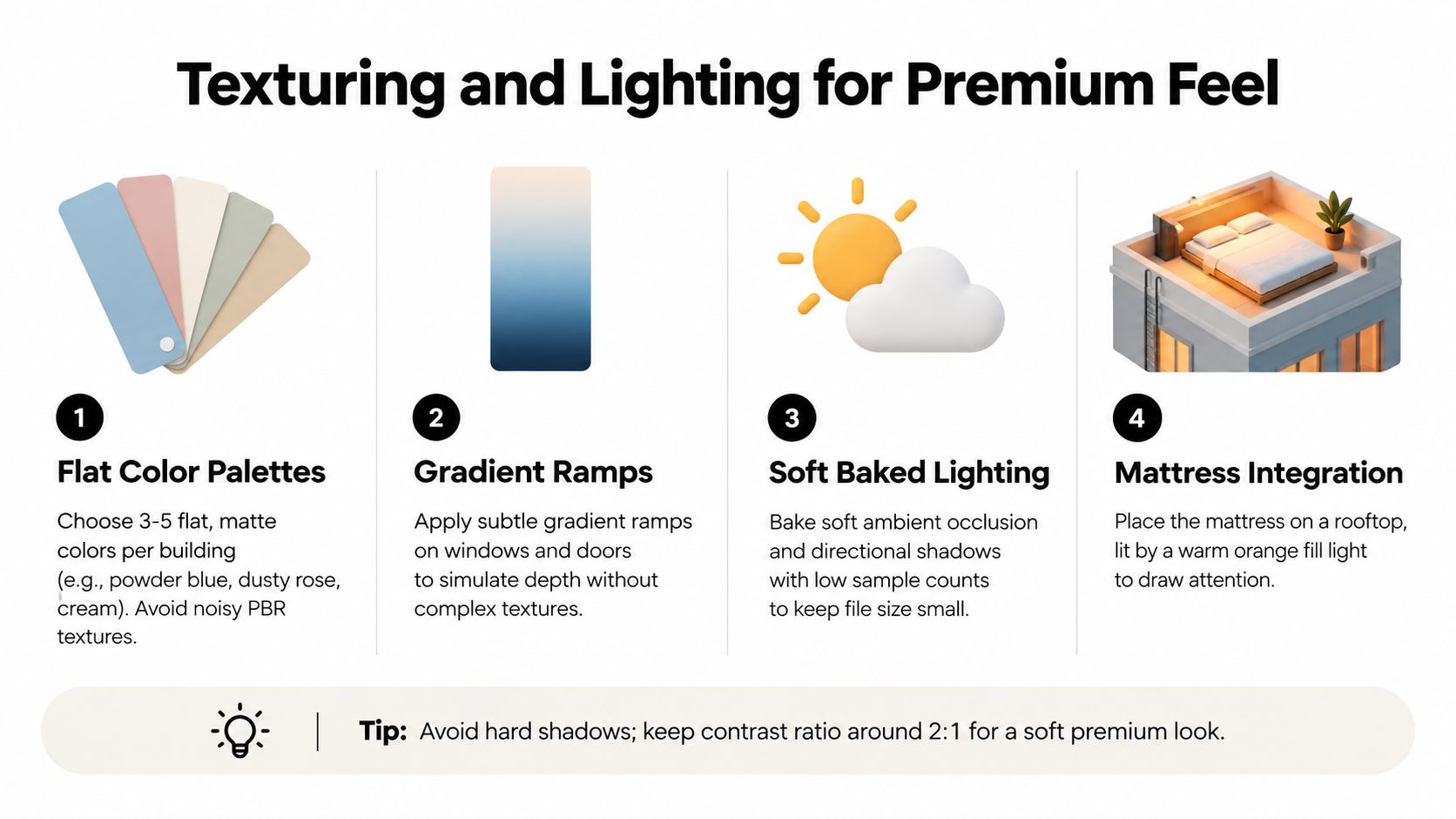
Low poly doesn't mean flat in the bad sense. It means selective. The premium look comes from restraint, not from piling on roughness maps and texture noise that the style doesn't need.
Use color like a merchandiser
Mattress product pages usually have one priority. Keep the product legible. White ticking, subtle quilting, charcoal side panels, navy gussets, and pale foam layers all need separation from the environment. That's why I prefer muted city palettes with soft contrast.
For this type of scene:
Flat colors do the heavy lifting. Buildings should read by hue and value first.
Gradient ramps add depth. A slight shift on windows or entryways often does more than a full material stack.
No fake grit. Scratches and concrete noise usually cheapen the result.
Light the bed, not the architecture
I almost never use a harsh noon setup for mattress marketing. A calm dawn or dusk mood is easier on bedding materials and more forgiving on stylized geometry. One directional key and soft ambient fill usually gets there. Window emissives can sit in a separate pass so they can be nudged brighter for hero frames without relighting the whole scene.
That's especially useful when the product includes a Digibun or layered interior visual nearby. If the city is overlit, the foam-layer story starts to look disconnected from the rest of the page. If the city is too dark, the quilt panel and border details disappear.
Soft lighting makes a stylized scene feel intentional. Hard lighting makes every shortcut visible.
Keep the texture system simple
Vertex colors are underrated for this kind of work. They remove texture overhead, keep edges clean, and hold up well when the scene gets compressed for the web. If I need a texture atlas, I'd rather have one shared sheet for the city and a separate controlled setup for the mattress itself.
A low poly city is also resurfacing because efficiency matters as much as aesthetics. Broader 3D design coverage has tied the style to micro-dioramas, lo-fi nostalgia, Blender-led pipelines, and AI-assisted workflows at Envato's 3D design trends overview. In mattress work, though, the useful part isn't nostalgia. It's that the scene can feel designed without adding rendering baggage that hurts deployment.
Optimizing for Real-Time and Interactive Use
If the low poly city is headed for a WebGL banner, AR preview, or virtual showroom, optimization starts before export. The scene has to survive both GPU load and browser patience. Mattress brands often focus on product fidelity, which is right, but the backdrop still has to behave.
Draw calls usually become the real problem
Unity community guidance around a mobile-optimized low-poly city puts the emphasis on batching-friendly construction, few draw calls, and one material per mesh at Unity Discussions. That aligns with what breaks real-time product pages. Teams obsess over polygon count while dozens of little material changes crush performance.
For mattress scenes, this means the city should be merged by material where possible, while the mattress itself stays separate. The bed often needs SKU swaps, fabric updates, or interactive layer reveals. The background doesn't.
Per-asset budgets for a low poly city
Asset Type | Triangle Budget | Notes |
|---|---|---|
Small building | 400 | Good for repeated side streets and fillers |
Mid building | 900 | Enough for clear silhouette without excess |
Hero building | 1500 | Reserve for near-camera anchors only |
Prop | Under 200 | Lamps, trees, signs, benches, repeated with instancing |
Background skyline piece | Minimal | Can be cards or simple blocks with shadows disabled |
Those budgets are less about purity and more about consistency. Once one hero building creeps too far past target, every neighboring asset starts chasing it.
Optimize around deployment, not personal preference
A lot of low poly city content is now packaged for performance-sensitive channels. One large marketplace lists 26,024 low-poly city 3D models available for download and explicitly notes low-polygon assets are suited to VR, AR, XR, and especially mobile games at CGTrader's low-poly city marketplace. That's the same deployment logic mattress marketers should care about when planning showroom tools or interactive product pages.
If the destination is an interactive product demo for mattress ecommerce, profile with the product in scene, not with the city alone. The ticking materials, edge seams, shadow catcher, and UI overlays all add cost.
Field note: A city that performs well by itself can still drag once the configurable mattress, hotspots, and analytics scripts join the page.
Good optimization choices are usually simple:
Merge static background meshes by shared material.
Instance repeated props like trees, lamps, and planters.
Turn off expensive shadows on distant pieces.
Preserve interactivity only on product-critical objects.
That last point matters most. Buyers aren't visiting the page to inspect rooftops. They're there to understand the mattress.
Export Settings and Marketing Integration
The export stage is where 3D teams often hand off something technically valid but commercially awkward. Mattress marketing needs deliverables that map cleanly to channels. PDP hero. email motion. virtual showroom. paid social cutdown. fallback still. The city has to move through that stack without constant cleanup.
Choose the format by destination
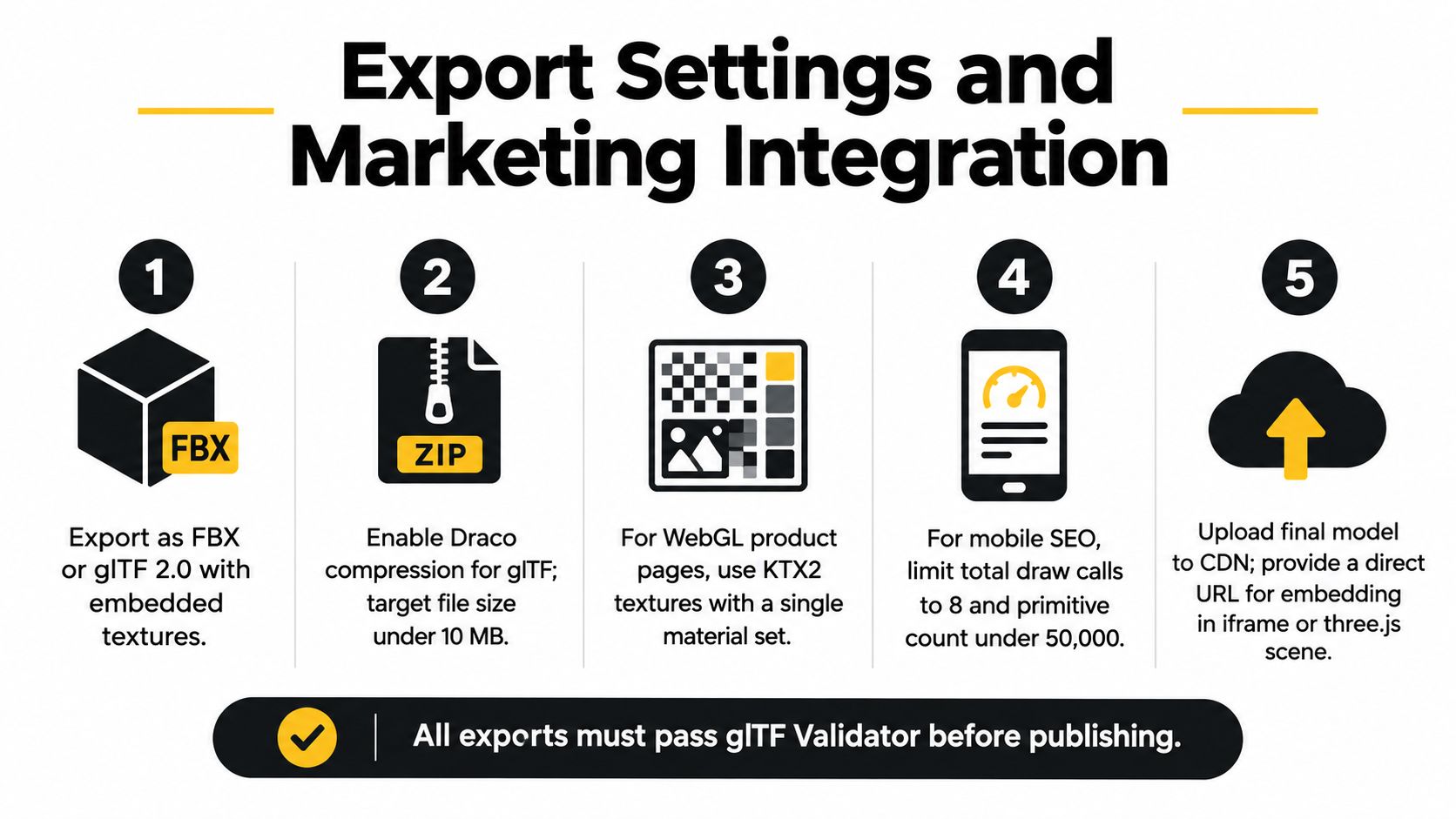
For browser delivery, I usually favor glTF 2.0 with embedded textures and compression. For showroom environments where another team may relight or recolor districts, FBX can still be the cleaner handoff. What matters is being deliberate about which version is for static use and which is for interaction.
A practical package usually includes:
One static hero render for banners and campaign headers
One lightweight interactive scene for the site
One editable source export for future revisions
One fallback 2D image for older browsers or failed 3D loads
Deliver the scene the way marketing will actually use it
Camera choices matter here. A mild downward angle usually gives the mattress proper authority in frame and leaves enough skyline behind it to communicate place. If the product page also carries silhouettes, room scenes, and a Digibun for the same SKU, the city version should complement those assets, not duplicate them.
I also like to separate building-color flexibility from mattress-material fidelity. Marketing teams often need to tweak the environment seasonally or by collection. The product itself needs tighter control. BEDHEAD is one option teams use when they need that split handled across 3D assets, room scenes, and mattress-specific product visuals within one workflow.
The larger marketplace trend also explains why this format works so well. A category page shows 62 results specifically for “low poly City” at Poly Pizza, and a 2024 low-poly city pack there advertises more than 410 prefabs plus 4 color variations. That kind of modular packaging is exactly why these scenes adapt so well to mattress campaigns. You can re-skin and re-stage without rebuilding from scratch.
Your Next Step With 3D Mattress Marketing
If you're evaluating this for your brand, don't start by building an entire virtual downtown. Start with one hero mattress shot inside a low poly city scene and make it earn its keep on a real page.
That first asset should do three jobs. It should create mood, support the product story, and stay light enough for modern ecommerce use. If it can't do all three, scale back the scene before scaling up the program.
A sensible first week
The teams that get value from this approach usually keep the opening sprint narrow:
Block one street segment. Keep it compact and composition-first.
Assign budgets by asset class. Buildings, props, and hero objects shouldn't compete for density.
Export two outputs. One polished still, one interactive proof for QA.
A lot of mattress ecommerce work is moving this direction anyway. Research on online mattress buying found 54% of consumers in 2023 said they would consider buying their next mattress online, up from 47% in 2020 and 27% in 2016, while 87% still said they would consider buying in a store, and 51% of actual purchases still happen in-store at The Roundup's mattress industry statistics summary. That split is exactly why visual storytelling has to work across both digital and showroom contexts.
Measure the asset like a merchandiser
A city scene shouldn't be approved because the creative team likes it. Track whether visitors engage with it and whether it helps the product page do its job. On a showroom version, compare interaction and downstream cart behavior against the static gallery experience.
There's also a broader reason to take 3D seriously in mattress ecommerce. One industry summary reports average conversion increases of 24% to 40% versus photography-only pages, with some platform reports showing lifts as high as 94% when merchants add 3D models to product pages at Lynxiz's review of 3D product visualization in ecommerce. The exact result will vary by brand and implementation, but the direction is clear. Better visualization can move the page from explanation to persuasion.
Low poly city work fits that shift when it's used with discipline. Not as decoration. As a focused storytelling environment around the mattress.
Bedhead works exclusively in the mattress and bedding category, so when a brand needs a low poly city scene, Digibun, silhouette set, room scene, or interactive product visual, the product details still stay accurate to the category. If you want to build one test asset that supports showroom storytelling and stronger product pages, visit BEDHEAD.
For mattress industry professionals who want more marketing insight, training resources, industry news, networking, and business tools, join the free Bedhead Network. It's a practical hub built specifically for the mattress industry.