How to Create Product Videos for Mattress Brands
A mattress can look perfect in a product gallery and still leave a shopper with unanswered questions. They can't feel the ticking, test the edge support, watch the foam recover, or judge motion transfer from a static image. That's why learning how to create product videos for mattress brands is less about producing a polished commercial and more about translating physical evidence into digital confidence.
The strongest mattress videos answer one objection at a time. They show how the quilt responds under pressure, where the comfort layers sit, how a hybrid mattress is assembled, and what the product looks like in a real bedroom or showroom. When live-action footage is combined with accurate 3D assets such as Digibuns, brands can explain what shoppers can't physically inspect online.
Why Mattress Shoppers Demand Video Proof
Selling a mattress involves a tactile barrier that most ecommerce categories don't face. A shopper can inspect a pair of shoes from multiple angles, but comfort still requires interpretation. With a mattress, the uncertainty is deeper. Firmness, cooling, pressure relief, edge support, motion isolation, setup, and construction all influence the purchase, yet much of the product remains hidden beneath the quilt and ticking.
Static photography has an important role, but it can't demonstrate every claim. A close-up may show fabric texture, but it won't show whether a sleeper disturbs a partner. A room scene can create context, but it won't explain the transition from memory foam to coils. Product video gives the shopper a sequence of evidence instead of asking them to infer performance from marketing copy.
Video has become a standard marketing asset. 91% of businesses use video as a marketing tool, and 96% of people have watched an explainer video to learn more about a product or service, according to video marketing research cited by SocialPilot. Those figures matter in bedding because the product requires education and reassurance before a buyer is comfortable committing.
Show evidence, not decoration
A decorative brand film may create an emotional impression, but it often leaves the retail associate, ecommerce manager, or shopper with the same unanswered questions. A conversion-focused mattress video should make the product easier to understand.
Use footage to show:
Surface feel: Capture the response of the quilt, ticking, gusset, and edge stitching under controlled but believable light.
Construction: Use a Digibun or animated layer breakdown to explain foam layers, coil systems, support cores, and comfort transitions.
Use in context: Show a sleeper changing position, sitting on the edge, or moving across the surface.
Purchase confidence: Demonstrate unboxing, expansion, handling, foundation compatibility, or the setup process when those issues create hesitation.
The objective isn't to promise a perfect night's sleep. That claim would be difficult to prove and can create unrealistic expectations. The objective is to help a shopper understand what they're buying, which gives retail teams a clearer conversation starter and gives ecommerce visitors more useful evidence before checkout.
Practical rule: Every shot should answer a question a shopper would otherwise ask a retail associate.
A product video also has to respect attention. Videos under one minute average a 52% engagement rate, while product videos average 50% engagement, according to the SocialPilot source above. The implication is straightforward. Keep the primary product detail page video concise, lead with the most important proof, and reserve deeper construction explanations for supporting assets.
Authenticity matters as well. Mattress shoppers are alert to exaggerated comfort language and overly glossy imagery. A real hand pressing the edge, a visible fabric response, or an honest bedroom demonstration can feel more credible than a cinematic shot that hides the product's practical details. Guidance on creating user-generated content for ecommerce can help teams think beyond formal commercials and capture believable demonstrations from customers, retail associates, or product educators.
Pre-Production Planning for Sleep Products
A mattress shoot usually fails before the camera arrives. The team chooses the wrong model, writes a generic script, or gathers attractive room footage without deciding which buyer objection the video must resolve. By the time the editor receives the footage, there may be no usable demonstration of edge support, motion isolation, cooling, or the internal build.
Start with a product evidence sheet. List the claims the brand can support, the construction details that make the product different, and the questions that showroom staff hear repeatedly. Then assign each question to a visual demonstration, a spoken explanation, a graphic, or a 3D asset.
Build the shot list around objections
A useful mattress shot list might include:
Motion transfer: Film one person moving or sitting on one side while another person remains on the other side. Keep the camera stable so the viewer can judge the movement rather than the camera motion.
Edge support: Show someone sitting near the perimeter, then include a close view of the edge construction, gusset, and support transition.
Cooling features: Reveal the cover texture and construction, then explain the relevant material or ventilation feature without implying that every sleeper will experience the same result.
Foam recovery: Press the comfort surface and allow the material to return naturally. Avoid speeding up the shot if recovery time is part of the product story.
Hybrid construction: Use live-action for the finished mattress, then shift to a Digibun or animated cutaway for coils and foam layers.
Setup: Film opening, expansion, positioning, and foundation placement in the order a buyer will experience them.
The best talent isn't always a professional actor. A trained retail sleep associate can explain a mattress in language shoppers already understand, provided the team gives them a short list of points rather than a dense technical script. Ask the speaker to explain what the shopper will notice, not to recite component terminology.
For example, “The pocketed coils support the center while the foam above softens the transition” is more useful than a list of material names with no practical meaning. The technical detail still matters, but it should connect to a physical experience.
Map assets to the buying journey
A short social clip and a product detail page video shouldn't use the same edit. They may share footage, but they need different jobs.
Buyer stage | Useful video role | Typical content |
|---|---|---|
Discovery | Establish the product problem and visual identity | Sleeper comfort, room scene, distinctive surface or profile |
Consideration | Explain the relevant difference | Cooling, motion isolation, firmness approach, hybrid construction |
Decision | Remove final objections | Edge support, setup, dimensions, return-related expectations, comparison |
Retail support | Give associates a clear demonstration tool | Layer breakdown, feature explanation, product activation sequence |
Prepare the physical environment with the same care used for the script. Use a clean floor model with accurate ticking, quilt, label placement, and profile height. Check that the mattress is properly expanded, the room scene doesn't distort the product's proportions, and the lighting reveals rather than flattens the fabric.
The production team should also identify what will be filmed and what will be rendered. A physical mattress is the right choice for surface behavior and human interaction. A 3D asset is usually the better choice for internal construction, controlled comparisons, and versions that need to be updated across channels.
Prepare the people and the product
Before production day, confirm:
Floor model condition: Inspect ticking, quilt loft, seams, handles, labels, and corners.
Construction references: Collect approved specifications for foam layers, coils, edge support, and cover materials.
Speaker preparation: Give RSAs or talent a small number of buyer questions to answer in plain language.
Retail coordination: Reserve the model and showroom area so the team isn't forced to work around customers or rearrange the floor repeatedly.
Version planning: Decide whether the same footage will support paid media, PDP content, sales training, email, and digital showroom displays.
A detailed buyer persona framework for mattress marketing can help prioritize objections, but don't let personas replace real retail feedback. The questions sales associates hear on the floor often reveal more useful video topics than broad demographic labels.
Production Techniques and Visual Asset Tiers
Filming a mattress is deceptively difficult. The product is large, heavy, and often visually uniform. White or pale ticking can lose its texture under direct light, while dark ticking can absorb detail. A wide shot may communicate scale but hide the quilt pattern, edge stitching, or gusset. A close shot may show the fabric but lose the relationship between the surface and the full product.
Live action and 3D rendering solve different problems. The right production plan doesn't treat one as a replacement for the other.
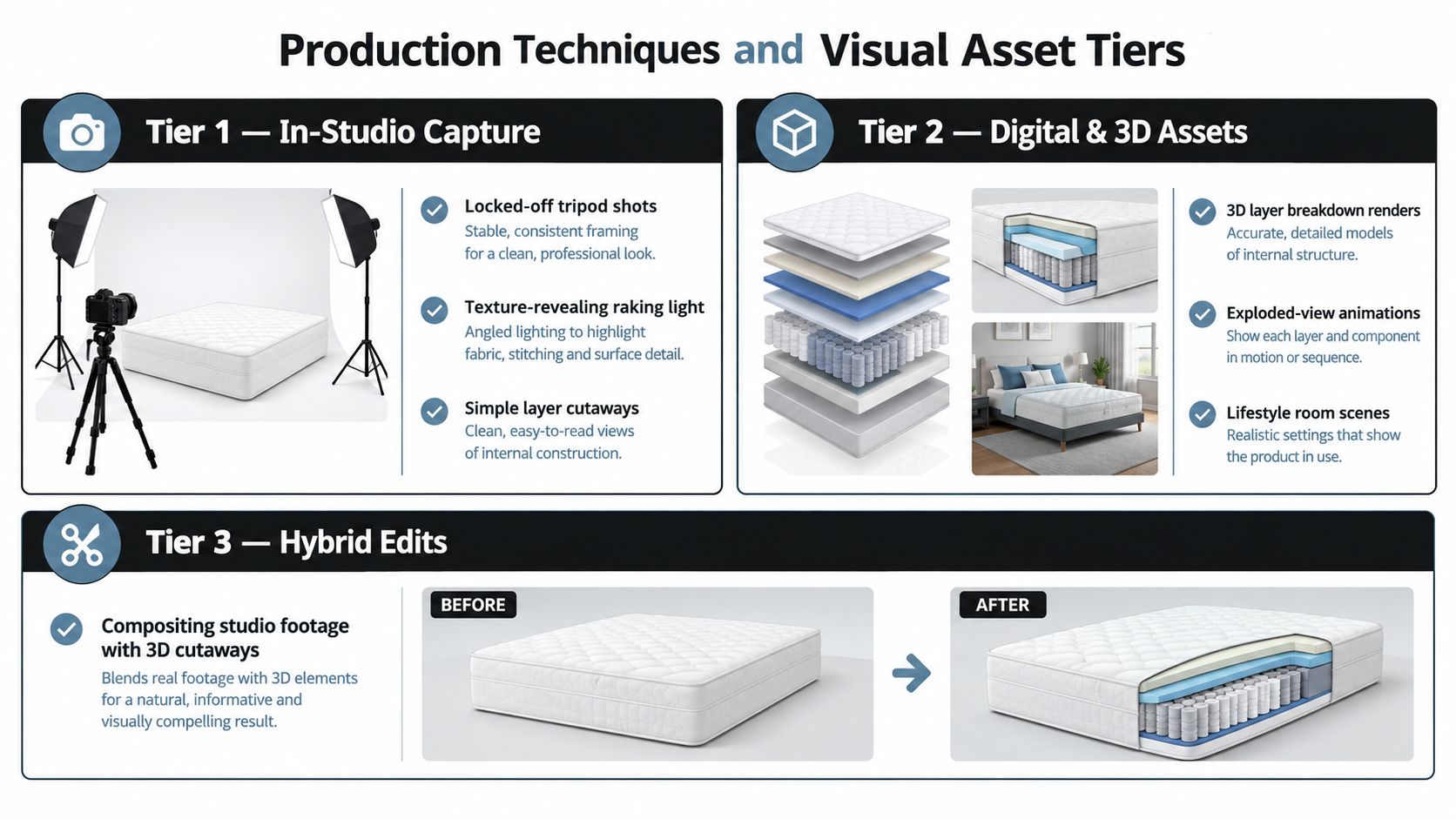
Tier one live-action capture
In-studio or showroom footage works best when the shopper needs to see the mattress behaving in the physical world. Use it for:
A sleeper changing position.
A person sitting on the edge.
Hands pressing the quilt and comfort surface.
Unboxing and setup.
Close views of ticking, quilt, handles, tape edge, and labels.
Room scenes that establish scale and use.
Lighting should rake across the surface rather than strike it flatly from the front. Angled light can reveal quilt loft, fabric weave, and edge stitching, but the team must monitor highlights so the ticking doesn't appear brighter or smoother than it is in person. The goal is a truthful rendering of the product, not an artificially perfect surface.
A small in-house team can work with a tripod, stable framing, controlled light, and an external microphone. Professional production becomes more valuable when the brand has multiple models, complex demonstrations, talent requirements, or a need for consistent footage across a large retail program.
Tier two digital and 3D assets
A 3D mattress asset starts with a digital model that can be reused across content. The render needs to preserve construction details such as profile height, edge radius, quilting loft, tape-edge behavior, handle placement, label scale, and fabric response under light, as described in this overview of mattress 3D rendering.
That accuracy matters because a rendered mattress isn't merely an attractive picture. It becomes a source asset for product videos, Silhouettes, room scenes, product pages, retailer presentations, and paid media. If the profile is wrong or the quilt appears too shallow, every downstream asset repeats the error.
A Digibun shows the internal build as a layered or exploded image. For mattress brands, it can explain foam sequence and internal construction without cutting apart a physical floor model. Animate the layers moving apart, label each component, and then return to the finished mattress so the viewer understands how the internal build relates to the product they'll receive.
Use 3D when you need to:
Show hidden foam layers and coil systems.
Compare models without photographing every physical unit.
Create a clean silhouette or profile animation.
Build a room scene in a controlled environment.
Update a component without reshooting the entire product film.
The best results don't make the render look like an unrelated computer animation. Match the fabric response, lighting direction, color, and camera perspective to the live-action footage.
Tier three hybrid edits
Hybrid production combines the credibility of physical demonstration with the explanatory power of 3D. A person can press the finished mattress, the edit can cut to a Digibun showing the support sequence, and the video can return to the sleeper using the product. That sequence connects construction to experience without pretending that a rendered cutaway is physical footage.
Keep the visual language documentary-style. Slight imperfections in a hand demonstration or a real bedroom can make the product easier to trust. Overproduction becomes a problem when shadows, texture, and movement look too artificial, especially for comfort claims that already require interpretation.
For teams reviewing broader capture standards, video production best practices 2026 offers useful production context. Mattress teams should still adapt general guidance to the category's specific requirements, especially product accuracy and the need to show hidden construction.
A 360-degree product view can support shoppers who want to inspect the silhouette, but it shouldn't replace a video that answers a buyer question. Use 360-degree mattress imagery when orientation, profile, or finish matters. Use video when movement, explanation, or demonstration matters.
Post-Production and Editing Workflows
Raw mattress footage becomes repetitive quickly. A static shot of a bed in a room may look attractive, but it doesn't hold attention or explain why the product deserves consideration. Editing should create a clear path from the shopper's problem to the product evidence and then to the next action.
For the primary PDP video, start with a tight structure under one minute. Industry coverage reports that videos under 60 seconds retain 68% of viewers to the end, while videos over two minutes retain 25%, making length a measurable performance variable rather than a stylistic preference. The figures are cited in this ecommerce product video guidance.
Cut for the first decision
Open with the product in use within the first three seconds, as recommended by the same source. A sleeper lying down, a hand pressing the edge, or a visible layer breakdown gives the viewer an immediate reason to continue.
Remove logo-only intros. The shopper didn't arrive to watch a brand ident; they arrived to understand a mattress. Put the logo into the end frame, a corner treatment, or a natural product label shot instead.
A practical edit might follow this sequence:
Opening proof: Show the mattress in use or reveal its defining feature.
One problem: Name the issue, such as partner disturbance, edge collapse, or uncertainty about construction.
Demonstration: Show the response rather than relying on an adjective.
Explanation: Use captions, a speaker, or a Digibun to clarify what the viewer is seeing.
Action cue: End with a visual direction toward product details, store availability, or add to cart.
Don't force every feature into the main video. A mattress with cooling materials, zoned support, a quilted cover, reinforced edges, and multiple foam layers may need several focused clips. One crowded edit can make each benefit harder to remember.
Combine footage and motion graphics carefully
Use motion graphics to clarify, not decorate. Animated Silhouettes can show profile, dimensions, or the relationship between the mattress and a foundation. Layered construction graphics can identify foam and coils while preserving the viewer's connection to the finished product.
A useful sequence is live action first, graphic explanation second. For example, show a person sitting on the edge, transition to a cutaway that identifies the edge support system, and return to the physical product. That order helps the viewer understand why the internal detail matters.
Color grading has a practical role. The ticking should look accurate on different screens, and the cover shouldn't shift from a neutral tone to an exaggerated blue or warm cast. Compare the edit with an approved physical sample before publishing. This is particularly important when a retailer uses the video beside floor models, because visible differences can undermine confidence.
Captions should be part of the edit, not an afterthought. Many viewers encounter product video with sound off, and captions also force the team to make the language concise. Review every caption for technical accuracy, especially with terms such as ticking, gusset, pocketed coils, latex, memory foam, and edge support.
Before exporting, check the file size and playback quality against the page experience. A practical video compression guide from LuminaClean can help editors balance image quality with a manageable file. Compression shouldn't erase quilt texture or make the foam layers unreadable.
Distribution and Platform Optimization
A good mattress video can underperform because shoppers don't find it. Product teams often place video below several rows of static images, hide it inside a secondary tab, or publish a social cut without adapting the opening for the platform. Placement is part of production, not a task left to the web team after export.
Product detail pages deserve particular attention. Industry summaries report that product pages with video can lift conversion rates by 10% to 30% and raise add-to-cart actions by 37%, while shoppers who watch a product video are up to 1.81 times more likely to purchase. The same summary warns that 35% of major ecommerce sites bury or misplace video, so the asset never reaches the shopper who needs it. These figures are discussed in conversion research comparing shoppable video and static product images.
Match the cut to intent
A short vertical clip can introduce a mattress on social media, but a PDP video needs clearer product education. A longer explainer may work for a comparison page or retailer training, while a digital showroom kiosk needs legible captions and a message that works without a sales associate standing beside it.
Use platform-native framing and export settings rather than stretching one master file across every channel. The exact technical specification should be confirmed against each platform's current requirements, but the strategic distinction remains stable: social discovery favors immediate visual proof, while a PDP supports deeper decision-making.
Platform / Placement | Optimal Format | Shopper Intent Stage |
|---|---|---|
Product detail page media gallery | Short, captioned product demonstration with a clear product frame | Decision |
Product detail page feature module | Focused explainer or Digibun animation tied to one objection | Consideration and decision |
Instagram Reels or TikTok | Vertical short-form demonstration with an immediate opening | Discovery |
YouTube Shorts | Vertical educational or comparison clip that stands alone | Discovery and consideration |
YouTube product channel | Longer explainer, setup demonstration, or construction walkthrough | Consideration |
Paid social landing destination | Concise proof matched to the ad promise | Discovery to consideration |
Email product or abandoned-cart flow | Lightweight thumbnail or linked product demonstration | Consideration and decision |
Digital showroom kiosk | Captioned loop showing features, use, and construction | In-store consideration |
Retail sales training library | Modular feature clips and layer breakdowns | Associate education |
Make the PDP earn its space
Place the primary video near the main product images, not after reviews or below a long specifications block. Give the thumbnail a useful promise, such as “See the hybrid layers” or “Watch the edge support demonstration,” rather than a generic play icon over an empty room scene.
The product page should also provide alternate paths for shoppers who don't watch. Pair the video with concise captions, diagrams, specifications, and comparison information. Video is an important proof layer, but it shouldn't become the only place where a critical fact appears.
Paid media can reuse the same source footage with different openings. A cooling-focused ad should lead with the cover or ventilation story, while a partner-focused ad should lead with motion isolation. Email can send a shopper back to the exact product section that addresses their concern.
For Pinterest users and brands exploring longer visual discovery formats, this introduction to what a Pin Video is provides useful channel context. The mattress-specific principle is simple. Build the video around the question the shopper is asking at that placement, not around the footage the production team happens to have.
Measuring ROI and Scaling Your Video Library
Video views are useful for diagnosing reach, but they aren't the business outcome. Mattress brands should connect each asset to the action it's meant to influence. A PDP demonstration may be evaluated through add-to-cart behavior and time on page. A retail training clip may be evaluated through associate usage and observed selling behavior. A post-purchase setup video may support a different operational objective.
Track the journey at the asset level:
Discovery clips: View starts, completion behavior, qualified site visits, and product-page engagement.
PDP videos: Play rate, watch depth, product selection, add-to-cart behavior, and checkout progression.
Comparison assets: Interaction with firmness, construction, or model comparison content.
Retail videos: Kiosk plays, associate access, training completion, and in-store conversion observations.
Post-purchase videos: Setup engagement, support questions, and customer feedback themes.
Use controlled tests where the traffic and page experience allow it. Test the video thumbnail against a static product image, compare visible placement with a buried tab, and evaluate autoplay against click-to-play. Keep the offer, product availability, price, and traffic source stable enough that the result can be interpreted.
The same discipline applies to returns. Don't claim that a video reduces returns without measuring it. Instead, compare return reasons and product expectations for shoppers exposed to specific explanation videos with comparable shoppers who weren't. If the video sets a more accurate expectation about firmness, profile, setup, or cooling, the return data may reveal that contribution over time.
Build modular assets
A scalable library separates components that change often from components that should remain stable. A product master video can use live-action footage of the finished mattress, while construction scenes, Silhouettes, room scenes, captions, voiceover, and end cards remain modular.
That structure makes updates more efficient. If the label changes, the product description needs a new qualification, or a retailer requires a different end card, the team shouldn't need to rebuild every version from the beginning. Accurate 3D assets are especially useful because one digital mattress can support several aspect ratios, product pages, presentations, ads, and training materials.
A strong library should include:
Hero demonstrations: Short videos that establish the product's primary difference.
Objection clips: Motion transfer, edge support, cooling, setup, firmness, and construction.
Construction visuals: Digibuns, layer animations, coil explanations, and profile views.
Retail tools: Sales associate clips, showroom loops, and product activation sequences.
Lifecycle content: Care, setup, comparison, and expectation-setting videos.
For teams that need a more formal framework for evaluating channel and campaign performance, this guide to measuring marketing ROI can support the planning process. The central point is to connect production decisions to measurable shopper behavior, not to treat video as a standalone creative expense.
Brands that combine live-action product proof with accurate 3D visualization can serve both DTC ecommerce and brick-and-mortar retail without producing every asset from scratch. If you're evaluating your current mattress imagery, product pages, or showroom storytelling, BEDHEAD provides mattress-specific product videos, 3D Digibuns, Silhouettes, Room Scenes, SEO, paid media, product page optimization, and sales training support. Start with the buyer objections your team hears most often, then build a focused video library around those questions.