360 Degree Spin Production for Mattress Brands
A mattress brand can spend days preparing a product for photography, only to end up with a few polished images that still don't answer the shopper's basic questions. Can they see the gusset? What does the quilt pattern look like from the side? How substantial is the edge support? Where do the foam layers sit inside the hybrid construction?
A 360 degree spin can close that gap, but the production method matters. A physical turntable shoot for a king-size mattress is expensive, difficult to stage, and hard to repeat whenever the ticking, quilt, or internal construction changes. A carefully built 3D-rendered spin gives manufacturers and retailers a more controllable way to show the product, create layered visuals, and support conversion across ecommerce, showroom screens, paid media, and sales training.
Why Mattress Shoppers Demand Interactive Visualization
Mattress shopping is a high-consideration decision made through a screen that often shows very little of the product. A flat hero image may communicate color and general shape, but it rarely explains how a pillow-top rises above the border, how the gusset is finished, or how a quilted ticking behaves around the corners. The shopper has to infer the rest.
That inference creates friction. A buyer may understand the advertised comfort level yet still hesitate because the page doesn't provide enough visual reassurance about construction, scale, or finish. Interactive imagery gives the shopper a way to inspect the product rather than accept a single staged angle.
The value of richer product imagery isn't limited to mattresses. A useful guide to shopping furniture online explains why multiple perspectives help shoppers make more informed decisions about physical products. The same principle applies to bedding, where the product is large, difficult to return, and closely tied to personal comfort expectations.
Static images leave construction questions unanswered
A mattress PDP usually needs to communicate several different things at once:
Surface finish: Ticking texture, quilt density, seams, embroidery, and color.
Profile: Mattress height, pillow-top elevation, border proportions, and corner shape.
Structure: Foam layers, coils, edge support, cooling materials, and transition zones.
Context: How the mattress sits on a foundation, adjustable base, or bedroom frame.
One photograph can't carry all of that information without becoming cluttered. A 360 degree spin helps the shopper examine the outer product from multiple angles, while a separate cutaway or Digibun can explain what the cover conceals.
Practical rule: Use the spin to answer questions about the outside of the mattress. Use layered visuals to answer questions about what is inside it.
This approach also supports the broader virtual shopping experience, especially for retailers that need to recreate some of the confidence normally created by touching a floor model. The spin doesn't replace a showroom test, but it can provide a more useful digital inspection than a sequence of nearly identical stills.
Why the format can affect purchase behavior
The commercial case is stronger for mattresses than for many low-consideration products. One industry summary reports that 63% of buyers find 360-degree spin photos useful for online product viewing, while brands using 360-degree product images have seen a 22% lift in overall conversion rate and a 35% increase in add-to-cart rates, according to reported product photography statistics. Another market summary reports that shoppers who interacted with 360-degree product images were 14% more likely to purchase than shoppers who saw still images alone, as documented in the same source set.
Those figures don't mean every mattress SKU needs a spin. They support a more disciplined conclusion: interactive imagery deserves priority on products where construction, profile, and finish influence the decision. Premium hybrids, specialty cooling mattresses, adjustable-base collections, and models with distinctive borders are stronger candidates than standardized products with little visible differentiation.
Physical Turntables Versus 3D Rendered Spins
A physical turntable sounds simple until the product is a mattress. A king-size hybrid requires significant floor space, a turntable capable of handling substantial weight, controlled lighting across a large surface, and a way to keep the product aligned while it rotates. The team must also manage wrinkles, compression, shifting fabric, reflections, and shadows that change from frame to frame.
A 3D workflow moves the challenge upstream. Artists need accurate product references, dimensions, materials, and construction details, but once the digital model is built, the brand can generate a consistent rotation without transporting a full-size product into a studio for every revision.
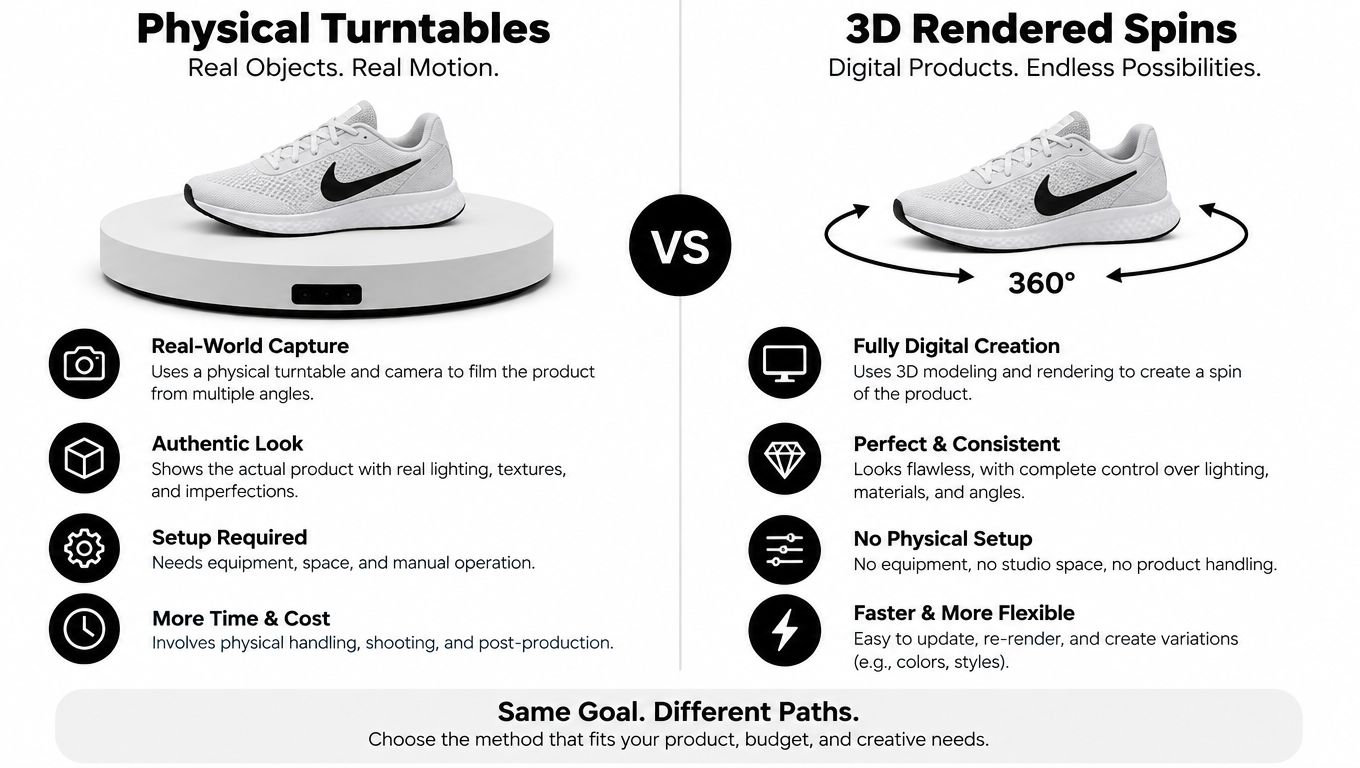
The production trade-off
Physical turntable capture | 3D-rendered spin |
|---|---|
Requires a large, controlled studio environment | Requires an accurate digital model and material references |
Fabric movement and lighting can vary between frames | Lighting, camera position, and materials remain consistent |
Physical prototypes must be available for capture | |
Revisions may require another shoot | Ticking, quilt, color, and construction updates can be rendered again |
Scaling across many SKUs creates scheduling pressure | One asset system can support multiple content formats |
Physical photography still has a place. It can be appropriate when the tactile behavior of a fabric is itself the story, when a retailer requires real-product capture, or when the brand already has an efficient studio process. The problem appears when teams treat physical capture as the only route for every size, cover variation, and construction update.
3D rendering also supports more than the spin. A single product model can produce a clean silhouette, a lifestyle room scene, an internal Digibun, close-up material views, and campaign assets. That reuse changes the economics of production because the team isn't commissioning isolated images for every channel.
For a broader example of how digital visualization helps shoppers understand physical products, Tyner Furniture's approach to visualizing pieces in your space illustrates the role of interactive context in product evaluation. Mattress brands can apply the same logic through room scenes and product viewers, while keeping the PDP focused on comfort, construction, and fit.
The practical production details behind this workflow are covered in how to make 3D photography. The key decision isn't whether physical photography is good or bad. It's whether the asset will be consistent, reusable, and economical enough to support the product's merchandising needs.
Technical Standards for Flawless Rotation Capture
A polished 360 degree spin depends less on visual novelty than on disciplined capture. If the mattress shifts slightly between frames, the viewer sees wobble. If the lighting changes, the ticking appears to change color or texture. If the sequence contains too few views, the drag interaction feels jerky and unfinished.
The baseline workflow uses a fixed camera, an indexed rotation, and manual exposure and white-balance settings. These controls prevent the camera from compensating for changing angles and producing frame-to-frame drift.
Choose the frame count deliberately
Common production standards use 24 or 36 frames for a full rotation, which equals 15-degree or 10-degree increments, respectively, according to 360 spin product photography guidance.
Use the lower frame count when file weight and production speed matter more than ultra-smooth inspection. Use the higher frame count when the mattress has pronounced contouring, complex edge detailing, or a premium finish that shoppers may want to examine closely. The correct choice depends on the viewer technology and the product's visual complexity.
Control the variables
Set the camera at a consistent height and keep the lens centered on the rotation axis. The mattress must remain square to the platform, especially when capturing a tall profile where even a small alignment error becomes obvious.
Lighting deserves equal attention. Avoid uncontrolled reflections on protective packaging, satin ticking, cooling covers, or glossy labels. Use the same light positions and intensity throughout the sequence. In a 3D render, match the material response carefully so quilted fabric, foam, piping, and borders don't look artificially flat.
Before exporting, inspect the sequence for:
Wobble: Usually caused by an off-center product or misaligned turntable.
Jerky movement: Often caused by too few frames or inconsistent frame spacing.
Visual drift: Created by changing exposure, white balance, shadows, or reflections.
False construction cues: Caused by inaccurate dimensions or a model that doesn't match the manufactured mattress.
A spin should make the product feel stable and trustworthy. If the viewer notices the production instead of the mattress, the asset needs another pass.
File Optimization and Mobile Web Integration
A high-resolution spin can improve product understanding, but a heavy sequence can damage the same PDP's usability. Mattress shoppers often browse on mobile networks, compare several models in one session, and abandon pages that take too long to become interactive.
Start with the first frame. It should be sharp, representative, and useful even before the rest of the viewer loads. The initial image is also the fallback for shoppers whose browser, connection, or marketplace environment doesn't support the interactive experience.
Build the loading experience in layers
Progressive loading is more effective than forcing the browser to download every frame before displaying anything. Load the first frame and viewer controls first, then bring in additional frames as the shopper interacts or as the connection allows.
Use modern image formats where the platform supports them. Image optimization guidance for the web covers the broader principles, including compression and delivery choices that protect page performance without making a mattress's ticking or quilt appear soft.
A practical desktop starting point for a hero visual is 1920 × 1080 pixels, while 2560 × 1440 pixels can support higher-density displays, according to hero image recommendations from HubSpot. The same guidance discusses keeping hero assets under 500 KB and using formats such as WebP where appropriate. Those figures apply to hero assets, not automatically to an entire spin sequence, so teams should test the viewer as a complete experience rather than applying a single file-size rule to every frame.
Test the actual customer journey
Desktop preview isn't enough. On real product pages, test:
Touch interaction: Dragging and swiping should work naturally on iOS and Android.
Progressive loading: Throttle the connection and confirm the viewer remains useful while frames arrive.
Fallback behavior: A static image should appear if the script fails or the platform blocks the viewer.
Layout stability: The spin shouldn't push purchasing controls below the fold as assets load.
Accessibility: Provide meaningful image descriptions and ensure the viewer doesn't prevent keyboard or screen-reader access to core product information.
A practical page-speed optimization resource can help teams evaluate wider performance issues around the PDP. The spin should support the buying experience, not compete with variant selection, financing information, delivery details, or the add-to-cart action.
Strategic Placement and Merchandising on the PDP
A spin won't rescue a confusing product page. Its placement should reflect the question the shopper is trying to answer at each point in the decision.
For a premium mattress, place the viewer close to the primary product gallery so shoppers can move from a clean hero image into active inspection. Don't bury it below long-form copy or customer reviews. The shopper should encounter the asset before leaving the visual evaluation stage.
Pair the spin with the right supporting assets
The most useful mattress PDPs assign a job to every visual:
Spin viewer: Shows the complete exterior, profile, border, and finish.
Digibun: Reveals foam layers, coil systems, comfort materials, and support zones.
Silhouette: Clarifies height, proportions, and the product's clean outline.
Room scene: Establishes scale and shows how the mattress works with a foundation or bedroom setting.
Detail crop: Displays ticking, quilt, handles, gusset construction, or edge stitching.
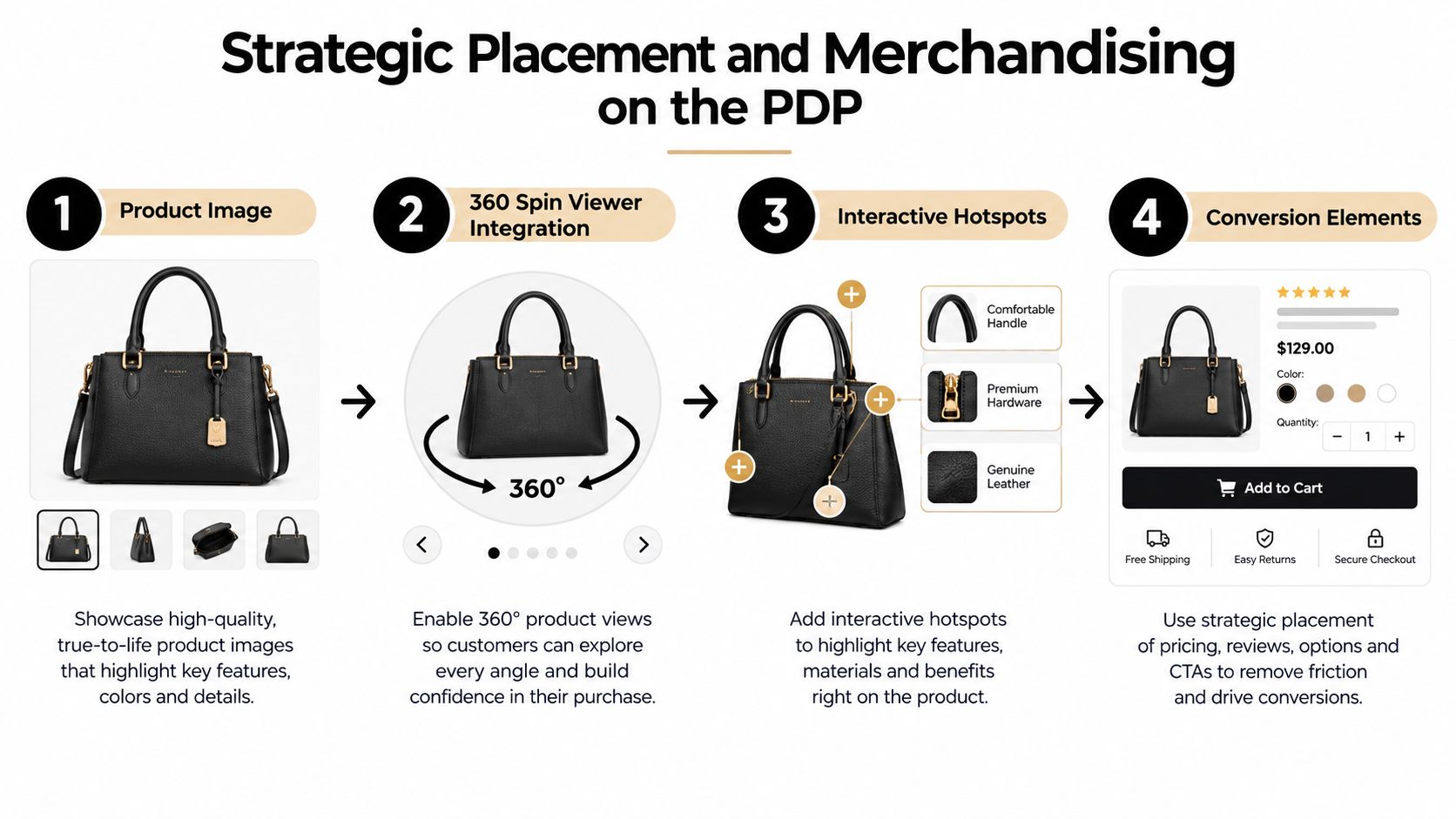
The handbag example in the diagram represents a general merchandising flow, but mattress teams should adapt the logic to category-specific proof. A spin can show the exterior, a layered image can explain the interior, and nearby copy can connect those visuals to comfort, durability, cooling, or support claims.
Make the interaction purposeful
Auto-play can attract attention when it begins subtly and stops quickly. Continuous motion is more likely to distract than persuade. A useful viewer should also offer a visible drag or swipe cue so the shopper understands what to do without hunting for controls.
Hotspots can work when they identify a meaningful feature, such as reinforced edge support or a cooling layer. They don't work when they turn every seam into a clickable label. Keep annotations tied to purchase questions and make sure the same claims appear in text for shoppers who don't interact with the image.
Merchandising should also reflect margin and consideration. Start with high-value or high-question SKUs, then compare engagement, conversion, add-to-cart behavior, and customer-service questions against comparable products. The objective isn't to add motion everywhere. It's to place the right visual where it removes the most uncertainty.
Quality Assurance and Measuring Visual ROI
Quality assurance starts on the product page, not inside the design file. A spin may look correct in a desktop preview and still fail because the viewer script conflicts with the theme, the image paths don't match, or the marketplace doesn't support the required asset structure.
Google Merchant Center guidance says an automatically generated spin requires at least five high-resolution images and warns that missing requirements, image-name mismatches, or URL mismatches can prevent the spin from appearing within two weeks. The platform-specific rules make asset naming and metadata validation part of production, not an afterthought.

Use a repeatable QA checklist
Metadata validation: Confirm filenames, URLs, product identifiers, and platform requirements.
First-frame review: Check sharpness, framing, brand presentation, and representative product appearance.
Mobile testing: Swipe and drag through the viewer on iOS and Android devices.
Network testing: Throttle the connection and verify progressive loading and fallback behavior.
Merchandising review: Confirm that the viewer doesn't hide variants, delivery information, reviews, or purchase controls.
Track the asset against a defined comparison group rather than relying on impressions. Useful measures include viewer interaction, gallery engagement, time spent on the PDP, add-to-cart activity, conversion, returns, and customer-service questions about construction. A spin that receives many interactions but doesn't influence downstream behavior may need better placement, clearer annotations, or stronger supporting copy.
For a disciplined framework, use how to measure marketing ROI to connect visual engagement with commercial outcomes. Prioritize changes that make the next production decision easier, such as which mattress family deserves a Digibun, which cover variation needs a new render, or which visual should appear earlier in the gallery.
Bedhead supports mattress manufacturers, retailers, private-label brands, and sleep startups with 3D-rendered spins, Digibuns, silhouettes, room scenes, product-page optimization, SEO, paid media, and sales training built around bedding-specific buying decisions. Visit BEDHEAD to evaluate a visualization workflow that fits your products, channels, and merchandising priorities.
For ongoing industry resources, BEDNET is free for mattress industry professionals at www.BedheadNetwork.com. The network brings together marketing insights, news updates, training resources, networking, an industry directory, and business tools for mattress manufacturers, retailers, suppliers, and sales professionals. Further education is available through Bedhead University.