Email Marketing Campaign Guide for Mattress Brands
The report looked fine. Open rate at 44%, a respectable click count, a tidy bar chart in the monthly deck. Then the sales director asked the only question that mattered: how many retailers requested the hybrid spec sheet? Nobody in the room could answer, because nobody had set that up. That's the usual failure mode of an email marketing campaign in the mattress category. The send works, the measurement doesn't, and the budget decision gets made on a number that doesn't connect to a single order.
Email still runs on infrastructure with real scale behind it. The Radicati Group's forecast put worldwide email users at roughly 4.0 billion in 2020, projected to exceed 4.4 billion by the end of 2024, with daily traffic rising from 306.4 billion to 361.6 billion messages, according to the Email Statistics Report executive summary. Your retail accounts live in that stream alongside every other brand pitching them. The channel isn't the problem. The plan usually is.
Two things get treated as design details and are performance problems: whether the mail lands in the inbox, and whether a human can read the offer at all. Both are covered below, along with the segmentation rules, the metrics worth reporting, and the templates that hold up when a buyer's email client blocks images.
Start With the Conversion, Not the Send Date
Say a retailer opens your launch email, taps through to the asset library, and downloads the product imagery for a new hybrid. She never requests the sales deck. The bedding team reports a strong send, the deck looks healthy, and nobody notices the gap until the account orders nothing for a quarter. The campaign produced a signal that felt like progress and zero pipeline.
That gap opens because the campaign was built around a send date instead of a conversion. Before anyone writes a subject line, name one conversion per campaign and write it as a single sentence the sales team can verify in the CRM. Not "drive awareness." Something like: "Retail buyers request the hybrid spec sheet." A spec-sheet download, a sales-training registration, a quote request, an online order. One of those, named, dated, and owned by a person.
Campaign type | Audience | Conversion event | Send cadence |
|---|---|---|---|
Product launch | Retailers and RSAs | Spec-sheet or image download | Two to three sends over three weeks |
Retailer education | Showroom owners and managers | Sales-training registration | One send per month |
Trade show follow-up | Buyers met at the event | Meeting or quote request | Three sends within two weeks |
Post-purchase care | Consumers who bought a mattress | Accessory or protector purchase | One send plus one reminder |
Promotional event | Consumers on the retailer or DTC list | Online order | Two sends, timed to the offer deadline |
The difference between a click and a conversion shows up fastest in retail. A retailer who orders a single hybrid after a launch sequence is worth more to a bedding brand than a click from a store manager who never opens the spec sheet, because the first one moves a floor model, reorders, and tells two other accounts. Clicks don't travel. Orders do.
The one-sentence test: if you can't write the conversion as a sentence your sales team could check without calling marketing, the campaign isn't planned yet.
Separate the plans, too. A launch sent to retail accounts and a post-purchase note to consumers need different offers, different frequency, and different success measures, even when the same person builds both. Retail sends usually run tighter cadences against a buying window. Consumer care runs on the delivery date and the trial period.
Check it today: if the campaign can't name its conversion, it can't be judged. And a campaign chasing three conversions usually lifts none of them, because the layout, the offer, and the CTA end up pointing at different doors.
Segment Lists by Role, Market and Buying Stage
One list for everyone fails in this category faster than in most. A showroom RSA, a private-label buyer, and a consumer want different products on different timelines. The RSA needs a fitting framework and a margin story. The buyer needs MOQs, lead times, and a layer breakdown. The consumer needs the trial window and whether the protector ships free. Send all three the same email and you get a low click rate that looks like a creative problem when it's a targeting problem.
Validity's 2025 benchmark report describes senders applying automation and AI to A/B testing, segmentation, dynamic content, personalization, recommendations, and send-time optimization, which sounds advanced until you look at what most bedding lists contain: one big export with a "retail" tag on it, per the 2025 Benchmark Report.
Four attributes worth segmenting on
Role: retail owner, merchandising manager, eCommerce buyer, sleep startup founder, RSA. Role sets vocabulary, so it sets relevance.
Market and channel: brick-and-mortar versus DTC, plus region. A 40-store chain in the Midwest and a single DTC brand don't buy the same way.
Product category: hybrid, latex, innerspring, adjustable bases, pillows. A hybrid maker's foam-layer story belongs with retailers that stock hybrids; innerspring accounts get a different offer entirely.
Engagement recency and prior commercial action: last open, last click, sample request, order history. Prior commercial action outranks everything else.
A hybrid manufacturer that sends its layer breakdown only to hybrid-stocking accounts and a separate innerspring offer to the rest will beat a broader send every time. The list is smaller, the relevance is higher, and the sales follow-up has a reason to exist.
Consent is a data field, not a checkbox
Record the opt-in source and date for every contact, and treat that record as part of the campaign, not part of the legal file. For EU contacts, the European Commission's guidance on legal grounds for processing data is specific: consent must be freely given, informed, and tied to a specific purpose, with the organization named, the processing purposes explained, and withdrawal possible. No preselected boxes, no marketing permission buried in unexplained terms.
Never merge retailers, manufacturers, suppliers, and consumers just because they share an industry. The shared industry is why they'll open the email. The role is why they'll click.
Before you send, check that each segment is large enough to read results from, and give each one a holdout group that receives nothing. Without a holdout, you can measure that a campaign happened, not that it did anything. That distinction matters more than the segmentation technique, and it's the reason zero-party data collection belongs in your signup forms instead of your guesswork.
Protect Deliverability Before You Judge Results
An open rate is not a deliverability metric. Privacy features in Apple Mail and Gmail inflate opens by pre-fetching images, and unauthenticated mail can disappear before anyone has a chance to ignore it. Judging a campaign on opens before confirming the mail reached the inbox is like reading a floor-model sell-through report for a store that never opened.
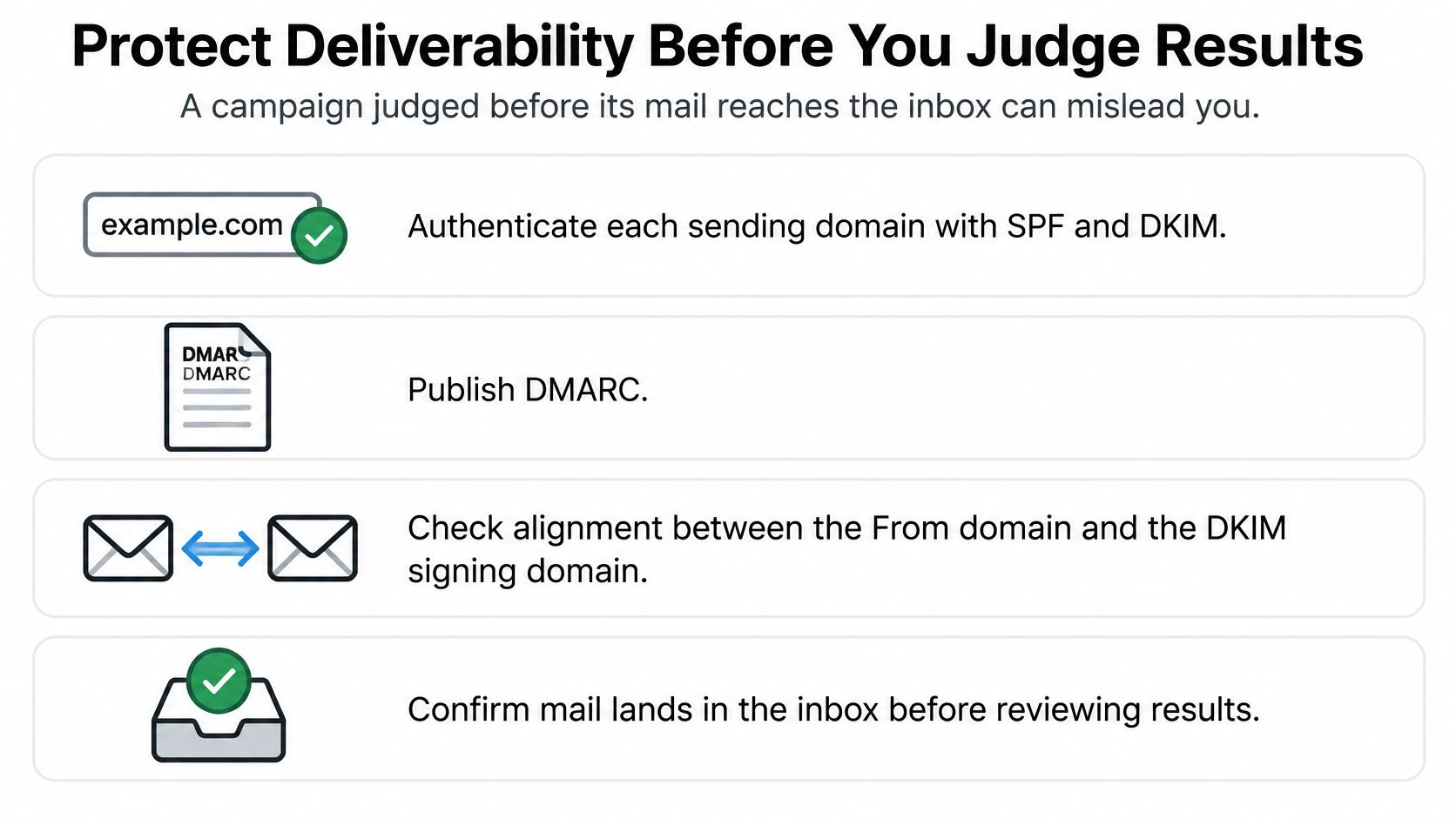
Authentication comes first
NIST's technical guidance sets out the sequence clearly: authenticate every sending domain with SPF and DKIM, then publish DMARC and monitor alignment between the visible From domain and the authenticated domain. DMARC can authenticate a message when either SPF or DKIM succeeds, but alignment and policy configuration determine how failures are handled, according to NIST Technical Note 1945. For a bedding brand sending launch mail through one platform and order confirmations through another, mismatched alignment is the most common reason a retailer's mail server ignores the message.
Separate the streams and ramp the volume
Promotional mail and transactional mail belong on distinct subdomains. Order confirmations, shipping notices, and warranty messages carry different expectations and different complaint profiles than a Black Friday promotion, and mixing them means a promotional complaint can degrade a confirmation email that a customer is actively waiting for.
Suppress hard bounces and repeatedly inactive contacts, and ramp volume gradually after list growth or infrastructure changes. A list built from a trade show badge scanner doesn't arrive warm. Send to the most engaged slice first, watch complaints and bounces, and expand from there.
The number to watch isn't "delivered." It's inbox placement, measured through seed accounts across Gmail, Microsoft, and the major regional providers, with authentication headers inspected.
Validity's 2025 benchmark reported 84.8% inbox placement, 6.1% spam placement, and 9.1% missing mail in its previous measurement, which means a sizable share of apparently sent mail never reaches an inbox at all.
What to fix before the next send
Pause bad acquisition sources: any list, pop-up, or partner feed producing abnormal complaints or invalid addresses gets paused, not cleaned monthly.
Track placement by provider: a drop on Microsoft domains is a different problem from a drop on Gmail, and the fix differs.
Watch complaint rate alongside bounces: complaints cost more reputation than bounces do.
Keep the exit working: under the U.S. CAN-SPAM Act, the unsubscribe mechanism must be able to process requests for at least 30 days after the email is sent, and opt-outs must be honored within 10 business days, per the FTC's compliance guide. A confirmation page is not a suppression process.
If your placement numbers look shaky, the operational fixes in this guide to improving email deliverability are worth working through before you touch subject lines.
Metrics That Show Whether the Campaign Paid Off
Metric | How to calculate | Benchmark | What it tells you |
|---|---|---|---|
Open rate | Opens divided by delivered emails | 39.64% average, 2023 (GetResponse) | Directional only; privacy features inflate opens |
Click-through rate | Clicks divided by delivered emails | 3.2% average, 2023 (GetResponse) | Shows whether the offer and creative pull |
Qualified request rate | Qualified requests divided by delivered emails | Your own baseline after three sends | Primary measure for B2B bedding campaigns |
Conversion rate | Conversions divided by unique clickers | Growth of 22.7% year over year, not a rate (Zeta Global, Q2 2024) | Shows whether the landing page and form work |
Revenue per delivered message | Attributed revenue divided by delivered emails | Your own rolling 90-day average | Ties the campaign to margin |
Inbox placement | Inbox count divided by seed-account tests | 84.8% inbox (Validity 2025, previous measurement) | Confirms the mail reached the inbox before judging content |
Open rate and click-through rate are the two numbers commonly reported and the two least useful in isolation. GetResponse reported average email open rates of 39.64% in 2023 and average click-through rates of 3.2%, per its email marketing benchmarks report. MailerLite's 2025 data, summarized by Sender, put the median open rate at 43.46% and average click-through at 2.09%, according to Sender's benchmark roundup. Two credible sources, two different pictures, because the industry mix and list hygiene differ.
The two metrics that decide a bedding campaign
For B2B bedding work, qualified request rate and revenue per delivered message carry the argument. Qualified request rate is the one a sales team can act on: how many of the people you reached asked for something real. Revenue per delivered message is the one a retail owner can weigh against margin, because a $1,200 hybrid at 40 points and a $90 protector attach don't belong in the same report.
Zeta Global's 2024 Q2 Email Benchmark Report found email conversion rates increased 22.7% year over year, based on data from April 1 through June 30, 2024, per the Q2 benchmark report. That's a growth figure, not a target. Reading it as "my conversion rate should be 22.7%" is how teams end up optimizing a number that measures something else.
Why benchmarks mislead
A national average blends a 40,000-contact DTC list with a 900-address retail list that includes buyers with two-week decision cycles and buyers who read everything on a phone in a warehouse. Attribution method shifts results too. Last-click attribution flatters a post-purchase email and buries a launch sequence that started the conversation.
No agency, ours included, can promise a specific return on a campaign; marketing outcomes move with factors outside any vendor's control. What a good partner can promise is that the metric was chosen before the send, that revenue is attributed with UTM parameters plus first-party conversion tracking, and that a holdout exists to compare against. When placement drops, report by mailbox provider rather than as one blended average. If you want a wider set of reference numbers to sanity-check against, these email marketing benchmarks are a reasonable starting point.
Rule for the review meeting: pick the metric before the send, not after the results come in. Otherwise the meeting becomes a search for the one number that looks good.
How to Build an Email Marketing Campaign Step by Step
Eight steps, in order, then a gate. Skipping the gate is how campaigns ship with an offer that only exists inside a JPEG.
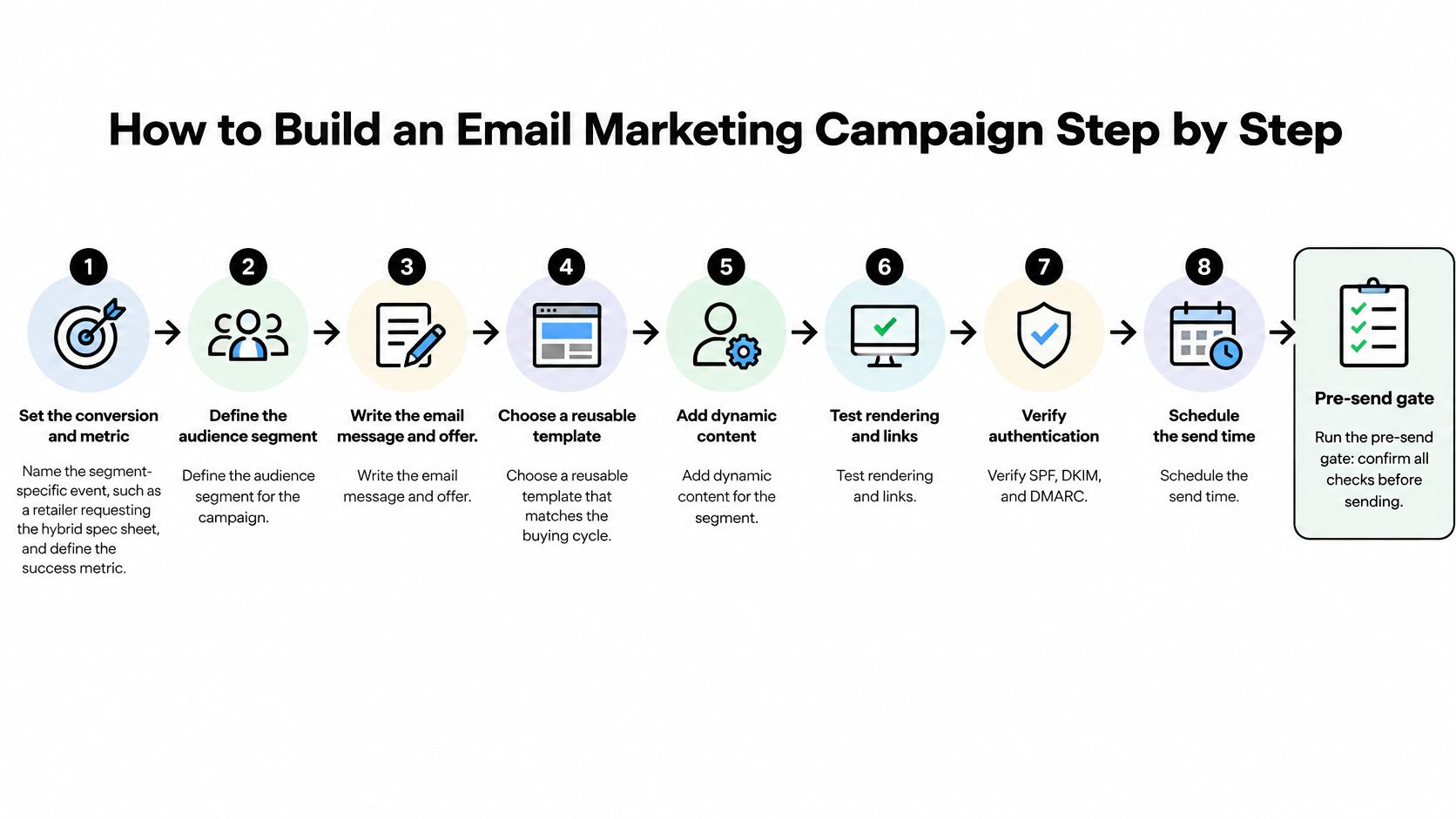
Steps 1 and 2: name the target and confirm the consent
1. Set the conversion and the metric. Name the segment-specific event, such as a retailer requesting the hybrid spec sheet, and the metric you'll judge by, such as qualified request rate. One event, one metric, written into the brief.
2. Choose the segment and confirm its consent source and date. If you can't say where a contact came from and when they agreed, that contact comes off the send. A 900-address list of verified buyers beats a 3,000-address list padded with contest entries, because mailbox providers read engagement per recipient and dead addresses drag placement for everyone on the list.
Steps 3 to 5: write it, build it, make it readable
3. Write the subject line and preheader together. The preheader should carry the offer, not repeat the subject. A retail buyer scanning on a phone should know what's being asked before opening anything.
4. Build the layout with one hero, one product block, and one CTA. Put a layer breakdown in the product block for hybrid launches so the reader can see the quilt, the transition foam, and the support core without leaving the email. Keep the offer in live text.
5. Make every image carry its meaning in text. Ball State University's email accessibility standards recommend no more than 40% images and at least 60% live text, an alt attribute on every image, an empty alt attribute on decorative images so screen readers skip them, alt text that includes the wording displayed inside banner images, and colors that meet WCAG 1.4.3 Level AA contrast. Section 508 guidance adds the baseline rule: all images in email need alt text or should be marked decorative, and images conveying meaning need a textual equivalent, per Section508.gov's email guidance.
Step 5 fails. If your hero reads "Save 15% on every hybrid floor model this month" and that sentence exists only inside the image, a screen-reader user gets a product name and no offer, and an Outlook user with images blocked sees the same thing.
Steps 6 to 8: footer, test, send
6. Add a footer with a working unsubscribe link and a postal address. Route opt-outs into suppression the same business day, well inside the window the law allows.
7. Test one variable against a holdout. Subject line or hero image, not both. Define the winner in advance and give the test enough volume to mean something.
8. Send from an authenticated domain, log UTM parameters, and schedule the review 72 hours after send. Reviewing at the two-hour mark tells you about delivery timing, not campaign performance.
The pre-send gate
Before the send button, confirm four things in writing: segment sizes, seed-test placement across Gmail and Microsoft, the metric you'll judge by, and the holdout group. The most common slip is step 4, where the offer lives only in the hero image and vanishes the moment images are blocked in Outlook.
These eight steps govern a single campaign. Mapping a full year of sends across product launches, trial windows, and retail buying seasons is a separate planning exercise, and this 2026 B2B email strategy guide covers that annual cadence side.
Templates That Match the Mattress Buying Cycle
Three templates cover most of what a bedding brand sends. Build them once, reuse them with new offers, and stop rebuilding layout from scratch at every launch.
The hybrid launch template
Headline in live text. A layer-breakdown visual paired with a caption that names the ticking, the quilt, and each foam layer in words, not just in the graphic. The spec table as an HTML table rather than an image, because buyers copy those numbers into spreadsheets and images don't paste. Close with one CTA: request the spec sheet.
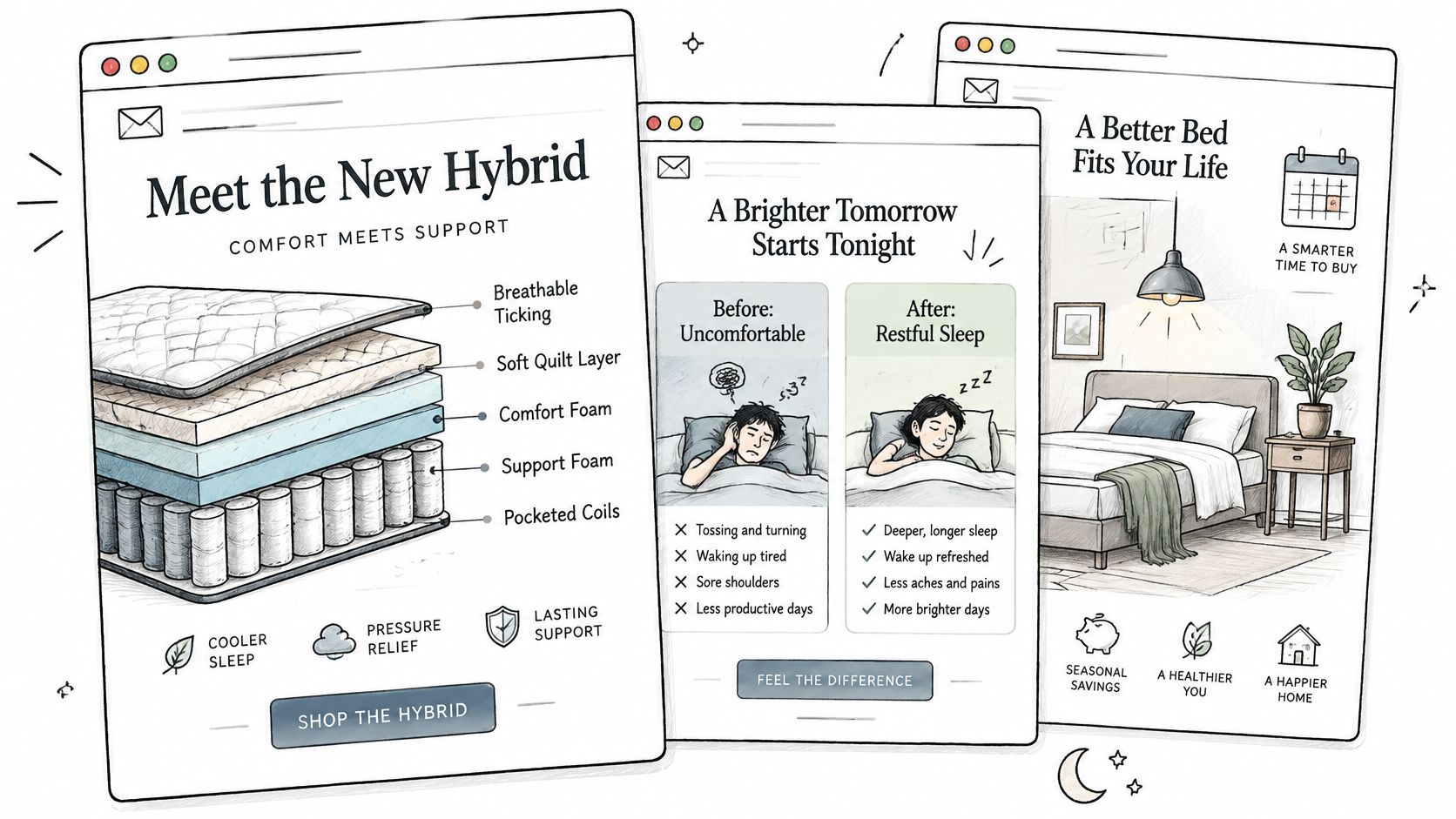
The showroom education template
A floor-model photo, then a three-point fitting tip or one margin argument the RSA can use on the floor that week, then a link to sales-training registration. Keep it to one idea. Showroom managers forward single ideas to their teams; they don't forward five.
The post-purchase template
Care instructions for the mattress, a protector or topper recommendation timed to the trial period, and a reminder of the trial or return window the business offers. This one earns its keep on attach rate, not on reorders, since nobody buys a second mattress in month two.
What stays text and what can live in images
Price, offer, CTA, spec numbers, and the next step stay in live text. Lifestyle photography, ticking texture, and room scenes can live in images. The Email Markup Consortium's 2025 report analyzed 443,585 emails and found that 99.89% contained serious or critical accessibility issues, with only 21 messages passing all automated checks, according to the Email Markup Consortium accessibility report. Missing alternative text, weak contrast, and incorrect semantic structure were among the reported problems.
That's a production problem, not a niche concern. The image-off test catches most of it: remove every image in preview, and if the email still states the offer and the next step, the template holds. The layout principles that make this survivable, live text blocks, single-column stacks, and predictable CTA placement, are covered in this guide to email marketing design.
Next Step for Your Email Program
Choose the next send by the decision it should trigger. A retail buyer needs assortment, margin, and delivery timing in terms their merchandising meeting can use; a consumer list needs the offer, trial terms, and store or checkout path in live text. Write that conversion in one sentence, then run the pre-send gate: authentication records aligned, seed inboxes checked, image-off preview read end to end, and every claim on the landing page matching the email.
If placement slips, do not judge creative first. Pull the campaign, compare Gmail and Microsoft seed results, and check whether the failure sits in authentication, complaint spikes, or a template that hides price and CTA inside images. Inbox placement and readable structure decide whether the email can influence margin at all.
When the gap is upstream, fix the asset trail before the next blast. BEDHEAD works with mattress brands, bedding manufacturers, and retailers on digital marketing, ecommerce strategy, creative assets, product storytelling, website design, high-end visual content, and 3D visualization, so the email, product page, and sales materials carry the same offer. Visit BEDHEAD to plan the next sequence.