Digital Ads Mockup for Mattress Brands
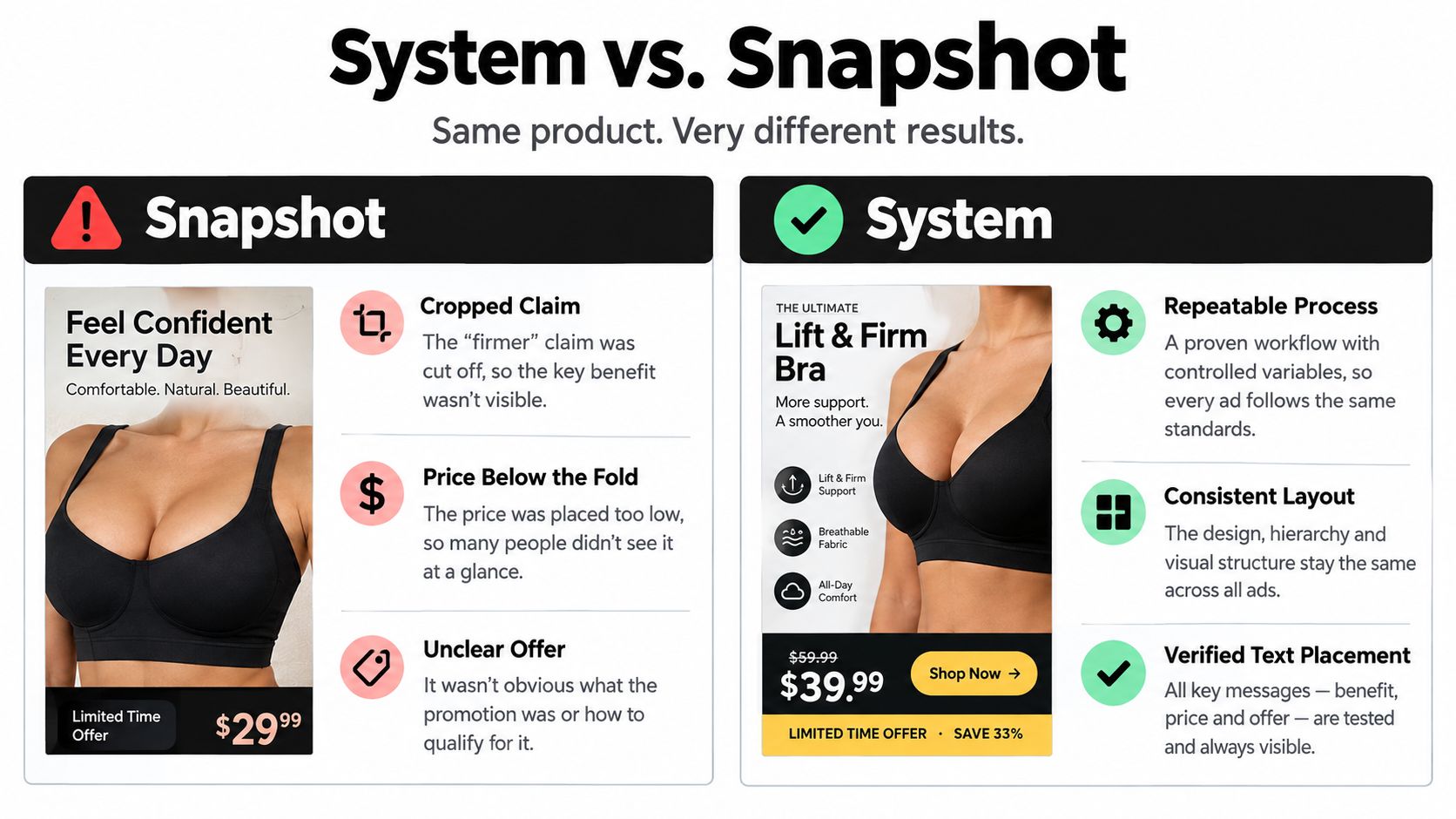
You approved the digital ads mockup on a large monitor and it looked perfect. The hybrid sat centered in a bright room scene, the firmness claim sat neatly over the quilt, and the promotional price tied the whole layout together.
Then the campaign went live. A vertical crop removed the firmness claim, a square placement pushed the price toward the edge, and the retailer version looked washed out on a showroom screen. Nothing about the mattress changed. The mockup was not built to survive real placements.
Why Mattress Ad Mockups Need a System, Not a Snapshot
That failure is common in bedding because a launch rarely lives in one channel. A manufacturer may need Meta feed creative, Google responsive display, retail media, short-form video, connected TV, and a trade deck for buyers who still think in floor models and margin per slot.
Each placement crops, scales, and recombines assets differently. A wide room scene that shows a king bed, nightstands, and headboard can lose its center when forced into a tall format. A close crop of ticking and gusset detail may read beautifully in a square, then turn abstract in a small programmatic banner.
The Real Placement Map
Digital spend now sits behind that complexity. U.S. internet advertising revenue reached $294.6 billion in 2025, and social advertising accounted for $117.7 billion, or 40.0% of revenue, according to IAB digital ad revenue findings. Display and video also represent major shares, so a single banner cannot represent a full campaign.
Programmatic buying adds another layer because placements are automated and varied. Your mockup has to preserve product recognition when the same promise appears in a retailer banner, a mobile feed, and a video end card. That's a system problem, not a resizing task.
Placement | Typical Ratio | Top Risk to Mockup |
|---|---|---|
Meta and Instagram feed | 1:1 or 4:5 | Headline and price compete in a tight frame |
Stories and short-form video | 9:16 | Side copy and wide room details get cropped |
Google responsive display | 1.91:1, 1:1, 9:16 | Assets recombine in unexpected pairings |
Retail media | Varies by retailer | Product scale and promo terms lose clarity |
Connected TV | 16:9 | Small disclaimers become unreadable at distance |
Trade presentation | 16:9 slide | Lifestyle polish hides construction details |
What Changes in Each Format
A feed ad needs instant product recognition. Shoppers should see the bed, understand whether it's a hybrid mattress or all-foam model, and catch the primary benefit before scrolling.
Short-form video needs a storyboard, not just a static frame. Teams planning repeatable video variants can learn from RenderIO video automation insights because the opening frame, product reveal, proof point, and CTA must work as a sequence. If your logo only appears at the end, many viewers will never connect the comfort claim to your brand.
Responsive display is different again. Google assembles ads from separate headlines, descriptions, images, logos, and optional videos, as explained in Google responsive display ad requirements. Your mockup should preview combinations, not pretend the platform will preserve one exported layout.
Practical rule: If the offer disappears in one crop, you do not have a finished mockup. You have one approved view of an unfinished system.
Retail media and trade decks add commercial pressure. Retailers care about showroom differentiation, attachment opportunities, and whether the advertised price protects margin. DTC teams care about PDP clicks, lead quality, and returns caused by unclear firmness or height expectations.
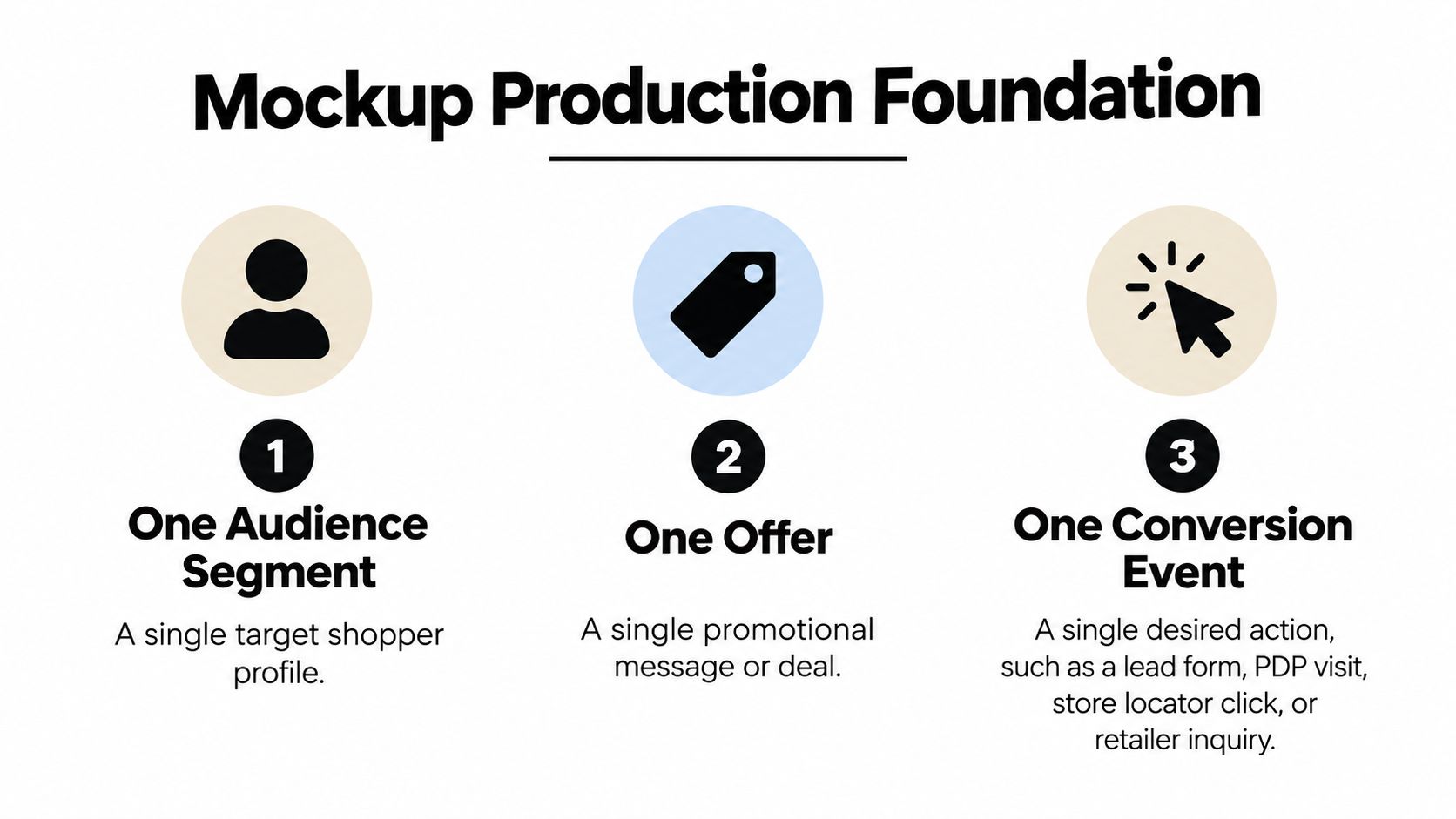
We've seen this work in the mattress industry specifically when brands stop asking for one hero banner. They define one audience, one offer, one conversion event, and one primary KPI, then produce 3 to 4 concepts that vary message and imagery. Placement, audience, budget, and landing page stay constant, so the team can learn which visual premise drives action.
That structure also prevents internal debates based on taste. A room scene, a feature close-up, a comparison visual, and a testimonial concept can all enter the test with the same offer. The mockup becomes quality control for scale, typography, CTA hierarchy, promotional pricing, and brand consistency before money goes behind it.
Setting Up the Mockup Production Foundation
Lock the controls before a designer opens a file. Name the audience segment, such as hot sleepers shopping for a queen hybrid, or independent retailers evaluating a new private label line.
Then define one offer and one conversion event. That event might be a PDP visit, lead form, store locator click, or retailer inquiry, but every variant should drive toward the same action. If one concept sells a trial and another sells store traffic, you're testing strategy and creative at the same time.
Production Specs Designers Need Up Front
For Google responsive display, prepare horizontal 1.91:1 at 1200×628 px, square 1:1 at 1200×1200 px, and vertical 9:16 at 900×1600 px, with each image at or below 5,120 KB, following Google responsive display asset specifications. Supply multiple images per ratio where possible so the platform has usable combinations, not forced crops of one master file.
Copy limits matter just as much as pixels. Short headlines need discipline, descriptions must stay concise, and the business name cannot carry a long promotional message. A claim like cooling pressure relief has to survive being paired with different images and descriptions without becoming vague or noncompliant.
Resolution decisions also affect how quilt pattern, foam edges, and fabric texture hold up when compressed. Teams that need a refresher can use Bedhead guidance on resolution in graphics before final exports are approved.
Pre-Flight Checklist
Audience documented: One segment, one shopping context, and one likely objection.
Offer locked: Price, savings language, dates, and exclusions written exactly as they'll appear.
KPI selected: CTR for attention or cost per lead or acquisition for business value.
Assets named clearly: Ratio, concept, product, and version included in every filename.
Landing page matched: The click destination repeats the same product promise and price.
Don't sign off on a beautiful concept without those details attached. Approval should confirm the creative can be produced, trafficked, and measured, not just admired in a review meeting.
Sequencing a Mattress Mockup That Reads Fast
Mattress shoppers scan before they study. They look for bed scale, comfort cues, price, and a reason to trust a claim they can't test through a screen.
A reliable sequence gives them those answers in order. It also helps designers keep the same hierarchy when a concept moves from horizontal display to a vertical mobile placement.
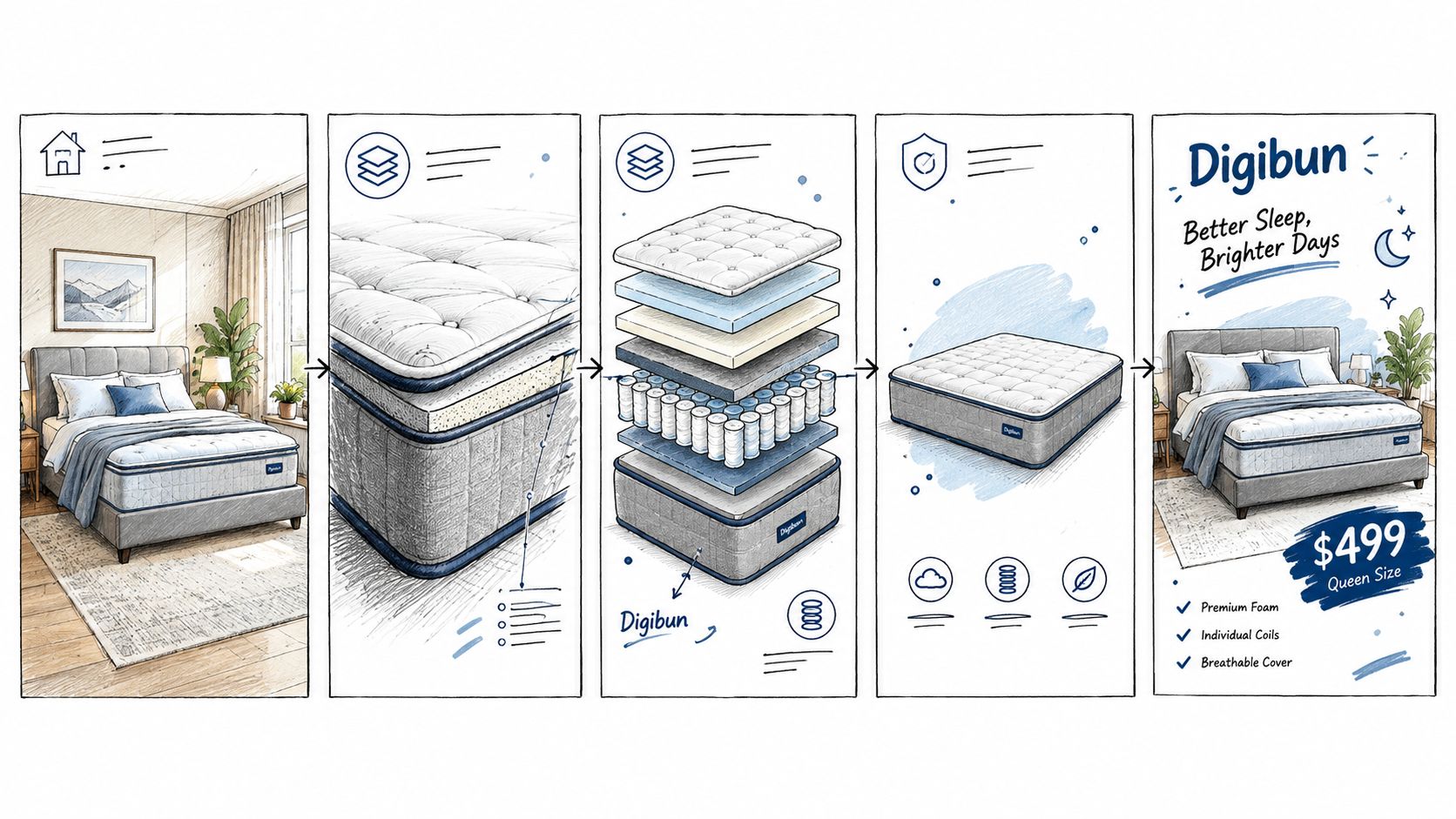
The Five-Layer Sequence
Hero product view: Show the bed in a room or a layered visual that establishes scale, height, and comfort context.
Benefit headline: Lead with one claim, such as pressure relief, temperature control, or motion isolation.
Proof element: Add a certification, warranty term, review count, or construction detail that supports the claim.
Price or promotion: Make the offer and key conditions readable without zooming.
Single CTA: Use one dominant action, not competing buttons for shopping, chatting, and finding a store.
Keep critical product edges, logos, and offer text inside a conservative safe area. Responsive placements crop and recombine assets, so anything placed near the edge is vulnerable. That risk grows in vertical formats, where Google lists a recommended 900×1600 px size and a minimum of 600×1067 px for 9:16 assets in Google vertical responsive display guidance.
A mattress ad should still make sense when the prettiest part of the room disappears.
Avoid surrounding the bed with so much empty space that the product becomes a small rectangle in the center. Realistic settings with natural shadows usually communicate thickness and softness better than a floating composite. They also help shoppers judge whether the bed looks plush, structured, low profile, or substantial.
Use the same sequence across variants, even when the visual premise changes. One concept can open with a room scene, another with a close view of foam layers, and another with a sleeper. The benefit, proof, offer, and CTA should still appear in a predictable order so performance differences point back to the concept, not a new layout every time.
Plugging 3D Assets Into Your Mockup Pipeline
Photography can work well for a finished product, but it becomes slow when ticking changes, a retailer requests a different base, or a promotion needs a new visual by Friday. A render based pipeline lets the team revise product details without rebuilding a set or waiting for another floor sample.
The key is matching the asset type to the job. Not every mockup needs a lifestyle scene, and not every claim can be supported by a clean product shot.
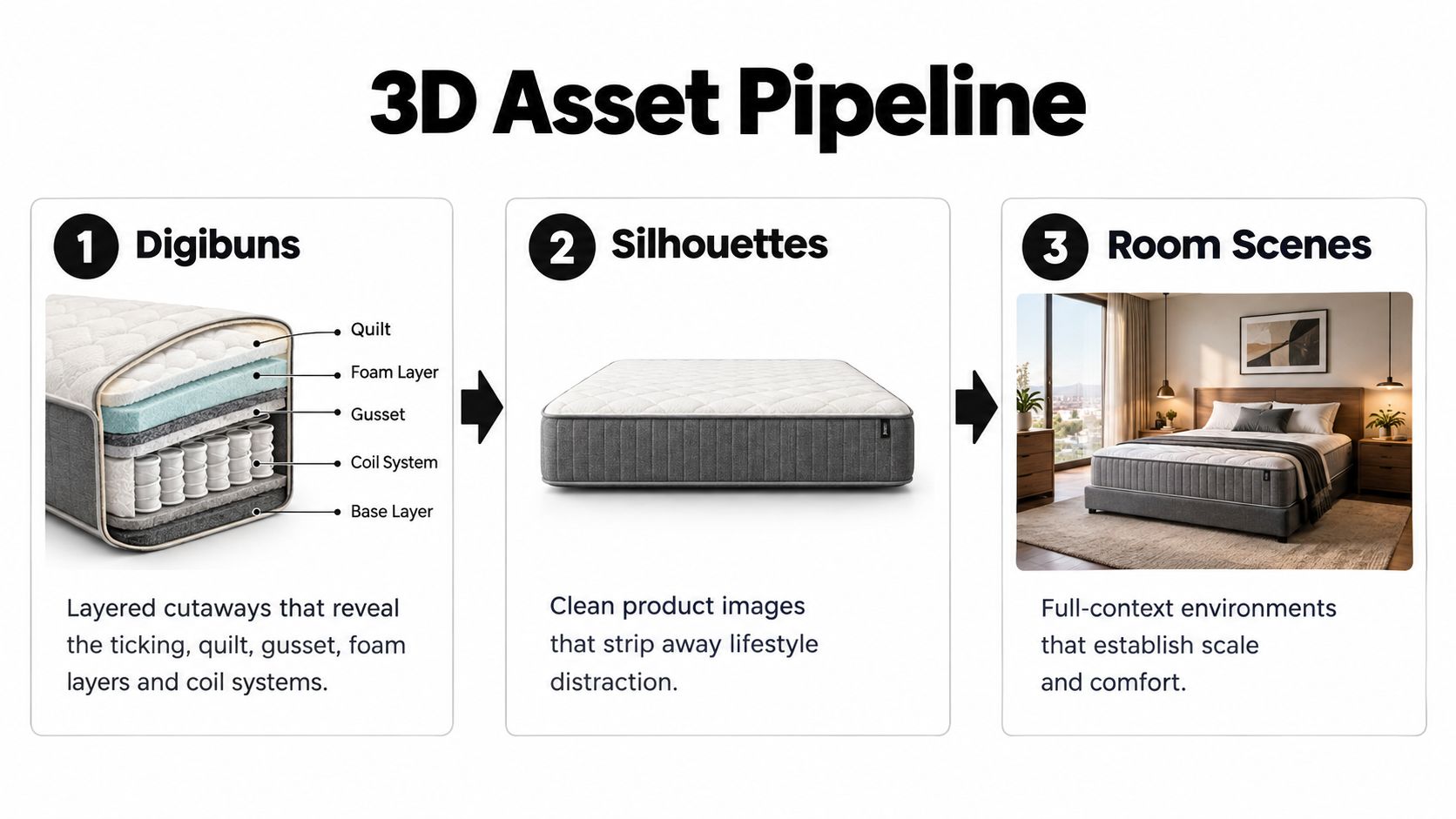
Digibuns are layered cutaways that show what's inside the mattress. They're strongest in the proof layer when the claim depends on construction, such as zoned coils under transition foam or a cooling material placed near the sleep surface. A buyer or RSA can see the relationship between quilt, comfort layers, support core, and edge system without cutting open a floor model.
Silhouettes strip away the room and focus on the product. They work well for retargeting, comparison ads, retailer decks, and placements where recognition matters more than mood. A clean silhouette also makes height, profile, handles, and border design easier to compare across a line.
Room Scenes carry the hero layer. They establish scale against nightstands and headboards, show how the bed fits a real bedroom, and give shoppers a comfort context that a white background can't provide. For showroom support, they also help retailers visualize how a product story could look before the floor model arrives.
BEDHEAD provides these 3D asset types for mattress brands that need responsive ad creative, PDP visuals, and presentation material built from the same product source. Teams exploring interactive use cases can also review Bedhead material on AR and 3D modeling to see where a model can extend beyond static ads.
The operational advantage is consistency. One approved model can feed a square social ad, a vertical video frame, an eCommerce PDP, and a manufacturer deck without the ticking pattern changing between channels. That consistency matters when shoppers compare your ad against the product they'll eventually see in store.
Accessibility and Privacy-Safe Personalization in the Mockup
A polished mockup can still be unusable. Pale gray promo copy over white ticking may look refined on a designer's screen, then disappear for a shopper using a phone outside or a low vision setting.
Accessibility belongs in mockup approval because the creative carries firmness, dimensions, warranty terms, material claims, and pricing. An ACM study found that only 13.2% of 1,069 unique ads showed no inaccessible characteristics, based on ACM research on online ad accessibility. Automated checks help, but a person still needs to confirm the ad's meaning survives outside the visual layout.
Functional Approval Checklist
Contrast checked: Headline, price, CTA, and disclosure remain readable at small sizes.
Text scaling reviewed: Larger text does not cover the product or push terms out of view.
Alt text written accurately: The description states the product and offer instead of repeating a filename.
Keyboard focus visible: Interactive elements can be reached and identified without a mouse.
Motion controlled: Animation does not hide the first frame's brand, product, or offer.
Captions included: Video claims and spoken proof points remain available with sound off.
Personalization creates a second approval problem. One static mockup cannot represent every version a shopper might see when headlines, images, CTAs, and landing pages change by context or consent status. Industry coverage of first party data and contextual targeting trends points toward consent based systems and multiple creative variants rather than unrestricted tracking.
Document the rules inside the mockup set. Show the baseline promise, approved variable fields, audience or context rules, and fallback creative when consent is absent. Teams refining that approach can compare it with personalisation strategies that boost conversions and with Bedhead guidance on zero party data.
For mattress claims, consistency is the guardrail. If one variant says cooling, another says pressure relief, and the landing page leads with adjustability, the shopper receives three product stories. A privacy safe mockup system makes those changes visible before launch and keeps a relevant contextual version available without relying on sensitive behavioral data.
Testing Mockups With a Real Decision Rule
Stakeholder preference is not a test. The executive who likes the darkest bedroom scene may be right, but the mockup process should prove it against the audience that has to buy, visit, or inquire.
Launch 3 to 4 variants with the same audience, budget structure, placement set, and landing page. Change the visual premise or message, not five variables at once. A sleep scene, feature close-up, comparison chart, and testimonial give you cleaner learning than four nearly identical room renders.
The Staged Test Workflow
Before launch, confirm tracking, UTM parameters, event firing, audience eligibility, and landing page consistency. A strong setup process like Bedhead guidance on conversion tracking setup prevents the common problem of judging creative with broken measurement.
Let delivery stabilize for at least seven days, consistent with the staged approach described in creative testing performance data. Monitor impressions, reach, frequency, CTR, conversion rate, CPA or CPL, and spend share. Use CTR to judge initial attention and cost per lead or acquisition to judge business value.
Do not declare a winner from a handful of clicks. Set the exposure threshold before the first impression runs.
Pause clear losers only after sufficient exposure. Then iterate the winning premise with one changed variable, such as swapping a room scene for a Digibun while keeping the headline and offer constant. For additional structure on variant discipline, ContentBuck on testing ad creatives offers a useful companion view.
Available creative testing analyses report that only about 5 to 8% of ads become winners and roughly 6% of creatives capture most account spend, as noted in the testing data cited above. That reality argues against polishing one mockup for weeks. Build a test log that links each visual premise to qualified leads, PDP actions, store locator use, and retailer inquiries, so the next launch starts from evidence instead of memory.
Presenting Mockups to Retail and Manufacturer Buyers
A buyer meeting is not a design reveal. Retailers and manufacturers need to know how the creative will differentiate a floor, protect margin, support RSAs, and move a shopper from an ad to a product conversation.
Walk into that meeting with a deck that explains decisions before anyone reacts to colors. Start with the shopper problem, such as confusion between two hybrid models that look identical in white ticking. Then show how the mockup system separates them through construction, comfort language, and proof.
A Four-Part Buyer Presentation
Concept rationale comes first. Explain the audience, offer, conversion event, and KPI in plain language. If the campaign is built to send shoppers to a retailer PDP, say so before showing creative intended for a national DTC sale.
Next, show the 3 to 4 variants and what each one tests. A Digibun concept may test whether layer transparency improves qualified clicks. A room scene may test comfort aspiration, while a comparison concept tests firmness clarity for shoppers worried about returns.
Then show responsive previews. Put the horizontal, square, and vertical versions side by side and point to the safe area. Buyers understand cropping risk quickly when they can see a warranty badge move, a price tighten, or a border pattern disappear.
Close the presentation with the test plan. Name the stabilization period, primary KPI, minimum exposure threshold, and the action you'll take with winners and losers. That turns approval into a business decision instead of a vote on taste.
Trade and DTC Versions Should Not Be Identical
Trade buyers often need the silhouette and Digibun early because they're judging construction, line architecture, and how RSAs will explain the bed. They also care whether the advertised offer can work across stores with different floor assortments.
DTC teams usually need the room scene first, followed by proof that reduces purchase anxiety online. Their concerns lean toward PDP consistency, return risk, delivery expectations, and whether the ad promise matches the product page.
Both groups benefit from the same source assets. A manufacturer can support national creative, retailer co-op placements, and sales training without producing three unrelated versions of the same mattress. That is where better visualization compounds, because each season builds on an approved product system rather than starting from another photoshoot.
Print Ready Checklist
Placement map complete: Every channel has a ratio, preview, and known crop risk.
Controls documented: Audience, offer, conversion event, KPI, budget, and landing page are fixed.
Sequence verified: Hero, benefit, proof, price, and CTA survive every format.
3D asset matched: Digibun, silhouette, or room scene supports the claim being tested.
Accessibility passed: Contrast, captions, alt text, focus, motion, and disclosures were reviewed.
Personalization rules clear: Variable fields, context rules, and no consent fallback are documented.
Test log ready: Each concept will be tied to qualified actions, not engagement alone.
Buyer deck structured: Rationale, variants, previews, and decision thresholds are ready to present.
Production ready mockups save more than design time. They reduce claim disputes, prevent last minute retailer revisions, and give sales teams a clearer story for the showroom floor.
For ongoing peer discussion, Bedhead Network at www.BedheadNetwork.com is free for mattress industry professionals. It's a hub for marketing insights, news updates, networking, training resources, an industry directory, and business tools for manufacturers, retailers, and partners working through the same creative problems.
If you're evaluating your current mattress ad creative, BEDHEAD can help you build Digibuns, silhouettes, room scenes, and responsive mockups from one accurate product system. That gives your team creative that's ready for paid media, PDPs, retailer presentations, and showroom support without rebuilding the asset for every placement.