Digital Product Imaging for Mattress Marketing
A shopper lands on a mattress product page, sees a polished studio shot of a quilted top, scrolls past a logo, and still can't tell how thick the mattress is, what's inside it, or whether the ticking looks like the fabric they'll receive. The image may be attractive, but it hasn't answered the questions that help someone choose.
That's the gap digital product imaging should close. For mattress brands, the job isn't to make better photos. It's to build a dependable system of accurate product views that helps shoppers evaluate construction, scale, materials, and options across product pages, marketplaces, ads, and the showroom.
The Mattress Image Problem Most PDPs Share
A clean hero shot can make a mattress look orderly without helping a shopper compare it. The top quilting may be visible, but the image might not show the gusset, side profile, handles, or how the mattress sits on a frame. A retailer can have a complete written description and still leave basic visual questions unanswered.
That matters because shoppers often go to the images first. Baymard usability research found that 56% of users' first actions after reaching a product-details page involved exploring product images, and 42% tried to judge size from those images (Baymard's product-image research). A mattress page therefore needs to communicate more than brand mood. It needs to make construction and proportions understandable.
I've seen this failure pattern across mattress catalogs: the product team has good specifications, the retailer has a presentable floor model, and the PDP has one isolated image that doesn't translate either of those things. The shopper still has to infer whether the surface looks plush or taut, how the profile compares with another model, and whether a split configuration will suit the bed setup. That uncertainty can make a product page feel incomplete even when the copy is detailed.
A useful comparison is how shoppers assess furniture online. A guide to comparing furniture online with photos makes the broader point that images help buyers evaluate items they can't inspect in person. Mattress brands need to take that principle further, because the product's layers and materials aren't visible from a single exterior angle.
The practical distinction: A pretty image attracts attention. An evaluable image helps a shopper understand what's being sold.
Treat the product page as a selling environment, not a digital catalog page. Bedhead's guidance on product detail page optimization fits the same principle: each image should answer a real product question, not fill a slot in the gallery.
What Digital Product Imaging Actually Means for Mattress Brands
Digital product imaging starts with an image file, but a useful mattress catalog needs a coordinated set of assets. Each view should have a defined job: identify the model, show its scale, reveal a feature, or explain how the product is built.
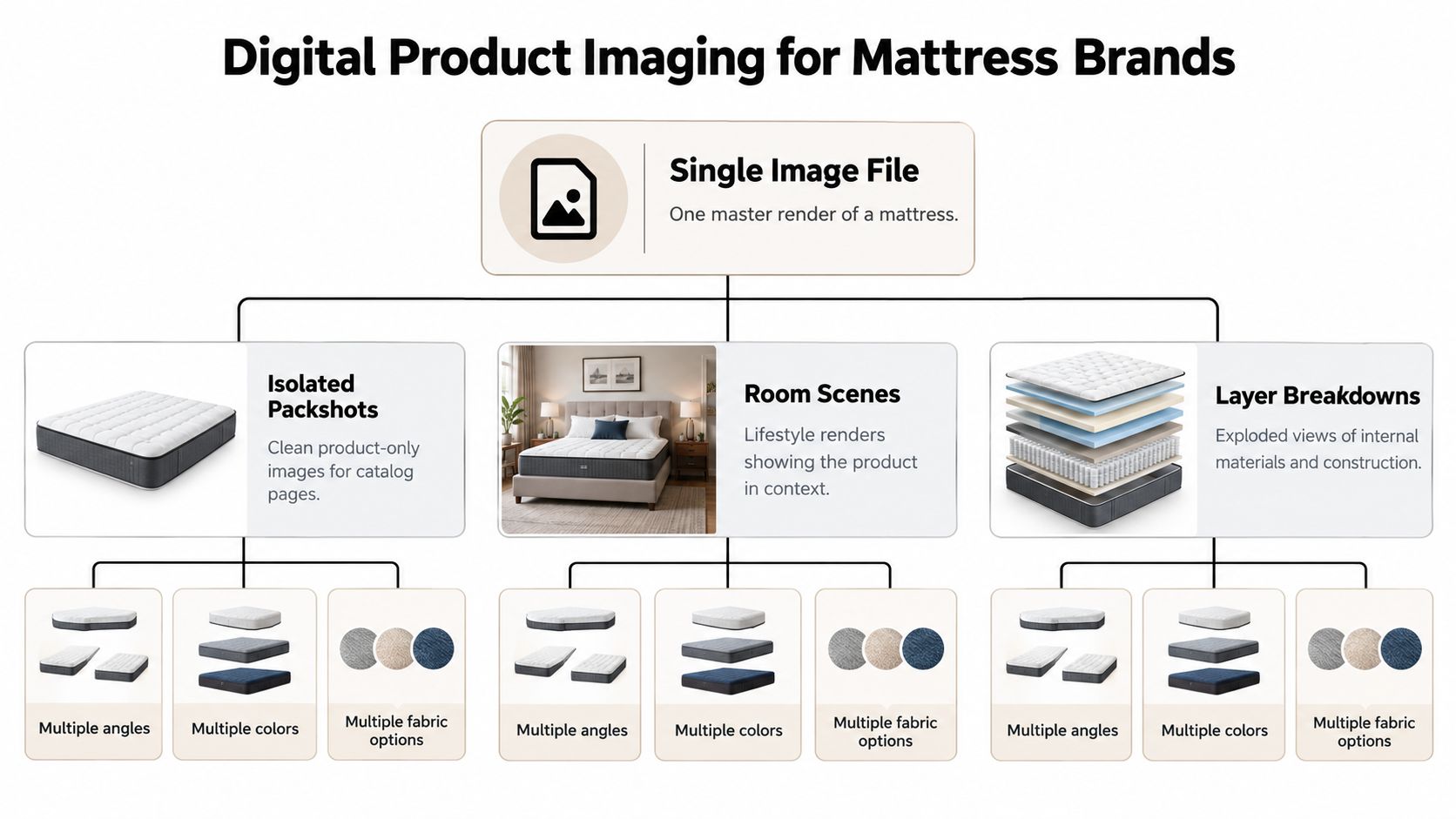
Start with the isolated packshot, a clean view of the mattress against a plain background. It gives retailers and marketplaces a consistent product image. The next asset should establish context: a room scene or in-scale composition showing the mattress on a frame in a bedroom, with proportions that shoppers can judge. Baymard's research found that 42% of users attempted to assess a product's size from its images, so mattress pages shouldn't rely on an isolated shot alone (Baymard on in-scale product images).
A third category is detail imagery. Close-ups should make the ticking pattern, quilt stitching, piping, gusset, edge profile, and handle placement legible. If the product line varies by fabric or color, the images need to distinguish those options without implying that a shopper is looking at a different construction.
Then there are layer breakdowns, sometimes called Digibuns. These visuals show foam layers or hybrid construction in a way that an exterior product shot can't. They can help a retail associate explain what sits beneath the quilt, and they give online shoppers a clearer view of how models differ. Interactive or 3D views can add rotation and inspection, but they work only when the geometry, materials, and controls support genuine product understanding.
Map each image to a shopper question
A complete asset set might include:
Packshot: Which mattress is this?
Room scene: How might it look in a bedroom?
Scale view: How does its height and footprint compare with the bed setup?
Detail close-up: What do the ticking, seams, and gusset look like?
Layer breakdown: What materials and layers are inside?
Interactive view: Can I inspect the product from another angle?
This system should serve more than the PDP. A manufacturer may need a showroom screen, a retailer may need marketplace files, and a startup may need product assets for paid media. Build a master library around the product's real variations, then adapt the exports for each destination.
Traditional Photography vs 3D Rendering for Mattress Catalogs
Traditional photography and 3D rendering solve different production problems. Photography captures a physical mattress as it exists at the time of the shoot. Rendering builds a digital model that can be used to create controlled views and revisions without bringing the physical product back to a studio each time.
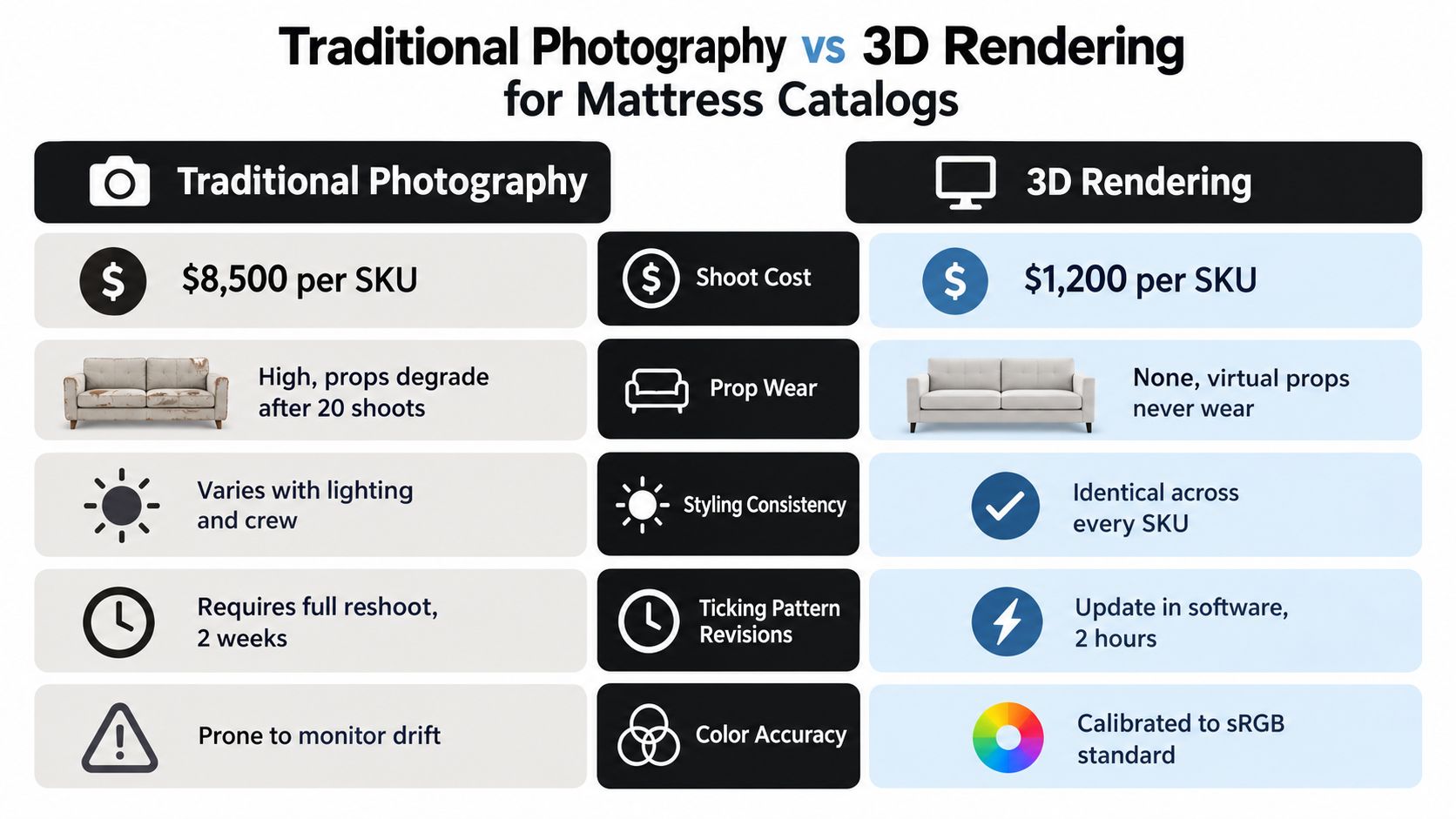
Criterion | Traditional photography | 3D rendering |
|---|---|---|
Product source | A physical mattress must be available to shoot | A digital model can be built from approved product references |
Tactile character | Can capture real fabric behavior and physical texture | Depends on the quality of material modeling and references |
Styling consistency | Lighting, props, and setup must be controlled from shoot to shoot | Camera, lighting, and room setups can be reused |
Product revisions | Changes may require new photography | Approved model details can be updated in the 3D pipeline |
Asset reuse | Images are shaped by the original shoot and framing | Views can be produced for different channels and compositions |
Photography remains valuable when the product has tactile qualities that are difficult to reproduce convincingly, such as a distinctive knit ticking or nuanced surface texture. It also gives a team a direct visual record of the physical sample. The trade-off is that the mattress needs to be available, the set needs to be styled, and product changes can mean arranging another shoot.
Rendering shifts the work upstream. The manufacturer or brand provides CAD data, product specifications, and physical references; the 3D team builds a model and checks its details against those references. Once approved, the model can support packshots, room scenes, close-ups, and different product angles. That's useful when a line has multiple sizes, fabrics, or colorways, or when the team needs to revise a ticking pattern after launch.
Choose the pipeline that fits the product
For a limited launch with one distinctive physical sample, photography may be the sensible choice. For a broad catalog that needs repeatable angles and frequent revisions, a 3D workflow can reduce dependence on repeated physical setups. Hybrid manufacturers often benefit from both: photography for tactile reference or campaign work, rendering for scalable catalog production and variations.
The attached comparison chart includes precise production figures for cost and turnaround. Those figures are not established by the verified product-imaging data available here, so they shouldn't be used as general benchmarks. Build your own comparison using your actual shoot expenses, render scope, revision history, and asset reuse needs.
Techniques That Make Mattress Images Actually Work
A mattress image can be technically sharp and still misrepresent the product. The craft is in keeping geometry, materials, and color faithful while making details clear enough to inspect.
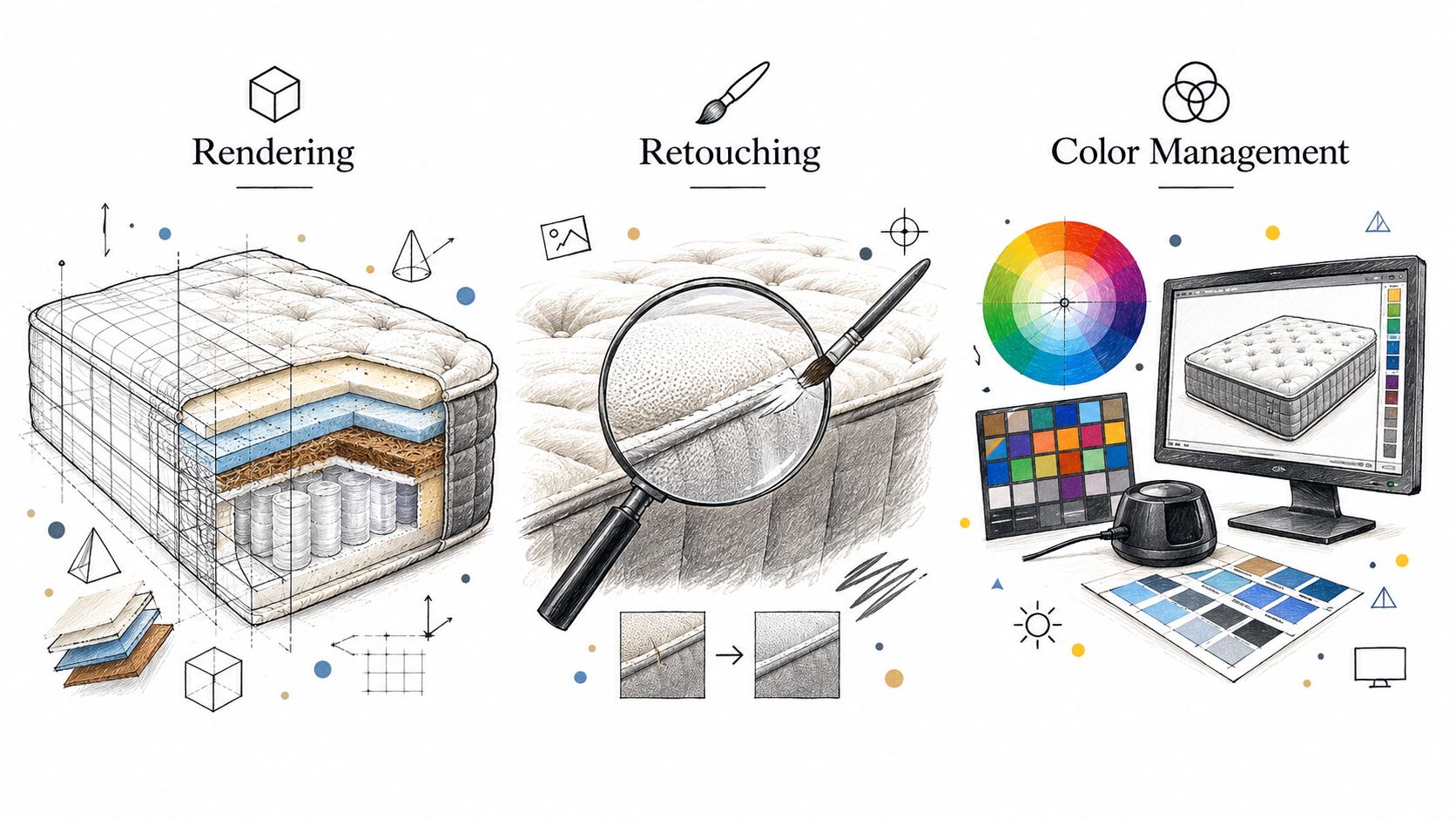
Rendering protects construction and form
Check the mattress profile first. A render should show the correct height, edge shape, gusset, corner construction, and handle placement. If the quilt is meant to have a visible loft, the model and lighting should preserve that impression rather than flattening the top into a generic surface.
Materials need equal care. Knit ticking should read as fabric, not a smooth digital shell. Foam layers in a cutaway should look distinct enough to follow, but the image shouldn't imply materials or construction that aren't in the approved specification. Reference the physical sample and technical information together. Neither a CAD model nor a photograph automatically guarantees that every product detail is current.
Retouching should clarify, not conceal
Retouching is for cleanup and consistency, not redesign. Correct stray artifacts, remove distractions, and keep seams and edges legible. Don't over-smooth the surface until the foam looks plastic or erase the texture that helps a shopper distinguish one ticking option from another.
Review rule: If a correction makes the mattress look more polished but less like the physical product, it's the wrong correction.
Color management helps avoid a different problem: the digital image may look plausible on one screen and misleading on another. Use a consistent working color process for web assets, and compare approvals against a physical fabric sample under controlled viewing conditions. Teams that need a shopper-facing explanation of online color variation can also point to this practical guide on avoiding color mismatch when buying furniture.
Audit the image library
Open a representative product image and check whether the ticking pattern, stitch contrast, quilt shape, gusset piping, and edge profile remain clear. Inspect close-ups at their intended display size, not just in the design file. Make sure color approvals reflect the physical material, and keep revisions tied to an identified product version.
Image optimization is part of that craft. A high-resolution zoom asset can help a shopper inspect fabric detail, while a lighter preview supports faster initial loading. For practical guidance on that balance, use Bedhead's image optimization recommendations. The objective is not to make every file as large as possible. It's to deliver enough native detail for real inspection without sending an unnecessarily heavy asset to every device.
A Workflow That Stays Compliant Across Marketplaces
A render isn't ready to publish just because the creative team approves it. Mattress brands need a production workflow that checks the product, the color, and each destination's image rules before files enter the feed or listing.
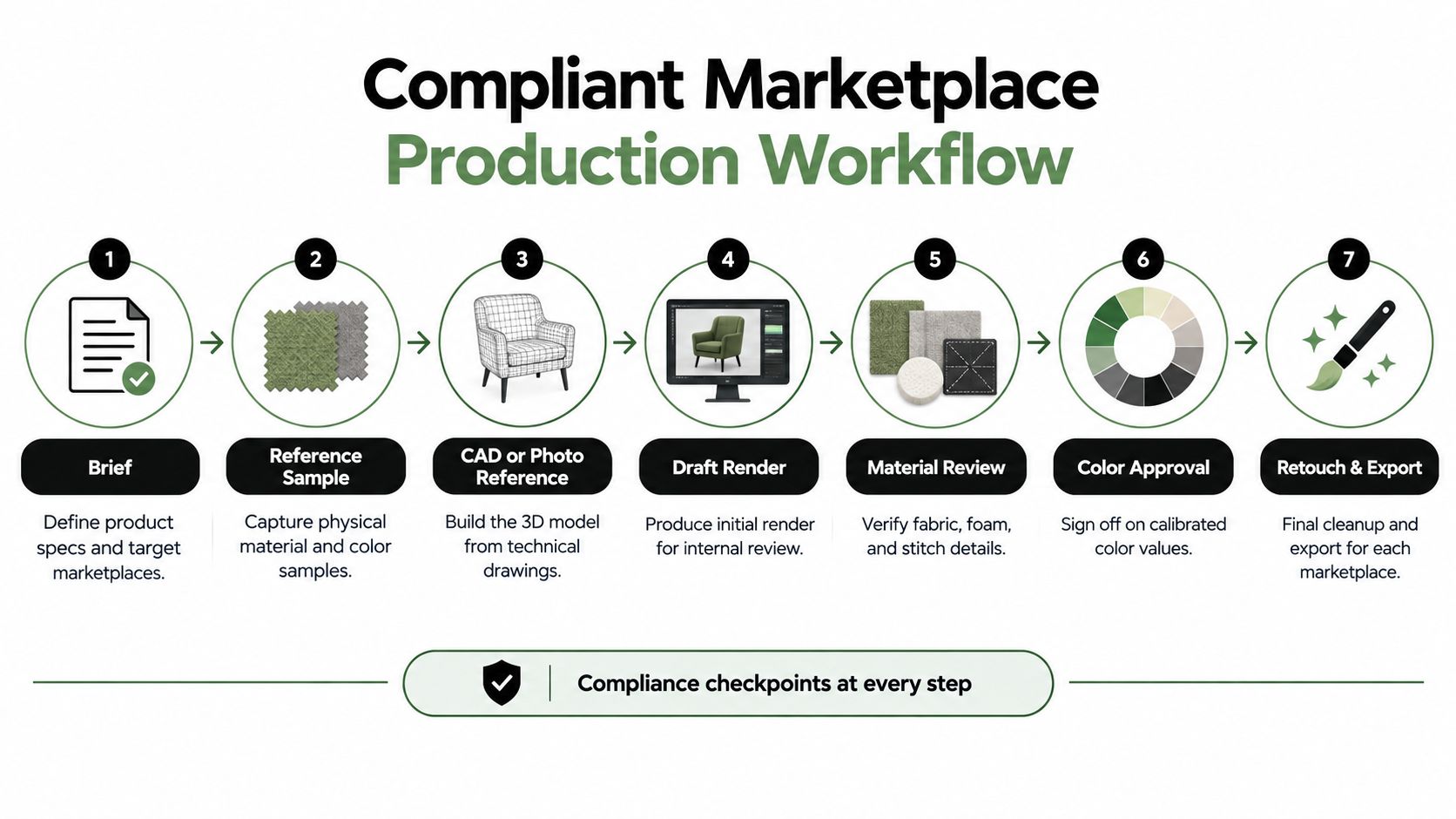
Build approval into the production path
Brief the job. List the product version, approved options, required views, and target destinations. Identify what's included, such as a foundation or adjustable base, so imagery doesn't create ambiguity.
Collect references. Gather the physical sample, fabric swatches, product specifications, and available CAD or photography. Note differences between the reference item and any current production changes.
Build the model or prepare the shoot. For a render, use technical drawings and product references. For photography, confirm the correct mattress and materials are on set.
Review a draft. Check silhouette, profile, quilting, seams, handles, and component placement before requesting a polished final.
Approve materials and color. Compare the render or photograph with the approved physical sample. Keep the approval attached to the exact product variation.
Retouch and prepare exports. Preserve texture and construction detail, then create channel-appropriate crops and file sizes.
Run destination QA. Confirm that the main image meets the rules for its product feed or marketplace, then test the final files in the actual listing workflow.
Google Merchant Center requires product feeds to include a main image URL and says the image must accurately represent the item, use an accepted format, and be crawlable. It prohibits placeholder images, thumbnails, promotional text, watermarks, and borders. Google also states that a 500 × 500 pixel minimum for product and additional product images will take effect January 31, 2027 (Google Merchant Center image requirements). Treat that as a future requirement and prepare catalog templates accordingly.
Google's local product-image guidance recommends at least 800 × 800 pixels, a maximum file size of 16 MB, a maximum resolution of 64 megapixels, and product framing that occupies roughly 75%–90% of the image area (Google's local product-image specifications). Amazon requires a pure white main-image background, at least 500 pixels on the longest side, and recommends 1,000 pixels or more to enable zoom (Amazon's product-image requirements). Keep separate export presets for each destination rather than assuming one master file will satisfy every rule. Bedhead's Amazon image requirements guide can help teams build those checks into their listing process.
Where the ROI Actually Shows Up
Digital product imaging earns its place when it helps a mattress brand sell the right product with less confusion. The business case isn't an assumed conversion lift. It's a way to connect the image set to the decisions teams already monitor, such as add-to-cart activity, average ticket, and returns.
On a PDP, a coordinated set lets a shopper compare a queen with a king or split configuration more clearly. The packshot identifies the mattress; an in-scale bedroom scene shows how it relates to the frame and room; detail views clarify the fabric and profile. If shoppers still can't tell what makes two models different, an image gallery hasn't done enough selling work.
In the showroom, a layer breakdown gives retail associates a visual aid when a shopper asks what's inside the mattress. It can support a more consistent explanation of foam layers or hybrid construction, especially when the floor model doesn't make those components visible. Pair the screen content with sales training so the imagery reinforces a clear product story instead of becoming background decoration.
Returns are another reason to prioritize accuracy. If an image exaggerates the loft, changes the fabric color, or suggests that a base is included when it isn't, the shopper may receive something different from what they expected. Clear, accurate imagery helps set expectations before checkout. It can also reduce the need for staff to explain avoidable misunderstandings after delivery.
Tie the image system to business measures
Define the measure before changing the asset set. Track PDP actions around the updated image gallery, watch how product options are compared, and review reasons customers give for returns or product questions. Bedhead's guide to measuring marketing ROI offers a useful framework for connecting marketing activity with business outcomes.
A room scene, a Digibun, or a close-up isn't valuable because it looks polished. It's valuable when it answers a question that otherwise stalls a decision, confuses a comparison, or creates a mismatch between expectation and delivered product.
Bringing It Together and Choosing Your Next Step
Treat digital product imaging as a production system, not a one-time deliverable. The master render, product references, approved colors, export presets, and marketplace checks all need to stay aligned as the catalog changes. That's what lets a manufacturer reuse accurate assets across the PDP, marketplace, showroom, and campaign work without losing control of product detail.
Start with a short catalog audit:
Count the asset types you have for each mattress SKU, from packshot and room scene to construction views.
Check the marketplace files against each destination's current image requirements.
Choose one missing category that would answer a real shopper or sales-floor question.
Verify the product details against the current sample and specification, especially ticking, gusset, quilt, handles, and foam layers.
Bedhead Marketing is focused exclusively on mattress and bedding brands, with 3D rendering, Digibuns, silhouettes, room scenes, SEO, paid media, product-page optimization, and retail sales training. For ongoing industry learning, mattress professionals can also join Bedhead Network, a free hub for industry professionals, with marketing insights, news updates, networking, training resources, an industry directory, and business tools.
If you're reviewing your mattress catalog, Bedhead can help assess the image gaps, build accurate 3D assets, and prepare product visuals for PDPs and marketplace use. Explore BEDHEAD to discuss a practical imaging workflow for your products.