White Background for Products in the Mattress Industry
76% of 7 million edited ecommerce product images were converted to a pure white background, and about 92% had their original background removed. For mattresses, though, copying generic packshot advice can create compliant images that still fail to communicate loft, texture, scale, and comfort.
That distinction matters to every bedding brand managing marketplace listings, retailer feeds, paid ads, and product detail pages. A mattress is large, soft-edged, and visually dependent on lighting. A poorly handled white background can erase the quilt, flatten a pillow-top, turn ticking gray, or leave a distracting contact shadow under the foundation.
Bedhead Marketing works exclusively with mattress manufacturers, retailers, private label brands, and sleep product startups. Its work spans 3D mattress rendering, performance marketing, brand development, sales training, and product presentation, because product imagery only performs when it supports how mattresses are manufactured, sold, compared, and explained.
What White Background Product Photography Really Means
The 76% finding from an analysis of 7 million edited product images, together with the related 92% background-removal result, shows how firmly isolated imagery has become embedded in ecommerce presentation (Prodshot's analysis of white-background product photography). White background for products usually means a controlled studio image in which the mattress is isolated against a uniformly lit canvas, exported at RGB 255,255,255, with no props, furniture, room context, or unrelated visual cues.
That definition works well for a phone case. It needs more care for a hybrid mattress with a thick gusset, rounded corners, handles, quilting, and multiple foam layers. The product must remain visually clean without looking deflated or artificially cut out.
The mattress-specific problem
Mattresses are bulky and soft-edged. Their shape changes with compression, foundation support, camera height, and the direction of the light. A high-key setup that works for small hard goods can overexpose the white ticking, remove the seam shadow, and make a quilted cover look like a flat rectangle.
The objective isn't just to make the background white. It's to preserve the details that help a buyer understand the product:
Loft: Keep the pillow-top or comfort layer visibly full.
Construction: Make the gusset, tape edge, handles, and quilting readable.
Texture: Retain the weave and surface pattern of the ticking.
Scale: Show enough profile and frame fill for the mattress to feel substantial.
Resources outside the bedding category can still help with broader studio thinking. For example, senior portraits and boudoir photography demonstrates how controlled lighting and careful edge treatment affect the way soft surfaces read, although mattress production requires different staging, framing, and compliance checks.
A clean cutout is the baseline. The production question is how to achieve it without sacrificing the physical cues that drive mattress comparison. That means treating white-background photography as a compliance, lighting, and catalog-system problem, not just a background-removal task.
Why Marketplaces and Shoppers Default to Clean Backgrounds
Marketplace rules, shopper scanning habits, and catalog distribution systems all favor isolated product images. For mattresses, that preference creates a production standard as much as a visual style.
Amazon's summarized guidance calls for a pure white background, at least 85% product fill, and a minimum 1,000-pixel long side for zoom. It recommends 2,000 pixels for stronger high-resolution display quality, according to ProShot Media Group's white-background guide. These requirements make the main image easier to compare in a crowded results grid. The first image must identify the mattress quickly, before brand storytelling or room context has a role.
The same pattern appears in shopper behavior. 94.1% of online shoppers say product images influence buying behavior, and 83.6% say a product's appearance in a photo directly affects the decision, according to the ecommerce research cited by Pola Marketing. That source also reports that white-background listings can receive up to 20% more clicks than cluttered or colored alternatives.
Mattress photography adds a difficult compliance trade-off. A large, soft-edged product can meet a white-background requirement while losing the profile, loft, tape edge, or quilting that helps shoppers compare models. A clipped corner or weak contact shadow can also make the mattress appear distorted, compressed, or poorly supported.
Driver | What It Requires | Mattress-Brand Consequence If Ignored |
|---|---|---|
Marketplace rules | Isolated main images, pure white backgrounds, controlled framing, and adequate resolution | Listing friction, weaker scanability, and possible compliance problems |
Shopper comparison | Consistent framing that keeps attention on shape, size, loft, and construction | Buyers judge presentation quality instead of mattress features |
Catalog distribution | Clean assets that can move through feeds, ads, search results, and retailer grids | Manual edits, inconsistent galleries, and slower campaign production |
The issue extends beyond a single product page. Noncompliant hero images can restrict listing use, weaken paid-media eligibility, or look inconsistent beside competing mattresses. Predictable canvases and clean silhouettes also reduce rework across retailer feeds and dynamic placements.
A practical furniture photo buying guide helps explain why consistent product framing supports comparison. Bedding teams must apply that principle with tighter control of fabric texture, sidewall shape, and visible support. Compliance is no longer a one-off upload concern once a brand manages a large catalog. It becomes a repeatable production standard.
Studio Setup and Lighting for Mattresses on White
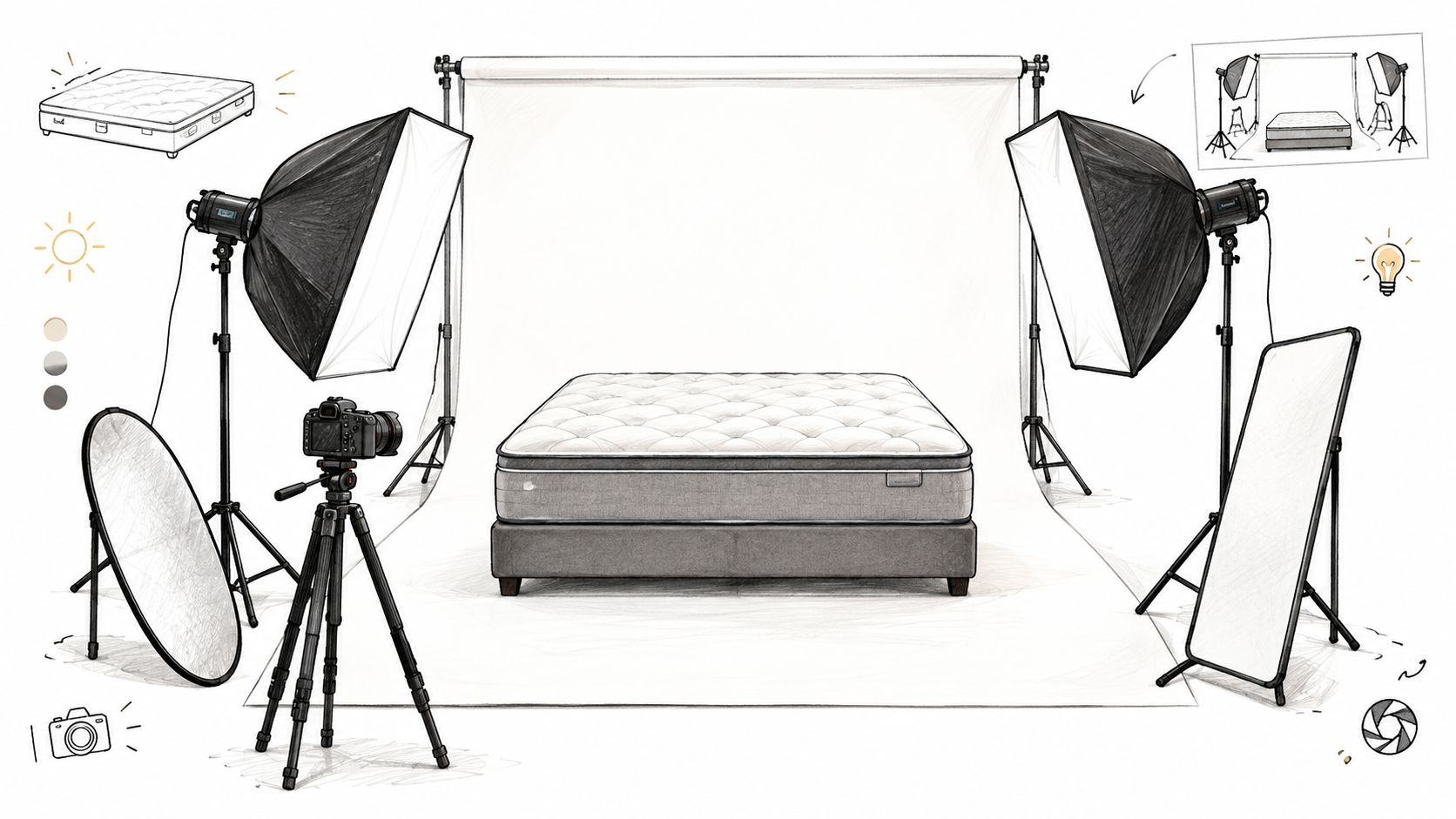
A mattress needs enough physical space to show its silhouette without losing the texture that makes it look comfortable. Start with a clean sweep large enough for the queen or king being photographed, then position the mattress so the top panel, tape edge, gusset, handles, and foundation relationship remain visible.
Avoid pushing the product too close to the background. That creates a hard contact shadow and makes the mattress appear pasted onto the sweep. Raise or separate the product when possible, and preserve enough underside definition to show where the mattress ends and the foundation begins.
A workable high-key recipe
Use large, diffused key sources from camera-left and camera-right. They should wrap around the corners rather than create bright strips along the sidewalls. Add a soft top fill to suppress the broad seam shadow that can cross the top panel, while keeping enough directional variation for quilting and foam profile to remain readable.
Light the background separately and lift it slightly above the subject exposure. The goal is a clean sweep that reaches RGB 255,255,255 without blowing out white ticking or bleaching the subtle color of a cover.
For teams reviewing a room or studio environment, it can also be useful to browse furniture lighting options for ideas about diffusion and placement. Furniture lighting isn't a substitute for product testing, but it reinforces an important point: broad, controlled illumination usually serves soft, large surfaces better than small, hard sources.
A reliable capture setup includes:
ISO 100: Keep the file clean and retain fabric detail.
Around f/8 to f/11: Hold the full bed in focus without making diffraction the dominant concern.
Strobe-synced shutter: Tune the shutter to the lighting system rather than relying on ambient exposure.
Tethered capture: Inspect corners, quilting, tape edges, and shadow behavior while the mattress is still staged.
Color-checker pass: Establish a known reference for ticking whites and colored covers.
The Bedhead guide to product photography for ecommerce is useful when a mattress team needs to connect studio decisions with product-page requirements. In practice, the final white check should sample multiple corners and edges. A background that looks white to the eye can still read gray or tinted in a marketplace file.
Comparing Studio Photography, AI Retouching, and 3D Renders
There isn't one production path that suits every bedding catalog. Traditional photography, AI background replacement, and full 3D or CGI each solve a different part of the workflow.
Studio photography remains strongest when a new mattress needs authentic material evidence. A photographer can capture the exact ticking, quilt compression, tape-edge construction, and natural interaction between the mattress and foundation. The trade-off is that every new color, size, cover revision, or model change may require another physical setup.
AI background replacement is useful when the source image already has accurate product information and the team needs a fast cleanup. It can isolate a catalog of existing images and support colorway or listing refreshes, but it requires close review for edge halos, color casts, warped quilting, and false texture. Automation makes the first pass faster. It doesn't remove the need for mattress-specific QA.
Full 3D rendering starts with a digital model and material definitions. A well-built model can generate a Silhouette, a Room Scene, a profile view, or a Digibun showing layered foam and support construction. The initial modeling work can be substantial, but later variants don't depend on transporting a physical mattress, rebuilding a set, or scheduling another shoot. Bedhead's explanation of rendering 3D models provides useful context for how that pipeline supports product visualization.
Path | Cost per SKU | Turnaround | Visual Fidelity | Best Fit |
|---|---|---|---|---|
Studio photography | Varies by set, crew, and retouching scope | Slower when staging and reshoots are involved | Strong for real ticking, quilt, and physical finish | Hero launches, tactile close-ups, and lifestyle extensions |
AI background replacement | Varies by tool, image condition, and review needs | Fast for batch cleanup | Dependent on source quality and edge accuracy | SKU refreshes, colorways, and marketplace cleanup |
3D or CGI rendering | Higher initial modeling effort, then reusable assets | Efficient for variants after the model exists | Strong when materials and construction are modeled accurately | Size changes, bundles, pre-launch products, and repeated variants |
The key trade-off is repeatability versus physical authenticity. A brand that changes models often may get more value from a reusable 3D pipeline than from repeatedly photographing the same construction.
Retouching and QA Workflows That Hold Up at Catalog Scale
Retouching a mattress isn't just removing a backdrop. The editor must preserve the rounded corner, pillow-top edge, quilt pattern, and shadow logic while making the canvas meet a strict marketplace standard.
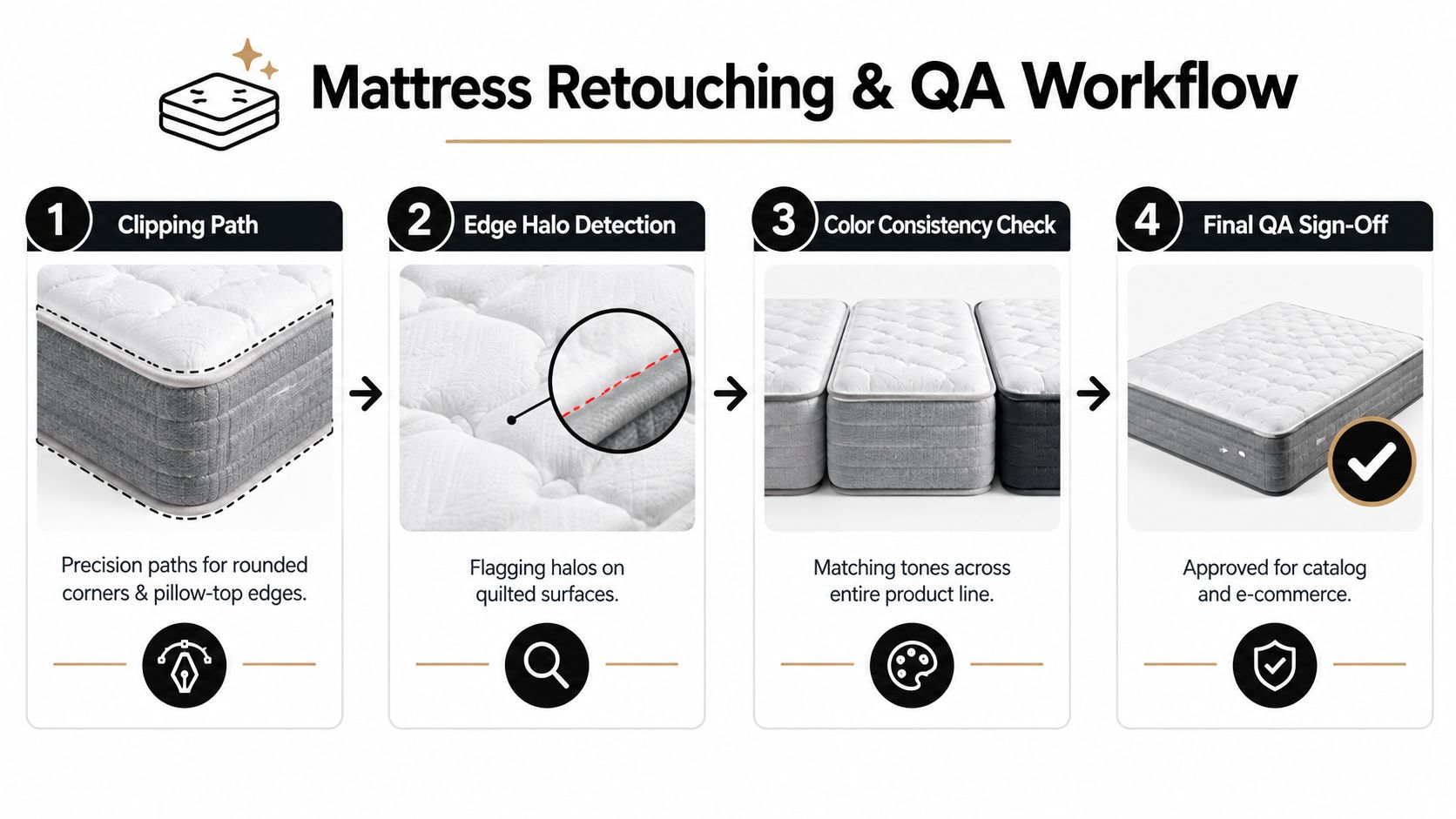
Start with a clipping path that follows the actual product contour. A path that's too tight will shave off loft. One that's too loose leaves a pale fringe around white ticking. Quilted seams need special attention because contrast changes across the stitch pattern, making automated selections prone to halos.
The production checklist
Clipping path: Follow rounded corners and pillow-top edges without cutting into the silhouette.
Edge halo detection: Review quilted seams at 100% and inspect pale or dark outlines against the white canvas.
Shadow consistency: Keep the hero, corner, profile, and lifestyle sets visually related. A floating mattress and a heavily grounded mattress shouldn't appear to belong to different catalogs.
Texture preservation: Check knit covers and ticking for plastic-looking blur. Noise reduction and aggressive sharpening can both damage fabric credibility.
Color neutrality: Compare the file with a known reference mattress and confirm that whites haven't shifted blue, green, or gray.
Canvas confirmation: Sample corner and edge pixels to verify the intended RGB 255,255,255 background.
File control: Use consistent SKU, size, angle, and revision naming before CMS upload.
Batch actions in Photoshop and Capture One can standardize exposure, export dimensions, sharpening, and naming. They shouldn't apply identical corrections blindly to every mattress. White-on-white ticking, charcoal covers, and reflective quilting each need a review threshold that catches different failures.
The practical advantage of a disciplined workflow is consistency between people. A two-person team can move through a large release more reliably when both editors use the same path rules, sample points, version structure, and sign-off criteria. The Bedhead guide to optimizing images for the web adds the performance layer, because a compliant file still needs sensible compression and delivery.
When White Backgrounds Hurt Mattress Storytelling
A pure white hero image can be the right marketplace asset and the wrong first impression for a comfort-led product page. Mattresses sell through cues that a cutout often suppresses: visible loft, bedroom scale, edge support, sleeping position, fabric hand, and the relationship between the mattress and its base.
The problem isn't white itself. The problem is asking one image to handle compliance, differentiation, construction education, and emotional reassurance. A sterile cutout may show the outline clearly while giving a shopper little sense of how the mattress will look in a bedroom or how its quilting contributes to the sleep experience.
Build an image set, not a single image
Use the clean white image as the controlled reference, then give secondary assets distinct jobs:
Room Scenes: Show the mattress in a proportionate bedroom with realistic bedding, lighting, and foundation height.
Digibuns: Expose foam layers, coil systems, quilt panels, and other construction details that a surface photograph can't explain.
Profile views: Communicate height, gusset shape, edge support, and the relationship between top comfort layers and the base.
360-degree views: Help shoppers inspect the product from more than one fixed angle when the platform supports interactive media.
Detail frames: Show ticking, quilting, handles, tape edges, and stitching without turning the main image into a technical diagram.
This approach also helps retail teams. A showroom associate can use a layered construction visual to explain why two mattresses differ, while a shopper can use the room scene to understand scale. The same asset system supports product pages, retailer presentations, sales training, and paid campaigns.
White is a compliance baseline, not a storytelling ceiling. Keep the main image clean where the channel requires it, then use the surrounding gallery and editorial content to explain the feel and construction that make the mattress worth considering.
Marketplace Image Specs Mattress Brands Must Hit
Marketplace rules vary, so mattress teams should maintain a high-resolution master file and create channel-specific exports from it. Amazon's summarized main-image guidance requires RGB 255,255,255, at least 85% product fill, a minimum 1,000-pixel long side for zoom, and 2,000 pixels recommended for stronger high-resolution display quality, as noted earlier.
Keep the main slot free of badges, promotional text, logos, props, and lifestyle staging. Bulky mattresses need careful framing: too little fill weakens visible quilting and edge detail, while too much fill can clip the silhouette or remove the clean margin expected by the channel. Check the full soft edge, not only the corners, because compression, shadow cleanup, and white bedding can make the outline look uneven.
Shopify allows more flexibility because presentation depends on the theme and template. HubSpot's hero image guidance recommends keeping hero images under 500KB when possible and using modern formats such as WebP for performance. Shopify product pages still need responsive design and fast loading, even when their background rules are less restrictive than a marketplace's main-image requirements.
Marketplace | Min dimension (px) | Recommended (px) | Aspect ratio | Format | Background rule |
|---|---|---|---|---|---|
Amazon | 1,000 on long side | 2,000 on long side | Commonly square for catalog presentation | JPEG, PNG, or TIFF | Pure white, RGB 255,255,255, with controlled product fill |
Shopify | Theme-dependent | 2,048 is a common recommendation | Template-dependent, often 1:1, 4:5, or 16:9 | PNG or JPEG | Brand and theme dependent, clean backgrounds remain useful |
Walmart | Platform and placement dependent | 1,600 pixels or more is commonly expected in the supplied specification | Often square for product grids | Platform-supported image formats | Clean background for main product presentation |
For a mattress catalog, run this final check:
Sample a corner swatch and confirm the white canvas.
Inspect the full-size edge for halos, clipping, gray contamination, or lost fabric texture.
Confirm the mattress fills the intended frame without cutting the silhouette.
Remove text, badges, props, and lifestyle staging from the hero slot.
Keep the high-resolution master separate from channel-specific exports.
The Bedhead overview of Amazon image requirements can help turn these checks into a repeatable upload standard.
Choosing the Right Production Path for Your Catalog
The right choice depends less on whether a team likes photography or CGI and more on catalog volume, SKU churn, and the cost of repeating physical work.
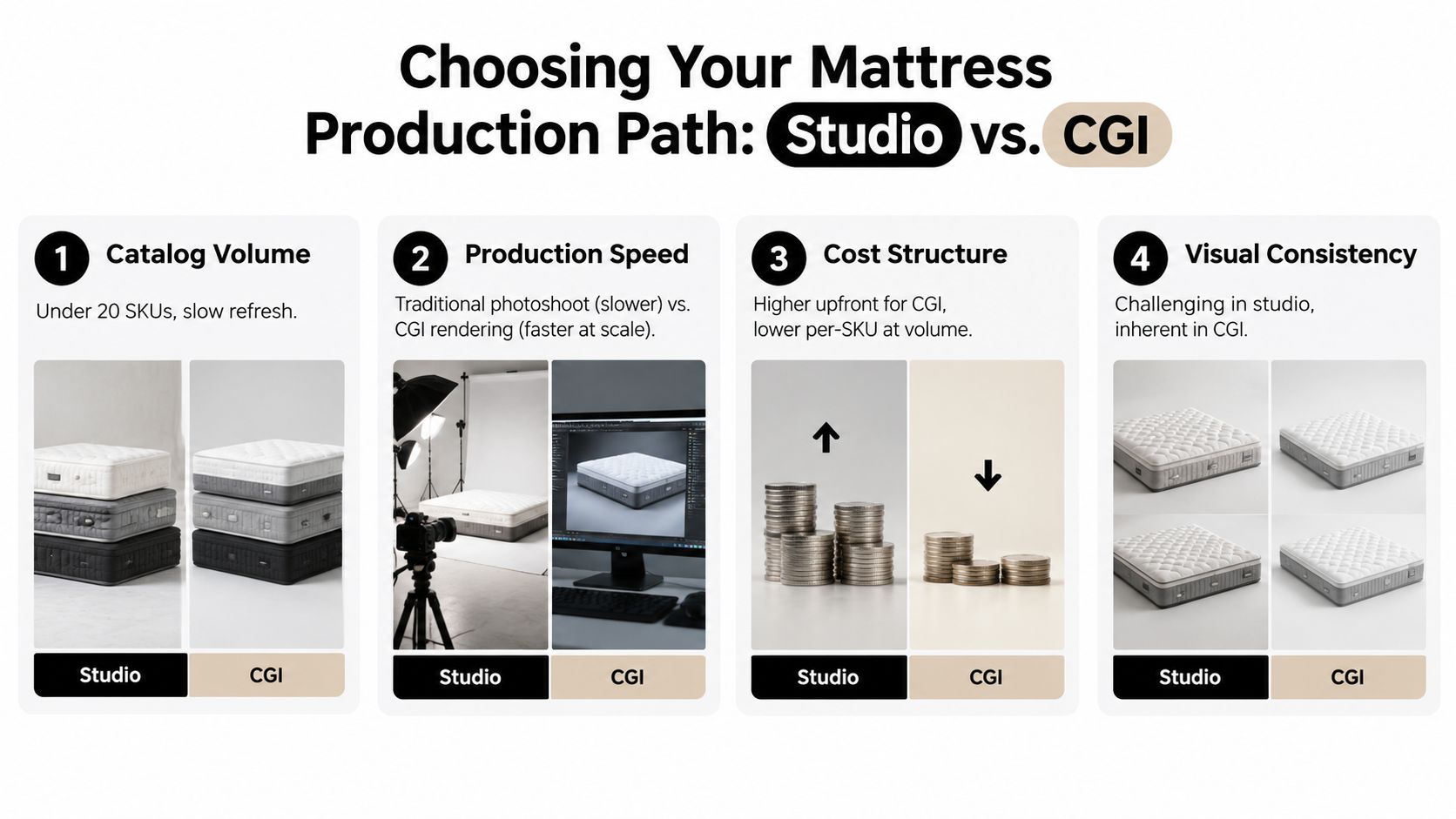
A small catalog with slow product changes usually benefits from traditional photography. The team can invest in a well-controlled set, capture hero views and tactile details, and reuse the finished files across the product page and retailer materials. Once variants and refreshes multiply, the economics change. AI cleanup can help with existing source files, while 3D becomes more useful when one digital model can produce several presentation formats.
Use this framework:
Under 20 SKUs with slow refreshes: Traditional studio work is often the clearest path. Prioritize authentic ticking, quilt, gusset, edge profile, and close-up detail.
50 to 500 SKUs with seasonal colorways: A hybrid workflow usually makes more sense. Photograph representative constructions, use AI for controlled cleanup, and build 3D assets for repeated variants.
500 or more SKUs, frequent variants, or pre-launch products: Full 3D rendering deserves serious consideration. It can reduce dependence on physical inventory and reshoot logistics once the models and materials are accurate.
Fast marketplace remediation: AI background replacement can clean existing files quickly, but every batch still needs edge, texture, and color review.
Retail education and sales activation: Digibuns, Silhouettes, and Room Scenes can explain construction and use context that a compliant packshot cannot.
Choose around the cost structure
Studio work carries costs for staging, crew, samples, transportation, and retouching. AI tools reduce manual isolation work but can introduce review costs when they alter a soft edge or quilt pattern. 3D requires modeling and material setup, then becomes more reusable across colors, sizes, bundles, and future presentations.
Turnaround follows the same pattern. Studio depends on physical scheduling and product availability. AI can process an existing image set quickly. 3D takes deliberate setup at the beginning, then supports repeated outputs without rebuilding the set for every variant.
The most reliable recommendation for many mattress catalogs is hybrid: studio for hero and tactile close-ups, 3D for colorways, sizes, bundles, and construction views, and AI for fast cleanup and marketplace updates. Bedhead Marketing can combine those asset types with SEO, paid media, product-page optimization, brand presentation decks, and mattress sales training. For independent benchmarking, vendor comparisons, and industry resources, Bedhead Network is free for mattress industry professionals and includes marketing insights, news updates, networking, training resources, an industry directory, and business tools.
If your current mattress imagery is compliant but still struggles to explain comfort, construction, or scale, BEDHEAD can help audit the image system and select the right mix of studio photography, AI retouching, Silhouettes, Digibuns, and Room Scenes. Visit the site to discuss a practical production plan for your catalog, retailer feeds, and product pages.