What Is 3D View? How Mattress Brands Use It
A 3D view is an interactive digital model of a product built from width, height, and depth, which a viewer can rotate, zoom, and inspect from any angle.
You've probably sat in a product review staring at a hybrid mattress page that should be converting better. Traffic looks steady, specs are accurate, and the floor model sells well in showrooms, yet online shoppers keep bouncing or asking live chat basic questions about edge height and quilting. Then an agency pitches a "3D experience," a software vendor pitches a spinner, and your team is left asking what is 3D view in plain operational terms. Sorting out what that format does, how it's built, and where it falls short saves you from paying for flashy visuals that leave shoppers just as hesitant as before.
What Is 3D View in Plain Terms
On a mattress product page, nobody can press their palm into the comfort foam, rub the ticking (the outer fabric shell covering a mattress), or tug on the gusset (the vertical side panel joining the top and bottom surfaces). Because the shopper can't lie down for five minutes, the visuals on screen carry the entire burden of proving how the bed is built.
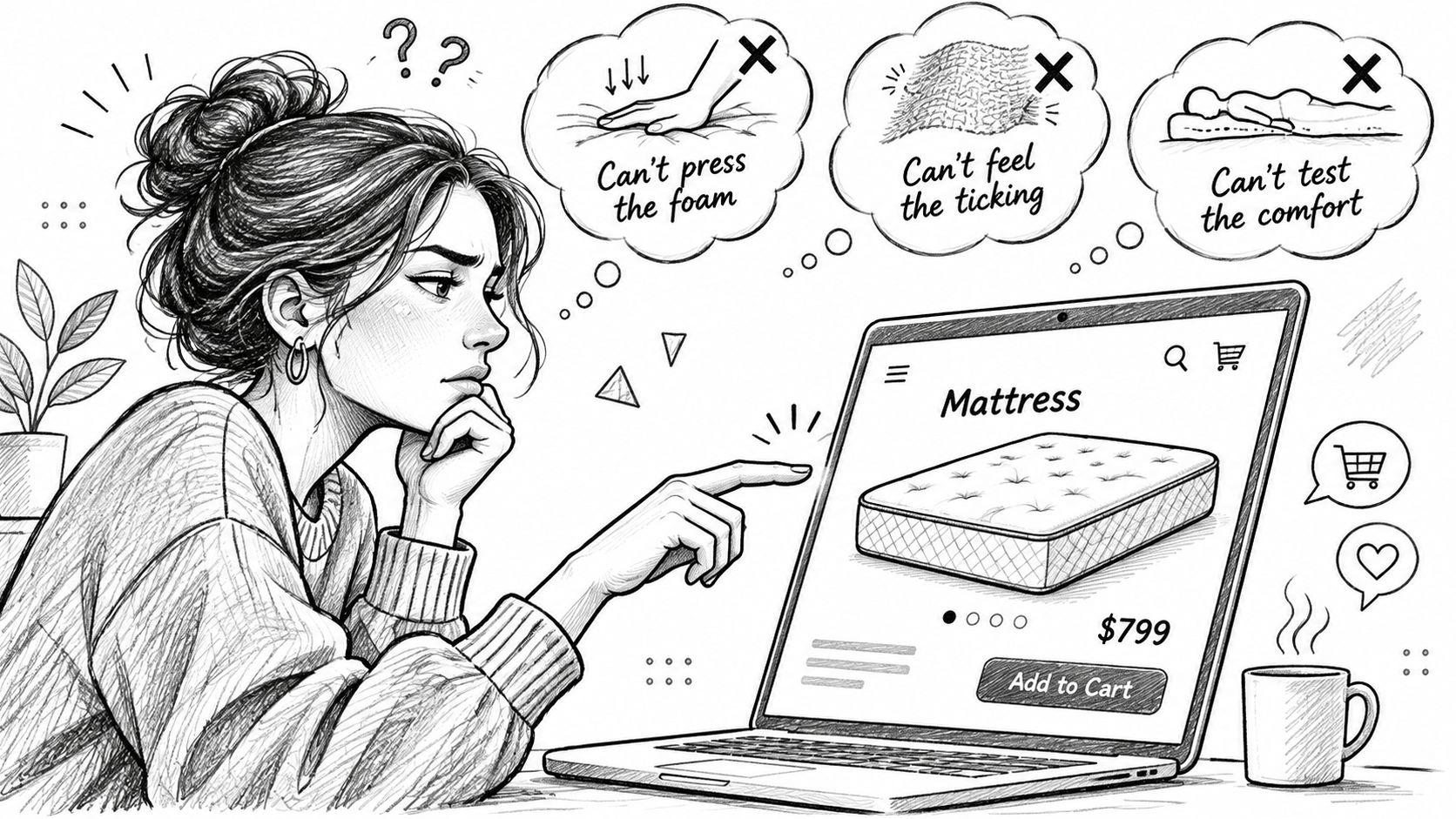
A standard photograph captures one frozen camera angle and flattens it onto two dimensions. According to the Wikipedia overview of computer graphics), a true 3D view stores an object as geometric data across width, height, and depth, combining coordinates, surfaces, lighting, shading, and color so the viewpoint can shift on demand. That underlying math traces back to 1963, when Ivan Sutherland built Sketchpad, an early system that let users draw and manipulate lines in real time with a light pen, before researchers in the late 1960s and 1970s moved from wire-frames to polygonal models and shaded surfaces.
Think of a flat product photo as a framed snapshot of the front of a showroom bed. A 3D view works more like a physical corner sample you can pick up, tilt toward the light, and turn sideways. As the BigCommerce guide to 3D visualization explains, the defining mechanic is user-controlled viewpoint changes: the screen renders the model live as the shopper rotates or zooms, showing shape and proportion far more clearly than disconnected static shots.
How a 3D View Looks on a Hybrid Mattress Page
Picture a shopper evaluating a queen hybrid online. A typical studio shot sits slightly above the bed, spotlighting the quilted top panel while hiding how tall the mattress stands on a platform frame. With an interactive 3D view built to scale, say for a 25 cm profile, that shopper can drag the model down to eye level, inspect the stitched border tape, check handle placement along the side rail, and zoom into the knit pattern without hunting through twelve gallery thumbnails.
Before you assume a product page already uses true 3D, run three quick checks on the viewer:
Side-Angle Access: Can a shopper rotate smoothly down to the gusset and corner stitching rather than jumping between fixed snapshots?
User Control: Does the viewer let the shopper choose the exact angle and zoom level instead of looping on autopilot?
Honest Thickness: Can someone judge the mattress height against its width without guessing from a flattering camera angle?
If the answer to any of those questions is no, the page is showing a photo or an animation, not a true 3D view.
How a 3D View Is Built From Model to Screen
Building a believable mattress viewer isn't magic, and it doesn't start with fancy lighting. It starts with accurate manufacturing specs and moves through a repeatable production pipeline. When a brand's digital bed looks "plastic" or off-scale, the mistake almost always happened in one of these production stages.
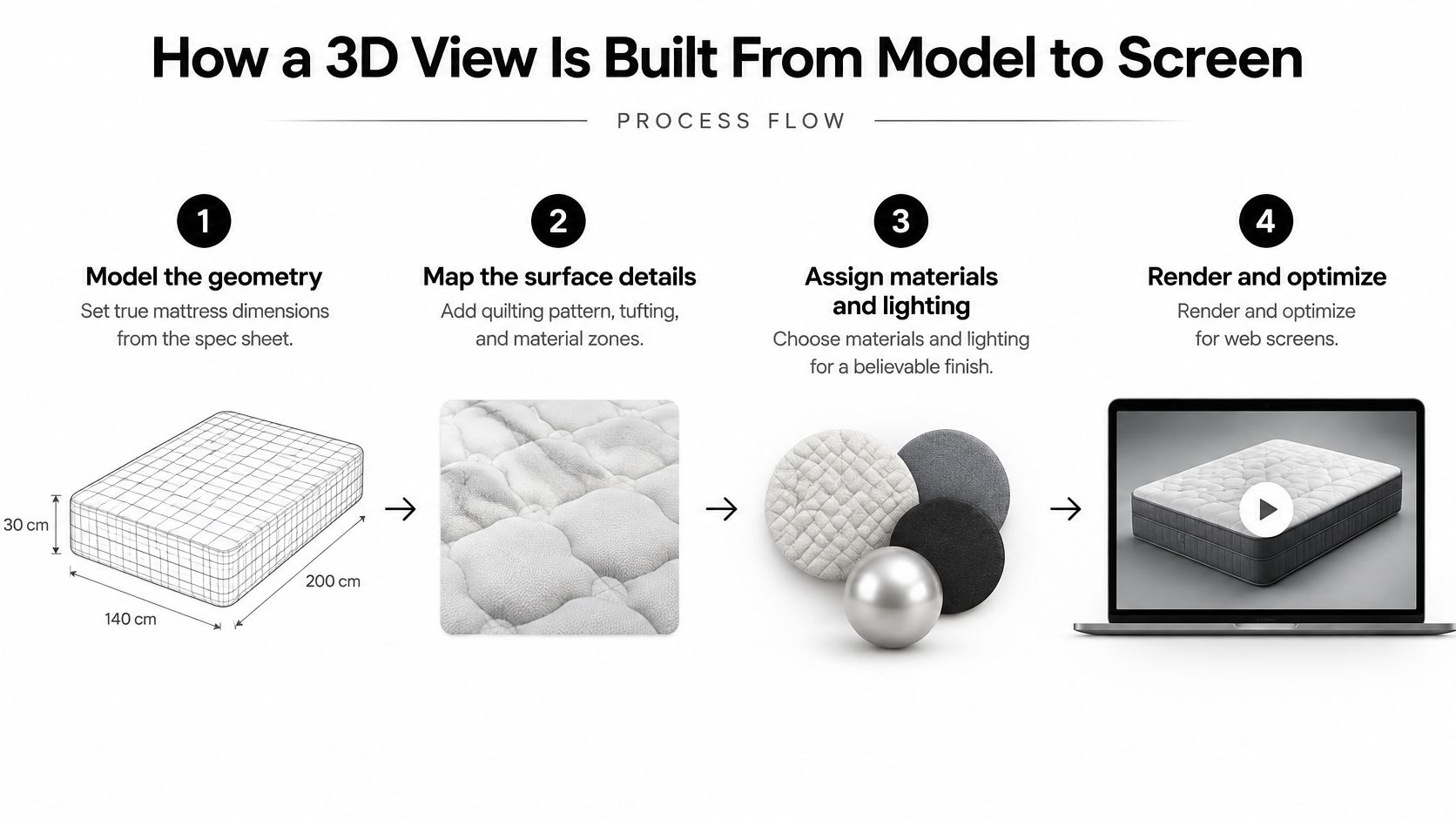
From Factory Spec Sheet to Digital Geometry
Model the geometry at true factory dimensions. Start directly from the production spec sheet, setting exact width, length, total height, and corner radius, such as a 140 x 200 cm build with realistic crown loft across the top panel. Getting this underlying 3D model right anchors every visual that follows, while guessing the height by even a couple of centimeters makes a mid-profile bed look bloated or thin. A 25 cm mattress rendered as 29 cm throws off every downstream visual, from headboard proportions to fitted sheet depth in the shopper's mind.
Map the surface construction details. Once the core block matches physical specs, artists sculpt the quilt (the stitched top pattern binding comfort foam to the cover), tape-edge piping, side handles, woven labels, and visible layer transitions. Skipping micro-details leaves the mattress looking like a smooth marshmallow, which immediately signals "computer graphic" to skeptical buyers.
Materials, Lighting, Cameras, and Web Export
Assign physically based materials to every fabric zone. Modern viewers rely on physically based rendering (PBR), which calculates how real light bounces off surfaces rather than painting fake highlights. In the Khronos glTF 2.0 specification, materials use a metallic-roughness system built around base color, metallic response, and roughness (how widely reflected light scatters). A low-roughness satin border creates crisp, narrow highlights, while a higher-roughness knit or woven ticking produces broad, soft sheen. The most common slip here is reusing one generic fabric preset across every SKU, turning a sleek cooling cover into dull cotton.
Build two lighting setups. Set up a neutral studio rig for your master file so colors stay honest, then test the model under warm retail lighting that mimics a showroom floor. Poor color temperature calibration is notorious for shifting crisp white ticking toward dingy yellow or icy blue, which sparks customer complaints the day the bed gets unboxed.
Lock in honest camera presets. Define default views for front, three-quarter angle, low side profile, top-down, and close-up stitch inspection using a lens setting that prevents perspective distortion. According to the Khronos Group glTF overview, keeping camera parameters calibrated inside the scene stops exaggerated angles from misrepresenting mattress thickness across your catalog. A wide lens at a low angle can add apparent height the bed never had, so the preset matters as much as the model itself.
Export to a lightweight web standard. Package the finished scene into glTF (Graphics Library Transmission Format), an open standard structured around meshes, materials, cameras, and animations for fast browser loading. Exporting once to a platform-independent format turns the model into a reusable product-data asset that powers your eCommerce site, showroom tablets, and wholesale decks without rebuilding files for every channel.
Sign-off check: Never approve a 3D mattress asset from a laptop screen alone. Pull a physical ticking swatch or floor sample under store light, compare it side by side with the render, and sign off only when weave scale, sheen, and border proportions match.
3D View Versus 360 Spins, Renders, AR and Video
Walk through ten mattress websites and you'll see five completely different formats all labeled "3D." That sloppy labeling trips up brand executives during vendor RFPs, because you can easily pay for a pre-rendered image loop while expecting an interactive model your team can update for future cover fabrics.
As outlined in the Zakeke guide to 3D product visualization for ecommerce, a true 3D view calculates geometry live so the shopper controls rotation and zoom, whereas a 360-degree spin flips through a fixed ring of pre-rendered still frames. A static 3D render outputs a single high-resolution still image from that model, augmented reality (AR) drops a scaled model into the shopper's bedroom camera feed, and a product video plays a scripted sequence from start to finish. Each format solves a different sales problem on a mattress page.
Format | What the shopper controls | How it is built | Best mattress question | Main trade-off |
|---|---|---|---|---|
3D view | Rotate, zoom, and inspect any angle | Interactive 3D model | Profile, edges, and construction | Heavier load on slow mobile connections |
360 spin | Scrolls through a fixed set of frames | Pre-rendered image sequence | Overall look from all sides | Cannot zoom into detail or change options |
Static 3D render | Nothing; one fixed frame | Single output from a 3D model | Layer styling and lifestyle context | Only one angle, no inspection |
AR preview | Moves the product within a room | 3D model placed in the camera view | Footprint and fit in a bedroom | Needs device support; does not show construction |
Product video | Watches a fixed sequence | Rendered or filmed motion | Motion of the build and process explanation | No control over angle or zoom |
Choosing the Format That Fits Your Bottleneck
Rather than buying every visual format at once, match the asset to the friction slowing down your checkout funnel:
Realism Needed: Static 3D renders deliver magazine-grade fabric texture and soft room shadows with zero browser lag, making them ideal for hero slots and paid social ads.
Shopper Task: Decide whether buyers need to inspect construction details (3D view), swap covers and base heights (configurator), or check if a California king clears a bedroom doorway (AR).
Production Cost: One well-built master 3D model can output static renders, a 360 spin, an interactive viewer, and AR, so building clean master geometry first avoids paying twice.
Device Compatibility: Static renders and standard videos play everywhere, while AR requires modern phone sensors and browser support.
Page Speed: Heavy interactive viewers can drag down mobile load times if meshes and textures aren't compressed, which hurts paid ad landing pages more than organic deep-research sessions.
If a buyer's main question is about profile, gusset stitching, or layer construction, choose a 3D view. If the question is bedroom footprint, choose AR. If you only need clean styling consistency across a large catalog, static renders or a 360 spin will do the job faster.
What a 3D View Can and Cannot Prove
Interactive visuals are great at answering visual doubts, yet they can also create false confidence if a marketing team expects graphics to close the entire mattress sale on their own. Shoppers rarely return a bed because the piping looked different than expected. They return it because it felt firmer than they imagined, slept warm, or transferred their partner's movement across the coils.
The CanvasLogic analysis of 3D visualization in ecommerce draws a sharp line between search attributes and experience attributes. Search attributes are traits a buyer can verify visually before purchase: overall dimensions, edge reinforcement layout, layer stack, cover color, and handle position. Experience attributes can only be felt in use: softness, pressure relief, motion isolation, off-gassing odor, temperature regulation, and multi-year durability. No rotating model can prove how memory foam responds under a heavier side sleeper.
Attribute | Can a 3D view show it? | Evidence that still matters |
|---|---|---|
Overall profile and height | Yes, at true dimensions | Spec sheet with dimensional tolerance |
Layer order and thickness | Yes, through an exploded or cutaway view | Foam density and ILD ratings |
Cover color and finish | Partly, depends on calibrated lighting | Physical swatch checked under store light |
Handle and border placement | Yes | Product photo to confirm details |
Firmness | No | Firmness rating and in-store trial |
Motion isolation | No | Documented testing results |
Heat and odor | No | Material certifications |
Long-term durability | No | Warranty terms and verified reviews |
Notice how each visual claim pairs with a concrete technical proof point. Even when an exploded model shows a 3-inch top foam layer clearly, thickness alone doesn't reveal support feel. Shoppers and retail buyers still need foam density (weight per cubic foot, tied to durability) and ILD (indentation load deflection) ratings, which measure how many pounds of force it takes to compress a foam sample by 25 percent.
Guardrails for an Honest Mattress Product Page
Commercial vendors often highlight engagement jumps from 3D tools, yet independent category-wide evidence on mattress return rates remains limited. To keep your viewer helpful rather than misleading, pair it with four disciplined page standards:
True Dimensions on Every Model: Tie every interactive asset directly to your published spec sheet, including manufacturing tolerance notes for compressed bed-in-a-box recovery.
Clear Captions and Text Descriptions: Label every layer and view in plain language so shoppers understand what they're zooming into, rather than guessing what a blue foam layer represents.
Accessible Alternatives: Provide static high-resolution images and structured text specs alongside the viewer for buyers using screen readers, older phones, or slow rural connections.
Size-Level Return Tracking: Monitor returns, add-to-cart rate, and assisted conversions on the specific SKUs carrying 3D views so you spot whether better visuals lower post-delivery surprises.
A 3D view explains a mattress's shape and build. It never replaces the testing, certifications, and trial terms that prove how the bed feels at 2 a.m.
Where Mattress Brands Put 3D Views to Work
Knowing how the technology works is one thing; knowing where it earns its keep across DTC product pages, wholesale catalogs, and brick-and-mortar floors is another. Most bedding teams get the strongest traction from four practical applications.
Online Product Pages and Configurators
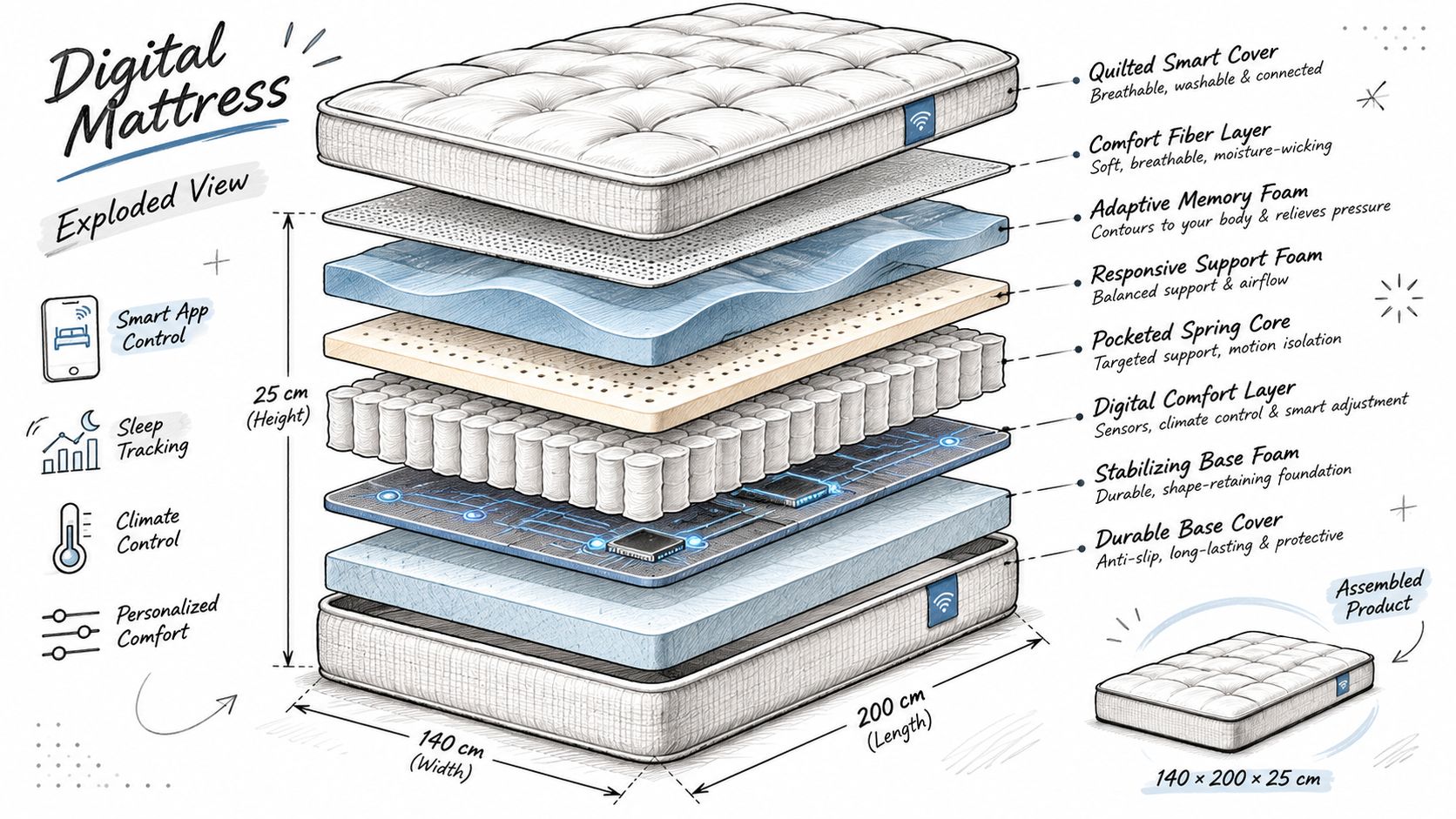
Exploded layer views clarify what justifies a higher price tier. In the mattress category, these vertically separated anatomy graphics are often called Digibuns, because they lift each comfort foam, transition layer, and pocketed coil unit apart while preserving how the stack fits inside the finished ticking. In a documented Alfa3D exploded mattress rendering case study, artists modeled a digital mattress at 140 × 200 × 25 cm, separated each internal layer vertically for clear anatomical inspection, and delivered layered PSD files keeping the mattress, background, and shadow separate for downstream marketing edits. This approach shines when shoppers compare a mid-tier all-foam bed against a step-up hybrid; watch time spent on the construction view to see whether buyers engage with the internal story before scrolling to price.
Interactive configurators replace guesswork on multi-option lines. When a mattress collection comes in three cover fabrics, two height profiles, or optional perimeter handle trims, tiny color swatches leave buyers guessing how the finished bed looks. As noted in the Reality Atlas guide to 3D product configurators, real-time configurators apply the shopper's exact selection directly onto the product model, turning abstract SKU options into an immediate visual check. Exploring interactive 3D examples helps teams picture how smooth option switching should feel, provided every selectable combination matches an approved factory build. Track add-to-cart rate on configurable models to verify whether seeing the chosen cover lifts buyer confidence.
Retail Showrooms and Omnichannel Listings
Showroom tablets turn floor models into clear teaching tools. Retail sales associates can't unzip a stitched luxury hybrid on the showroom floor to show zoned coils or cooling gel channels. Putting a calibrated 3D cutaway on a tablet right next to the floor model lets staff walk through the ticking, gusset construction, and foam order in sixty seconds, keeping the conversation focused on sleep benefits rather than memorized specs. Monitor time spent explaining construction alongside floor close rates to measure whether tablets shorten the step-up pitch.
One calibrated master asset stops cross-channel visual drift. Many mattress brands shoot one photo set for their DTC site, another for regional retail partners, and a third for wholesale decks, creating slight color and profile mismatches that erode buyer trust. Shoppers already cross-check product imagery heavily before buying, and resources from retailers like Lucas Furniture & Mattress that help buyers browse furniture photos with confidence underscore how closely customers scrutinize visual consistency online. Driving your website, marketplace listings, and sales presentations from one verified 3D asset eliminates studio discrepancies; keep a close eye on returns on the affected sizes to confirm that aligned expectations hold up after delivery.
Pick the single use case that answers the question your customer service inbox and showroom floor hear most often, and prove it there before rolling 3D across your entire catalog.
What the Research Shows and What It Does Not
Whenever 3D visualization comes up in a budget meeting, a handful of impressive furniture statistics usually hit the slide deck. Those numbers are real, and they signal clear momentum across home goods, yet executives make bad forecasts when they treat broad furniture sentiment as guaranteed mattress ROI.
In a 2024 survey of more than 400 recent furniture buyers, the Home Furnishings Association reported that two-thirds preferred retailers offering 3D shopping experiences. On the seller side, a 2025 global study of 100 furniture retailers conducted by London Research and published by Fixtuur found that 96% said visual commerce improved online sales. Zooming out to total industry spending, a 2024 market estimate from Market.us valued the global 3D e-commerce market at USD 3.1 billion.
Finding | Source and year | Limit to keep in mind |
|---|---|---|
Two-thirds of recent furniture buyers preferred retailers offering 3D shopping | Home Furnishings Association, 2024 survey of 400+ buyers | Stated preference, furniture not mattresses |
96% of 100 furniture retailers said visual commerce improved online sales | London Research via Fixtuur, 2025 | Self-reported, no sales figures attached |
Global 3D e-commerce market valued at USD 3.1 billion | Market.us, 2024 estimate | Market size, not evidence of conversion lift |
Read those three limits carefully. Buyer surveys capture stated preference on couches and tables, not checkout behavior on a premium hybrid mattress. Retailer polls reflect self-reported opinions without audited revenue figures, and market valuation tracks software spending rather than your store's conversion lift.
Treat published furniture data as directional context, then build your own proof. Before launching a 3D view on two or three core SKUs, benchmark add-to-cart rate, assisted conversions, and size-specific return rates. Tracking returns separately by size matters in bedding because an exaggerated profile on a king or split-king triggers expensive white-glove reverse logistics. Claim a performance win only when your own checkout and return logs verify it.
Audit Your Product Pages Before Adding More Renders
Adding another spinning viewer to a cluttered product page rarely fixes a conversion slump. Before commissioning new assets, walk your team through a five-step audit to tie every dollar of visualization spend to an actual buyer objection:
Pull the top five recurring customer questions. Gather real phrasing from return reason codes, live-chat transcripts, and showroom sales associates over the past quarter so you're solving genuine friction rather than internal design preferences.
Match every question to an existing visual or spec sheet. Open each product page on a phone and verify whether a shopper can find the answer. If you already run 3D imagery, hold the render next to a physical mattress under retail light to catch any color or loft drift.
Separate visual gaps from feel gaps. Flag every unanswered question tied to firmness, heat, or motion isolation, and route those straight into spec tables, trial guarantees, and third-party test results as part of broader product detail page optimization.
Lock your pre-launch baseline. Record add-to-cart rate, return rate by mattress size, and engagement time on construction visuals across your test models and a matching set of control SKUs.
Re-measure 60 days after launch. Compare the updated sizes directly against the unchanged SKUs so seasonal promo swings like Memorial Day or Labor Day sales don't disguise whether the new visuals moved the needle.
If you're evaluating your current mattress imagery, BEDHEAD offers website design and 3D visualization created exclusively for bedding brands, including Digibun layer breakdowns, clean Silhouettes, and lifestyle Room Scenes built from real factory specs. Teams looking to sharpen their in-house marketing and visual strategy can also explore training through Bedhead University, or join Bedhead Network for free to access mattress-specific marketing insights, news updates, training resources, networking, an industry directory, and business tools.
Ready to turn flat mattress pages into accurate visual assets that answer real buyer questions? BEDHEAD builds photorealistic 3D views, Digibun layer cutaways, and conversion-focused websites built exclusively for mattress manufacturers, retailers, and sleep brands. Visit BEDHEAD to review your current product imagery and map out which visual formats will deliver the clearest return on your catalog.