Real Time 3D Rendering Software for Mattress Brands
A mattress launch can stall before the product reaches the first product page. The physical sample is still in transit, the photography brief has changed, the quilt pattern isn't final, and the e-commerce team is waiting for clean silhouettes, room scenes, and internal construction visuals. By the time everyone approves the images, the campaign window has narrowed and the showroom floor model is already asking questions the website can't answer.
Real-time 3D rendering software gives mattress manufacturers, private label brands, retailers, and sleep product startups a faster way to build, review, and adapt product visuals. It isn't a replacement for every photograph or every offline render. Used properly, it helps teams make decisions earlier, produce SKU variations more efficiently, and create interactive product experiences. Used carelessly, it can make a premium mattress look flat, inaccurate, or less trustworthy than the product deserves.
The Shift to Real-Time 3D Rendering in Bedding
Traditional mattress photography has a practical weakness. A physical shoot captures one product, in one configuration, under one lighting setup, at one point in the product's development. If the ticking changes, the gusset is revised, the quilt pattern is adjusted, or a hybrid mattress gains another foam layer, the team may need to rebuild the scene or schedule new photography.
That delay affects more than the creative department. Marketing directors wait for approved assets, e-commerce managers postpone product-page updates, sales teams work from incomplete presentations, and retailers receive floor models that don't match the imagery used in campaigns. A manufacturer can have a strong product and still lose momentum because its visual explanation arrives late.
A digital mattress model changes the workflow. Designers can adjust the cover, quilting, materials, camera angle, and room context without shipping another sample to a studio. Real-time previews let product, brand, sales, and merchandising teams review the same visual reference while decisions are still inexpensive to change. The 3D visualization program approach is especially useful when one mattress must appear across product detail pages, retailer portals, paid media, showroom screens, and sales presentations.
Why bedding needs more than a clean product shot
A mattress is difficult to explain in a single image. Shoppers need to understand surface comfort, support construction, height, edge treatment, and the relationship between materials. A neatly made bed can communicate lifestyle, but it often hides the very details that distinguish one SKU from another.
That's where a coordinated asset set earns its place:
Silhouettes give e-commerce teams clean, consistent product views for comparison grids and marketplaces.
Digibuns show the internal construction through layered visuals, helping shoppers see foam layers, coils, foundation materials, and cover construction.
Room scenes place the mattress in a credible bedroom setting without requiring a physical set for every campaign direction.
Interactive views can support product exploration when a shopper wants to inspect the model from different angles.
Practical rule: Use real-time rendering to shorten decisions, not to avoid decisions about material accuracy.
The commercial value comes from control. A shared 3D source can support a manufacturer's launch presentation, a retailer's product page, a showroom activation, and a paid social campaign without forcing every team to interpret the product independently. For mattress brands, that consistency is often more valuable than merely producing another attractive image.
Core Mechanics of Real-Time 3D Rendering Software
Real-time 3D rendering software generates an image from a digital scene while the user is changing the scene. Move the camera, adjust a light, swap the ticking, or alter the room background, and the viewport updates instead of waiting for a separate offline render to complete. Autodesk's overview of real-time rendering describes the category as interactive visualization commonly used for games, virtual reality, and simulations, with output commonly running from 20 to 120 frames per second and 30 or 60 FPS among the most common targets.
For a mattress team, the process can be understood as a sequence of connected decisions:
Build or import the geometry. The model represents the mattress body, border, piping, handles, seams, quilting, and internal components.
Assign materials. The artist defines how ticking, knit fabric, foam, wood, metal, and coil assemblies respond to light.
Set the environment. Lighting, floor surfaces, walls, camera height, and background establish the visual context.
Optimize the scene. Geometry, textures, shadows, and effects are adjusted so the scene remains responsive.
Review and export. Teams use the live view for decisions, then export images, animations, interactive assets, or files for downstream use.
Frame time is the operating constraint
Interactive rendering works within a frame-time budget. Common targets include 30 FPS, or 33 milliseconds per frame, 60 FPS, or 16 milliseconds, and 120 FPS, or 8 milliseconds, as documented in Unreal Engine's rendering introduction. Every frame must be calculated quickly enough to keep camera movement and interaction consistent.
That constraint changes how a bedding scene is built. A highly detailed quilt may look excellent in a still image, but thousands of small raised stitches can consume performance. A physically rich ticking material may need simplified texture treatment for an interactive product viewer. A room scene with multiple lights, reflective surfaces, bedding layers, and decorative objects can become hard to explore if the scene isn't optimized.
The software isn't asking, “What is the most perfect image possible?” It's asking, “What image can be produced consistently while the user is moving, changing, and reviewing the scene?” That distinction makes real-time rendering valuable for design approval, product configurators, training, and interactive retail experiences. For teams working across formats, understanding 3D graphics file formats also helps prevent avoidable problems when assets move from the studio to a website or presentation system.
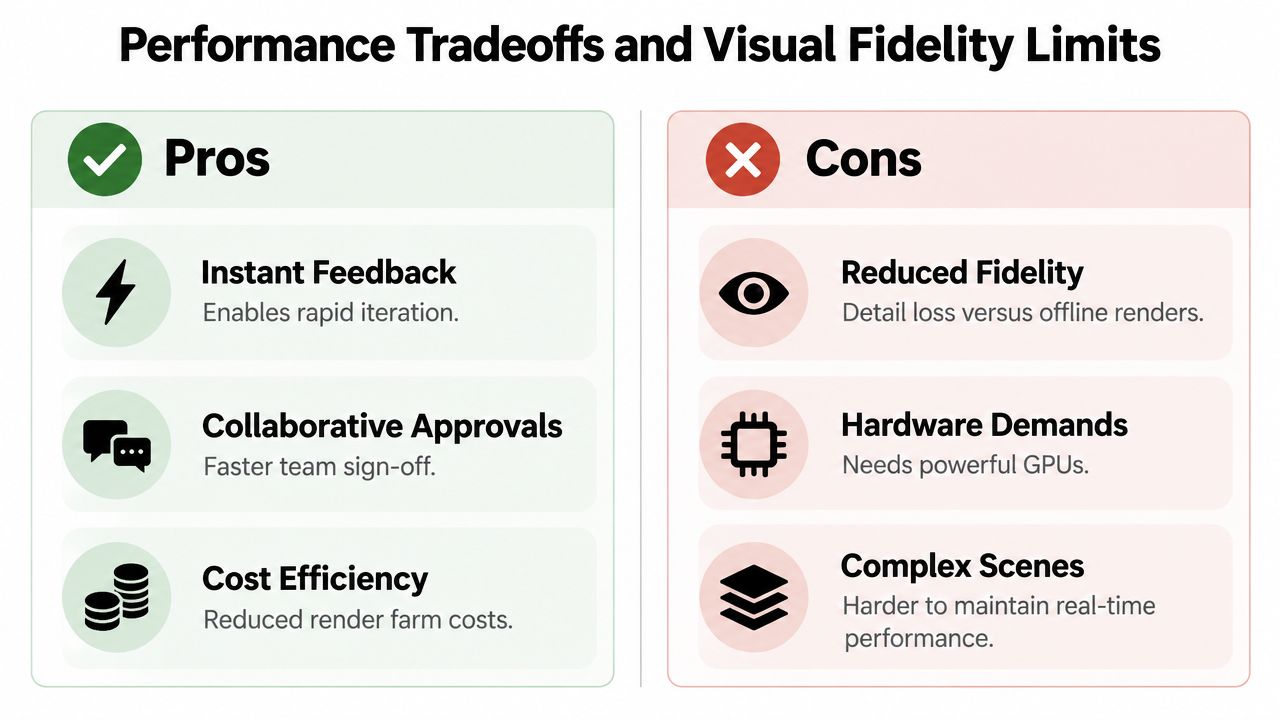
Performance Tradeoffs and Visual Fidelity Limits
Real-time rendering prioritizes responsiveness. Offline rendering prioritizes the final image. Both can produce convincing visuals, but they solve different problems, and mattress marketers get into trouble when they treat them as interchangeable.
A live preview may show the overall shape, color direction, room composition, and layer arrangement clearly. It may not reproduce every subtle interaction between light and fabric with the same refinement as an offline render. That matters when the hero image must communicate premium ticking, a soft quilt, a precise edge profile, or the material distinction between latex, memory foam, and other components.
Where speed earns its place
Real-time workflows are strong during the parts of a launch where people need to compare options. A marketing director can review several room directions. A product manager can inspect a revised gusset. A retailer can evaluate whether a floor-model visual explains the product without requiring a new photography setup.
The speed also reduces the cost of ambiguous feedback. Instead of debating whether the cover looks too warm, the team can change the lighting or material and review the result immediately. KeyShot's product-design workflow illustrates this principle by displaying material, lighting, and camera changes instantly through CPU and GPU real-time ray tracing.
Where quality must take priority
Hero imagery has a different job. It often appears beside pricing, promotional claims, comparison content, and brand messaging. If the ticking looks synthetic, the quilting loses its depth, or the mattress silhouette misrepresents the product, shoppers may question the entire presentation.
For that reason, use a hybrid pipeline:
Real-time rendering for concept review, SKU variations, room-scene testing, interactive views, and sales enablement.
Offline rendering for high-stakes hero stills where surface detail, reflections, shadows, and color control need more refinement.
Post-production review for final color, cropping, compression, accessibility, and consistency across channels.
High-polygon assets can help when a quilt pattern or stitched border needs close inspection, but more geometry isn't automatically better. The high-poly model workflow should serve the intended output. A detailed model that slows every review may be the wrong production asset for a product configurator, while a simplified model may be inadequate for a premium campaign image.
The useful question isn't whether real-time rendering looks good. It's whether it looks accurate enough for the decision the customer is about to make.
Blender makes the distinction clear through its Eevee and Cycles engines. Blender's rendering tools describe Eevee as suitable for real-time previews and stylized visuals, while Cycles supports photorealistic output with longer render times. That separation is useful for bedding teams because it encourages the right output for the right moment instead of forcing one engine to do everything.
Integrating Real-Time Workflows into Mattress E-Commerce
A mattress product page has to answer questions that a showroom associate traditionally handled in person. What's inside the mattress? How does the cover differ from another model? Is the support system visible? What does the mattress look like at its actual height? Does the product fit the shopper's bedroom expectations?
Real-time assets help organize those answers into a visual journey. A clean silhouette establishes the product. A room scene gives it context. A layered Digibun reveals the construction. An interactive model lets the shopper inspect the object instead of relying on a single front-facing image.

Product pages need explanatory assets
A hybrid mattress can contain several visually different systems beneath a familiar quilted cover. If the page only shows a finished bed, the shopper may not understand why the model costs more than a simpler alternative. A layered visual can separate the cover, comfort foams, transition materials, coils, edge support, and base, provided the illustration matches the actual specification.
That accuracy is critical. A Digibun that shows the wrong foam order or exaggerates a layer can create confusion for shoppers, retailers, and customer service teams. The digital model should be governed like product data, with version control and approval from the people responsible for construction details.
Interactive product experiences can also support retail. A store associate can use a layer breakdown while discussing comfort and support, then move to a lifestyle scene to connect the construction to the shopper's bedroom. Retailers can display alternate views without storing every possible configuration as a physical floor model.
Build a reusable asset system
The best workflow doesn't create one isolated render. It creates a master product asset that can produce related outputs:
PDP imagery for product pages and comparison modules.
360-degree views for shoppers who want more control over inspection.
Layered construction graphics for education and sales conversations.
Room scenes for campaigns, email, paid media, and retailer presentations.
Short animations for social content and product activation.
Web-ready interactive files when the site supports product exploration.
A product configurator can extend this system by letting shoppers change size, color, firmness, or configuration within defined rules. Before committing to that feature, review what a product configurator involves and confirm that the model, product data, interface, and export workflow can stay synchronized.
Real-time rendering won't automatically lower returns. It can, however, make product information clearer before purchase. A shopper who sees the true profile, understands the internal layers, and views the mattress in a believable room context is working with better information than a shopper who sees one generic bed photo. The business objective is not more visual effects. It's fewer misunderstandings between the product promise and the delivered mattress.
Selection Criteria for Mattress and Bedding Brands
The right rendering software depends on the asset's job, the team's existing tools, and the product information available from manufacturing. A mattress manufacturer with CAD data, frequent private label revisions, and several size configurations needs a different workflow from a retailer that mainly needs clean silhouettes and room scenes.
Start with the product, not the software interface. Ask whether the system can represent the details that make the mattress sellable: ticking weave, quilt depth, gusset stitching, piping, handles, edge reinforcement, foam transitions, coil systems, and accurate proportions. Then test the same approved model across the outputs your team uses.
Compare capabilities against commercial use
A viewport that feels fast with a simple mattress may struggle once you add a detailed quilt, multiple foam layers, a bedroom environment, and realistic lighting. A renderer that produces beautiful stills may be inefficient for interactive review. Integration matters just as much. If the team must repeatedly rebuild materials or manually convert files, the apparent software savings can disappear in production time.
Use this matrix to guide a practical evaluation.
Capability | E-Commerce Impact | Showroom Impact |
|---|---|---|
Accurate ticking and quilt materials | Supports credible close-ups and reduces visual mismatch between page and product | Gives associates a clearer way to discuss surface feel and construction |
Layered mattress geometry | Enables Digibuns and construction education on product pages | Helps sales teams explain hybrid mattresses and support systems |
Fast camera and lighting changes | Produces campaign variations without rebuilding every scene | Lets retailers adapt visuals to store layouts and presentations |
CAD and model compatibility | Reduces duplicate modeling when product specifications change | Keeps floor-model visuals aligned with approved manufacturing data |
Interactive export options | Supports spins, configurators, and exploratory product views | Creates more engaging digital selling tools for in-store activation |
Offline-quality output | Protects premium hero imagery and close-up material presentation | Improves printed collateral, displays, and high-resolution presentations |
Scene optimization controls | Keeps mobile and web experiences usable | Supports smooth demonstrations on available showroom hardware |
Version and approval workflow | Helps teams prevent outdated dimensions or materials from reaching PDPs | Gives sales teams confidence that visual claims match the current SKU |
Test the workflow with a difficult SKU
Don't evaluate software with the easiest mattress in the line. Use a hybrid mattress with a complex quilt, distinctive ticking, layered construction, and a room scene that reflects the brand's positioning. Test how quickly the team can make a legitimate change, such as replacing a cover material, adjusting the mattress height, or showing a new internal layer.
Also inspect the output on the channels that matter. A render may look excellent on a large review monitor but lose fabric detail after web compression. An interactive model may be impressive on a workstation but awkward on a shopper's phone. Software selection should include the entire route from model approval to customer experience.
Choose the tool that keeps product truth intact while removing unnecessary production friction.
Support, training, file compatibility, and asset management deserve the same attention as visual quality. Bedhead University offers education for mattress marketing teams, which can help non-specialist stakeholders understand how product visuals, content, and sales activation need to work together.
Evaluating Photorealistic Assets for Showrooms and Digital
A visual audit should begin with the customer's questions, not with the number of files in the asset library. A mattress brand may have dozens of images and still lack the specific views needed to explain construction, compare SKUs, or support a showroom conversation.

Run a five-part asset check
Start with product truth. Compare the render against the approved specification. Check mattress height, corner shape, border treatment, quilting, ticking color, gusset placement, handles, and layer order. If a shopper can identify a mismatch, the image needs correction before it reaches a product page.
Review the silhouette. The clean product view should show the mattress without distracting styling. It needs to support comparison across sizes and models, with consistent camera perspective and enough visual information to communicate thickness and edge construction.
Inspect the construction graphic. A Digibun should explain, not decorate. Each foam layer and support component needs a clear place, a readable separation, and a visual relationship to the finished mattress. Avoid dramatic cutaways that imply a construction the factory doesn't produce.
Test the room scene. The bedroom should support the brand's positioning without overpowering the mattress. Check scale, lighting direction, bedding arrangement, headboard relationship, and the visibility of the mattress profile. A lifestyle scene that hides the product doesn't solve an e-commerce problem.
Check channel readiness. Confirm that the asset works in product pages, retailer portals, paid ads, sales decks, showroom displays, and social formats. Keep master files available so the team can create new crops and variations without starting over.
Connect digital visuals to physical activation
Showroom design also depends on how people move through space and encounter information. Brands planning a trade show, dealer event, or retail display can review Exhibition Stand Design as a useful reference for organizing product storytelling around traffic flow, visual hierarchy, and display context.
For mattress retailers, the same logic applies on a smaller scale. A floor model needs a visual explanation nearby, especially when the construction is hidden beneath the cover. A screen or printed panel can show the layer system, while the associate uses the physical mattress to discuss feel, support, and fit.
A photorealistic asset earns its place when it answers a buying question that the physical mattress or product copy can't answer alone.
The final review should include someone who knows manufacturing, someone who understands the customer journey, and someone responsible for the channel where the asset will appear. Marketing can approve the mood, but product experts must approve the construction. E-commerce can approve the crop, but sales teams can identify whether the visual actually helps a shopper choose.
Strategic Takeaways and Next Steps for Bedding Marketers
Real-time 3D rendering software is most valuable when mattress brands use it as part of a deliberate production system. It can accelerate product reviews, support SKU variations, strengthen showroom education, and create interactive e-commerce experiences. It can also expose weak product data quickly, which is useful if the team treats those discoveries as operational issues rather than cosmetic problems.
The practical position is simple. Use real-time rendering where interaction and iteration matter. Use offline rendering where the final image must carry premium material detail and photorealistic credibility. Keep one approved digital source for the mattress, then create channel-specific outputs from that source instead of asking each department to rebuild the product story.
What executives should decide first
Set the visual job. Decide whether the asset supports a design review, a product page, a paid campaign, a showroom conversation, or a hero brand image.
Define approval ownership. Product, marketing, e-commerce, and sales should know who approves geometry, materials, claims, and final crops.
Choose a difficult pilot SKU. Test the workflow with a mattress that includes complex ticking, quilting, layered foam, or hybrid construction.
Measure operational outcomes. Track turnaround time, revision volume, launch readiness, asset reuse, and the number of product questions the visual system answers.
Build the asset family. Plan silhouettes, Digibuns, room scenes, interactive views, and campaign crops together rather than ordering them as disconnected projects.
Bedhead Marketing works specifically across the mattress category, supporting manufacturers, retailers, private label brands, and sleep product startups with 3D assets, SEO, paid media, product-page optimization, brand development, and retail sales training. That specialization matters because a mattress render has to do more than look polished. It has to respect construction details, margin realities, showroom behavior, e-commerce expectations, and the language buyers use when they choose sleep products.
The next step is an honest audit. Find the SKU whose imagery is slowest to update, hardest to explain, or most inconsistent across channels. Then decide whether a real-time workflow, an offline finish, or a hybrid pipeline will solve the actual bottleneck.
For ongoing mattress-industry marketing insights, news, training resources, networking, an industry directory, and business tools, join the free Bedhead Network for mattress industry professionals. If you're evaluating your current product imagery, BEDHEAD can help map mattress-specific 3D assets, including Digibuns, silhouettes, room scenes, and interactive product visuals, to the e-commerce and showroom outcomes your team needs.