Product 3D Animation for Mattress Brands
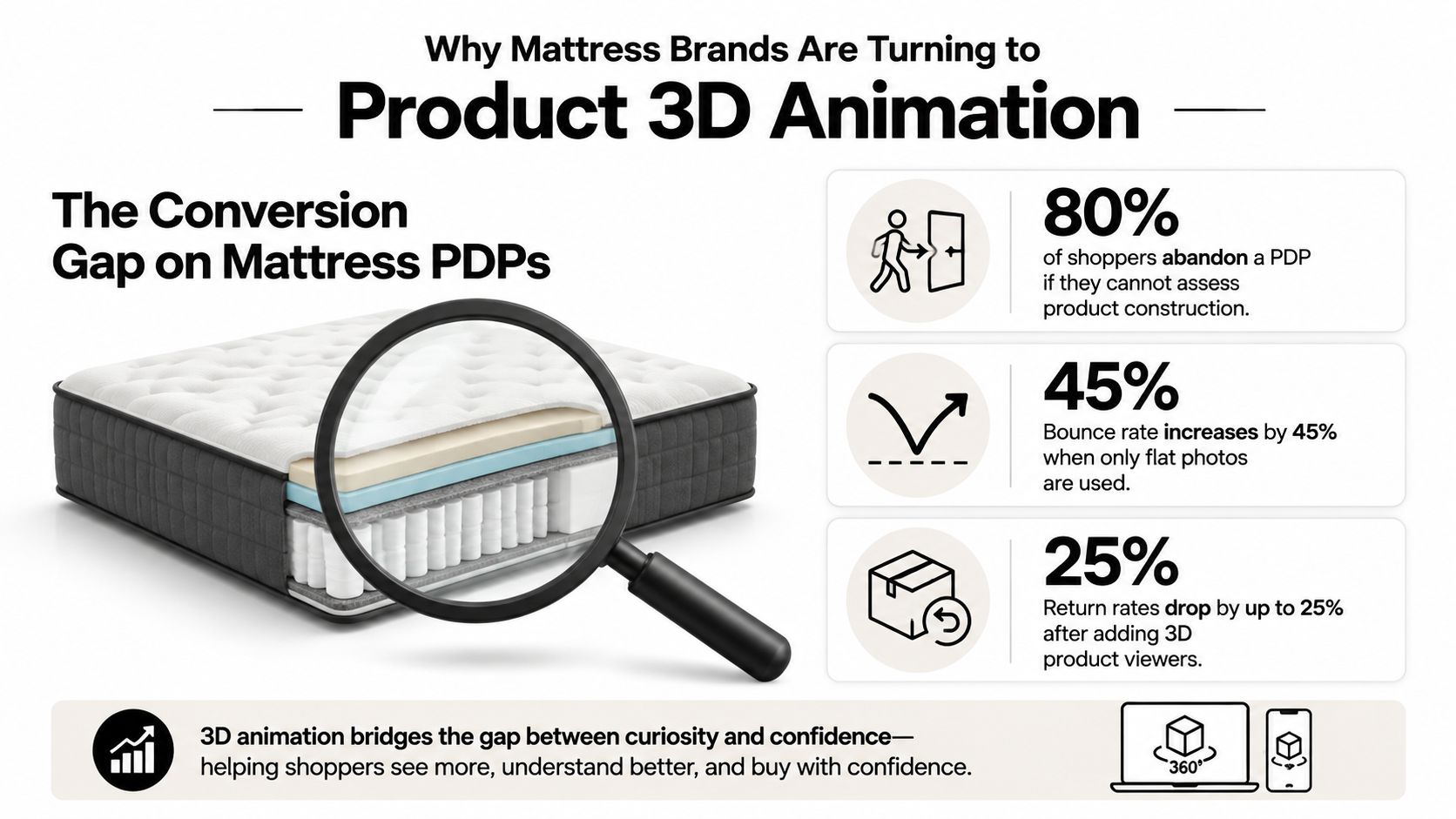
A mattress shopper can't feel coil gauge, foam density, or gusset height through a flat lifestyle photograph. That gap between what the product is and what the buyer can understand is where weak product pages lose confidence, create showroom friction, and invite expectation-driven returns. Product 3D animation gives mattress brands a controllable way to show the build, not merely decorate the page.
That matters beyond a hero video. A properly built digital mattress model can become a reusable system for product detail pages, paid media, retail screens, RSA tablets, email, marketplaces, and sales decks. The strongest programs prioritize construction accuracy and asset reuse over cinematic spectacle.
Why Mattress Brands Are Turning to Product 3D Animation
Mattress shoppers still rely heavily on physical stores. One industry study found that 87% would consider buying from a brick-and-mortar store, while willingness to buy online rose from 27% in 2016 to 47% in 2020 and 54% in 2023 (BedTimes Magazine's mattress shopping research). The implication is practical. Your digital product story has to prepare shoppers for the showroom, and your showroom story has to reinforce what they saw online.
Two-thirds of buyers visited a mattress retailer within a month of starting the purchase journey, and shoppers typically compared only one to three brands and three to six mattresses in-store (Furniture Today's analysis of the mattress purchase journey). Early visual communication therefore carries unusual weight. If the PDP shows a vague bedroom scene but never explains the quilt, ticking, foam stack, or hybrid support core, the RSA has to rebuild the story from scratch.
A Digibun, an exploded construction view, or a short animation can make that explanation visible. The ticking can lift away from the comfort layers. Foam can compress and rebound. Transition foam, pocket coils, edge support, and the base can separate cleanly, then return to the finished mattress. That isn't visual decoration. It's a way to give the buyer a mental model of the product before they decide whether the mattress fits their needs.
The commercial case is broader than one conversion event
Interactive 3D visualization has been associated with conversion lifts ranging from 40% to 94% in some implementations, while one large A/B test reported that shoppers who interacted with 3D or AR converted 35% more (JSpace's review of 3D product visualization and ecommerce conversions). These figures shouldn't be treated as a guarantee for every mattress PDP. They do show why on-demand visualization deserves priority for products where construction and feel are difficult to communicate with still photography.
The global 3D animation market also reflects a move into mainstream commercial workflows. One estimate places the market at about USD 30.4 billion in 2024, with a projection near USD 54.6 billion by 2030, implying roughly 10.2% compound annual growth over that period (Research and Markets market report). For mattress brands, the relevant shift is not the market size itself. It's the normalization of 3D as a product communication tool across ecommerce, retail, and immersive experiences.
Practical rule: Build the model once, then plan every useful crop, cutaway, spin, label, and channel version before production begins.
The Main Types of Product 3D Animation for Mattresses
A mattress brand rarely needs “an animation” in the abstract. It needs specific assets for specific selling environments. A photorealistic still might carry the PDP hero, while a clean silhouette supports a marketplace listing and an exploded view gives an RSA a faster explanation of a hybrid build.
Match the format to the selling task
Photorealistic renders replace or supplement conventional photography. They're useful when a brand needs consistent lighting, multiple room scenes, alternate colors, or a product view that would be difficult to stage physically. The same model can produce a compressed foam detail for paid social and a clean three-quarter hero for a PDP.
Silhouettes and Digibuns are the workhorses. A silhouette places the finished mattress on a white or transparent background, while a Digibun breaks down the internal construction. A useful version might show the quilted ticking, gusset, comfort foam, transition layer, pocket coils, perimeter support, and base foam in a clean vertical stack.
Exploded views add movement and hierarchy. They can rotate each component apart, pause on a specific layer, and bring the build back together. This works especially well when the selling point is a zoned support system or a layered comfort design that an ordinary floor model can't reveal.
Interactive 3D lets a shopper spin, zoom, and toggle layers on a PDP. It demands more technical planning than a rendered MP4, but it gives the buyer control over the inspection. AR places the mattress in a room, while VR is more useful for training, dealer presentations, or guided showroom education than for every consumer page.
For a broader look at how motion can support mattress communication, see this practical overview of product video animation.
Product 3D Animation Formats Compared for Mattress Brands
Format | Best Use Case | Complexity | Primary Channel |
|---|---|---|---|
Photorealistic stills | Hero views, colorways, room scenes | Moderate | PDP, paid media, email |
Silhouette renders | Clean product presentation and specification support | Low to moderate | Category pages, marketplaces, spec sheets |
Digibun or exploded view | Construction education and feature explanation | Moderate to high | PDP, showroom screens, sales decks |
Interactive 3D | Shopper-led inspection and layer toggles | High | PDP, ecommerce configurators |
AR asset | Room-scale visualization | High | Mobile ecommerce, retail support |
VR walkthrough | Staff training and dealer education | High | Showrooms, trade presentations |
The mistake is commissioning the most dramatic format first. Start with the decision the buyer needs to make, then choose the least complex asset that explains it clearly.
Where Mattress 3D Animation Earns Its Place in the Journey
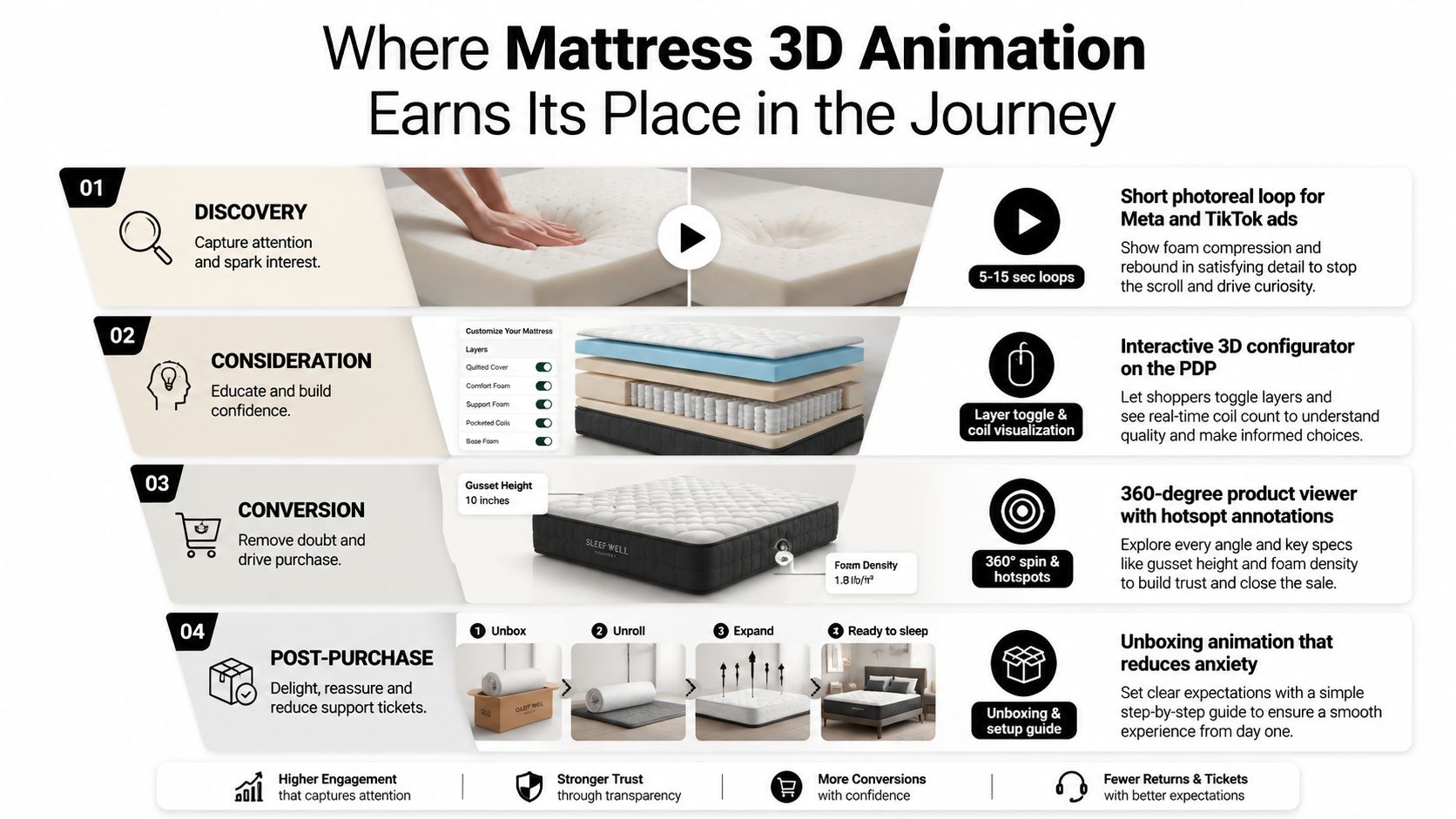
A mattress buyer doesn't encounter your product in one environment. They may see a paid social ad, compare a PDP on a phone, visit a retailer, ask an RSA about the coil system, and return to the site before purchasing. The asset system should follow that journey instead of forcing one long video to do every job.
At discovery, short photorealistic loops can show foam compression, rebound, surface quilting, or a hand pressing into a comfort layer. These clips work as attention devices because motion demonstrates a property that a still image can only suggest. Paid social teams can adapt the same source model into vertical and square compositions without arranging another photo shoot.
Give the PDP more than a beautiful bed
The PDP is where construction clarity earns its keep. Place an interactive viewer near the product information, then use an exploded-view sequence below the buy box to explain the build in a controlled order. A hotspot can identify the gusset, quilt, edge encasement, or a specific foam layer without making the buyer hunt through a block of copy.
For high-consideration products, 3D visualization can support conversion because it narrows the gap between a static image and the physical object. One academic report describes expected conversion improvements of 35% to 40% after businesses invest in 3D visualization (IJGET's report on 3D visualization in ecommerce). Treat that as directional evidence, not a promise. The result depends on page speed, merchandising, price, reviews, offer structure, and whether the animation answers a common question.
Showrooms and post-purchase use different assets
A vertical 4K loop can run beside a floor model while an RSA explains the same construction in person. A tablet version gives the salesperson a way to show layers to a couple standing beside the bed, especially when the physical sample can't be cut open.
Post-purchase animation has a quieter role. A confirmation or setup email can show the exact build purchased, clarify rotation or unpacking expectations, and reinforce the quality of the construction. Dealers and wholesalers can use looping trade-show visuals to explain a new ticking or coil system when a physical sample isn't available.
The best mattress animation doesn't replace the RSA. It gives the RSA a shared visual language and removes the need to explain every layer from memory.
Inside a Typical Mattress 3D Animation Production Workflow
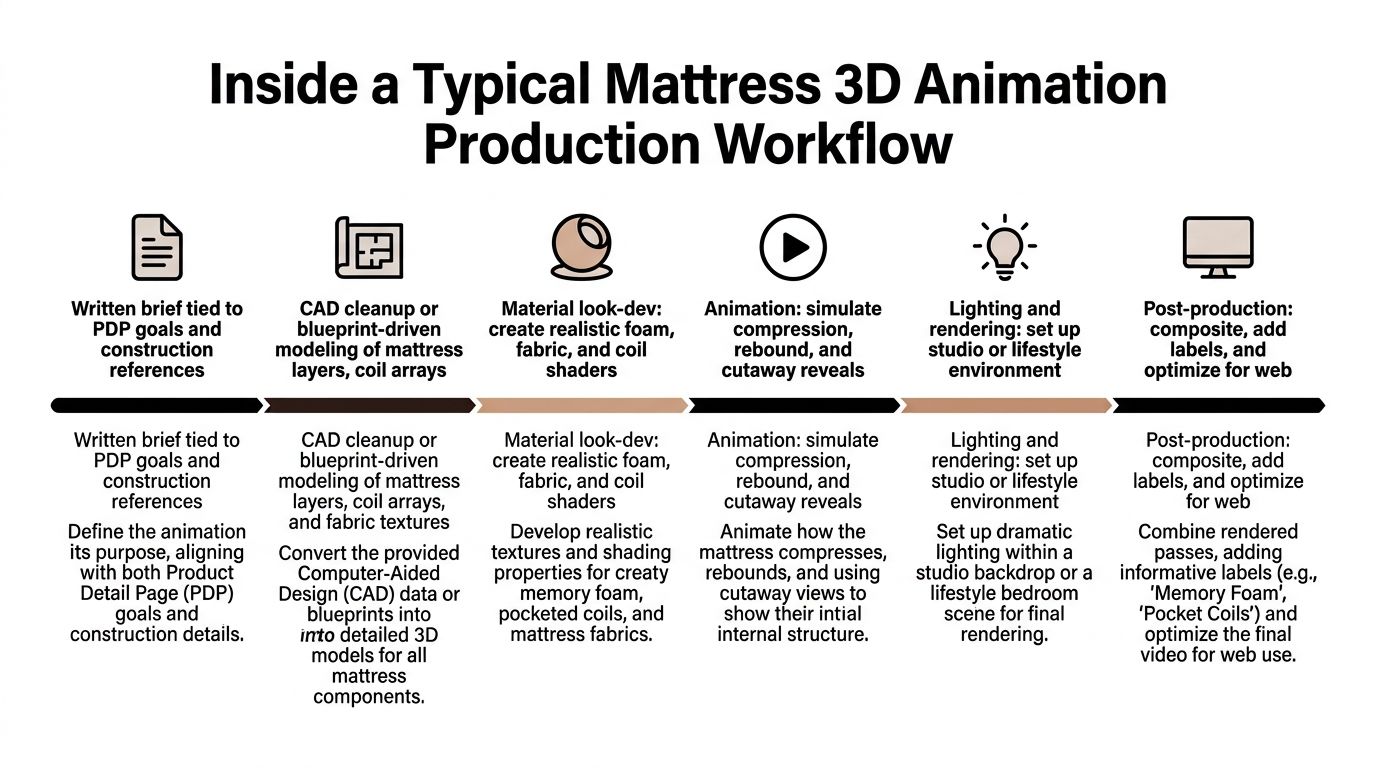
The strongest projects begin with a commercial question, not a camera move. “Show the hybrid construction clearly on mobile” produces a better brief than “make it cinematic,” because it tells the studio what the animation must help the shopper understand.
A typical production starts with the product brief, PDP goals, construction references, approved claims, and channel requirements. The studio then reviews CAD, cut sheets, spec sheets, photographs, and physical measurements. If the source data is incomplete, the team should identify assumptions before modeling begins, especially around hidden foam layers, coil spacing, edge systems, and ticking dimensions.
From construction references to a reusable model
The modeler cleans CAD or builds from blueprints, then constructs the mattress as separate components. Ticking needs attention to weave, quilting, piping, labels, and seam behavior. Foam requires believable edges and compression behavior. Coil arrays need enough visual fidelity to communicate the system without turning the scene into an unnecessarily heavy digital object.
Material look development follows. Fabric shaders should respond properly to studio light, while foam, latex-like surfaces, and metal coils need distinct finishes. White-on-white PDP scenes are deceptively difficult because the mattress must separate from the background without appearing gray or artificially outlined.
The animation pass may include:
Layer separation: Ticking, quilt, comfort foam, transition foam, coils, and base move apart along a controlled path.
Compression: A body impression or hand interaction demonstrates surface response without making unsupported claims about feel.
Rotation: The finished mattress turns through a clean hero angle for a viewer or loop.
Callouts: Labels identify construction features in a way that remains readable on mobile.
The workflow benefits from formal review gates. A rough block confirms proportions and timing. Shaded look development checks materials and lighting. Animation review checks motion and labels. Final color and compositing prepare the approved assets for delivery.
A single hero animation commonly takes roughly two to three weeks, while a full PDP asset kit can take four to six weeks, depending on source files, review speed, and scope. Rendering is a separate constraint. A high-quality frame can take about two to 30 minutes, so a 10-second animation at 30 frames per second may require roughly 10 to 150 hours of compute time on one workstation (3Dimerce's explanation of 3D render times). Teams use render farms, simplify scenes, or adjust samples when SKU volume matters.
For teams formalizing approvals, this video production workflow guide offers a useful general reference. Mattress-specific planning still needs to account for construction validation and reusable outputs. Bedhead's guide to rendering 3D models is also relevant when deciding how a single model should support stills, motion, and interactive use.
Cost Drivers, Timelines, and File Formats to Plan For
Price follows complexity more than runtime. A short animation showing a simple all-foam mattress can require less modeling and simulation than a shorter sequence featuring a hybrid build, detailed coil arrays, quilted ticking, embroidery, and multiple material variants.
A single hero animation typically ranges from a few thousand dollars to the low five figures, while a full product-line system costs more initially but can reduce the effective cost of later assets through reuse. Those figures are planning ranges, not universal quotes. The production brief should separate the one-time model build from the cost of each new view, colorway, animation, channel crop, or interactive implementation.
What changes the estimate
Construction detail: Hybrid mattresses with pocket coils, edge systems, and multiple foam layers require more modeling and review than straightforward builds.
Surface treatment: Quilting, ticking patterns, gussets, embroidery, piping, and branded labels affect material work and close-up credibility.
SKU count: Multiple sizes, heights, firmnesses, and colorways multiply review and output requirements.
Animation behavior: Rotation is relatively straightforward. Compression, rebound, layer separation, and fabric motion introduce additional simulation and approval needs.
Experience type: AR, VR, and interactive viewers require technical preparation beyond a rendered video.
Revision scope: A clear reference pack and consolidated feedback protect both schedule and budget.
A hero render may take about 10 days, a more developed animation three to four weeks, and an interactive kit six weeks or more, depending on the production scope. File planning matters just as much as the visual brief. A beautiful MP4 won't solve a WebGL requirement, and an AR-ready model won't automatically work as a lightweight PDP viewer.
Mattress 3D Animation Deliverables and Format Guide
Deliverable | Format | Best Use |
|---|---|---|
Finished animation | MP4 | PDP, paid media, showroom screens |
Web-optimized animation | WebM | Faster web playback and embedded motion |
Interactive 3D model | GLB | Web viewers and product interaction |
AR model | USDZ | Compatible mobile AR experiences |
Layered still composition | PSD | Internal design edits and campaign variations |
Vertical cutdown | MP4 | Social stories, reels, and mobile placements |
Seamless loop | GIF or video loop | Email, retail displays, and lightweight placements |
Agree on naming, dimensions, compression, transparent backgrounds, source files, and usage rights before production. Bedhead's reference on 3D graphics file formats can help marketing and creative teams align their delivery checklist before requesting bids.
How to Hire a Mattress-Focused 3D Animation Vendor
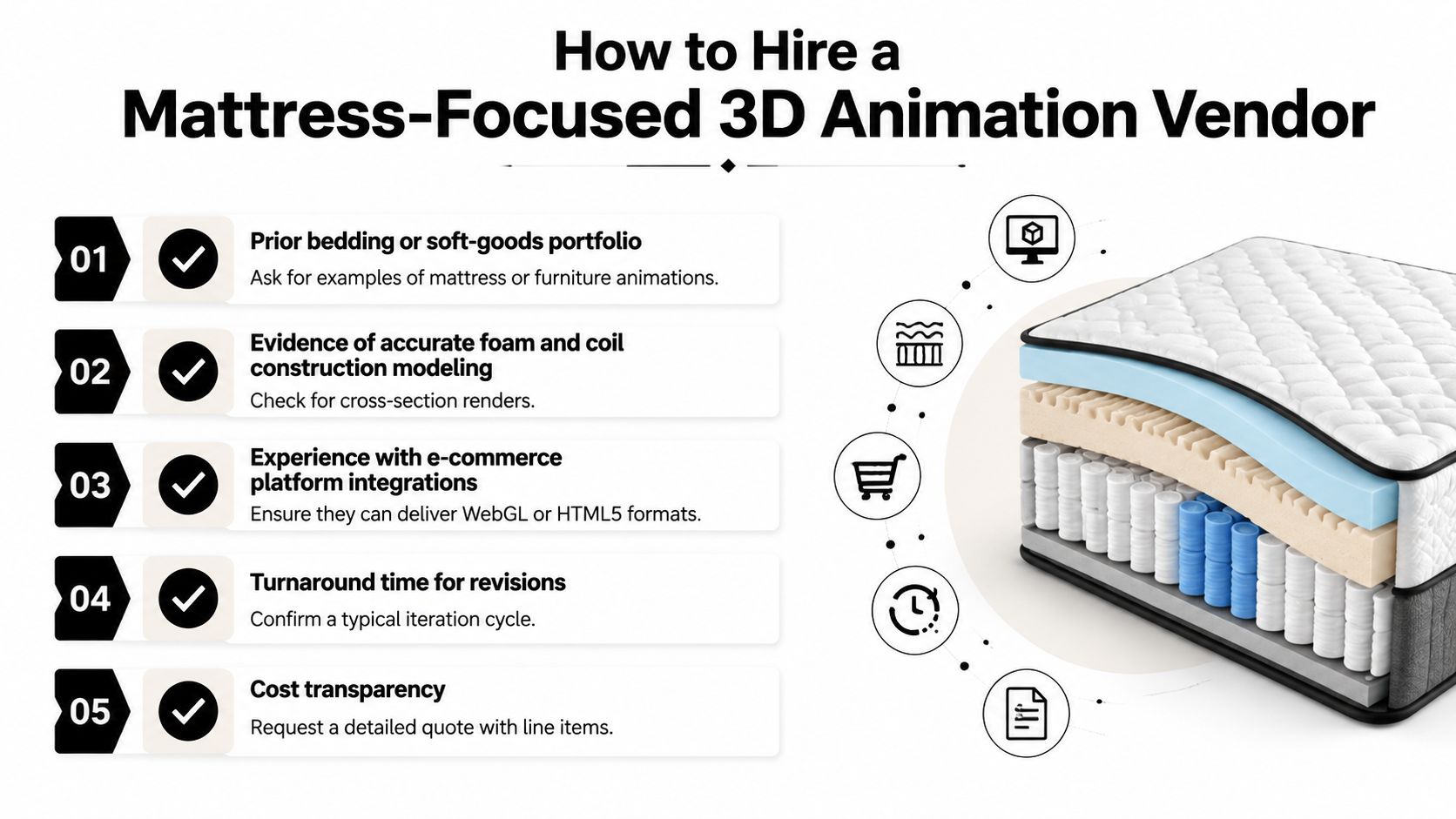
A generalist studio may have an impressive reel and still misunderstand mattress construction. The hiring test is whether the vendor can represent a hybrid build accurately, preserve the shape of a gusset, show a quilt without making it look painted on, and explain foam layers without turning the product into a technical diagram nobody wants to watch.
Start with the portfolio, but inspect it like a mattress operator. Ask for bedding or other soft-goods work, then request cross-sections and close-ups. Look for coherent layer proportions, believable material response, clean seams, and animation that reveals rather than obscures.
A practical vendor checklist
Prior bedding experience: Ask for mattress, upholstered, or soft-goods examples. A furniture reel may show lighting skill, but it won't prove construction knowledge.
Construction accuracy: Confirm that the vendor can work from CAD, blueprint files, spec sheets, photographs, or hand measurements. Ask how unknown internal details will be approved.
Modular asset planning: Require a reuse map for PDPs, social, email, print, dealer presentations, retail screens, and RSA tablets. The finished model should support more than one hero render.
Technical testing: Check the actual interactive viewer on mobile, the AR model on supported devices, and the animation on showroom screens. A file can look fine in a review window and fail in a retail environment.
Revision control: Get the review stages, turnaround expectations, included rounds, and change-order rules in writing.
Source access: Ask whether layered stills, scene files, texture references, and model assets are included. In-house designers may need to create future crops or campaign variations.
Search readiness: Alt text should describe the product and image purpose rather than stuff keywords into a caption. RankEngine's product image alt text optimization guide provides a useful reference for ecommerce teams.
A detailed quote should identify modeling, shading, animation, rendering, compositing, interactive development, revisions, and file preparation separately. That structure makes it easier to compare vendors without selecting the cheapest bid by accident.
Bedhead can fit this kind of project when a mattress manufacturer, retailer, private label brand, or sleep startup needs 3D modeling alongside mattress-specific SEO, paid media, PDP optimization, or sales training. Its service mix includes Digibuns, silhouettes, room scenes, and interactive product imagery, which is useful when one construction model needs to serve both digital and showroom teams. A vendor comparison should still focus on the evidence above, not on branding alone. For additional evaluation criteria, see this guide to 3D rendering companies.
Your Next Steps and Where to Go Deeper
Don't begin by commissioning a full catalog. Begin by identifying where unclear construction is costing the brand attention, confidence, or sales support.
During the first stage, audit current PDP imagery and showroom signage. Mark the SKUs where shoppers ask repeated questions about ticking, comfort layers, firmness, coil systems, height, or edge support. Compare the claims on the page with what the animation would show. If the visual implies a construction detail that isn't present, technical trust suffers.
A practical evaluation path
Select a focused pilot: Choose two or three representative products, such as a flagship hybrid, a value all-foam mattress, and a premium model where ticking or quilting is part of the differentiation.
Separate build cost from reuse cost: Ask vendors to price the one-time model, then list the cost of stills, cutdowns, exploded sequences, AR files, room scenes, and future colorways separately.
Test the smallest useful system: Produce one hero animation, one exploded layer diagram, and one AR-ready GLB. Put the assets on the PDP, in a showroom environment, and in a sales presentation before expanding.
Measure behavior and questions: Review product engagement, add-to-cart behavior, assisted sales conversations, and customer-service questions. Don't judge the asset only by video views.
Create governance: Assign owners for construction approval, claims approval, brand review, and channel delivery. Keep a source-of-truth model and a version record for every mattress build.
The commercial value of product 3D animation appears when the asset library keeps working after launch. A layer breakdown can become a PDP module, a retail screen loop, a paid-social cutdown, an email explanation, a dealer presentation, and a training visual. That's a stronger investment case than treating animation as a single launch video.
Bedhead Network, available at www.BedheadNetwork.com, is free for mattress industry professionals. It serves as a hub for marketing insights, news updates, networking, training resources, an industry directory, and business tools, giving mattress teams and 3D specialists a place to share briefs, vendor reviews, and benchmark renders.
The education library at Bedhead University offers another place to build practical marketing knowledge. A phased rollout keeps the work tied to real mattress merchandising needs, while a modular production plan turns the finished model into a permanent business asset.
If your mattress PDPs or showroom screens still rely on flat images to explain ticking, foam layers, gusset details, or hybrid construction, BEDHEAD can help map those gaps into reusable Digibuns, silhouettes, room scenes, animations, and interactive assets. Visit BEDHEAD to discuss a focused pilot that connects 3D visualization with product-page optimization, paid media, and mattress sales training.