How to Create 3D Renderings for Mattress Products
If you're staring at a launch calendar while the sample box is stuck in transit, you already know why how to create 3D renderings has become a practical question, not a design hobby. Mattress teams don't usually lose a week because the idea was weak, they lose it because the product photography chain is fragile, the foam sample is late, the room set is wrong, or a last-minute spec change forces everyone back to square one.
A 3D pipeline gives you a way out of that loop. For mattress brands, it's not just about pretty visuals, it's about capturing the ticking, gusset, foam layers, and silhouette once, then reusing that master asset across PDPs, retail training, cutaways, and room scenes without repeating the same production headache every time the SKU shifts.
Why Mattress Brands Are Moving to 3D Renderings
The worst week in mattress marketing is easy to recognize. The PDP shoot is booked, the warehouse sample never arrives, the prop bed is wrong, and the launch date doesn't move just because the product did. At that point, everyone feels the cost, photographer, stylist, retoucher, room staging, and the internal approval cycle all need to be reset before a single image can go live.
3D fixes that operationally. A good mattress model becomes a living asset, so the quilt pattern, gusset height, edge profile, and comfort stack can be re-lit, re-framed, and re-exported without dragging the whole team back to set. That's why teams treat rendering less like a novelty and more like production infrastructure.
Practical rule: if a visual changes every time a fabric, tuft, or label changes, build the source asset in 3D and stop paying for repeat photography.
There's also a presentation advantage that matters in bedding. Photography can struggle with clean cross-sections and exploded views, especially when you want to show layered construction without making the bed look strange or staged. A digibun style asset makes the internal story legible, while room scenes and clean silhouettes keep the product line visually consistent across the catalog.
For a broader look at the production logic behind this category, Bedhead's overview of 3-D product visualization is worth keeping handy. If you're also thinking about how bedding styling affects the final image, this practical guide on how to match bedding with your mattress is a useful reference for room-scene planning.
Factor | Traditional Photography | 3D Rendering |
|---|---|---|
Sample dependence | Needs the physical mattress on hand | Built from CAD, references, and swatches |
Revision speed | Slower when specs change | Faster once the master model exists |
Layer storytelling | Hard to show internal construction cleanly | Strong for digibuns and cutaways |
Visual consistency | Can drift across shoots | Easier to standardize across a line |
Variant testing | Requires new shoot setups | Easier to swap materials and angles |
Choosing How 3D Renderings Get Produced
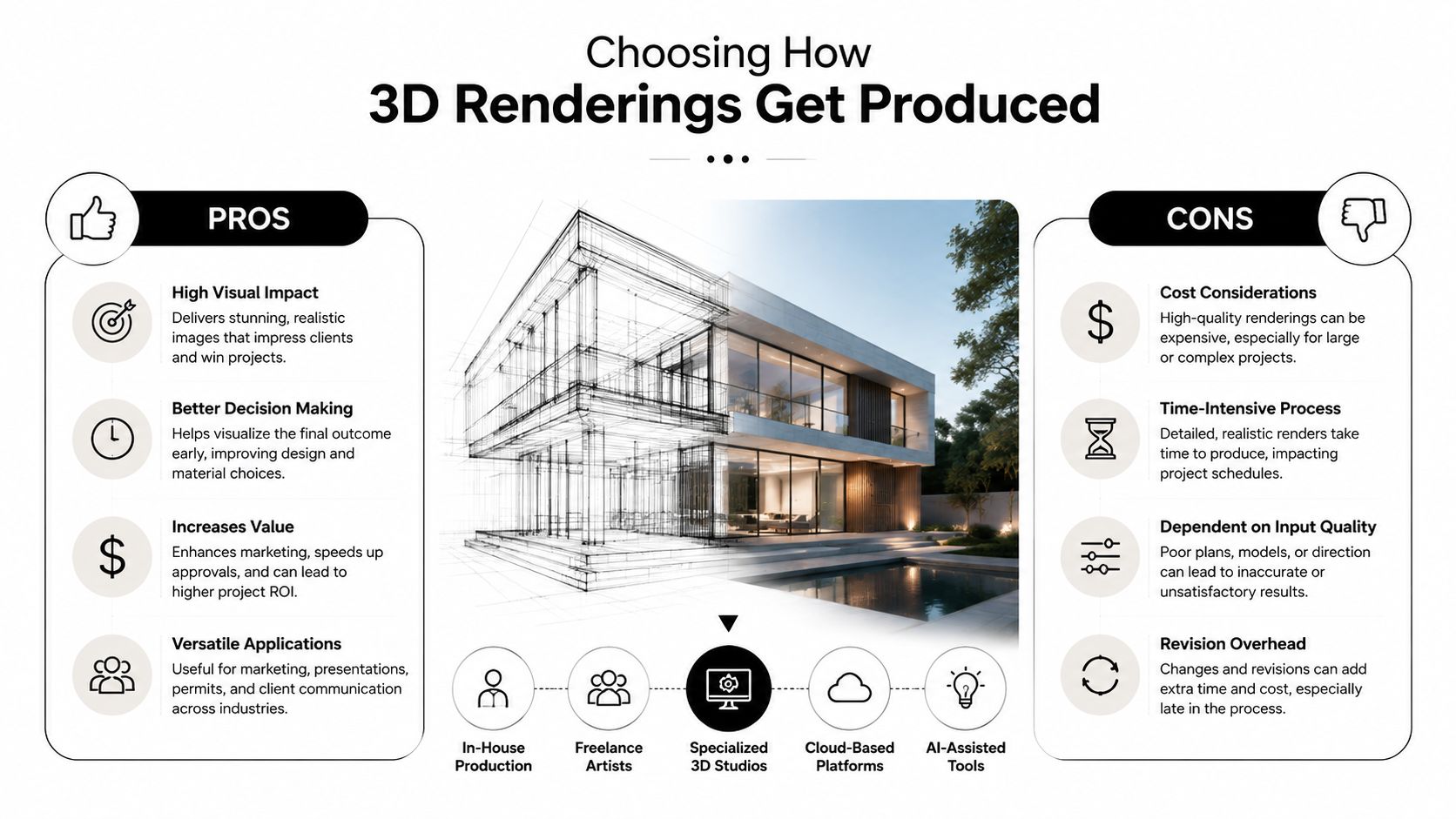
The production route matters as much as the image itself. In-house teams, freelancers, and dedicated studios all solve different problems, and mattress brands usually feel the trade-offs most sharply when a fabric swatch changes mid-campaign or a new base style needs to match the existing line.
In-house teams
In-house works best when the brand already has a strong visual language and needs quick turnaround on hero shots. The advantage is control, especially if the art director wants fixed lighting presets, house angles, and immediate access to internal product knowledge.
The problem is specialty work. Quilted ticking displacement, memory foam deformation, or a complex hybrid stack can stall an internal team if the pipeline is too shallow or the artist is wearing too many hats. Asset ownership and NDA handling are easier inside the company, but revision bandwidth is usually the bottleneck.
Freelancers
Freelancers can be a good bridge for one-off jobs or a single launch package. They're flexible and often fast, but the quality of revision management varies a lot, and that matters when product development sends a new swatch after approval.
A solo artist can also get trapped by scope creep. If the mattress build needs more technical modeling, or the campaign wants a second room scene and a cleaner silhouette pass, the project can start to wobble unless there's a strong internal lead keeping the brief tight.
Studios
A dedicated visualization studio is usually the safest path for repeatable output, especially when the brand needs model building, lookdev, and batch rendering handled without constant handholding. A studio is also better equipped for layered approvals, because the pipeline can separate geometry, materials, lighting, and post work cleanly.
For teams that want a practical reference on the studio option, Bedhead's page on 3-D rendering companies is a useful comparison point. If your team is also thinking about fast iteration and shorter feedback loops, this overview of how RemotionAI renders videos is a good reminder that pipeline design matters as much as raw output.
A simple filter helps here, if you launch a few SKUs a year, a freelancer or small in-house setup may be enough. If you push many materials, collections, or room-scene variants every quarter, a studio workflow usually pays for itself in fewer revision spirals.
Building the Mattress Model and Materials
The mattress model has to start with real inputs, not guesses. A good lookdev artist asks for spec sheets, factory CAD or DXF files, swatch scans of the actual ticking, and at least one clean reference photo of the product in daylight. Without those, scale errors and texture drift show up later, usually after the client has already fallen in love with the wrong version.
Block the geometry before you chase beauty
The first pass is pure structure. The foundation, coil block, comfort layers, quilted cover, rolled edge, and label placement all need to line up with the physical product. If the mattress is hybrid, the transition between support core and foam stack has to read correctly, because mattress buyers notice proportion faster than most brands expect.
After that comes the quilted surface. Clients zoom in on this area more than they say they will, so the quilt can't just be a fake bump map. The stitched pattern needs real depth, and the corners need clean continuity so the ticking doesn't break at the seam.
Materials need to behave like textile, not plastic
UVs matter here because the cover has to wrap cleanly around the corners and the gusset pattern has to repeat without obvious stretching. Once that's right, the shader work begins. Knit fabrics usually need a controlled sheen, the weave needs normal detail, and the foam edge in a cutaway often benefits from a subtle subsurface tint so it doesn't look like carved chalk.
The first thing clients respond to is whether the surface feels like bedding or packaging. If the material looks synthetic, the whole render loses trust, even if the lighting is strong.
Displacement should be used with restraint. Enough to catch shadow and highlight on the quilt, not so much that the silhouette starts to wobble. That balance matters on PDP imagery, because mattress shoppers compare these details across brands and immediately spot anything that feels inflated or flattened out of proportion.
Picking Render Engines and Lighting for Bedding Imagery
The render engine should match the job, not the other way around. Real-time tools like Unreal Engine 5 with Lumen or Eevee are useful when the team needs to review shape, angle, and room composition fast. Path-traced engines like Corona, V-Ray, Cycles, Octane, and Redshift are stronger when the final image has to hold up at close inspection on a PDP, especially around quilting, stitching, and soft shadow transitions.
For mattress batches, the biggest question is usually iteration speed versus final polish. Real-time engines win when the art director wants to move quickly through multiple options, while path tracing is better when the brand wants a more finished hero image or a room scene that needs realistic fabric response. If the deadline is tight and the batch is large, cloud rendering through services like RebusFarm or GarageFarm can be the safer choice than tying up a single workstation.
Engine | Best For | Render Speed | Hardware | Learning Curve |
|---|---|---|---|---|
Unreal Engine 5 with Lumen | Fast review, scene blocking | Very fast | GPU-heavy | Moderate |
Eevee | Quick look tests | Very fast | Light GPU load | Moderate |
V-Ray | Photoreal hero renders | Slower | GPU or CPU | Steeper |
Corona | Soft interior and bedding scenes | Slower | CPU-focused | Moderate |
Cycles | Flexible production rendering | Moderate to slow | GPU or CPU | Moderate |
Octane | Fast GPU path tracing | Fast on strong GPUs | GPU-heavy | Steeper |
Redshift | Batch production and large scenes | Fast on GPUs | GPU-heavy | Steeper |
Lighting should flatter the material, not flatten it. For hero mattress shots, soft area lights or a clean HDRI usually preserve the shape without turning the top surface into a hard shiny block. Room scenes usually benefit from a three-point key, fill, and rim approach, while close-ups of ticking look better with a dedicated top-down setup that reveals texture without exaggerating it.
Color management also matters. Linear sRGB and ACEScg are common choices when you need consistent output across post and final delivery, and denoisers should be used carefully so they clean noise without erasing textile detail. For a deeper software comparison, Bedhead's guide to software for CGI is a useful companion when your team is deciding how much horsepower the pipeline really needs.
Post-Processing and Asset Delivery for PDPs
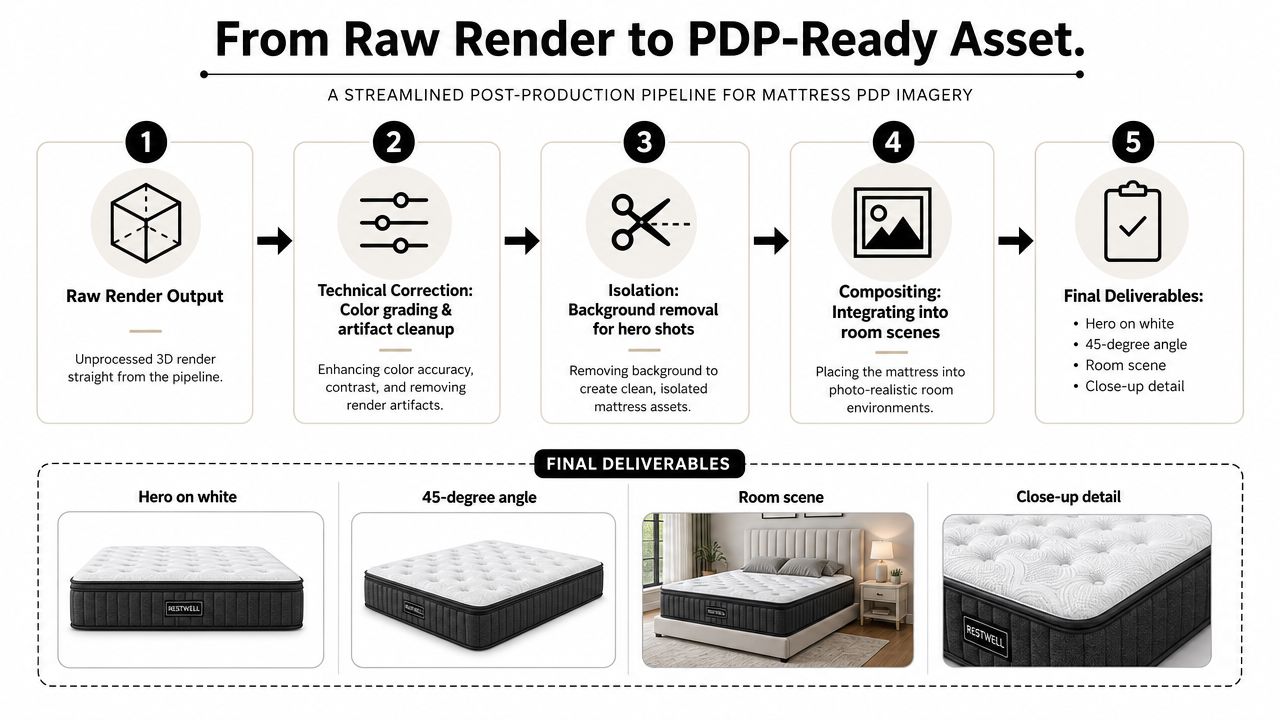
The raw render is rarely the final asset. What matters is turning that output into a delivery set the ecommerce, marketing, and retail teams can use, without re-opening the whole scene every time someone wants a new crop. That usually means a mix of hero on white, three-quarter angle, room scene, ticking close-up, gusset detail, cross-section layers, and 360 spin frames.
Clean up first, then composite
Post usually starts in Photoshop or Affinity with nondestructive work. Exposure needs to match across the whole set, the fabric texture sometimes needs frequency separation to keep it readable, and background swaps are common for marketplace versions that need a different white or neutral base.
The key is to keep the render flexible. If the same master image will feed Shopify, Amazon, and Meta placements, the exports need to be planned before the design team starts requesting random crops. That's where a versioned naming system and a proper DAM handoff save time later.
Review in the browser, not in email
Browser-based review tools make the approval chain much cleaner. Frame.io and ftrack work well for frame-level comments, and a custom Bedhead Network portal can do the same thing for teams that want one place for product, marketing, and sales notes. Comments land directly on the frame, which means fewer screenshots, fewer forwarded threads, and less confusion about which version is final.
If your internal team is also optimizing for web performance, Bedhead's note on how to optimize images for web is a smart follow-up once the assets are approved. That step matters when the same render has to look sharp on a high-end PDP and still load well in the browser.
The best approval process I've seen is boring in the right way. One master file, clear naming, direct comments, and no guessing about which image version the retailer actually signed off on.
Common Mistakes When Brands Create 3D Renderings
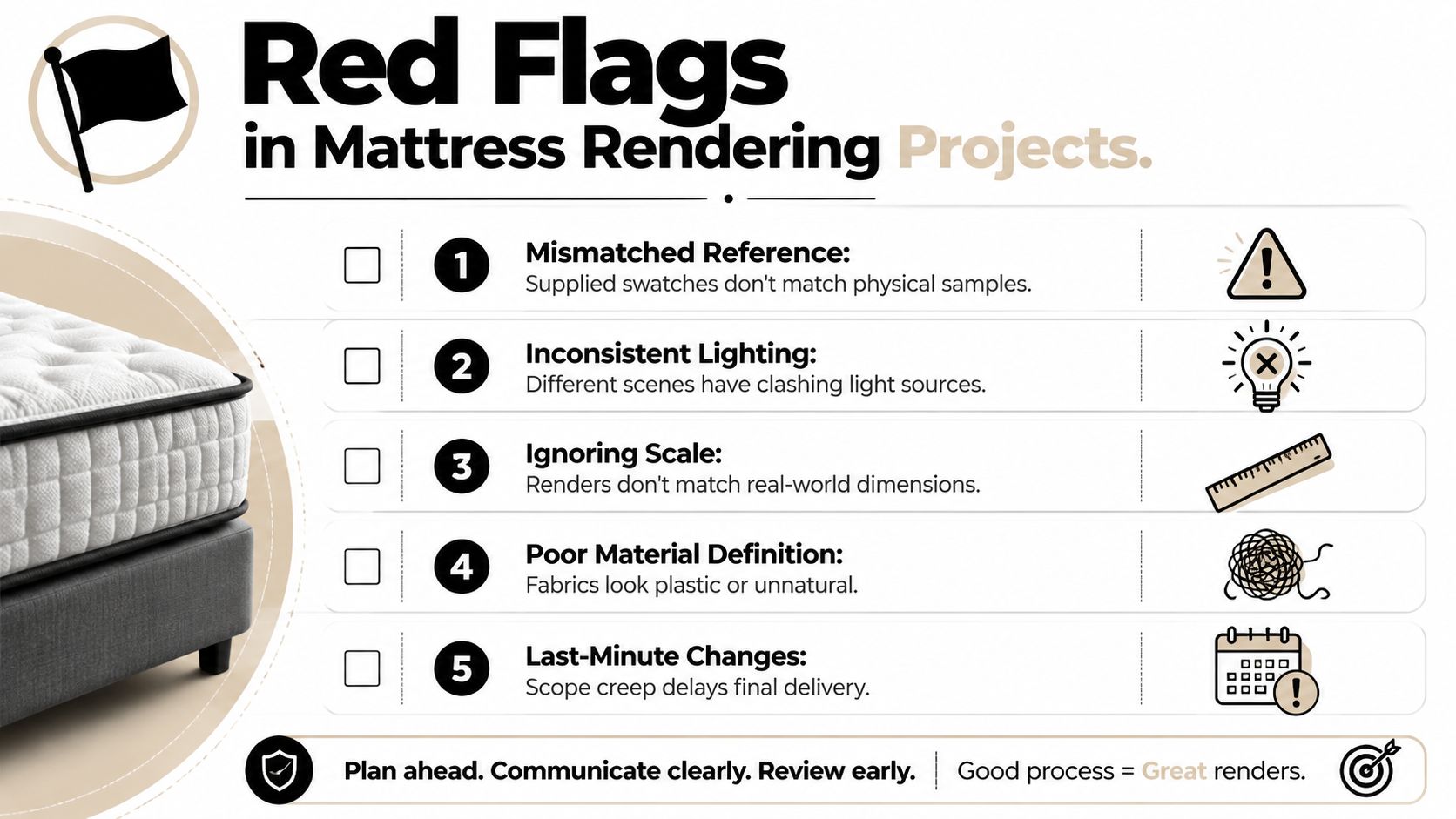
The first rendering project usually fails in predictable ways. The biggest one is mismatched reference, where the swatch photo, the CAD, and the physical sample all disagree about the actual ticking pattern or coil layout. If the studio builds from the wrong input, the final image may look polished while still being technically off.
Scale problems show up next. Bed pillows, headboards, and room props often read too large, which makes the mattress feel toy-like instead of premium and grounded. Over-saturated materials cause a different issue, especially when foam edges look plastic or the quilting gets lit so evenly that the fabric loses softness.
Pre-flight checks that save rework
Confirm the physical sample matches the CAD. If the factory updated the build after the drawing was issued, the model needs the latest spec before anything is lit.
Send the actual fabric reference. A scan or swatch is far better than a marketing photo, because pattern scale and weave detail matter.
Ship enough technical context. Thread count references, untextured CAD, and notes on the gusset or edge construction help avoid guesswork.
Review a silhouette or turntable early. Those passes expose proportion problems before the final beauty render hides them.
Watch for late scope drift. If the campaign adds a new finish, a new base, or a room-scene swap after signoff, the schedule slips fast.
The other common mistake is treating lighting as decoration instead of information. Uniform light can make a mattress look flat, while inconsistent light between scenes makes the collection feel disconnected. If the goal is retail confidence, the render should read like a real product the buyer could see on the floor, not a generic CG object dropped into a clean room.
What Comes Next for Mattress Product Visualization
A master 3D asset should do more than produce one hero image. Once the model is approved, it can become the source for cutaway animations, exploded views, interactive 360 spins, and AR-style room placements without asking the factory for another sample or scheduling another set build. That's where the value sits, especially for mattress brands that need the same product story to work across ecommerce, retail training, and sales decks.
This is also where partner selection gets more serious. A good studio should be able to explain asset ownership, revision licensing, and how it handles foundations, adjustable bases, and other sleep-specific components that don't behave like generic furniture. If the pipeline feels fragile at the proposal stage, it usually gets worse once the revisions start.
For brands that want a mattress-specific workflow, Bedhead Marketing is built around exactly this kind of output, including 3D mattress rendering, digibuns, silhouettes, room scenes, and the follow-through that turns a render into a usable sales asset. If you want to see how that fits into a broader mattress marketing system, visit BEDHEAD and review the services and resources there.
If your current visuals are slowing down launches, confusing buyers, or creating too many versioning headaches, Bedhead can help you build a mattress-specific 3D workflow that's easier to approve and easier to reuse. Visit BEDHEAD to talk through product imagery, render production, and the downstream assets your team needs.