Computer Generated Imagery CGI: A Mattress Brand Guide
A new hybrid mattress is ready for launch. The factory has approved the quilt, the foam layers are locked, and the sales team is preparing the floor model. Then someone opens the product detail page and sees a flat side profile, a dated cutaway graphic, and no useful way to understand the ticking, gusset, or support system.
Meanwhile, another brand is occupying the same search results with a clean silhouette, a room scene, and an interactive product view. The problem isn't that one brand has better design. The gap sits between what shoppers see online and what they can inspect, touch, and discuss on a showroom floor. Computer generated imagery, or CGI, can connect those two experiences when it's built around the actual questions mattress buyers ask.
The Product Page Problem Every Mattress Brand Recognizes
A mattress can have a thoughtful construction story and still look generic online. A flat image may show the profile, but it rarely explains why the hybrid feels different, how the comfort layers are arranged, or what the quilted cover contributes to the product experience.
That creates work for everyone downstream. The eCommerce manager has to explain the product with longer copy. The retailer receives more product questions. The retail sales associate repeats the same construction explanation at the floor model. The shopper still has to translate technical language into a buying decision.
A well-built CGI library gives each person a visual tool rather than another paragraph to read. A Digibun, for example, can reveal the foam layers, pocket coil unit, edge support, and cover construction in one controlled image. A silhouette can show the mattress shape and proportions without visual clutter. A room scene can place the product in a believable bedroom, which helps a shopper understand scale and positioning before visiting a store.
The value comes from control. A digital model can produce consistent angles, fabric variations, cutaways, and room compositions without arranging another physical shoot for every change. That doesn't make photography unnecessary. It gives a mattress team a practical way to fill the gaps photography often leaves behind.
Practical rule: Start with the buyer's unanswered question, then choose the CGI asset that answers it.
A product page should make the next decision easier, whether that means comparing a hybrid with an all-foam model, understanding a firmness option, or recognizing why one mattress carries a higher price. The principles in this product detail page optimization guide apply especially well when the visuals and the product story are developed together.
What Computer Generated Imagery Actually Means
Computer-generated imagery is visual content created by rendering a digital model with software rather than capturing the image directly with a camera. It can be a still image, a moving sequence, a product diagram, or a digitally built environment. CGI is broader than 3D animation, because animation specifically adds movement over time. It also sits within the wider field of visual effects, or VFX, which can combine computer-created elements with live-action footage.
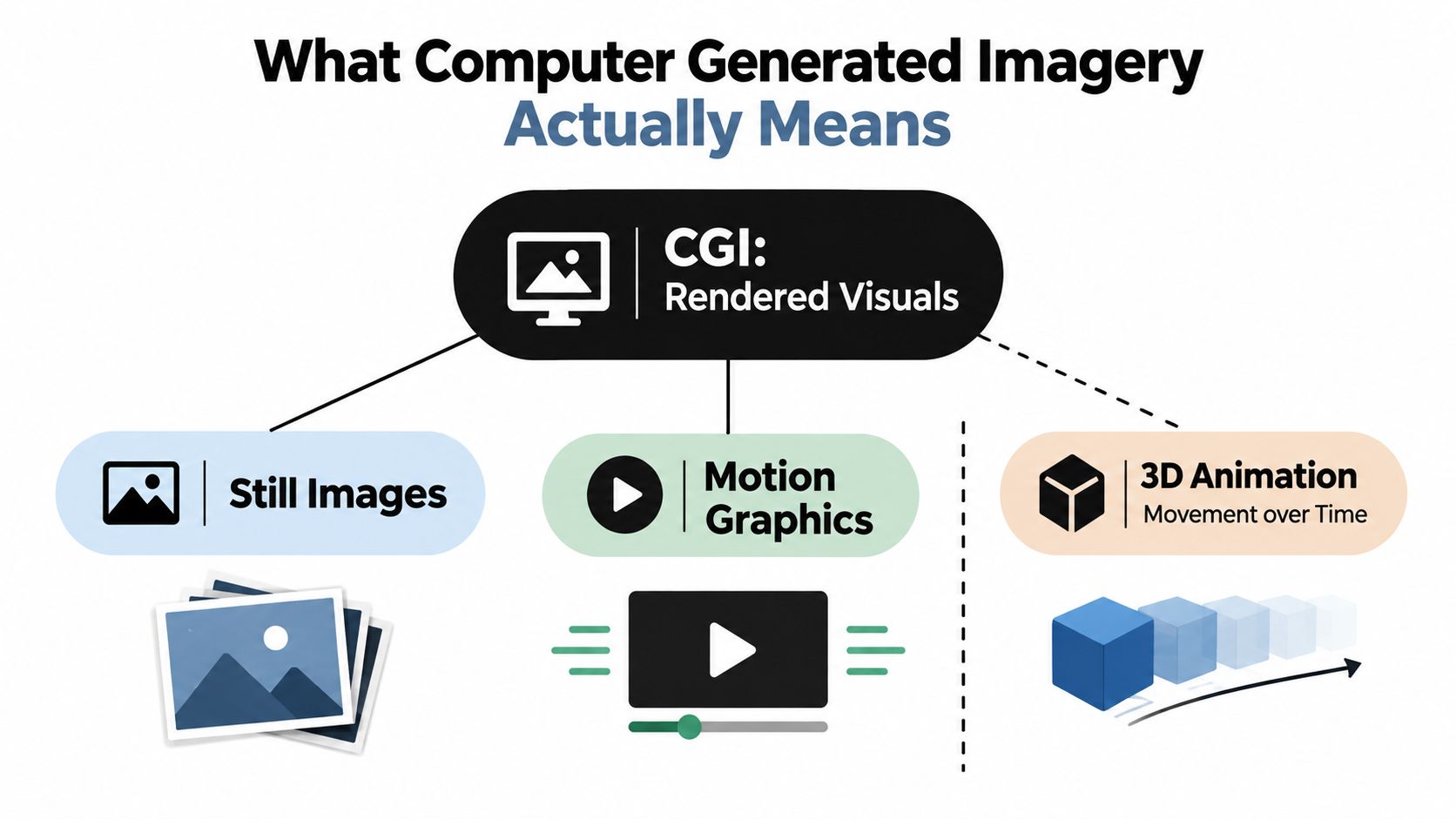
The distinctions become straightforward with mattress examples:
A still CGI image might show a mattress at an angle with the ticking, quilting, piping, and gusset rendered from a 3D model.
A Digibun might display a cutaway of the cover, comfort layers, transition foam, and coil system. It remains CGI if the image doesn't move.
An animated layer demonstration combines CGI with 3D animation. The layers may separate, rotate, or settle into the finished mattress.
A room scene uses CGI to build the bedroom, bed frame, lighting, and mattress in one controlled composition.
A configurator or spin uses the same digital asset interactively, allowing a shopper to view the product from different angles.
A live-action advertisement with digital additions may use both photography and VFX. A person filmed on a set and a digitally altered bedroom are not the same production as a fully rendered product image.
The distinction matters because teams often order “3D” without defining the deliverable. A retailer may need a clean silhouette for a catalog, while a DTC product page needs a hero image, a layer breakdown, a material close-up, and a short rotation. Those are related assets, but they solve different merchandising problems.
CGI also isn't limited to photorealism. A deliberately simplified exploded view can communicate construction more clearly than a realistic image where every layer overlaps. The right visual style depends on the information the buyer needs, not on how technically impressive the render looks.
How CGI Evolved Into a Commercial Tool
CGI didn't arrive as a finished commercial process. It developed through film experiments that gradually proved computers could manipulate images, represent objects, and integrate digital elements with live action.
The 1973 film Westworld is widely identified as the first feature film to use digital image processing. Its sequel, Futureworld, advanced the field with early three-dimensional computer-generated imagery, including digital representations of a hand and face created by Edwin Catmull and Fred Parke. Star Wars then used early 3D wireframe graphics for the Death Star trench sequence, while Tron expanded the use of computer animation and compositing. Young Sherlock Holmes included an early CGI character in its stained-glass-window sequence. These milestones are documented in this overview of computer-generated imagery history.
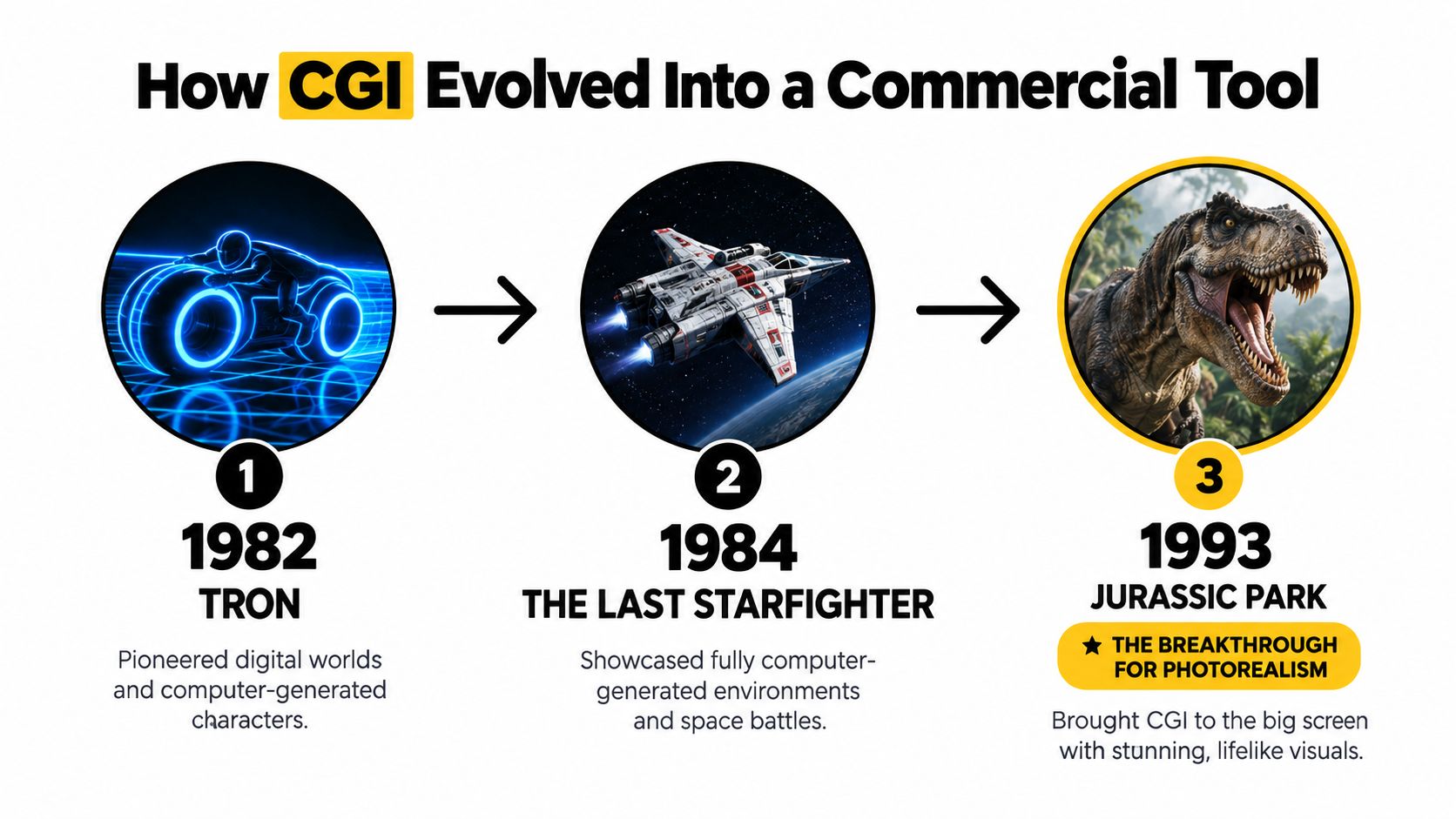
Jurassic Park became the practical turning point for many people because it placed convincing computer-generated animals alongside live actors. The result wasn't a fully digital production. The film used roughly 14 to 15 minutes of dinosaur material, with approximately 4 to 6 minutes consisting entirely of CGI, according to the Smithsonian account of the film's production. Stan Winston's full-scale animatronics and physical models carried much of the work.
That hybrid approach still offers a useful lesson for mattress brands. CGI doesn't need to replace physical references to be valuable. The strongest workflow can combine measured product information, photographed fabric samples, CAD data, and physical validation. Digital production then extends what the team can show, from an internal coil system to a room scene that would be difficult to stage repeatedly.
Photorealistic CGI gained further credibility when The Abyss won the Academy Award for Visual Effects in 1989, and Pixar's Toy Story became the first fully computer-generated feature film in 1995, as summarized in the historical reference above. The same progression now appears in product visualization. Better material models, controlled lighting, reusable assets, and faster rendering have made CGI useful for a mattress catalog, not just a film studio.
Inside the Mattress CGI Production Pipeline
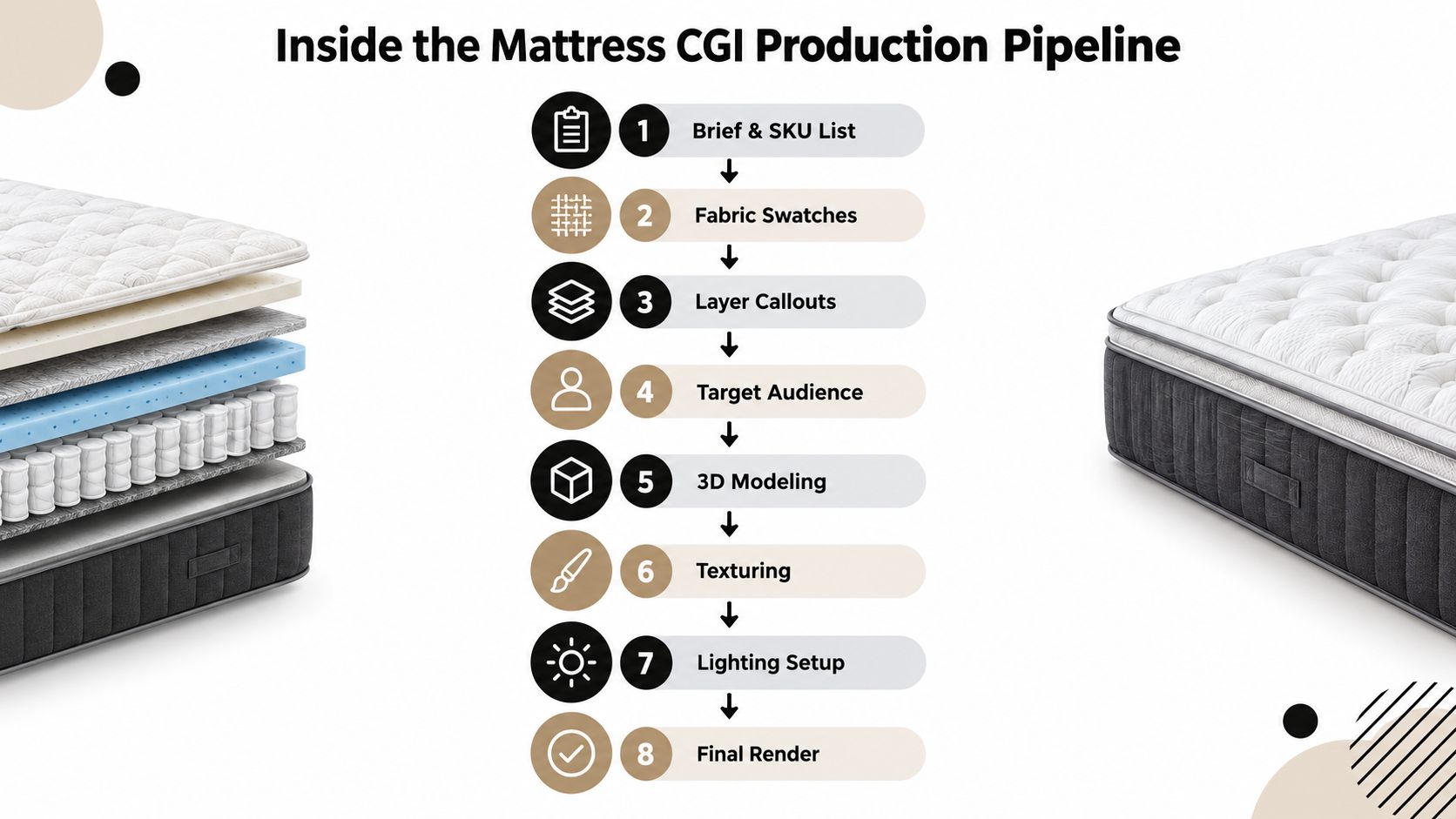
A good mattress render starts before anyone opens a 3D program. The production team needs a controlled brief that connects the product specification to the intended use.
Begin with product truth
The brief should identify the SKU list, approved dimensions, fabric swatches, layer callouts, logo placement, target channels, and required aspect ratios. It should also state which details are physically verified and which visualizations are explanatory.
From there, the pipeline usually moves through these stages:
Model the mattress shell. The artist builds the overall profile, border, corners, handles, gusset, quilting, and cover construction from CAD data, technical drawings, or carefully documented references.
Build the internal structure. Foam layers, transition materials, pocket coils, edge support, and foundation components are modeled as separate parts when the final asset needs a Digibun or exploded view.
Prepare the surfaces. UV mapping assigns how fabric, ticking, quilt patterns, foam textures, and printed details sit on the model. Poor mapping can make a knit pattern stretch around corners or cause quilting to drift across the top panel.
Create the material library. Shading controls the difference between a matte foam edge, a slightly reflective ticking, a woven cover, and a metal coil. Color alone won't communicate those differences.
Set the lighting. A product image needs directional light, ambient fill, reflections, and contact shadows that support the intended environment. Image-based lighting uses a high-dynamic-range representation of real-world illumination so a digital object can receive a comparable light environment. Research on integrating CGI objects into photographs identifies camera parameters, geometry, materials, motion, and illumination as variables that must be matched, as described in this research on lighting and object integration.
Develop the look. The team tests the hero angle, silhouette, room scene, close-up, and cutaway against the product references. This is when an overly glossy quilt or an artificially sharp foam edge should be corrected.
Review sample frames. Stakeholders check construction accuracy, label placement, fabric appearance, proportions, shadows, and the way the image supports the claim beside it. Revision rounds should be agreed before final rendering.
Deliver usable files. Final outputs may include hero images, catalog views, PDP crops, Digibuns, retailer-ready size packs, short loops, and transparent-background silhouettes. Naming conventions should identify the model, size, colorway, angle, view type, and channel.
A physically based workflow improves consistency because material and lighting parameters can be reused rather than repainted for every composition. The underlying image-formation chain includes material reflection, light transport, and display processing. Monte Carlo rendering generally reduces noise as samples increase, but it also increases render time, so high-quality settings belong on final frames, not every draft.
For teams refining their process, this guide to the process of rendering offers useful production context. A separate resource on high-quality 3D product renders is also helpful when evaluating how modeling detail, materials, and presentation affect the finished asset.
CGI vs Traditional Photography for Mattress Products
Photography and CGI solve different problems. Photography captures the exact physical sample, including the way the cover settles, how the quilt catches the light, and how a person interacts with the bed. CGI gives the team controlled access to views that a camera can't capture easily, such as a clean internal cutaway or a floating layer breakdown.
The decision should follow the product situation rather than a general preference.
Factor | Traditional Photography | CGI |
|---|---|---|
Physical accuracy | Strong when the approved sample is available and correctly dressed | Strong when the digital model and material references are accurate |
Fabric and hand-feel cues | Captures real surface behavior, wrinkles, and compression | Can represent weave, sheen, and quilting, but needs calibrated references |
SKU changes | Requires the right physical sample and another setup when details change | Color, fabric, angle, and environment variations can be produced from the digital model |
Internal construction | Limited by what can be cut, staged, or illustrated physically | Well suited to Digibuns, exploded views, and layer storytelling |
Lighting consistency | Depends on set control, retouching, and repeatable photography | Lighting can be parameterized across a product family |
Room scenes | Requires a suitable location, set, and physical product | Can build alternate rooms and compositions without moving the mattress |
Retailer delivery | Works well when the required views are known in advance | Useful for adapting the same model to different crops, backgrounds, and channel rules |
Revision flexibility | Changes may require reshooting or extensive retouching | Model, material, camera, and lighting changes can be revised digitally |
A small launch with a finished sample and a clear shot list may favor photography. The camera records the actual product, which matters when a buyer needs to see a specific ticking, a natural quilt loft, or the way a mattress sits on a foundation. A studio shoot also provides useful reference material for validating a later CGI library.
CGI becomes more practical when the line includes multiple colorways, evolving construction, many retailer requirements, or views that physical photography can't provide. It also helps when a manufacturer needs the same product presented in a hero composition, a cutaway, a sales deck, a room scene, and an eCommerce crop.
The best production choice is often hybrid: photograph the physical materials and validate the finished product, then use CGI for repeatable views and construction storytelling.
Teams planning an eCommerce shoot can use this Amazon product photography guide as a reference for the discipline required around composition, clarity, and marketplace presentation. For broader planning, this eCommerce product photography resource helps frame where camera work remains valuable and where digital assets can extend the catalog.
Where CGI Shows Up on a Mattress Buyer's Journey
A shopper may meet the mattress before seeing its product name. A room scene in a paid social ad or a homepage banner establishes the bedroom, the scale, and the intended mood. It gives the brand a visual entry point without asking the buyer to understand foam density, coil counts, or firmness terminology immediately.
That same shopper needs a different visual on the product page. The Digibun answers the construction question. It can show how the quilt, ticking, comfort layers, transition foam, support core, and edge system relate to one another. The image should sit beside clear labels and factual copy, not replace the specifications.
A material close-up handles another question: what does the surface look like? The shopper may zoom into the knit, quilting pattern, piping, or gusset to distinguish one model from another. CGI is useful here because the studio can maintain a consistent camera position and lighting approach across a product family.
One asset, several decisions
A silhouette works well on comparison pages and retailer catalogs. It removes room styling and focuses attention on height, profile, border construction, and proportions. For a hybrid mattress, a clean cutaway can then expose the relationship between the comfort system and support core without requiring a physical mattress to be sliced open.
Different channels call for different treatments:
Paid social and email: Use a room scene or short loop that communicates the product context quickly.
Product detail pages: Lead with a clean hero view, then support it with a Digibun, material close-up, and feature-specific image.
Comparison pages: Use silhouettes and consistent cutaways so shoppers can compare construction without changing visual language.
Retailer portals: Supply standardized angles, transparent-background images, and size or color variations that fit the retailer's templates.
Showrooms: Give sales associates a tablet-ready room scene or construction visual when the floor model is out of stock or doesn't expose a feature.
A retail sales associate can use a layer view to explain why a mattress has a particular feel, then return the conversation to the physical model. That sequence matters. The digital asset supports the conversation, but it can't prove pressure relief, temperature regulation, motion isolation, or long-term durability by itself.
A practical 3D product visualization guide can help teams match each asset to the decision it needs to support. The strongest product pages don't add CGI because it looks modern. They add the specific view that removes a buying hesitation.
Where CGI Helps and Where It Hurts a Mattress Brand
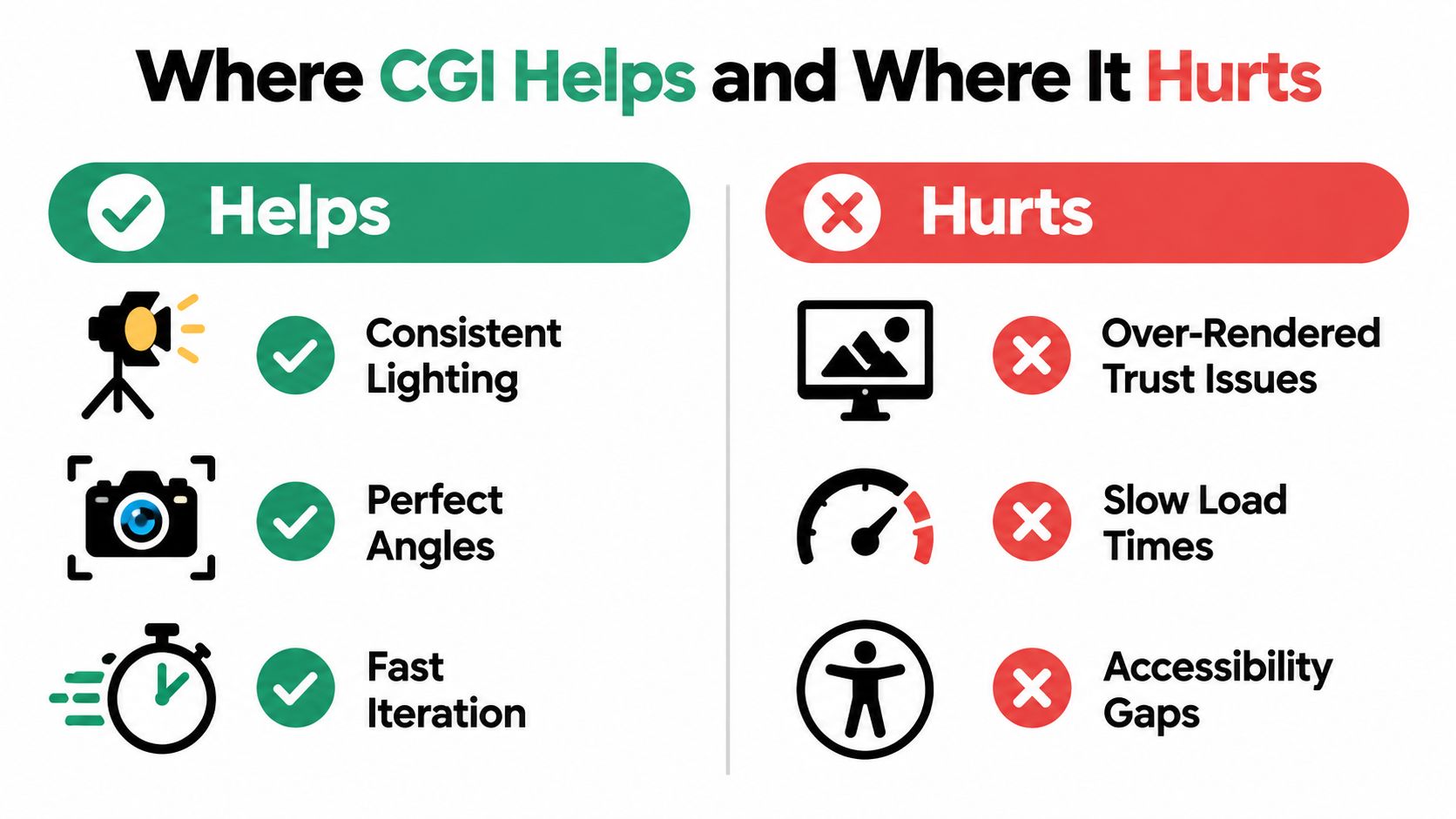
More realism isn't automatically more trustworthy. A render can look technically polished and still create doubt if the ticking shines like plastic, the quilting has no believable depth, or the room scene looks nothing like the environments where shoppers will see the product.
The danger increases when a visual implies evidence the brand hasn't established. CGI can show a construction layer, but it can't visually prove comfort, cooling performance, durability, or pressure relief. A product image should clarify the claim beside it, not make the claim seem more scientifically certain than the available testing supports.
Where additional polish helps
CGI earns its place when it improves understanding or production control:
Premium positioning: Controlled lighting and precise materials can support a considered presentation.
Layer storytelling: Cutaways and exploded views make hidden construction visible.
SKU expansion: A validated model can support color, fabric, size, and angle variations.
Retail consistency: The same camera logic and product proportions can travel across channels.
Showroom support: Digital visuals can explain features that the floor model doesn't reveal.
Where it creates friction
The same tool can work against the brand when the team ignores the user experience:
False material cues: Excessive reflections can make ticking look synthetic or suggest inaccurate surface performance.
Unclear construction: A dramatic cutaway may distort layer thickness or imply a coil arrangement that isn't present.
Heavy delivery: An oversized hero file can slow the page, especially for shoppers on mobile connections.
Poor contrast: Dark room scenes with low-contrast labels can make important information inaccessible.
Claim confusion: A beautiful image can cause buyers to assume visual proof where only an illustration exists.
Distracting motion: A spin or loop can compete with the price, firmness selector, or purchase action.
Use a simple review rubric before approval:
Visual accuracy: Does the model match the approved mattress, ticking, quilt, gusset, and internal layers?
Accessibility contrast: Can shoppers read labels and understand the image without relying on subtle color differences?
File weight: Is the image optimized for the placement, rather than exported at an unnecessarily large size?
On-page relevance: Does the asset answer a real product question?
Trust consistency: Does the visual align with the specifications, testing, and claims on the page?
If a render looks impressive but fails two of those checks, it needs revision. A clean, honest silhouette often serves a mattress brand better than a cinematic scene that hides the product.
Turning CGI Into a Competitive Advantage
CGI becomes commercially useful when it operates as a repeatable system rather than a one-off hero image. Start by auditing the current product page and identifying the three gaps that most affect understanding: missing lifestyle context, weak layer storytelling, or inconsistent size and color views.
Then build in an order that lets each asset support another channel:
Hero render: Establishes the product's primary presentation on the PDP.
Room scene: Extends the product into paid media, email, and showroom storytelling.
Digibun: Explains the construction beside specifications and feature claims.
Silhouette or spin: Supports comparison, retailer listings, and angle exploration.
Retailer-ready size pack: Keeps product presentation consistent across partner sites and sales materials.
The operating advantage comes from reusing a validated digital model. A manufacturer can update the material, revise a layer, or create a new composition without rebuilding the entire visual language from scratch. A retailer can receive useful files instead of trying to crop one flat photograph into every required format.
For education on mattress marketing, sales activation, and product communication, Bedhead University is a useful industry resource. Mattress professionals can also use the free Bedhead Network to find marketing insights, news updates, networking opportunities, training resources, an industry directory, and business tools.
Audit the product page first, then commission the asset that addresses the largest buyer question. That approach keeps CGI tied to conversion, showroom conversations, and retailer usability instead of treating it as decoration.
The mattress-focused team behind BEDHEAD develops Digibuns, silhouettes, room scenes, product-page imagery, SEO, paid media, and sales training for manufacturers, retailers, private-label brands, and sleep product startups. If your current visuals don't connect the construction buyers see online with the product they test in a showroom, request a practical review of your imagery system and the next assets your team should build.