3D Graphics Design for Mattress Marketing That Converts
A shopper lands on a mattress product page, sees one polished photo of a quilted cover, and still can't answer the question that matters most: what's inside this bed? They can't see the foam layers, pocketed coils, gusset, edge support, or the height relative to their frame. So they leave, compare another mattress, or buy with expectations the product page never properly set.
That gap is where 3D graphics design earns its place in mattress marketing. A well-built model doesn't merely make a product look polished. It translates construction, materials, proportions, and use context into visual information a shopper can act on. Digibuns explain the inside, silhouettes standardize the product line, room scenes establish scale, and interactive viewers give shoppers control over the details that create uncertainty.
The important distinction is that 3D isn't a decorative add-on. It should be a production system tied to product-page clarity, retail selling, launch speed, and the questions that contribute to returns. The mattress brands that get value from it don't start by asking, “How can we make this look more immersive?” They ask, “What does the buyer still not understand?”
The Shopper Who Almost Bounced
A shopper arrives on a hybrid mattress page after searching for pressure relief and support. The hero image shows a clean white bed in a bright bedroom. The next image shows the same mattress from an angle. The quilt looks premium, but nothing explains whether the mattress contains coils, latex, memory foam, or a thin comfort layer over a substantial support core.
The shopper scrolls to the specifications. The copy mentions “advanced support technology” and “responsive comfort.” Those phrases don't show the construction. They don't reveal how the layers stack, where the edge support sits, or why the mattress has the profile shown in the image. The shopper isn't necessarily rejecting the product. They haven't been given enough information to choose it confidently.
That scenario is common across manufacturer sites, retailer PDPs, and private-label catalogs. A photo can communicate surface appearance, but it can't always communicate internal architecture. A technical specification can name materials, but it rarely gives the buyer a useful mental model of how those materials work together.
Practical rule: Every visual asset should answer a buyer question that the product copy can't answer efficiently.
That might be “What does this mattress look like from the side?” A silhouette can answer it. It might be “How are the foam layers arranged?” A digibun, or layered cutaway image, can answer it. “Will this profile look too tall on my platform bed?” A room scene can establish proportion. “Can I inspect the quilting, handles, and edge?” An interactive 3D viewer may help, provided the controls are purposeful.
The commercial value comes from reducing avoidable confusion. Better visualization won't prove comfort, durability, odor, or long-term performance, and it shouldn't pretend to. It can make the product easier to understand, helping shoppers compare the right attributes before they buy.
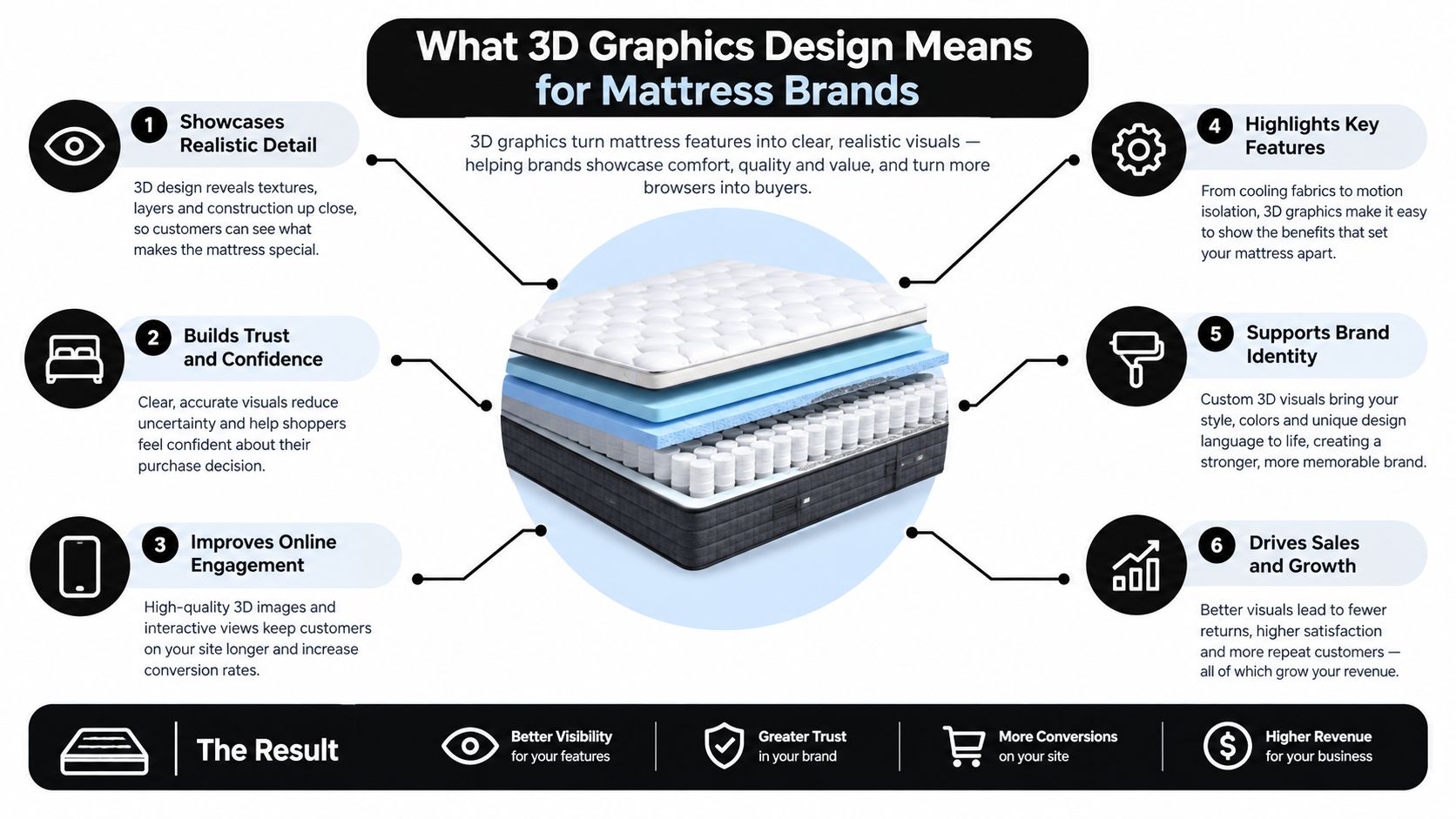
What 3D Graphics Design Means for Mattress Brands
3D graphics design combines digital geometry, material development, lighting, camera work, and rendering to produce product visuals or interactive assets. For a mattress brand, the process starts with an accurate representation of the product, then turns that representation into the images, animations, configurators, or viewers used by shoppers, sales teams, and retailers.
The distinction from photography is practical. A photo captures one physical setup at one moment. A 3D asset can preserve exact product proportions while changing the camera angle, cover color, room, layer visibility, lighting, or product configuration. That makes it useful when a brand manages frequent line changes, private-label variations, regional SKUs, or compressed launch schedules.
A photographer still has an important role. Ticking, quilting, fabric sheen, and showroom context can be captured beautifully in a physical shoot. But photography becomes expensive and inflexible when every internal variation needs a new setup. If a coil supplier changes, a foam layer is revised, or a retailer needs a different room context, a structured 3D model can make those updates more controlled.
Modeling and rendering solve different problems
Modeling defines the form. Rendering determines how that form appears through materials, lighting, camera perspective, and output quality. A mattress can have accurate geometry and still look unconvincing if its ticking is too glossy, its quilting lacks depth, or its edge profile is distorted by the camera.
A useful working definition for a project brief is:
3D graphics design for mattresses is the creation of accurate, reusable digital product assets that explain construction, appearance, scale, and use context across commerce and retail touchpoints.
Brands considering the difference between a model and a final rendered image can also review this explanation of 3D models. The key is to brief both the structure and the intended decision. A beautiful image with no clear job often becomes another asset that looks good but doesn't help a shopper choose.
Inside the 3D Production Pipeline
A mattress render begins long before the final image. The production team needs product drawings, reference dimensions, component information, material references, and a clear list of the views the buyer or salesperson must understand.
Modeling the product truthfully
The model should reflect the actual mattress, not an idealized version that only resembles it. That means establishing the correct overall dimensions and building the visible construction, including the ticking, quilt, gusset, foam layers, pocketed coils, foundation layers, handles, seams, and edge support.
Not every detail deserves the same geometry budget. Seams, handles, tufting, compressed foam contours, and a cutaway edge may need high-detail geometry because the camera will inspect them. Broad fabric weave or fine quilting texture may be better represented with normal or displacement maps, depending on the output.
A model review should answer questions such as:
Profile accuracy: Does the mattress height match the approved specification?
Layer order: Are comfort layers, transition foam, coils, and base materials shown in the correct sequence?
Edge behavior: Does the perimeter communicate the intended support without exaggerating it?
Scale: Does the mattress sit correctly on the foundation or bed frame?
Building believable materials
The material stage translates a product specification into visual behavior. Physically based rendering, or PBR, commonly uses parameters such as base color, metallicity, roughness, and physically motivated lighting. A mattress cover won't usually behave like metal, but its roughness and weave still determine whether it looks like fabric, plastic, or an over-polished digital surface.
A close camera can expose weak texturing quickly. Quilting should have believable depth, ticking should show an appropriate weave, and a gusset shouldn't look like a painted stripe. Texture compression is useful for web delivery, but aggressive reduction can erase stitching, labels, and fabric structure.
The rendering process guide from Bedhead reflects the broader principle that modeling, materials, lighting, and output are connected. A late change to the quilt pattern can affect UVs, texture work, lighting, and every final image that uses the asset.
Lighting and rendering for the destination
PBR and ray-traced shadows are particularly useful for mattress visuals because contact shadows help communicate height, edge support, quilting depth, and the relationship between the mattress and its base. A research renderer tested on an NVIDIA GeForce RTX 4090 rendered scenes containing more than seven million triangles with GPU computation times of approximately 0.55 to 0.56 milliseconds per scene, and was reported as 6.1 to 8.5 times faster than its comparison engine in the tested scenes. Those results come from a specific Vulkan-based research renderer, so they shouldn't be treated as a universal production promise. They do reinforce the need to benchmark the actual asset and renderer rather than judging performance by polygon count alone. (Research renderer details)
For an interactive viewer, a target of roughly 16.7 milliseconds per frame supports 60 frames per second. Offline hero imagery can spend more time on samples and denoising. The same calibrated asset can then serve web configurators, retailer listings, advertising renders, and video, provided the team maintains consistency between the digital product and the physical merchandise.
Digibuns, Silhouettes, and Room Scenes Explained
The most useful way to choose a mattress asset is to start with the uncertainty it resolves, not the visual style it delivers.
A digibun answers, “What is inside this mattress, and how is it built?” It presents the layers in a cutaway or separated composition, making a hybrid mattress easier to explain than a paragraph about coils, comfort foam, and transition materials. Digibuns work on PDPs, in retailer training, on product activation screens, and in sales decks where an RSA needs to explain construction without opening a floor model.
A silhouette answers, “What does this product look like?” It gives the lineup a consistent profile, angle, shadow treatment, and background. That consistency matters when shoppers compare multiple SKUs in a catalog or marketplace grid. A silhouette can also show the height, edge shape, quilting, handles, and branding details without the visual distractions of a lifestyle setting.
A room scene answers, “Will this mattress or bed look right in a real room?” It gives the product proportion, context, and styling. For brands developing room-based merchandising, resources such as DwellShot's guide to virtual staging can help frame the broader role of digitally composed environments. Mattress-specific room scenes should still preserve accurate profile height and realistic placement on the foundation.
Interactive 3D is a fourth layer. It answers, “What can I inspect for myself?” The strongest implementations let shoppers examine the edge, rotate the profile, reveal construction, or compare a product against a frame. They don't force every shopper through a slow novelty experience.
Asset type | Buyer question it answers | Best placement |
|---|---|---|
Digibun | What is inside and how are the layers arranged? | PDP explainer, retailer training, sales deck |
Silhouette | What is the profile, finish, and overall product shape? | PDP hero, marketplace listing, catalog grid |
Room scene | How will the mattress look in a realistic bedroom? | PDP gallery, advertising, retail display |
Interactive 3D | Which details can I inspect or compare myself? | PDP viewer, configurator, product activation |
The first commission should match the largest information gap. Use digibuns for construction confusion, silhouettes for catalog inconsistency, and room scenes when shoppers understand the product but can't visualize it in their space.
Where 3D Assets Plug Into Mattress Workflows
A useful mattress model shouldn't end as a single hero image. It should move through the places where buyers, retailers, and sales teams already encounter the product.
On the eCommerce side, one approved asset can produce the marketplace thumbnail, PDP hero, product gallery views, Google Images assets, feed imagery, and an AR or spatial preview. Each output still needs its own QA. A thumbnail needs a readable profile. A hero image needs strong material detail. A cutaway needs labels and layer order. A viewer needs optimized geometry and textures.
Google Merchant Center accepts GLB and glTF models. Its requirements also state that the model URL must be valid and crawlable, and that textures may be no larger than 2K, because 4K textures aren't supported. The same rules require product images to accurately display the item and prohibit thumbnails with promotional text, watermarks, borders, placeholders, or generic imagery. (Google Merchant Center product data requirements)
Retail and manufacturing handoffs
Retail screens need quick comprehension. A silhouette can support a comparison display, while a digibun can help an associate explain why a hybrid differs from an all-foam model. Manufacturer sales teams can use the same layer callouts in retailer onboarding, product activation sessions, and line reviews.
The handoff should include:
Approved source model: The geometry and layer structure must have an owner.
Output library: Create the required stills, crops, transparent images, animations, and interactive files.
Usage guidance: State which image is the hero, which view explains construction, and which asset belongs in training.
Version control: Record changes to the quilt, foam stack, coil unit, label, and product naming.
For interactive product experiences, 3D product configurator guidance is relevant because configuration logic, asset delivery, and product-page structure need to work together. A viewer that can't load quickly on representative mobile devices won't help a shopper who is already uncertain.
What 3D Actually Changes for Conversion and Returns
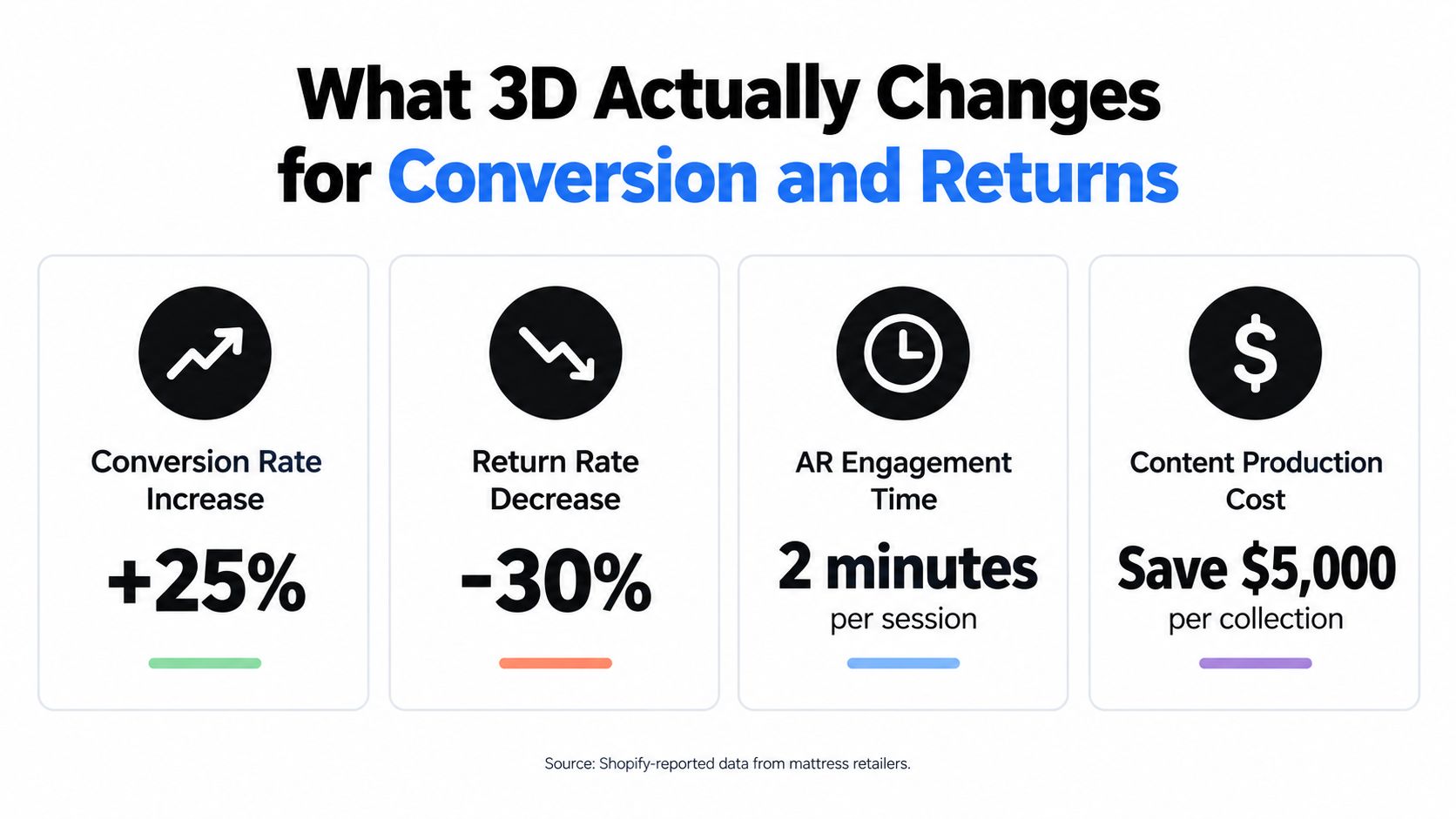
3D can support commercial performance, but it isn't a guaranteed conversion switch. Shopify's retailer examples provide useful signals to test. At Rebecca Minkoff, visitors who viewed a product in augmented reality were 65% more likely to purchase, while shoppers who viewed a 3D model were 44% more likely to add to cart and 27% more likely to place an order than visitors who didn't view the model. These are retailer-specific outcomes, not universal mattress benchmarks. (Shopify's 3D commerce examples)
The more important question is what the interaction helped shoppers understand. In mattresses, 3D may clarify a hybrid layer stack, profile height, edge construction, or fit within a room. It can't establish whether the bed feels soft, isolates movement over time, resists body impressions, or arrives with an odor a customer considers unacceptable.
The evidence also challenges the assumption that any rotation is useful. A 2025 experiment with 206 participants compared automated rotation with user-controlled rotation in online shopping. Participants who controlled viewing direction and speed reported more positive product attitudes, higher purchase intentions, and greater willingness to pay than those shown an automatic rotation. (Experiment on user-controlled product viewing)
That finding fits mattress retail behavior. A shopper may want to inspect the gusset, move to the side profile, pause on the quilting, or reveal the support core. An automatic spin can show motion without answering the question.
A separate 2025/2026 peer-reviewed study found that AR significantly increased engagement compared with 2D or 3D images alone, but it didn't produce notable improvements in product attitudes or purchase intentions. (Study of AR engagement and purchase intention) That distinction should change the measurement plan.
Track:
Assisted conversion: Did shoppers who used the asset later purchase, even if they didn't convert on the same session?
Comprehension: Can users identify the layer order, product profile, or intended use?
Expectation-related returns: Do return reasons mention that the product didn't match its appearance or construction?
Time to decision: Does the asset help shoppers reach a choice without excessive browsing?
Interaction quality: Are users inspecting the intended details, or abandoning before the viewer loads?
Google also recommends combining Product structured data with a Merchant Center feed to help products qualify for richer search experiences. That means a 3D asset still needs accurate product identity, image, price, availability, and applicable commerce information. (Google product structured data guidance)
A Mid-Size DTC Mattress Brand Rebuilds Its Imagery With 3D
Consider a representative DTC mattress brand selling three hybrid mattresses and two all-foam SKUs through Shopify. Its website uses one set of images, retailer listings use another, and marketplace thumbnails show inconsistent angles and product heights. The brand's main problem isn't a lack of creative. It's that shoppers receive different versions of the product story depending on where they encounter it.
The brand starts with two digibuns for its hero hybrid mattresses. The cutaways show the quilt, comfort foam, transition layer, pocketed coils, and base. The PDP copy remains important, but the layer stack now gives shoppers an immediate explanation of what the marketing language refers to.
Next, the team creates silhouettes for the full lineup. The images establish a repeatable camera angle, background, scale, and shadow treatment. Retailer feeds and DTC pages now use the same visual foundation, so the product looks like the same mattress across the catalog.
The phased rollout
Phase one: Digibuns address the “what's inside?” problem on the two hero hybrids.
Phase two: Silhouettes standardize thumbnails and PDP hero imagery across all five products.
Phase three: Room scenes show the top three SKUs in realistic bedroom settings.
Phase four: An interactive viewer adds controlled inspection to the hero hybrid, with hotspots for layer callouts and edge support.
The brand measures hybrid PDP bounce after the layer explainer, interaction with the construction block, assisted conversion, returns that cite expectation mismatch, and update time when a component changes. It also checks whether marketplace and retailer imagery remain aligned after each revision.
The outcome isn't framed as a universal conversion lift. The practical benefit is a clearer product story, faster line-change updates, and fewer inconsistencies between DTC, retail, and marketplace presentation. A structured 3D product visualization service workflow can support that phased approach without forcing the brand to rebuild every asset before publishing anything.
The lesson is scope. Start with the asset that removes the most expensive misunderstanding, then reuse the approved model wherever the product appears.
Where to Start and What to Measure Next
Start with the gap you can describe in one sentence. If shoppers don't understand a hybrid's construction, commission a digibun. If your lineup looks inconsistent across retailer pages, start with silhouettes. If customers can't judge profile, proportion, or bedroom context, begin with room scenes.
The second asset should extend the first rather than duplicate it. A digibun paired with a silhouette explains both construction and appearance. A silhouette paired with a room scene gives shoppers a clean product reference and a realistic context. An interactive viewer should come after the basic visual story is accurate, not before it.
Build a focused measurement plan
Track performance before and after the asset is added, but don't rely on a single engagement metric. A shopper can spend time with a viewer and still leave confused.
Use a practical scorecard:
PDP behavior: Monitor assisted conversion, product-gallery interaction, and bounce after the layer-explainer block.
Expectation signals: Review return reasons that mention appearance, height, construction, or a mismatch with the product description.
Decision friction: Measure time to decision and movement from product page to comparison, checkout, or retailer inquiry.
Retail usage: Ask sales teams which visuals help explain foam layers, coils, edge support, ticking, or quilt differences.
Production efficiency: Record how quickly a changed cover, component, or SKU variation can be updated across the asset library.
Make each visual claim match the product. Don't use a dramatic cutaway that implies unsupported comfort performance. Don't show a room scene with a distorted mattress height. Don't use a glossy material that makes ordinary fabric look like a different product. Trust is lost when the render looks better than the merchandise it represents.
Bedhead Marketing works with mattress manufacturers, brick-and-mortar and eCommerce retailers, private-label brands, and sleep-product startups on 3D mattress rendering, Digibuns, Silhouettes, Room Scenes, SEO, paid media, product-page optimization, brand development, and sales training. The team also provides Bedhead University education for mattress professionals building stronger product and marketing knowledge.
For ongoing industry resources, Bedhead Network, or BEDNET, is free for mattress industry professionals. Visit www.BedheadNetwork.com for marketing insights, news updates, networking, training resources, an industry directory, and business tools.
If you're evaluating your mattress imagery, start with one buyer uncertainty and one product family rather than commissioning an unfocused library. BEDHEAD can help turn approved product specifications into Digibuns, Silhouettes, Room Scenes, and practical interactive assets that work across PDPs, retail screens, and sales training. Reach out through the site to discuss the first asset worth building and the measurements that will show whether it helped.