3D Image Rendering for Mattress Marketing
A mattress launch can stall before shoppers ever understand the product. The floor model is still in transit to the studio, the photography team is waiting for a revised quilting pattern, and the eCommerce team needs product images for a page that also has to explain ticking, gusset height, foam layers, edge support, and firmness. By the time the assets arrive, the campaign window may already be closing.
3D image rendering gives mattress manufacturers, retailers, private label brands, and sleep product startups another way to work. A carefully built digital mattress can produce product cutouts, layered construction visuals, room scenes, advertising assets, and retail presentations without treating every new angle or product revision as a completely new photoshoot. The value isn't visual novelty. It's operational control, provided the render remains accurate, loads efficiently, and helps shoppers make a more confident decision.
The Shift from Traditional Photography to 3D Assets
A traditional mattress photoshoot carries more operational baggage than many marketing plans show. Someone has to move a heavy hybrid mattress to the studio, prepare the floor model, coordinate the room set, match lighting across multiple ticking fabrics, and make sure every product variation is available at the right time. A small change to quilting, a new cover treatment, or an updated label can force a reshoot or leave teams using inconsistent imagery across channels.
That inconsistency creates practical problems. A retailer may show one version of a mattress on its website, while a showroom display or sales deck presents another. A manufacturer may have a polished hero image but no credible way to show the foam layers, pocketed coils, gusset, or edge construction without cutting into a physical product.
3D image rendering changes the asset model. Instead of treating every image as a separate production, a brand can build a digital master that supports multiple outputs:
Silhouettes: Clean, isolated mattress images for product detail pages, comparison charts, catalogs, and paid media.
Digibuns: Layered or exploded visuals that reveal foam layers, coils, quilting, and support systems without destroying a sellable floor model.
Room Scenes: Lifestyle compositions that place the mattress in a bedroom setting with controlled lighting, furniture, and styling.
Retail assets: Presentation slides, point-of-sale graphics, training materials, and product activation visuals built from the same approved model.
This approach also supports revisions. If the quilt pattern changes, the digital scene can be updated without rebuilding every camera angle from the beginning. If a brand wants to show the same mattress in a modern bedroom for DTC advertising and a more traditional setting for a brick-and-mortar retailer, the product geometry and proportions can remain consistent while the environment changes.
Practical rule: Build one accurate product master, then plan the asset family before commissioning individual images.
The shift doesn't mean photography has no place. Physical photography can be valuable for validating color, surface texture, and the way a finished product behaves in a real environment. The mistake is relying on photography alone when a mattress has complex internal construction or a broad channel mix. Bedhead's broader guidance on product photography for eCommerce is useful when deciding which assets should be photographed, rendered, or combined.
Teams evaluating a visualization workflow can also review this Sprello brand workflow guide for a useful perspective on organizing product visualization beyond a single campaign. The important question is not whether a render looks impressive in isolation. It's whether the asset can be updated, approved, resized, repurposed, and delivered consistently across product pages, showroom screens, sales training, and advertising.
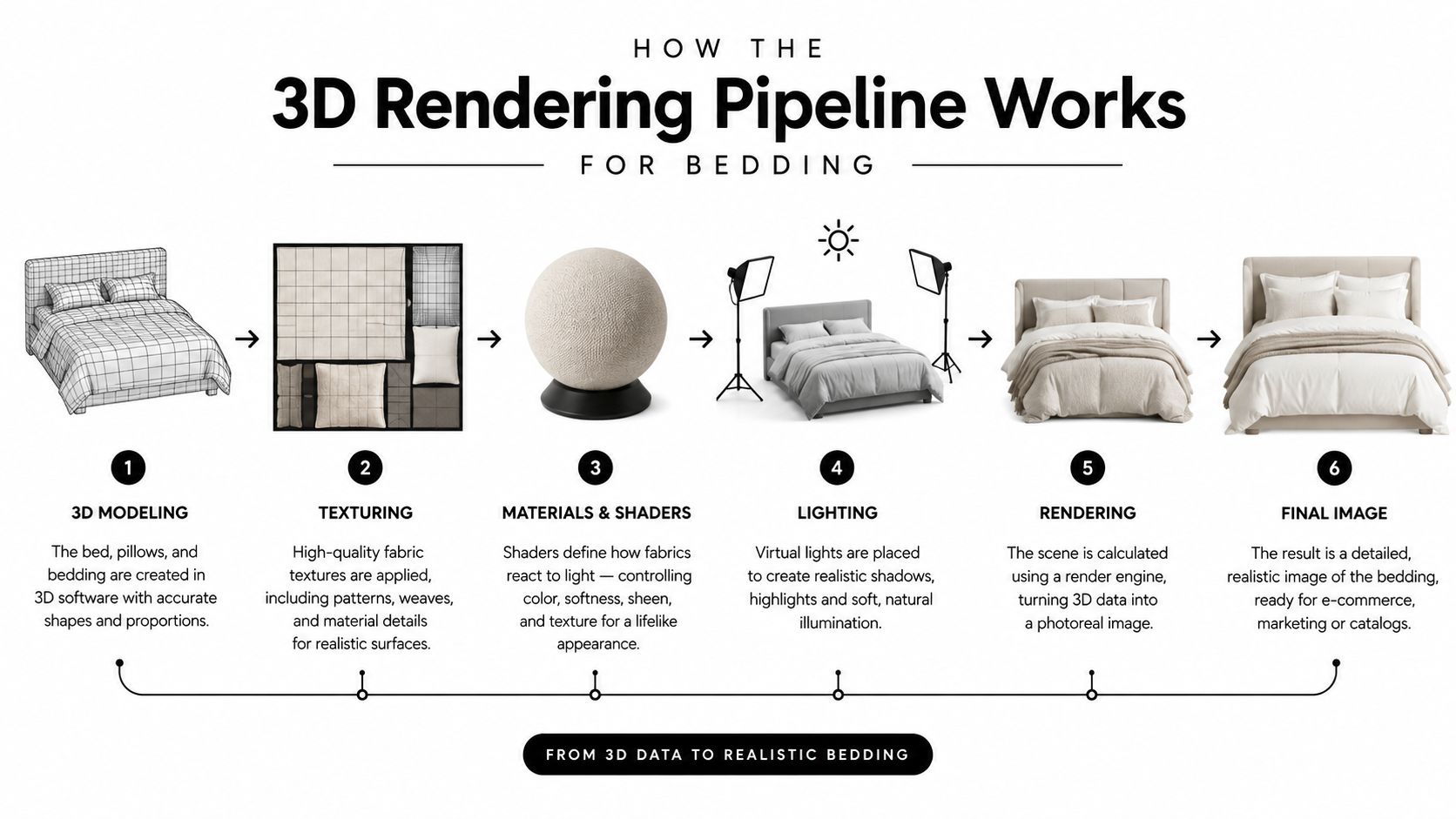
How the 3D Rendering Pipeline Works for Bedding
A mattress render starts with product information, not a camera filter. The team needs accurate dimensions, construction details, reference photography, CAD or technical drawings where available, material references, and a clear understanding of which features shoppers must see.
Modeling the mattress structure
The first stage creates the digital geometry. Computer-graphics workflows represent objects with geometric primitives such as triangles and polygons, then calculate how those surfaces appear from a selected camera. For a mattress, the model may include the outer shell, quilted top, side panels, gusset, foundation, foam layers, coils, handles, and edge support.
The model shouldn't show detail merely because detail is possible. A close-up render of a tufted pillow top may need more geometry around quilting and seams, while a product-listing image can use a lighter version. The right level of detail depends on the final use, viewing distance, and device.
For a deeper look at the modeling side of mattress visualization, Bedhead's guide to 3D mesh for mattresses provides relevant context.
Applying materials and textures
Geometry defines shape. Materials define how that shape behaves under light.
A cooling cover may need a subtle sheen, while a linen blend should read as more matte and tactile. Quilting needs enough relief to show depth without making the ticking appear exaggerated. Foam layers should communicate density and separation, not look like brightly colored blocks detached from a real product.
Material references should be approved against physical samples whenever possible. Color, roughness, weave, stitching, piping, and compression all influence what a shopper thinks the mattress will feel like. A render that makes a knit cover look glossy or a foam layer look unusually thick may be technically polished but commercially misleading.
Lighting, camera, and ray tracing
The camera establishes the shopper's viewpoint. A straight product angle works for a silhouette, while a slightly raised view may communicate mattress height and bedroom context more effectively in a room scene. A Digibun often needs a controlled angle that makes the layer order obvious without distorting proportions.
Ray tracing creates a 2D image from a 3D scene by tracing light paths from the camera through each pixel into the scene and back toward light sources, modeling physically accurate reflections, refractions, shadows, and indirect lighting. This is why it can make fabric, foam, stitching, and bedroom lighting appear believable. The technical explanation is covered in NVIDIA's ray tracing overview.
The final stage includes rendering, color review, retouching, and export. If the team later wants a short product animation or an interactive walkthrough, a workflow such as an AI video tour generator may help explore motion-led presentation formats. It still shouldn't replace product verification or a properly approved master asset.
Measurable Benefits for Mattress Brands and Retailers
The strongest business case for 3D image rendering isn't that it produces prettier images. It's that one approved digital model can support more commercial work than a single studio photograph.
Consider a mattress manufacturer preparing a new hybrid collection. A physical photoshoot may require finished floor models, a studio or showroom set, coordinated samples, product preparation, and repeated scheduling whenever construction details change. A digital workflow can begin from approved product information and generate the core product view, a layered Digibun, a bedroom scene, alternate angles, retailer-specific backgrounds, and sales-training visuals from the same source.
That changes how marketing teams plan launches. They can begin developing assets while reducing dependence on shipping a physical mattress to every stakeholder who needs to review the product. The time savings are operational rather than magical. Teams still need accurate inputs, review cycles, and approvals, but they aren't rebuilding the entire visual system for every channel.
Where the value appears
Product education is one of the clearest use cases. Shoppers rarely see the inside of a mattress in a showroom. A Digibun can show the relationship between the quilt, comfort foams, transition layer, coil unit, perimeter support, and foundation. The visual gives retail associates a teaching tool and gives online shoppers a clearer explanation of why the product is built the way it is.
Room scenes solve a different problem. A mattress can look smaller, taller, softer, or firmer depending on the surrounding environment and camera angle. A controlled room scene helps a brand show scale, styling, and intended positioning without booking another location for every audience or campaign. Furniture, headboards, lighting, bedding, and wall treatments can be changed while the mattress remains consistent.
Retail activation extends the same work beyond the product page. A retailer may need a clean image for a comparison card, a construction graphic for a training deck, and a lifestyle scene for an in-store display. Those outputs can share the same approved geometry and brand rules, which reduces visual drift between the showroom and eCommerce experience.
A practical ROI framework
Don't measure the project only by the cost of producing a single render. Compare the full operating cost of each asset route:
Production inputs: Product shipping, studio preparation, location setup, styling, and physical sample handling.
Revision exposure: The cost of changing quilting, labels, ticking, layer order, or dimensions after the first shoot.
Channel reuse: The number of product pages, dealer presentations, retailer displays, ads, catalogs, and training materials that need visuals.
Commercial clarity: Whether the asset explains construction, scale, and material differences well enough to support a buying decision.
Accuracy risk: Whether the image could create false expectations about loft, surface texture, height, or internal construction.
The conversion question deserves discipline. A polished render won't fix weak pricing, unclear value propositions, poor reviews, or a confusing product page. It can, however, make the product easier to understand and give SEO, paid media, sales training, and retail teams a more useful visual foundation.
Navigating Mobile Performance and AI Accuracy Risks
Interactive 3D can create a compelling showroom effect, but a mattress page still has to work for shoppers using ordinary mobile hardware and cellular connections. A heavy model, oversized texture, or poorly implemented viewer can make the page feel slow before the shopper reaches the information that matters, such as dimensions, firmness, materials, warranty, and delivery.
WebGL is better suited to browser-based real-time processing than conventional HTML5 canvas. In a benchmark across desktop, laptop, and smartphone hardware, a WebGL implementation processed at least 50 convolution operations on a mobile phone, while canvas-based processing wasn't fast enough for most real-time video workloads, as reported in this WebGL performance study. That supports a GPU-backed approach, but it doesn't guarantee that every mattress viewer will perform well. Developers still need to test representative phones, networks, models, textures, and fallback behavior.
A specialized rendering-engine experiment reported GPU computation times below 2 milliseconds for scenes exceeding seven million triangles, but that result depended on the engine and shouldn't be treated as a browser or mobile benchmark. The same study recorded speed improvements of 6.1× and 8.5× over a comparison system across two scenes, illustrating how architecture and scene management affect throughput, as described in the rendering-engine experiment.
AI needs a product approval process
AI-assisted rendering is becoming common, but speed doesn't equal truth. Recent market reporting estimates that roughly 30% of 3D-rendering innovation is focused on AI-driven rendering, about 28% is influenced by immersive VR and AR solutions, and 56% of rendering professionals use AI tools, according to Global Growth Insights' 3D rendering market report.
For mattresses, the risk is easy to identify. An AI-generated image may invent or distort:
Fabric behavior: A matte ticking can become shiny, or a woven cover can lose its visible texture.
Quilting and stitching: Seams may shift, disappear, or repeat incorrectly.
Construction: Layer order, coil placement, or edge support may no longer match manufacturing files.
Dimensions: A render may exaggerate loft, compress the side profile, or change the relationship between width and height.
Color: Simulated surfaces may look different across displays and compared with physical samples.
Approval standard: Compare the render with calibrated photography, physical samples, and manufacturing files before publishing it.
AI can assist with ideation, texture exploration, denoising, or workflow acceleration. It shouldn't have the final say on a product claim. Maintain version control, label simulated surfaces internally, validate layer order, and review color under multiple displays. The goal is a product-accuracy system, not an artistic shortcut that creates avoidable returns.
For implementation details around practical site improvements, Bedhead's guidance on improving page load speed is a useful companion to asset optimization.
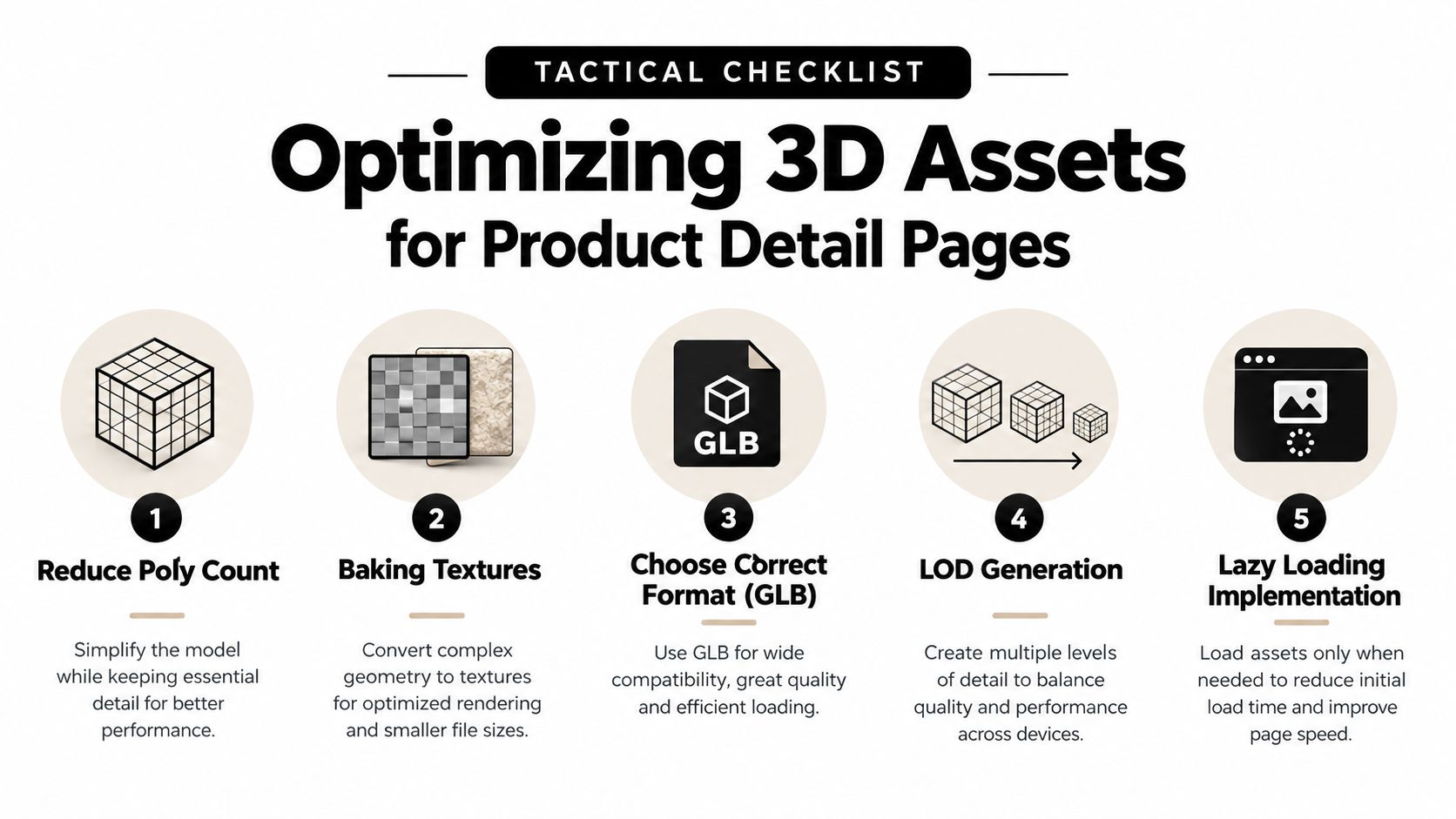
Optimizing 3D Assets for Product Detail Pages
A high-quality render can still fail if the eCommerce team uploads it at the wrong dimensions, uses an unsuitable format, or loads every asset before the shopper asks to see it. Product detail pages need a delivery plan that separates visual quality from file weight and interactive complexity.

Start with the right asset hierarchy
Use the simplest asset that answers the shopper's question. A static silhouette may be enough for a product grid. A room scene can help with scale and lifestyle positioning. A Digibun is appropriate when the buyer needs to understand construction. An interactive 360-degree viewer makes sense when rotation adds information that a sequence of stills can't provide.
Don't force every product page to carry the full 3D experience. Keep a strong static hero image available, then load additional angles, video, or interactive content as the shopper engages. A low-bandwidth visitor should still receive a meaningful image, product description, dimensions, and accessible explanation of the construction.
Choose formats deliberately
Google reports that lossy WebP images are typically about 30% smaller than comparable JPEG files while maintaining similar visual quality, and lossless WebP images are about 26% smaller than comparable PNG files, according to Google's WebP research. WebP also supports transparency, which suits isolated mattress cutouts and layered product graphics.
AVIF can provide stronger compression in suitable conditions, but browser support and progressive rendering considerations still matter. Test the actual export on representative devices instead of assuming the newest format will always produce the best customer experience. Compression should preserve the details shoppers need to see, especially quilting, piping, stitching, and foam boundaries.
Teams wanting a broader explanation of image compression techniques can use that resource to align creative and development decisions. Bedhead's guide to optimizing images for the web also addresses the practical relationship between image preparation and page performance.
A delivery checklist for developers
Serve responsive sizes: Export dimensions that match the placement instead of sending a full-resolution render to every screen.
Lazy-load secondary media: Keep the initial view focused on the hero asset, then load galleries, viewers, and video when appropriate.
Use WebGL for interaction: Hardware-accelerated WebGL is better suited to real-time 3D processing than relying on CPU-heavy canvas manipulation.
Create level-of-detail assets: Use simplified geometry for mobile or listing contexts and reserve high-detail models for close inspection or offline output.
Keep fallback content complete: Provide static imagery, descriptive text, keyboard access, screen-reader descriptions, and reduced-motion behavior.
Accessibility can't be added after launch as a decorative layer. A shopper who can't rotate a model still needs to understand the mattress height, dimensions, material layers, firmness positioning, and relevant support features. Search visibility also depends on the surrounding page content, not just the visual asset, so include useful text, descriptive image alt text, structured product information, and a clear path to purchase.
Building a Scalable Visual Strategy with Bedhead
The mattress brands that get lasting value from 3D image rendering don't begin with the question, “Which visual looks most impressive?” They start with product communication. What does a shopper need to understand about the ticking? Which layer explains the difference between models? Does the room scene show scale accurately? Can a retail associate use the same image to explain edge support on the sales floor?
That commercial context matters because mattress construction is easy to misrepresent. A generalist team may know how to create a beautiful bedroom scene but miss the significance of a gusset, confuse a transition foam with a comfort layer, or use lighting that makes phase-change material appear metallic. In bedding, visual polish has to support manufacturing accuracy, retail storytelling, and eCommerce clarity at the same time.
Build the system around approved product truth
A scalable workflow should include:
A source-of-truth model: Approved geometry, dimensions, layer order, materials, labels, and construction notes.
An asset matrix: Silhouettes, Digibuns, room scenes, detail views, retail graphics, advertising crops, and training visuals.
A review protocol: Manufacturing, product, sales, marketing, and brand stakeholders should know what they are approving.
A delivery standard: File formats, responsive sizes, accessibility requirements, fallback images, and loading behavior should be defined before launch.
A measurement plan: Track how each asset is used across product pages, paid ads, retail presentations, and sales enablement instead of treating every image as a standalone creative item.
Bedhead Marketing operates as a digital marketing agency, 3D design studio, brand development partner, expert consultation resource, and sales training organization focused exclusively on mattresses and bedding. Its work includes Digibuns, Silhouettes, Room Scenes, SEO, paid media, product page optimization, brand and USP development, presentation decks, retail sales training, and product activation for manufacturers, retailers, private label brands, and sleep product startups.
The practical advantage of a mattress-specific partner is contextual review. The team can connect a render to the product's actual selling framework, showroom use, retailer margin considerations, paid campaign needs, and SEO content instead of handing over an isolated image file. Bedhead also offers Bedhead University as an educational resource for mattress professionals building stronger marketing and sales capabilities.
Start by auditing one collection. Identify where photography is expensive to update, where shoppers struggle to understand construction, where mobile delivery is weak, and where sales associates lack a useful visual explanation. Then decide which assets should be rendered, which should be photographed, and which need both.
Join Bedhead Network, also known as BEDNET, for free access to a hub for mattress industry professionals that includes marketing insights, news updates, networking, training resources, an industry directory, and business tools.
Bedhead can help mattress brands create accurate Digibuns, Silhouettes, Room Scenes, and product-page visual systems that connect 3D image rendering with SEO, paid media, retail activation, and sales training. If your current imagery is expensive to update, difficult to use on mobile, or unclear about construction, visit BEDHEAD to discuss a practical visual workflow for your next collection.